---
title: Brand Your Survey Header
product: Form Library
description: Add a custom logo, survey title, and description to your SurveyJS forms with no additional expenses—the look-and-feel customization is available to all users free of charge. View this free code example for JavaScript and learn how to add and edit the survey header in no time.
framework: React
source: https://surveyjs.io/form-library/examples/brand-your-survey-header/reactjs
index: https://surveyjs.io/form-library/examples/overview.md
---
# Brand Your Survey Header (React)
Make your surveys look great and stand out with your brand's own design language. Create a custom survey title, description, and logo for your survey header to make the entire form look more professional and increase brand recognition. This demo shows how to add a survey title, description, and your company logo to the form header.
## Add a Title and Description to the Survey Header
To add a short survey title, assign it to `SurveyModel`'s [`title`](https://surveyjs.io/form-library/documentation/api-reference/survey-data-model#title) property. You can also display a longer survey description under the title. Use the [`description`](https://surveyjs.io/form-library/documentation/api-reference/survey-data-model#description) property to specify description text.
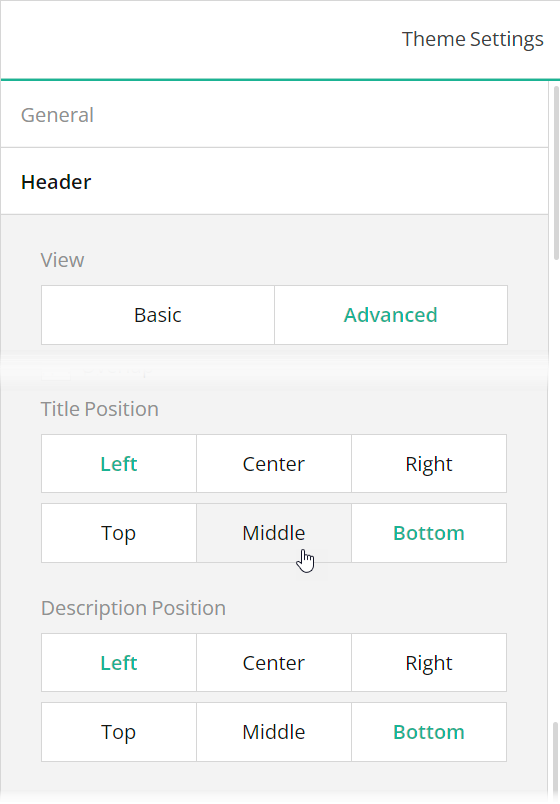
Survey title and description are aligned to the left corner of the form header. You can specify a different position for them using a custom theme. To do this, set the following properties in the theme JSON schema (see the `theme.js` file in this demo):
- [`header`](/form-library/documentation/api-reference/itheme#header).[`titlePositionX`](/form-library/documentation/api-reference/iheader#titlePositionX): `"left"` (default) | `"right"` | `"center"`
- [`header`](/form-library/documentation/api-reference/itheme#header).[`titlePositionY`](/form-library/documentation/api-reference/iheader#titlePositionY): `"bottom"` (default) | `"top"` | `"middle"`
- [`header`](/form-library/documentation/api-reference/itheme#header).[`descriptionPositionX`](/form-library/documentation/api-reference/iheader#descriptionPositionX): `"left"` (default) | `"right"` | `"center"`
- [`header`](/form-library/documentation/api-reference/itheme#header).[`descriptionPositionY`](/form-library/documentation/api-reference/iheader#descriptionPositionY): `"bottom"` (default) | `"top"` | `"middle"`
To apply the positioning settings, change the [`headerView`](https://surveyjs.io/form-library/documentation/api-reference/itheme#headerView) property value to `"advanced"` in the theme JSON schema.
If you are configuring your survey in Survey Creator, switch to the **Themes** tab to open an integrated Theme Editor. To position the survey title and description, open the **Header** category, switch the **View** editor to "Advanced", and use the **Survey title alignment** and **Survey description alignment** editors.
 ## Add Your Logo to the Survey Header
To add your logo to the survey header, assign an image URL or a Base64-encoded image to `SurveyModel`'s [`logo`](https://surveyjs.io/form-library/documentation/api-reference/survey-data-model#logo) property. You can use the [`logoWidth`](https://surveyjs.io/form-library/documentation/api-reference/survey-data-model#logoWidth) and [`logoHeight`](https://surveyjs.io/form-library/documentation/api-reference/survey-data-model#logoHeight) properties to specify logo dimensions.
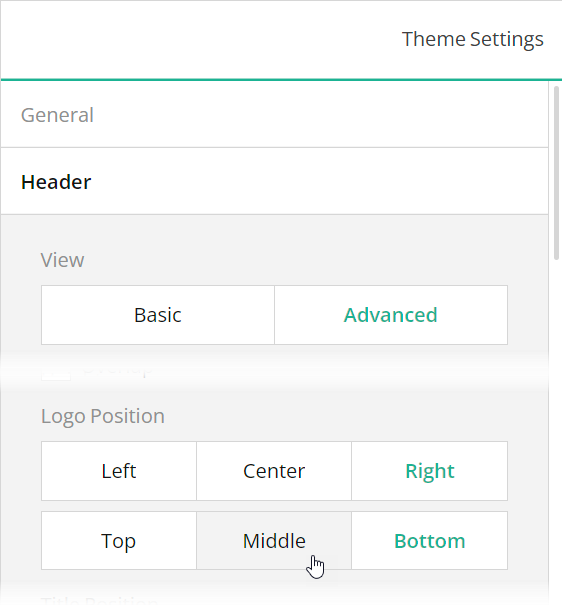
To position a logo image within a survey header, create a custom theme and set the following properties in it (see the `theme.js` file in this demo):
- [`header`](/form-library/documentation/api-reference/itheme#header).[`logoPositionX`](/form-library/documentation/api-reference/iheader#logoPositionX): `"right"` (default) | `"left"` | `"center"`
- [`header`](/form-library/documentation/api-reference/itheme#header).[`logoPositionY`](/form-library/documentation/api-reference/iheader#logoPositionY): `"top"` (default) | `"bottom"` | `"middle"`
To apply the positioning settings, change the [`headerView`](https://surveyjs.io/form-library/documentation/api-reference/itheme#headerView) property value to `"advanced"` in the theme JSON schema.
You can apply the same settings in Survey Creator: switch to the **Themes** tab, open the **Header** category, switch the **View** editor to "Advanced", and use the **Logo alignment** editors to align your logo image within the survey header.
## Add Your Logo to the Survey Header
To add your logo to the survey header, assign an image URL or a Base64-encoded image to `SurveyModel`'s [`logo`](https://surveyjs.io/form-library/documentation/api-reference/survey-data-model#logo) property. You can use the [`logoWidth`](https://surveyjs.io/form-library/documentation/api-reference/survey-data-model#logoWidth) and [`logoHeight`](https://surveyjs.io/form-library/documentation/api-reference/survey-data-model#logoHeight) properties to specify logo dimensions.
To position a logo image within a survey header, create a custom theme and set the following properties in it (see the `theme.js` file in this demo):
- [`header`](/form-library/documentation/api-reference/itheme#header).[`logoPositionX`](/form-library/documentation/api-reference/iheader#logoPositionX): `"right"` (default) | `"left"` | `"center"`
- [`header`](/form-library/documentation/api-reference/itheme#header).[`logoPositionY`](/form-library/documentation/api-reference/iheader#logoPositionY): `"top"` (default) | `"bottom"` | `"middle"`
To apply the positioning settings, change the [`headerView`](https://surveyjs.io/form-library/documentation/api-reference/itheme#headerView) property value to `"advanced"` in the theme JSON schema.
You can apply the same settings in Survey Creator: switch to the **Themes** tab, open the **Header** category, switch the **View** editor to "Advanced", and use the **Logo alignment** editors to align your logo image within the survey header.
 A logo can be automatically resized to fit into its container. Set the [`logoFit`](https://surveyjs.io/form-library/documentation/api-reference/survey-data-model#logoFit) property to specify the mode used to resize the logo: `"contain"` (default), `"cover"`, `"fill"`, or `"none"`. Refer to the
 object-fit CSS property description on MDN for more information.
## Add a Background Image to the Survey Header
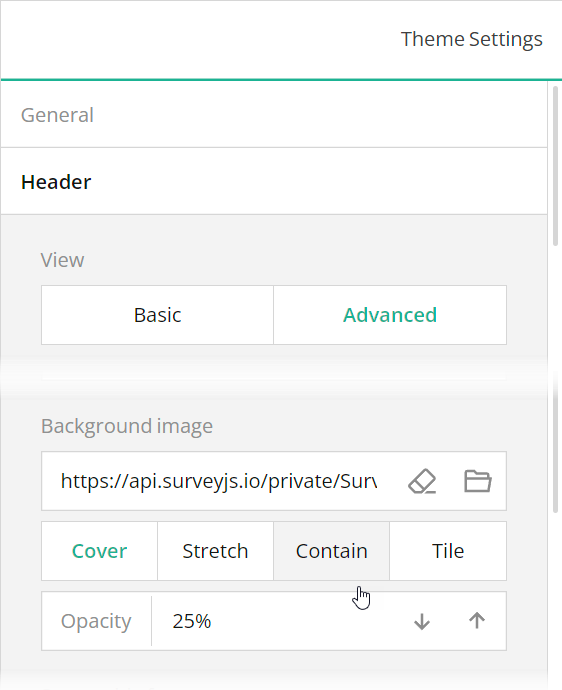
A form header can display an image in the background. To configure the image, create a custom theme and specify the following properties in it (see the `theme.js` file in this demo):
- [`header`](https://surveyjs.io/form-library/documentation/api-reference/itheme#header).[`backgroundImage`](https://surveyjs.io/form-library/documentation/api-reference/iheader#backgroundImage): `string`
An image to display in the background of the header. Accepts a hyperlink or a base64-encoded image.
- [`header`](https://surveyjs.io/form-library/documentation/api-reference/itheme#header).[`backgroundImageOpacity`](https://surveyjs.io/form-library/documentation/api-reference/iheader#backgroundImageOpacity): `"cover"` (default) | `"fill"` | `"contain"` | `"tile"`
A string value that specifies how to resize a background image to fit it into the header.
- [`header`](https://surveyjs.io/form-library/documentation/api-reference/itheme#header).[`backgroundImageFit`](https://surveyjs.io/form-library/documentation/api-reference/iheader#backgroundImageFit): `number`
A value from 0 to 1 that specifies how transparent the background image should be: 0 makes the image completely transparent, and 1 makes it opaque. In Theme Editor, the opacity values are mapped to a scale from 0% to 100%.
To apply these settings, change the [`headerView`](https://surveyjs.io/form-library/documentation/api-reference/itheme#headerView) property value to `"advanced"` in the theme JSON schema.
To configure a background image in Theme Editor, open the **Header** category, switch the **View** editor to "Advanced", and use the **Background image** editors.
 ## Enable Overlap Between the Header and Survey Contents
A survey header can be displayed back to back with the first question or be slightly overlapped by it, as shown in this demo. To set the `overlapEnabled` property to `true` in a theme JSON schema or select the **Header** > **Overlap** checkbox in Theme Editor.
## Files
### `public/index.html`
```html
```
### `src/SurveyComponent.jsx`
```js
import React from "react";
import { Model } from "survey-core";
import { Survey } from "survey-react-ui";
import "survey-core/survey-core.min.css";
import { themeJson } from "./theme";
import "./index.css";
import { json } from "./json";
function SurveyComponent() {
const survey = new Model(json);
survey.applyTheme(themeJson);
survey.onComplete.add((sender, options) => {
console.log(JSON.stringify(sender.data, null, 3));
});
return ();
}
export default SurveyComponent;
```
### `src/index.css`
```css
/* You can add your custom CSS here. */
```
### `src/index.js`
```js
import React from "react";
import { createRoot } from "react-dom/client";
import SurveyComponent from "./SurveyComponent";
const root = createRoot(document.getElementById("surveyElement"));
root.render();
```
### `src/json.js`
```js
export const json = {
"title": "NPS Survey Question",
"description": "NPS (net promoter score) is a metric used to evaluate customer loyalty and business growth opportunities. To measure NPS, respondents should rate on a scale of 0 to 10 how likely they would recommend your product or service to a friend or colleague.",
"logo": "https://api.surveyjs.io/private/Surveys/files?name=52f2ca1e-9604-4d41-a887-0ee358b37625",
"logoWidth": "auto",
"logoHeight": "80px",
"logoFit": "cover",
"completedHtmlOnCondition": [
{
"expression": "{nps-score} <= 6 or {rebuy} = false",
"html": "Thanks for your feedback! We highly value all ideas and suggestions from our customers, whether they're positive or critical. In the future, our team might reach out to you to learn more about how we can further improve our product so that it exceeds your expectations."
},
{
"expression": "{nps-score} = 6 or {nps-score} = 7",
"html": "Thanks for your feedback. Our goal is to create the best possible product, and your thoughts, ideas, and suggestions play a major role in helping us identify opportunities to improve."
},
{
"expression": "{nps-score} >= 8",
"html": "Thanks for your feedback. It's great to hear that you're a fan of our product. Your feedback helps us discover new opportunities to improve it and make sure you have the best possible experience."
}
],
"pages": [
{
"name": "page1",
"elements": [
{
"type": "panel",
"name": "panel1",
"elements": [
{
"type": "rating",
"name": "nps-score",
"title": "On a scale from 0 to 10, how likely are you to recommend us to a friend or colleague?",
"defaultValue": 9,
"rateMin": 0,
"rateMax": 10
},
{
"type": "comment",
"name": "disappointing-experience",
"visible": false,
"visibleIf": "{nps-score} <= 5",
"title": "How did we disappoint you and what can we do to make things right?",
"maxLength": 300
},
{
"type": "comment",
"name": "improvements-required",
"visibleIf": "{nps-score} >= 6",
"title": "What can we do to make your experience more satisfying?",
"maxLength": 300
},
{
"type": "checkbox",
"name": "promoter-features",
"visibleIf": "{nps-score} >= 9",
"title": "Which of the following features do you value the most?",
"description": "Please select no more than three features.",
"isRequired": true,
"choices": [
{
"value": "performance",
"text": "Performance"
},
{
"value": "stability",
"text": "Stability"
},
{
"value": "ui",
"text": "User interface"
},
{
"value": "complete-functionality",
"text": "Complete functionality"
},
{
"value": "learning-materials",
"text": "Learning materials (documentation, demos, code examples)"
},
{
"value": "support",
"text": "Quality support"
}
],
"showOtherItem": true,
"otherPlaceholder": "Please specify...",
"otherText": "Other features",
"colCount": 2,
"maxSelectedChoices": 3
}
]
}
]
},
{
"name": "page2",
"elements": [
{
"type": "boolean",
"name": "rebuy",
"title": "Would you buy our product again?"
}
]
},
{
"name": "page3",
"elements": [
{
"type": "radiogroup",
"name": "testimonial",
"title": "Would you mind providing us a brief testimonial for the website?",
"choices": [
{
"value": "yes",
"text": "Sure!"
},
{
"value": "no",
"text": "No"
}
]
},
{
"type": "text",
"name": "email",
"visible": false,
"visibleIf": "{testimonial} = 'yes'",
"title": "What is your email address?",
"validators": [
{
"type": "email"
}
],
"placeholder": "Enter your email here"
}
]
}
],
"showPrevButton": false,
"widthMode": "static",
"width": "800"
};
```
### `src/theme.js`
```js
export const themeJson = {
"cssVariables": {
"--sjs2-color-bg-basic-primary": "rgba(255, 255, 255, 1)",
"--sjs2-color-utility-property-grid": "rgba(255, 255, 255, 1)",
"--sjs2-color-utility-tabs": "rgba(255, 255, 255, 1)",
"--sjs2-color-utility-toolbox": "rgba(255, 255, 255, 1)",
"--sjs2-color-bg-basic-primary-dim": "rgba(248, 248, 248, 1)",
"--sjs2-color-bg-neutral-tertiary-dim": "#E2EBF6",
"--sjs2-color-utility-surface-survey-panelless": "#E2EBF6",
"--sjs2-color-utility-surface-survey": "#E2EBF6",
"--sjs2-color-bg-basic-secondary": "rgba(249, 249, 249, 1)",
"--sjs2-color-bg-basic-secondary-dim": "rgba(243, 243, 243, 1)",
"--sjs2-color-fg-basic-primary": "rgba(0, 0, 0, 0.91)",
"--sjs2-color-fg-basic-secondary": "rgba(0, 0, 0, 0.45)",
"--sjs2-color-project-brand-600": "#2f5abc",
"--sjs2-color-bg-brand-secondary": "rgba(47, 90, 188, 0.1)",
"--sjs2-color-bg-brand-primary-dim": "rgba(43, 83, 173, 1)",
"--sjs2-color-fg-brand-on-primary": "rgba(255, 255, 255, 1)",
"--sjs2-color-fg-brand-primary-disabled": "rgba(255, 255, 255, 0.25)",
"--sjs2-base-unit-size": "8px",
"--sjs2-base-unit-spacing": "8px",
"--sjs2-base-unit-radius": "4px",
"--sjs2-color-bg-accent-primary": "rgba(255, 152, 20, 1)",
"--sjs2-color-bg-accent-secondary": "rgba(255, 152, 20, 0.1)",
"--sjs2-color-bg-accent-secondary-dim": "rgba(255, 152, 20, 0.25)",
"--sjs2-color-fg-accent-on-primary": "rgba(255, 255, 255, 1)",
"--sjs2-color-fg-accent-primary-disabled": "rgba(255, 255, 255, 0.25)",
"--sjs2-border-effect-surface-default": "0px 1px 2px 0px rgba(0, 0, 0, 0.15)",
"--sjs2-border-effect-floating-default": "0px 2px 6px 0px rgba(0, 0, 0, 0.1),0px 8px 16px 0px rgba(0, 0, 0, 0.1)",
"--sjs2-border-effect-component-formbox-default": "inset 0px 1px 2px 0px rgba(0, 0, 0, 0.15)",
"--sjs2-border-effect-component-check-true-default": "inset 0px 1px 2px 0px rgba(0, 0, 0, 0.15)",
"--sjs2-border-effect-component-check-false-default": "inset 0px 1px 2px 0px rgba(0, 0, 0, 0.15)",
"--sjs2-color-border-basic-secondary": "rgba(0, 0, 0, 0.09)",
"--sjs2-color-component-input-default-line": "rgba(0, 0, 0, 0.16)",
"--sjs2-color-border-basic-secondary-overlay": "rgba(0, 0, 0, 0.16)",
"--sjs2-color-bg-alert-primary": "rgba(229, 10, 62, 1)",
"--sjs2-color-bg-alert-secondary": "rgba(229, 10, 62, 0.1)",
"--sjs2-color-fg-alert-on-primary": "rgba(255, 255, 255, 1)",
"--sjs2-color-bg-positive-primary": "rgba(25, 179, 148, 1)",
"--sjs2-color-bg-positive-secondary": "rgba(25, 179, 148, 0.1)",
"--sjs2-color-fg-positive-on-primary": "rgba(255, 255, 255, 1)",
"--sjs2-color-bg-note-primary": "rgba(67, 127, 217, 1)",
"--sjs2-color-bg-note-secondary": "rgba(67, 127, 217, 0.1)",
"--sjs2-color-fg-note-on-primary": "rgba(255, 255, 255, 1)",
"--sjs2-color-bg-warning-primary": "rgba(255, 152, 20, 1)",
"--sjs2-color-bg-warning-secondary": "rgba(255, 152, 20, 0.1)",
"--sjs2-color-fg-warning-on-primary": "rgba(255, 255, 255, 1)",
"--sjs2-color-component-header-default-title": "rgba(255, 255, 255, 1)",
"--sjs2-typography-font-weight-component-header-title": "700",
"--sjs2-typography-font-weight-component-header-description": "600",
"--sjs2-typography-font-size-component-header-description": "14px",
"--sjs2-color-component-header-default-description": "rgba(255, 255, 255, 1)",
"--sjs2-color-component-header-default-bg": "#2f5abc",
"--sjs2-typography-line-height-component-header-description": "21px",
"--sjs2-typography-font-weight-component-page-title": "700"
},
"themeName": "default",
"colorPalette": "light",
"isPanelless": false,
"header": {
"height": 320,
"textAreaWidth": 480,
"overlapEnabled": true,
"backgroundImage": "https://api.surveyjs.io/private/Surveys/files?name=b64cab40-6d94-420e-a5b8-67a4dae7be9b",
"backgroundImageOpacity": 0.25,
"backgroundImageFit": "cover",
"logoPositionX": "right",
"logoPositionY": "top",
"titlePositionX": "left",
"titlePositionY": "bottom",
"descriptionPositionX": "left",
"descriptionPositionY": "bottom"
},
"headerView": "advanced"
};
```
### `package.json`
```json
{
"dependencies": {
"react": "latest",
"react-dom": "latest",
"survey-core": "latest",
"survey-react-ui": "latest"
},
"devDependencies": {
"react-scripts": "latest"
}
}
```
## Other Frameworks
- [Angular](https://surveyjs.io/form-library/examples/brand-your-survey-header/angular.md)
- [Vue 3](https://surveyjs.io/form-library/examples/brand-your-survey-header/vue3js.md)
- [jQuery](https://surveyjs.io/form-library/examples/brand-your-survey-header/jquery.md)
- [Vanilla JS](https://surveyjs.io/form-library/examples/brand-your-survey-header/vanillajs.md)
## Enable Overlap Between the Header and Survey Contents
A survey header can be displayed back to back with the first question or be slightly overlapped by it, as shown in this demo. To set the `overlapEnabled` property to `true` in a theme JSON schema or select the **Header** > **Overlap** checkbox in Theme Editor.
## Files
### `public/index.html`
```html
```
### `src/SurveyComponent.jsx`
```js
import React from "react";
import { Model } from "survey-core";
import { Survey } from "survey-react-ui";
import "survey-core/survey-core.min.css";
import { themeJson } from "./theme";
import "./index.css";
import { json } from "./json";
function SurveyComponent() {
const survey = new Model(json);
survey.applyTheme(themeJson);
survey.onComplete.add((sender, options) => {
console.log(JSON.stringify(sender.data, null, 3));
});
return ();
}
export default SurveyComponent;
```
### `src/index.css`
```css
/* You can add your custom CSS here. */
```
### `src/index.js`
```js
import React from "react";
import { createRoot } from "react-dom/client";
import SurveyComponent from "./SurveyComponent";
const root = createRoot(document.getElementById("surveyElement"));
root.render();
```
### `src/json.js`
```js
export const json = {
"title": "NPS Survey Question",
"description": "NPS (net promoter score) is a metric used to evaluate customer loyalty and business growth opportunities. To measure NPS, respondents should rate on a scale of 0 to 10 how likely they would recommend your product or service to a friend or colleague.",
"logo": "https://api.surveyjs.io/private/Surveys/files?name=52f2ca1e-9604-4d41-a887-0ee358b37625",
"logoWidth": "auto",
"logoHeight": "80px",
"logoFit": "cover",
"completedHtmlOnCondition": [
{
"expression": "{nps-score} <= 6 or {rebuy} = false",
"html": "Thanks for your feedback! We highly value all ideas and suggestions from our customers, whether they're positive or critical. In the future, our team might reach out to you to learn more about how we can further improve our product so that it exceeds your expectations."
},
{
"expression": "{nps-score} = 6 or {nps-score} = 7",
"html": "Thanks for your feedback. Our goal is to create the best possible product, and your thoughts, ideas, and suggestions play a major role in helping us identify opportunities to improve."
},
{
"expression": "{nps-score} >= 8",
"html": "Thanks for your feedback. It's great to hear that you're a fan of our product. Your feedback helps us discover new opportunities to improve it and make sure you have the best possible experience."
}
],
"pages": [
{
"name": "page1",
"elements": [
{
"type": "panel",
"name": "panel1",
"elements": [
{
"type": "rating",
"name": "nps-score",
"title": "On a scale from 0 to 10, how likely are you to recommend us to a friend or colleague?",
"defaultValue": 9,
"rateMin": 0,
"rateMax": 10
},
{
"type": "comment",
"name": "disappointing-experience",
"visible": false,
"visibleIf": "{nps-score} <= 5",
"title": "How did we disappoint you and what can we do to make things right?",
"maxLength": 300
},
{
"type": "comment",
"name": "improvements-required",
"visibleIf": "{nps-score} >= 6",
"title": "What can we do to make your experience more satisfying?",
"maxLength": 300
},
{
"type": "checkbox",
"name": "promoter-features",
"visibleIf": "{nps-score} >= 9",
"title": "Which of the following features do you value the most?",
"description": "Please select no more than three features.",
"isRequired": true,
"choices": [
{
"value": "performance",
"text": "Performance"
},
{
"value": "stability",
"text": "Stability"
},
{
"value": "ui",
"text": "User interface"
},
{
"value": "complete-functionality",
"text": "Complete functionality"
},
{
"value": "learning-materials",
"text": "Learning materials (documentation, demos, code examples)"
},
{
"value": "support",
"text": "Quality support"
}
],
"showOtherItem": true,
"otherPlaceholder": "Please specify...",
"otherText": "Other features",
"colCount": 2,
"maxSelectedChoices": 3
}
]
}
]
},
{
"name": "page2",
"elements": [
{
"type": "boolean",
"name": "rebuy",
"title": "Would you buy our product again?"
}
]
},
{
"name": "page3",
"elements": [
{
"type": "radiogroup",
"name": "testimonial",
"title": "Would you mind providing us a brief testimonial for the website?",
"choices": [
{
"value": "yes",
"text": "Sure!"
},
{
"value": "no",
"text": "No"
}
]
},
{
"type": "text",
"name": "email",
"visible": false,
"visibleIf": "{testimonial} = 'yes'",
"title": "What is your email address?",
"validators": [
{
"type": "email"
}
],
"placeholder": "Enter your email here"
}
]
}
],
"showPrevButton": false,
"widthMode": "static",
"width": "800"
};
```
### `src/theme.js`
```js
export const themeJson = {
"cssVariables": {
"--sjs2-color-bg-basic-primary": "rgba(255, 255, 255, 1)",
"--sjs2-color-utility-property-grid": "rgba(255, 255, 255, 1)",
"--sjs2-color-utility-tabs": "rgba(255, 255, 255, 1)",
"--sjs2-color-utility-toolbox": "rgba(255, 255, 255, 1)",
"--sjs2-color-bg-basic-primary-dim": "rgba(248, 248, 248, 1)",
"--sjs2-color-bg-neutral-tertiary-dim": "#E2EBF6",
"--sjs2-color-utility-surface-survey-panelless": "#E2EBF6",
"--sjs2-color-utility-surface-survey": "#E2EBF6",
"--sjs2-color-bg-basic-secondary": "rgba(249, 249, 249, 1)",
"--sjs2-color-bg-basic-secondary-dim": "rgba(243, 243, 243, 1)",
"--sjs2-color-fg-basic-primary": "rgba(0, 0, 0, 0.91)",
"--sjs2-color-fg-basic-secondary": "rgba(0, 0, 0, 0.45)",
"--sjs2-color-project-brand-600": "#2f5abc",
"--sjs2-color-bg-brand-secondary": "rgba(47, 90, 188, 0.1)",
"--sjs2-color-bg-brand-primary-dim": "rgba(43, 83, 173, 1)",
"--sjs2-color-fg-brand-on-primary": "rgba(255, 255, 255, 1)",
"--sjs2-color-fg-brand-primary-disabled": "rgba(255, 255, 255, 0.25)",
"--sjs2-base-unit-size": "8px",
"--sjs2-base-unit-spacing": "8px",
"--sjs2-base-unit-radius": "4px",
"--sjs2-color-bg-accent-primary": "rgba(255, 152, 20, 1)",
"--sjs2-color-bg-accent-secondary": "rgba(255, 152, 20, 0.1)",
"--sjs2-color-bg-accent-secondary-dim": "rgba(255, 152, 20, 0.25)",
"--sjs2-color-fg-accent-on-primary": "rgba(255, 255, 255, 1)",
"--sjs2-color-fg-accent-primary-disabled": "rgba(255, 255, 255, 0.25)",
"--sjs2-border-effect-surface-default": "0px 1px 2px 0px rgba(0, 0, 0, 0.15)",
"--sjs2-border-effect-floating-default": "0px 2px 6px 0px rgba(0, 0, 0, 0.1),0px 8px 16px 0px rgba(0, 0, 0, 0.1)",
"--sjs2-border-effect-component-formbox-default": "inset 0px 1px 2px 0px rgba(0, 0, 0, 0.15)",
"--sjs2-border-effect-component-check-true-default": "inset 0px 1px 2px 0px rgba(0, 0, 0, 0.15)",
"--sjs2-border-effect-component-check-false-default": "inset 0px 1px 2px 0px rgba(0, 0, 0, 0.15)",
"--sjs2-color-border-basic-secondary": "rgba(0, 0, 0, 0.09)",
"--sjs2-color-component-input-default-line": "rgba(0, 0, 0, 0.16)",
"--sjs2-color-border-basic-secondary-overlay": "rgba(0, 0, 0, 0.16)",
"--sjs2-color-bg-alert-primary": "rgba(229, 10, 62, 1)",
"--sjs2-color-bg-alert-secondary": "rgba(229, 10, 62, 0.1)",
"--sjs2-color-fg-alert-on-primary": "rgba(255, 255, 255, 1)",
"--sjs2-color-bg-positive-primary": "rgba(25, 179, 148, 1)",
"--sjs2-color-bg-positive-secondary": "rgba(25, 179, 148, 0.1)",
"--sjs2-color-fg-positive-on-primary": "rgba(255, 255, 255, 1)",
"--sjs2-color-bg-note-primary": "rgba(67, 127, 217, 1)",
"--sjs2-color-bg-note-secondary": "rgba(67, 127, 217, 0.1)",
"--sjs2-color-fg-note-on-primary": "rgba(255, 255, 255, 1)",
"--sjs2-color-bg-warning-primary": "rgba(255, 152, 20, 1)",
"--sjs2-color-bg-warning-secondary": "rgba(255, 152, 20, 0.1)",
"--sjs2-color-fg-warning-on-primary": "rgba(255, 255, 255, 1)",
"--sjs2-color-component-header-default-title": "rgba(255, 255, 255, 1)",
"--sjs2-typography-font-weight-component-header-title": "700",
"--sjs2-typography-font-weight-component-header-description": "600",
"--sjs2-typography-font-size-component-header-description": "14px",
"--sjs2-color-component-header-default-description": "rgba(255, 255, 255, 1)",
"--sjs2-color-component-header-default-bg": "#2f5abc",
"--sjs2-typography-line-height-component-header-description": "21px",
"--sjs2-typography-font-weight-component-page-title": "700"
},
"themeName": "default",
"colorPalette": "light",
"isPanelless": false,
"header": {
"height": 320,
"textAreaWidth": 480,
"overlapEnabled": true,
"backgroundImage": "https://api.surveyjs.io/private/Surveys/files?name=b64cab40-6d94-420e-a5b8-67a4dae7be9b",
"backgroundImageOpacity": 0.25,
"backgroundImageFit": "cover",
"logoPositionX": "right",
"logoPositionY": "top",
"titlePositionX": "left",
"titlePositionY": "bottom",
"descriptionPositionX": "left",
"descriptionPositionY": "bottom"
},
"headerView": "advanced"
};
```
### `package.json`
```json
{
"dependencies": {
"react": "latest",
"react-dom": "latest",
"survey-core": "latest",
"survey-react-ui": "latest"
},
"devDependencies": {
"react-scripts": "latest"
}
}
```
## Other Frameworks
- [Angular](https://surveyjs.io/form-library/examples/brand-your-survey-header/angular.md)
- [Vue 3](https://surveyjs.io/form-library/examples/brand-your-survey-header/vue3js.md)
- [jQuery](https://surveyjs.io/form-library/examples/brand-your-survey-header/jquery.md)
- [Vanilla JS](https://surveyjs.io/form-library/examples/brand-your-survey-header/vanillajs.md)