 ## Configure the Form Header
A form header usually consists of a form title, short description, and a logo of your company. However, all these elements are optional. In this demo, the form header contains only a description and a logo.
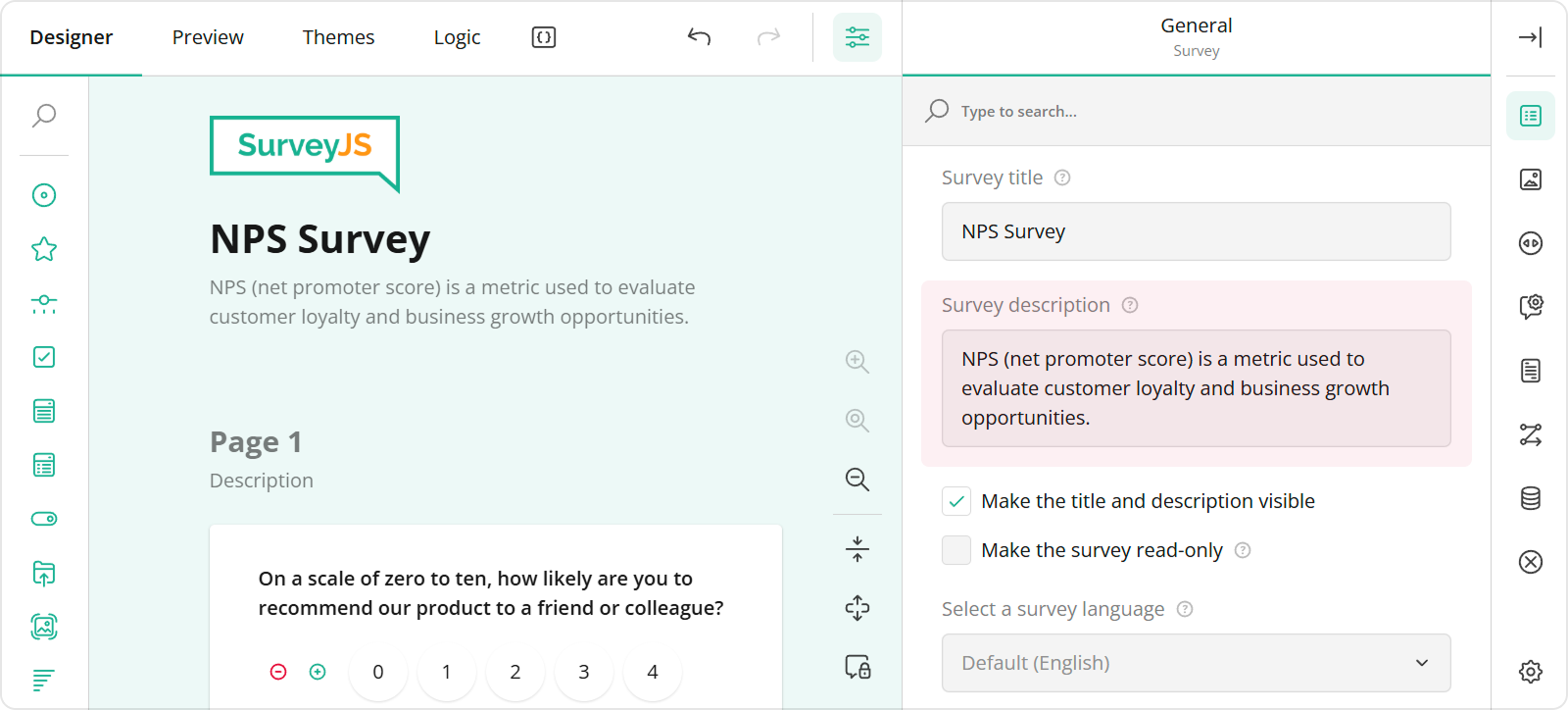
To specify a description text, open the **Designer** tab and enter your text in the **Survey description** editor within the **General** category.
## Configure the Form Header
A form header usually consists of a form title, short description, and a logo of your company. However, all these elements are optional. In this demo, the form header contains only a description and a logo.
To specify a description text, open the **Designer** tab and enter your text in the **Survey description** editor within the **General** category.
 To add and configure a logo for your form in Survey Creator, use editors in the **Logo in the Survey Header** category.
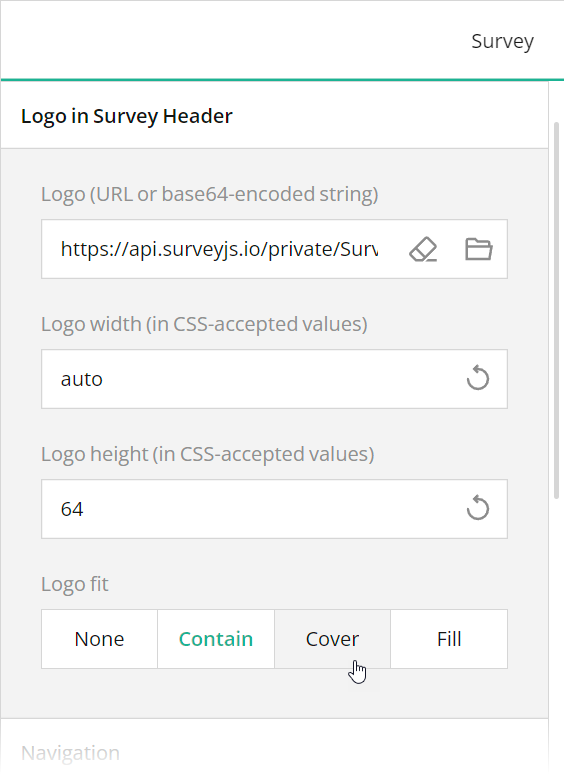 These editors are mapped to the following survey JSON properties:
- [`description`](https://surveyjs.io/form-library/documentation/api-reference/survey-data-model#description)
- [`logo`](https://surveyjs.io/form-library/documentation/api-reference/survey-data-model#logo)
- [`logoWidth`](https://surveyjs.io/form-library/documentation/api-reference/survey-data-model#logoWidth)
- [`logoHeight`](https://surveyjs.io/form-library/documentation/api-reference/survey-data-model#logoHeight)
- [`logoFit`](https://surveyjs.io/form-library/documentation/api-reference/survey-data-model#logoFit)
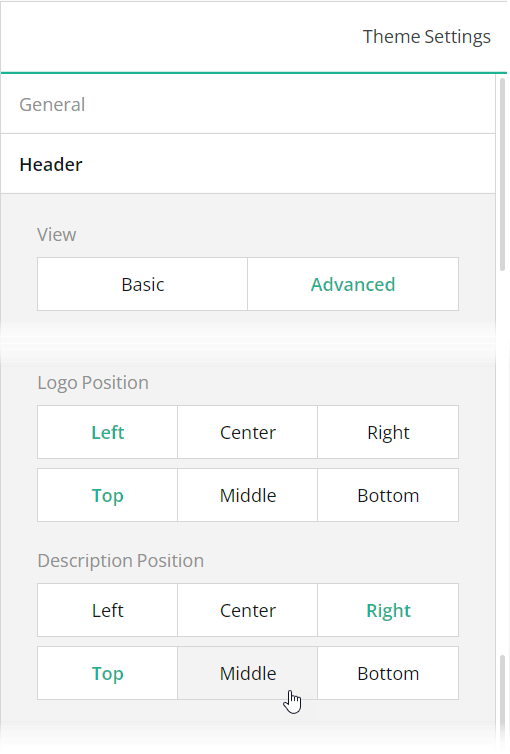
To position a description and logo within a form header, use Theme Editor integrated in Survey Creator. Switch to the **Themes** tab, open the **Header** category in Property Grid, and use the **Logo alignment** and **Survey description alignment** editors to align these elements as required. Ensure that the **View** switch is set to "Advanced".
These editors are mapped to the following survey JSON properties:
- [`description`](https://surveyjs.io/form-library/documentation/api-reference/survey-data-model#description)
- [`logo`](https://surveyjs.io/form-library/documentation/api-reference/survey-data-model#logo)
- [`logoWidth`](https://surveyjs.io/form-library/documentation/api-reference/survey-data-model#logoWidth)
- [`logoHeight`](https://surveyjs.io/form-library/documentation/api-reference/survey-data-model#logoHeight)
- [`logoFit`](https://surveyjs.io/form-library/documentation/api-reference/survey-data-model#logoFit)
To position a description and logo within a form header, use Theme Editor integrated in Survey Creator. Switch to the **Themes** tab, open the **Header** category in Property Grid, and use the **Logo alignment** and **Survey description alignment** editors to align these elements as required. Ensure that the **View** switch is set to "Advanced".
 You can also use other editors within the **Header** category to configure the form header in greater detail. All editors in this category, except font editors and View, are mapped to corresponding [`header`](https://surveyjs.io/form-library/documentation/api-reference/iheader) object properties in the theme JSON schema (see the `theme.js` file).
## Validate Dates
SurveyJS Form Library ships with flexible data validation capabilities. In this demo, data validation ensures a car pick-up date is neither earlier than today nor later than a drop-off date.
To implement this validation logic using Survey Creator, select the needed question on the design surface, open the **Validation** category, and add a validator of the **Expression** type. This validator throws an error when a specified [validation expression](https://surveyjs.io/form-library/documentation/design-survey/conditional-logic#expressions) evaluates to `false`. Type in the validation expression or build it using an integrated condition editor and enter the error message to display when your expression returns `false`.
You can also use other editors within the **Header** category to configure the form header in greater detail. All editors in this category, except font editors and View, are mapped to corresponding [`header`](https://surveyjs.io/form-library/documentation/api-reference/iheader) object properties in the theme JSON schema (see the `theme.js` file).
## Validate Dates
SurveyJS Form Library ships with flexible data validation capabilities. In this demo, data validation ensures a car pick-up date is neither earlier than today nor later than a drop-off date.
To implement this validation logic using Survey Creator, select the needed question on the design surface, open the **Validation** category, and add a validator of the **Expression** type. This validator throws an error when a specified [validation expression](https://surveyjs.io/form-library/documentation/design-survey/conditional-logic#expressions) evaluates to `false`. Type in the validation expression or build it using an integrated condition editor and enter the error message to display when your expression returns `false`.
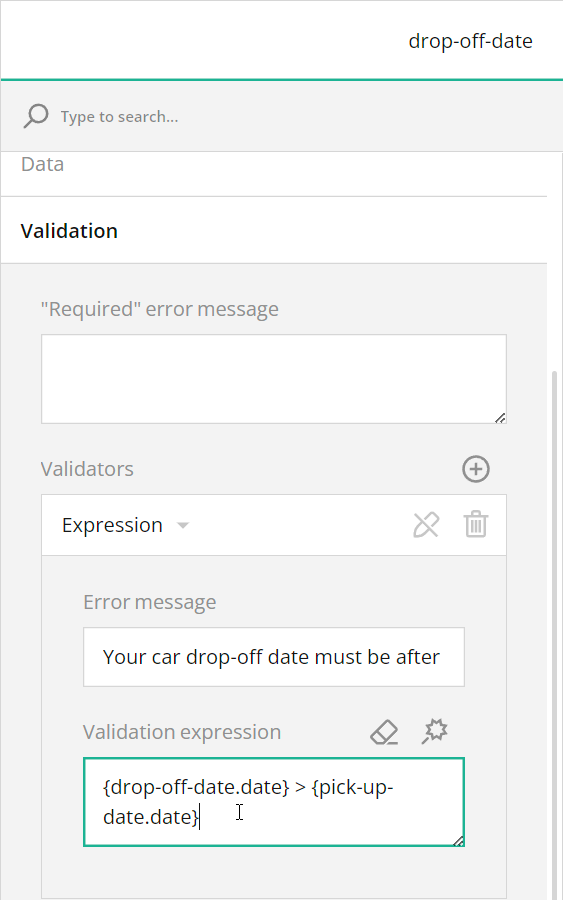 In code, you can use the [`validators`](https://surveyjs.io/form-library/documentation/api-reference/question#validators) array to specify the same settings. Refer to the `survey.json` file for a code example. For more information on data validation capabilities, view the following help topic:
[Built-In Client-Side Validators](https://surveyjs.io/form-library/documentation/data-validation#built-in-client-side-validators (linkStyle))
## Add a Drawing Field
If you want to let respondents submit free-form drawings as part of your survey, add a drawing field to it. You can use the [Signature](https://surveyjs.io/form-library/examples/signature-pad-widget-javascript/) question type as a drawing field. This question type supports [background images](/form-library/documentation/api-reference/signature-pad-model#backgroundImage), which is useful if you want to display a reference or template for a respondent's drawing. For instance, a drawing field in this demo displays a car in different views (front, back, top, left, and right) for respondents to mark any dents or scratches a rented car may have.
To add a Signature question to your form using Survey Creator, simply drag this question from the Toolbox onto the design surface. For information on how to add a Signature question programmatically, refer to the Signature demo.
[View Signature Demo](https://surveyjs.io/form-library/examples/signature-pad-widget-javascript/ (linkStyle))
## Use Placeholders for Form Field Titles
If you want to design more compact and neat-looking forms, you can hide form field titles and display title texts as input field placeholders. To implement this layout in your form, follow the steps below:
1. Open the Designer tab.
2. Select a question on the design surface.
3. In the Property Grid, switch to the **General** category.
4. Find and unselect the **Show the title and description** checkbox.
5. Enter the form field title in the **Placeholder text within input field** editor.
In code, you can use the [`validators`](https://surveyjs.io/form-library/documentation/api-reference/question#validators) array to specify the same settings. Refer to the `survey.json` file for a code example. For more information on data validation capabilities, view the following help topic:
[Built-In Client-Side Validators](https://surveyjs.io/form-library/documentation/data-validation#built-in-client-side-validators (linkStyle))
## Add a Drawing Field
If you want to let respondents submit free-form drawings as part of your survey, add a drawing field to it. You can use the [Signature](https://surveyjs.io/form-library/examples/signature-pad-widget-javascript/) question type as a drawing field. This question type supports [background images](/form-library/documentation/api-reference/signature-pad-model#backgroundImage), which is useful if you want to display a reference or template for a respondent's drawing. For instance, a drawing field in this demo displays a car in different views (front, back, top, left, and right) for respondents to mark any dents or scratches a rented car may have.
To add a Signature question to your form using Survey Creator, simply drag this question from the Toolbox onto the design surface. For information on how to add a Signature question programmatically, refer to the Signature demo.
[View Signature Demo](https://surveyjs.io/form-library/examples/signature-pad-widget-javascript/ (linkStyle))
## Use Placeholders for Form Field Titles
If you want to design more compact and neat-looking forms, you can hide form field titles and display title texts as input field placeholders. To implement this layout in your form, follow the steps below:
1. Open the Designer tab.
2. Select a question on the design surface.
3. In the Property Grid, switch to the **General** category.
4. Find and unselect the **Show the title and description** checkbox.
5. Enter the form field title in the **Placeholder text within input field** editor.
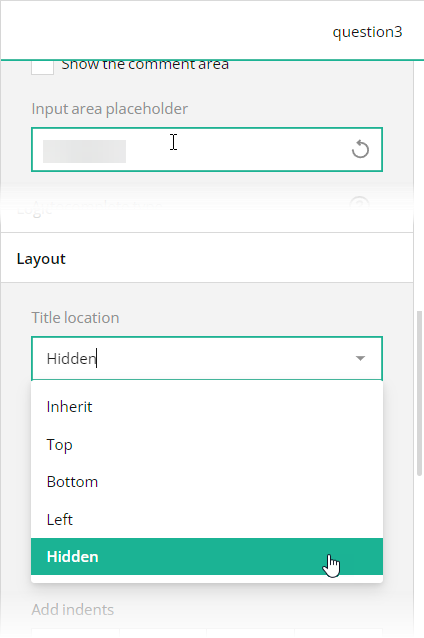 In the survey JSON schema, these editors are mapped to a question's [`titleLocation`](https://surveyjs.io/form-library/documentation/api-reference/text-entry-question-model#titleLocation) and [`placeholder`](https://surveyjs.io/form-library/documentation/api-reference/text-entry-question-model#placeholder) properties.
## Files
### `public/index.html`
```html
```
### `src/SurveyComponent.jsx`
```js
import React from "react";
import { Model } from "survey-core";
import { Survey } from "survey-react-ui";
import "survey-core/survey-core.min.css";
import { themeJson } from "./theme";
import "./index.css";
import { json } from "./json";
function SurveyComponent() {
const survey = new Model(json);
survey.applyTheme(themeJson);
survey.onComplete.add((sender, options) => {
console.log(JSON.stringify(sender.data, null, 3));
});
return (
In the survey JSON schema, these editors are mapped to a question's [`titleLocation`](https://surveyjs.io/form-library/documentation/api-reference/text-entry-question-model#titleLocation) and [`placeholder`](https://surveyjs.io/form-library/documentation/api-reference/text-entry-question-model#placeholder) properties.
## Files
### `public/index.html`
```html
```
### `src/SurveyComponent.jsx`
```js
import React from "react";
import { Model } from "survey-core";
import { Survey } from "survey-react-ui";
import "survey-core/survey-core.min.css";
import { themeJson } from "./theme";
import "./index.css";
import { json } from "./json";
function SurveyComponent() {
const survey = new Model(json);
survey.applyTheme(themeJson);
survey.onComplete.add((sender, options) => {
console.log(JSON.stringify(sender.data, null, 3));
});
return (You've successfully completed the car rental form. The vehicle is now ready for pick up by the lessee.
\n