---
title: Car Rental Form
product: Form Library
description: Explore our car rental form template with a free code example for JavaScript, showing powerful features, such as date validation, damage marking with a signature pad question, and the ability to take and upload driver's license photos directly in the form. You can embed the form in your app as-is or enhance it even further with our free form editing tool.
framework: Vue 3
source: https://surveyjs.io/form-library/examples/car-rental-form-template-free/vue3js
index: https://surveyjs.io/form-library/examples/overview.md
---

# Car Rental Form (Vue 3)

<!-- cut -->

A car rental online form helps individuals or businesses rent a vehicle from a car rental company. The form collects essential information about the lessee and the rental transaction, formalizes the rental agreement, and outlines its terms and conditions. This example demonstrates a car rental form fully created and designed in Survey Creator by SurveyJS, which now includes an integrated Theme Editor.

## Enable Panelless View

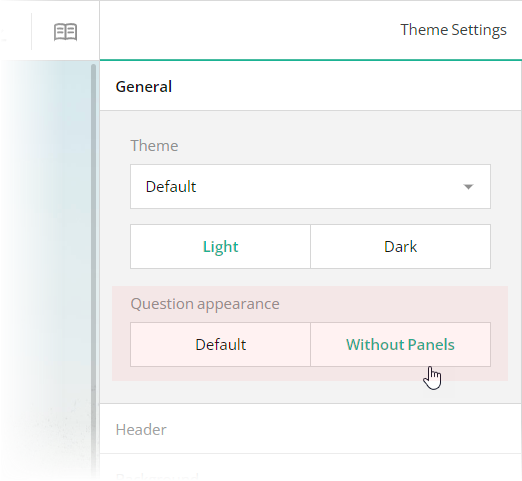
Form fields can be framed by panels or displayed without them. This demo uses the panelless view. To enable it in Theme Editor, switch the **General** > **Question appearance** editor to "Without Panels". This editor is mapped to the [`isPanelless`](https://surveyjs.io/form-library/documentation/api-reference/itheme#isPanelless) property in the theme JSON configuration (see the `theme.js` file).

<img src="/Content/Images/examples/featured-demos/panelless-question-appearance.png" alt="Specify panelless question appearance in SurveyJS Theme Editor" width="100%">

## Configure the Form Header

A form header usually consists of a form title, short description, and a logo of your company. However, all these elements are optional. In this demo, the form header contains only a description and a logo.

To specify a description text, open the **Designer** tab and enter your text in the **Survey description** editor within the **General** category.
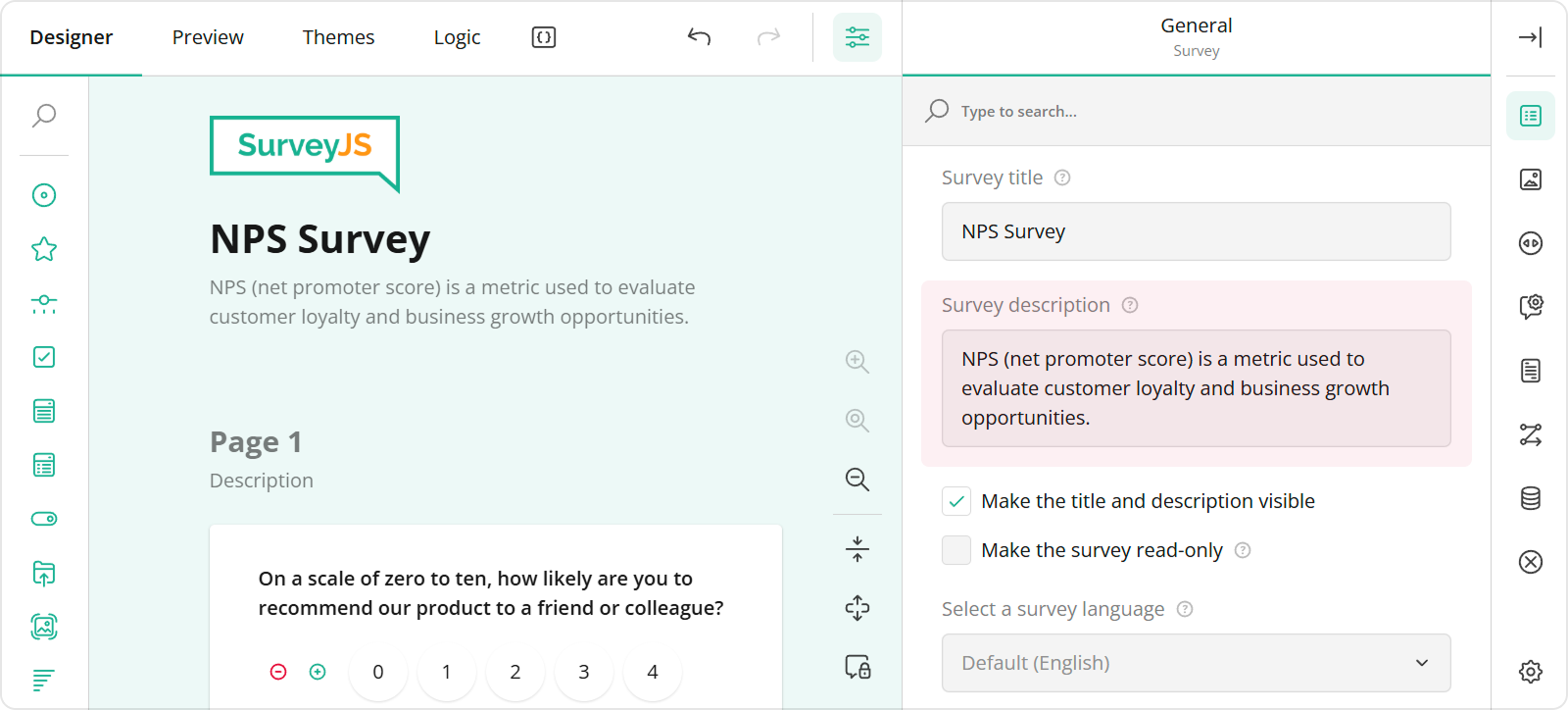
<img src="/Content/Images/examples/featured-demos/survey-description.png" alt="Specify survey description in SurveyJS Survey Creator" width="100%">

To add and configure a logo for your form in Survey Creator, use editors in the **Logo in the Survey Header** category.
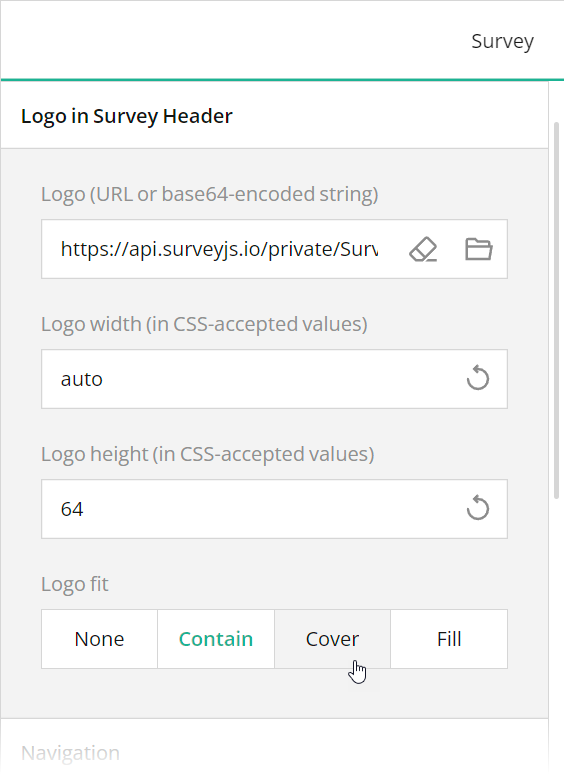
<img src="/Content/Images/examples/featured-demos/logo-settings.png" alt="Specify logo in SurveyJS Survey Creator" width="100%">

These editors are mapped to the following survey JSON properties:

- [`description`](https://surveyjs.io/form-library/documentation/api-reference/survey-data-model#description)
- [`logo`](https://surveyjs.io/form-library/documentation/api-reference/survey-data-model#logo)
- [`logoWidth`](https://surveyjs.io/form-library/documentation/api-reference/survey-data-model#logoWidth)
- [`logoHeight`](https://surveyjs.io/form-library/documentation/api-reference/survey-data-model#logoHeight)
- [`logoFit`](https://surveyjs.io/form-library/documentation/api-reference/survey-data-model#logoFit)

To position a description and logo within a form header, use Theme Editor integrated in Survey Creator. Switch to the **Themes** tab, open the **Header** category in Property Grid, and use the **Logo alignment** and **Survey description alignment** editors to align these elements as required. Ensure that the **View** switch is set to "Advanced".
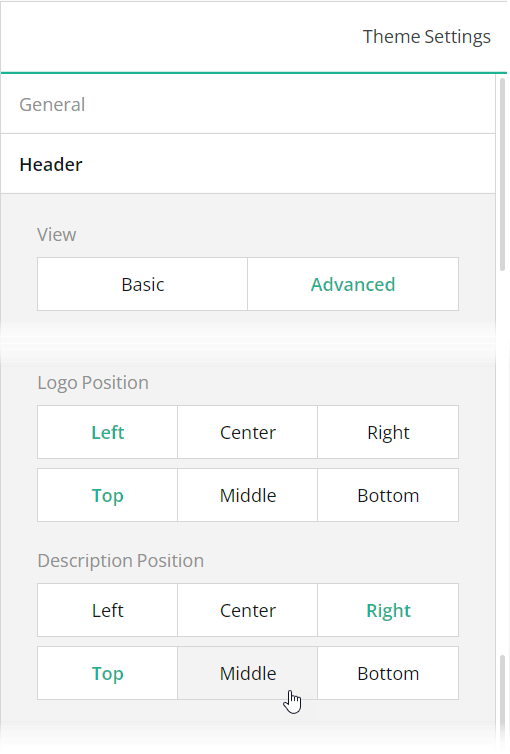
<img src="/Content/Images/examples/featured-demos/description-logo-position.png" alt="Specify logo settings in SurveyJS Survey Creator" width="100%">

You can also use other editors within the **Header** category to configure the form header in greater detail. All editors in this category, except font editors and View, are mapped to corresponding [`header`](https://surveyjs.io/form-library/documentation/api-reference/iheader) object properties in the theme JSON schema (see the `theme.js` file).

## Validate Dates

SurveyJS Form Library ships with flexible data validation capabilities. In this demo, data validation ensures a car pick-up date is neither earlier than today nor later than a drop-off date.

To implement this validation logic using Survey Creator, select the needed question on the design surface, open the **Validation** category, and add a validator of the **Expression** type. This validator throws an error when a specified [validation expression](https://surveyjs.io/form-library/documentation/design-survey/conditional-logic#expressions) evaluates to `false`. Type in the validation expression or build it using an integrated condition editor and enter the error message to display when your expression returns `false`.
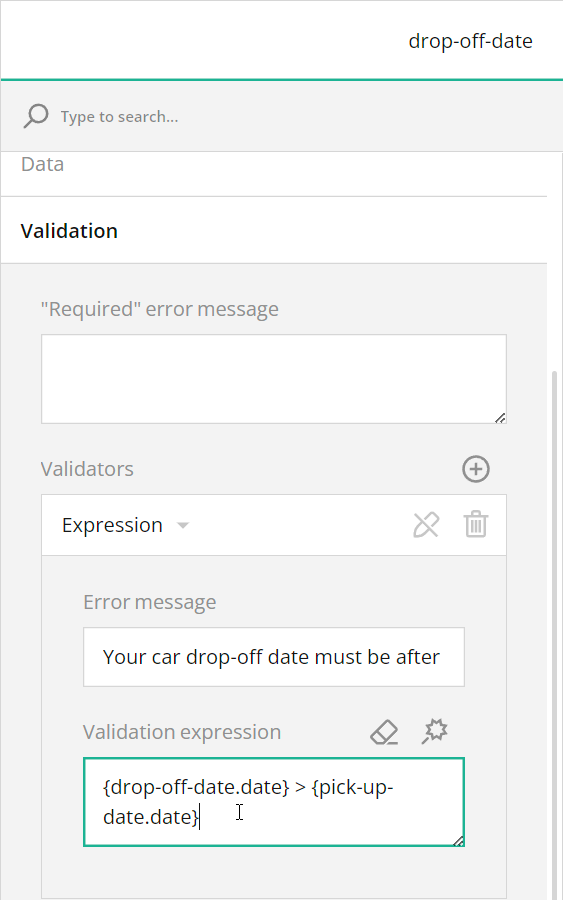
<img src="/Content/Images/examples/featured-demos/car-rental-expression-validator.png" alt="Configure data validation in Survey Creator by SurveyJS" width="100%">

In code, you can use the [`validators`](https://surveyjs.io/form-library/documentation/api-reference/question#validators) array to specify the same settings. Refer to the `survey.json` file for a code example. For more information on data validation capabilities, view the following help topic:

[Built-In Client-Side Validators](https://surveyjs.io/form-library/documentation/data-validation#built-in-client-side-validators (linkStyle))

## Add a Drawing Field

If you want to let respondents submit free-form drawings as part of your survey, add a drawing field to it. You can use the [Signature](https://surveyjs.io/form-library/examples/signature-pad-widget-javascript/) question type as a drawing field. This question type supports [background images](/form-library/documentation/api-reference/signature-pad-model#backgroundImage), which is useful if you want to display a reference or template for a respondent's drawing. For instance, a drawing field in this demo displays a car in different views (front, back, top, left, and right) for respondents to mark any dents or scratches a rented car may have.

To add a Signature question to your form using Survey Creator, simply drag this question from the Toolbox onto the design surface. For information on how to add a Signature question programmatically, refer to the Signature demo.

[View Signature Demo](https://surveyjs.io/form-library/examples/signature-pad-widget-javascript/ (linkStyle))

## Use Placeholders for Form Field Titles

If you want to design more compact and neat-looking forms, you can hide form field titles and display title texts as input field placeholders. To implement this layout in your form, follow the steps below:

1. Open the Designer tab.
2. Select a question on the design surface.
3. In the Property Grid, switch to the **General** category.
4. Find and unselect the **Show the title and description** checkbox.
5. Enter the form field title in the **Placeholder text within input field** editor.
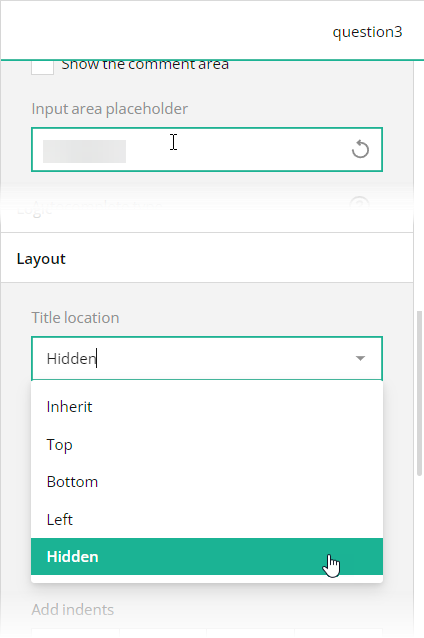
<img src="/Content/Images/examples/featured-demos/use-placeholders-instead-of-titles.png" alt="Set input field placeholder in SurveyJS Survey Creator" width="100%">

In the survey JSON schema, these editors are mapped to a question's [`titleLocation`](https://surveyjs.io/form-library/documentation/api-reference/text-entry-question-model#titleLocation) and [`placeholder`](https://surveyjs.io/form-library/documentation/api-reference/text-entry-question-model#placeholder) properties.

## Files

### `public/index.html`

```html
<div id="app" style="position: absolute; top: 0; left: 0; right: 0; bottom: 0; height:100%"></div>
```

### `src/App.vue`

```html
<template>
    <SurveyComponent :model="survey" />
</template>
<script setup lang="ts">
    import { Model } from "survey-core";
    import { SurveyComponent } from "survey-vue3-ui";
    import "survey-core/survey-core.min.css";
    import { themeJson } from "./theme";
    import "./index.css";
    import { json } from "./json";

    const survey = new Model(json);
    survey.applyTheme(themeJson);
    survey.onComplete.add((sender, options) => {
        console.log(JSON.stringify(sender.data, null, 3));
    });
</script>
```

### `src/index.css`

```css
/* You can add your custom CSS here. */
```

### `src/json.ts`

```ts
export const json = {
 "description": "3891 Ranchview Dr. Richardson, California +1 (201) 555-01-24",
 "logo": "https://api.surveyjs.io/private/Surveys/files?name=223a3e72-bf86-4801-bda5-94f4002ac662",
 "logoWidth": "auto",
 "logoHeight": "64",
 "completedHtml": "<div style=\"max-width:564px;text-align:center;margin:16px auto;\">\n\n<div style=\"padding:0 24px;\">\n<h4>Rental Form Successfully Saved.</h4>\n<br>\n<p>You've successfully completed the car rental form. The vehicle is now ready for pick up by the lessee.</p>\n</div>\n</div>",
 "pages": [
  {
   "name": "page1",
   "elements": [
    {
     "type": "multipletext",
     "name": "pick-up-date",
     "width": "60%",
     "minWidth": "256px",
     "validators": [
      {
       "type": "expression",
       "text": "Pick-up date cannot precede today's date.",
       "expression": "{pick-up-date.date} >= today()"
      }
     ],
     "items": [
      {
       "name": "date",
       "inputType": "date",
       "title": "Pick-up Date"
      }
     ]
    },
    {
     "type": "dropdown",
     "name": "pick-up-time",
     "width": "40%",
     "minWidth": "256px",
     "startWithNewLine": false,
     "choices": [
      "9:00 AM", "10:00 AM", "11:00 AM", "12:00 PM",
      "1:00 PM", "2:00 PM", "3:00 PM", "4:00 PM",
      "5:00 PM", "6:00 PM", "7:00 PM", "8:00 PM",
      "9:00 PM", "10:00 PM", "11:00 PM", "12:00 AM",
      "1:00 AM", "2:00 AM", "3:00 AM", "4:00 AM",
      "5:00 AM", "6:00 AM", "7:00 AM", "8:00 AM"
     ],
     "placeholder": "Pick-up Time",
     "allowClear": false
    },
    {
     "type": "multipletext",
     "name": "drop-off-date",
     "width": "60%",
     "minWidth": "256px",
     "validators": [
      {
       "type": "expression",
       "text": "Your car drop-off date must be after the pick-up date.",
       "expression": "{drop-off-date.date} > {pick-up-date.date}"
      }
     ],
     "items": [
      {
       "name": "date",
       "inputType": "date",
       "title": "Drop-off Date"
      }
     ]
    },
    {
     "type": "dropdown",
     "name": "drop-off-time",
     "width": "40%",
     "minWidth": "256px",
     "startWithNewLine": false,
     "choicesFromQuestion": "pick-up-time",
     "placeholder": "Drop-off Time",
     "allowClear": false
    }
   ],
   "questionTitleLocation": "hidden",
   "title": "Rental Period"
  },
  {
   "name": "page2",
   "elements": [
    {
     "type": "dropdown",
     "name": "vehicle-model",
     "width": "40%",
     "minWidth": "256px",
     "choices": [
       "Honda CR-V EX-L",
       "Chevrolet Sonic LT",
       "Toyota Highlander Limited",
       "Toyota Sequoia Platinum",
       "Mercedes-Benz C-Class C 250",
       "Volkswagen Passat 2.0T SE",
       "Toyota Corolla SE",
       "Ford Explorer XLT",
       "BMW 335 i xDrive",
       "Jeep Patriot Sport"
     ],
     "choicesOrder": "random",
     "placeholder": "Make and Model",
     "allowClear": false
    },
    {
     "type": "dropdown",
     "name": "vehicle-year",
     "width": "20%",
     "minWidth": "112px",
     "startWithNewLine": false,
     "placeholder": "Year",
     "allowClear": false,
     "choicesMin": 2014,
     "choicesMax": 2023
    },
    {
     "type": "dropdown",
     "name": "vehicle-color",
     "width": "40%",
     "minWidth": "256px",
     "startWithNewLine": false,
     "choices": [ "White", "Black", "Gray", "Red", "Silver" ],
     "choicesOrder": "random",
     "placeholder": "Color",
     "allowClear": false
    },
    {
     "type": "text",
     "name": "vehicle-vin",
     "width": "40%",
     "minWidth": "256px",
     "maxLength": 17,
     "placeholder": "VIN"
    },
    {
     "type": "text",
     "name": "vehicle-mileage",
     "width": "20%",
     "minWidth": "112px",
     "startWithNewLine": false,
     "title": "Details",
     "placeholder": "Mileage"
    },
    {
     "type": "rating",
     "name": "vehicle-gas-tank",
     "width": "100%",
     "minWidth": "256px",
     "title": "Gasoline Status",
     "autoGenerate": false,
     "rateValues": [
      {
       "value": 1,
       "text": "Empty Tank"
      },
      {
       "value": 2,
       "text": "1/4"
      },
      {
       "value": 3,
       "text": "1/2"
      },
      {
       "value": 4,
       "text": "3/4"
      },
      {
       "value": 5,
       "text": "Full Tank"
      }
     ],
     "displayMode": "buttons"
    },
    {
     "type": "signaturepad",
     "name": "damage-illustration",
     "signatureWidth": 824,
     "signatureHeight": 684,
     "signatureAutoScaleEnabled":  true,
     "backgroundImage": "https://api.surveyjs.io/private/Surveys/files?name=9c38f0ea-5f03-4120-9708-17e55f49aa19",
     "penColor": "#dd277f",
     "showPlaceholder": false
    },
    {
     "type": "comment",
     "name": "damage-information",
     "width": "100%",
     "minWidth": "256px",
     "rows": 6,
     "placeholder": "Please give more information about the damage you've marked above — if any.",
     "autoGrow": true,
     "allowResize": false
    }
   ],
   "questionTitleLocation": "hidden",
   "title": "Vehicle Information"
  },
  {
   "name": "page3",
   "elements": [
    {
     "type": "text",
     "name": "lessee-full-name",
     "width": "60%",
     "minWidth": "256px",
     "placeholder": "Full Name"
    },
    {
     "type": "text",
     "name": "lessee-passport-number",
     "width": "40%",
     "minWidth": "256px",
     "startWithNewLine": false,
     "title": "Passport #",
     "placeholder": "Passport #"
    },
    {
     "type": "comment",
     "name": "lessee-address",
     "width": "100%",
     "minWidth": "256px",
     "rows": 3,
     "placeholder": "Address",
     "autoGrow": true,
     "allowResize": false
    },
    {
     "type": "text",
     "name": "lessee-city",
     "width": "40%",
     "minWidth": "256px",
     "placeholder": "City"
    },
    {
     "type": "text",
     "name": "lessee-state",
     "width": "20%",
     "minWidth": "112px",
     "startWithNewLine": false,
     "placeholder": "State"
    },
    {
     "type": "text",
     "name": "lessee-zip",
     "width": "40%",
     "minWidth": "256px",
     "startWithNewLine": false,
     "placeholder": "Zip Code"
    },
    {
     "type": "text",
     "name": "lessee-driver-license-number",
     "width": "100%",
     "minWidth": "256px",
     "placeholder": "Driver's License #"
    },
    {
     "type": "multipletext",
     "name": "lessee-driving-license-exp-date",
     "width": "60%",
     "minWidth": "256px",
     "items": [
      {
       "name": "date",
       "inputType": "date",
       "title": "Expiration Date"
      }
     ]
    },
    {
     "type": "dropdown",
     "name": "lessee-driving-license-issue-country",
     "width": "40%",
     "minWidth": "256px",
     "startWithNewLine": false,
     "choicesByUrl": {
      "url": "https://surveyjs.io/api/CountriesExample"
     },
     "placeholder": "Issuing Country",
     "allowClear": false
    },
    {
     "type": "file",
     "name": "lessee-driving-license-photo",
     "width": "100%",
     "minWidth": "256px",
     "filePlaceholder": "Please upload a copy of a driver's license."
    }
   ],
   "questionTitleLocation": "hidden",
   "title": "Lessee Details"
  }
 ],
 "questionErrorLocation": "bottom",
 "completeText": "Confirm",
 "questionsOnPageMode": "singlePage",
 "widthMode": "static",
 "width": "904"
};
```

### `src/main.ts`

```ts
import { createApp } from "vue";
import App from "./App.vue";

const app = createApp(App);
app.mount("#app");
```

### `src/shims-vue.d.ts`

```ts
/* eslint-disable */
declare module "*.vue" {
    import type { DefineComponent } from "vue"
    const component: DefineComponent<{}, {}, any>
    export default component
}
```

### `src/theme.ts`

```ts
export const themeJson = {
    "backgroundImageFit": "cover",
    "backgroundImageAttachment": "scroll",
    "backgroundOpacity": 1,
    "isPanelless": true,
  "cssVariables": {
    "--sjs-general-backcolor": "rgba(255, 255, 255, 1)",
    "--sjs-general-backcolor-dark": "rgba(248, 248, 248, 1)",
    "--sjs-general-backcolor-dim": "#F0F0F5",
    "--sjs-general-backcolor-dim-light": "rgba(255, 255, 255, 1)",
    "--sjs-general-backcolor-dim-dark": "rgba(243, 243, 243, 1)",
    "--sjs-general-forecolor": "rgba(0, 0, 0, 0.91)",
    "--sjs-general-forecolor-light": "rgba(0, 0, 0, 0.45)",
    "--sjs-primary-backcolor": "rgba(52, 50, 62, 1)",
    "--sjs-primary-backcolor-light": "rgba(227, 227, 237, 1)",
    "--sjs-primary-backcolor-dark": "rgba(107, 103, 126, 1)",
    "--sjs-primary-forecolor": "rgba(255, 255, 255, 1)",
    "--sjs-primary-forecolor-light": "rgba(255, 255, 255, 0.25)",
    "--sjs-base-unit": "8px",
    "--sjs-corner-radius": "4px",
    "--sjs-shadow-small": "0px 0px 0px 1px rgba(52, 50, 62, 0.05), 0px 1px 2px 0px rgba(52, 50, 62, 0.15)",
    "--sjs-shadow-medium": "0px 2px 6px 0px rgba(0, 0, 0, 0.1)",
    "--sjs-shadow-large": "0px 8px 16px 0px rgba(0, 0, 0, 0.1)",
    "--sjs-shadow-inner": "0px 0px 0px 1px rgba(52, 50, 62, 0.05), 0px 1px 2px 0px rgba(52, 50, 62, 0.15)",
    "--sjs-border-light": "rgba(52, 50, 62, 0.15)",
    "--sjs-border-default": "rgba(52, 50, 62, 0.25)",
    "--sjs-border-inside": "rgba(0, 0, 0, 0.16)",
    "--sjs-special-red": "rgba(229, 10, 62, 1)",
    "--sjs-special-red-light": "rgba(229, 10, 62, 0.1)",
    "--sjs-special-red-forecolor": "rgba(255, 255, 255, 1)",
    "--sjs-special-green": "rgba(25, 179, 148, 1)",
    "--sjs-special-green-light": "rgba(25, 179, 148, 0.1)",
    "--sjs-special-green-forecolor": "rgba(255, 255, 255, 1)",
    "--sjs-special-blue": "rgba(67, 127, 217, 1)",
    "--sjs-special-blue-light": "rgba(67, 127, 217, 0.1)",
    "--sjs-special-blue-forecolor": "rgba(255, 255, 255, 1)",
    "--sjs-special-yellow": "rgba(255, 152, 20, 1)",
    "--sjs-special-yellow-light": "rgba(255, 152, 20, 0.1)",
    "--sjs-special-yellow-forecolor": "rgba(255, 255, 255, 1)",
    "--sjs-font-editorfont-color": "rgba(52, 50, 62, 1)",
    "--sjs-font-editorfont-placeholdercolor": "rgba(52, 50, 62, 0.5)",
    "--sjs-font-questiondescription-color": "rgba(52, 50, 62, 0.5)",
    "--sjs-editorpanel-hovercolor": "rgba(244, 244, 249, 1)",
    "--sjs-questionpanel-hovercolor": "rgba(244, 244, 249, 1)",
    "--sjs-font-surveytitle-size": "24px",
    "--sjs-font-questiontitle-color": "rgba(52, 50, 62, 1)",
    "--sjs-font-pagetitle-color": "rgba(52, 50, 62, 1)",
    "--sjs-font-pagetitle-size": "20px",
    "--sjs-header-backcolor": "transparent",
    "--sjs-font-headerdescription-color": "rgba(255, 255, 255, 1)",
    "--sjs-font-headerdescription-weight":  "600",
    "--sjs-font-headertitle-weight":  "700",
    "--sjs-font-headerdescription-size":  "20px",
    "--sjs-font-pagetitle-weight":  "700"
  },
    "themeName": "default",
    "colorPalette": "light",
    "header": {
        "height": 320,
        "inheritWidthFrom": "container",
        "textAreaWidth": 340,
        "overlapEnabled": false,
        "backgroundImage": "https://api.surveyjs.io/private/Surveys/files?name=d00d0812-8687-4d6d-b8b8-cc895bdf1957",
        "backgroundImageOpacity": 1,
        "backgroundImageFit": "cover",
        "logoPositionX": "left",
        "logoPositionY": "top",
        "titlePositionX": "left",
        "titlePositionY": "bottom",
        "descriptionPositionX": "right",
        "descriptionPositionY": "bottom"
    },
    "headerView": "advanced"
};
```

### `.eslintrc.js`

```js
module.exports = {
    root: true,
    env: {
        node: true
    },
    extends: [
        "plugin:vue/vue3-essential",
        "eslint:recommended",
        "@vue/typescript/recommended",
        "@vue/prettier",
        "@vue/prettier/@typescript-eslint"
    ],
    parserOptions: {
        ecmaVersion: 2020
    },
    rules: {
        "no-console": process.env.NODE_ENV === "production" ? "warn" : "off",
        "no-debugger": process.env.NODE_ENV === "production" ? "warn" : "off"
    },
    overrides: [
        {
            files: [
                "**/__tests__/*.{j,t}s?(x)",
                "**/tests/unit/**/*.spec.{j,t}s?(x)"
            ],
            env: {
                jest: true
            }
        }
    ]
};
```

### `babel.config.js`

```js
module.exports = {
  presets: ["@vue/cli-plugin-babel/preset"]
};
```

### `package.json`

```json
{
  "name": "surveyjs-library-vue3",
  "version": "0.1.0",
  "scripts": {
    "serve": "vue-cli-service serve",
    "build": "vue-cli-service build",
    "lint": "vue-cli-service lint"
  },
  "dependencies": {
    "core-js": "^3.6.5",
    "tslib": "2.6.1",
    "vue": "^3.4.1",
    "survey-core": "latest",
    "survey-vue3-ui": "latest",
    "vue-router": "^4.0.0-0",
    "vuex": "^4.0.0-0"
  },
  "devDependencies": {
    "@typescript-eslint/eslint-plugin": "^2.33.0",
    "@typescript-eslint/parser": "^2.33.0",
    "@vue/cli-plugin-babel": "~4.5.0",
    "@vue/cli-plugin-eslint": "~4.5.0",
    "@vue/cli-plugin-pwa": "~4.5.0",
    "@vue/cli-plugin-router": "~4.5.0",
    "@vue/cli-plugin-typescript": "~4.5.0",
    "@vue/cli-plugin-vuex": "~4.5.0",
    "@vue/cli-service": "~4.5.0",
    "@vue/compiler-sfc": "^3.0.0",
    "@vue/eslint-config-prettier": "^6.0.0",
    "@vue/eslint-config-typescript": "^5.0.2",
    "@vue/test-utils": "^2.0.0-0",
    "eslint": "^6.7.2",
    "eslint-plugin-prettier": "^3.1.3",
    "eslint-plugin-vue": "^7.0.0-0",
    "node-sass": "^4.12.0",
    "prettier": "^1.19.1",
    "sass-loader": "^8.0.2",
    "typescript": "~3.9.3"
  }
}
```

### `tsconfig.json`

```json
{
  "compilerOptions": {
    "target": "esnext",
    "module": "esnext",
    "strict": true,
    "jsx": "preserve",
    "importHelpers": true,
    "moduleResolution": "node",
    "skipLibCheck": true,
    "esModuleInterop": true,
    "allowSyntheticDefaultImports": true,
    "sourceMap": true,
    "baseUrl": ".",
    "types": [
      "webpack-env",
      "jest"
    ],
    "paths": {
      "@/*": [
        "src/*"
      ]
    },
    "lib": [
      "esnext",
      "dom",
      "dom.iterable",
      "scripthost"
    ]
  },
  "include": [
    "src/**/*.ts",
    "src/**/*.tsx",
    "src/**/*.vue",
    "tests/**/*.ts",
    "tests/**/*.tsx"
  ],
  "exclude": [
    "node_modules"
  ]
}
```

## Other Frameworks

- [Angular](https://surveyjs.io/form-library/examples/car-rental-form-template-free/angular.md)
- [React](https://surveyjs.io/form-library/examples/car-rental-form-template-free/reactjs.md)
- [jQuery](https://surveyjs.io/form-library/examples/car-rental-form-template-free/jquery.md)
- [Vanilla JS](https://surveyjs.io/form-library/examples/car-rental-form-template-free/vanillajs.md)
