---
title: Conference Registration Form
product: Form Library
description: Discover our free conference registration form template with a ready-to-use code example for JavaScript. It highlights features like conditional logic for follow-up questions when a specific ticket type is selected and the ability to display different fields based on the chosen payment method. Learn how to customize your SurveyJS forms extensively, from fonts and backgrounds to entry field and text colors.
framework: React
source: https://surveyjs.io/form-library/examples/conference-registration-form-template-free/reactjs
index: https://surveyjs.io/form-library/examples/overview.md
---

# Conference Registration Form (React)

<!-- cut -->

An online conference registration form helps conference organizers collect essential information from participants and attendees. The collected information typically includes personal details, contact information, preferences, and any specific requirements related to the conference. This demo shows an online conference registration form that was created and designed using SurveyJS Survey Creator with an integrated Theme Editor. The following sections give an overview of the key design solutions within this form and describe their implementation.

## Enable Panelless View

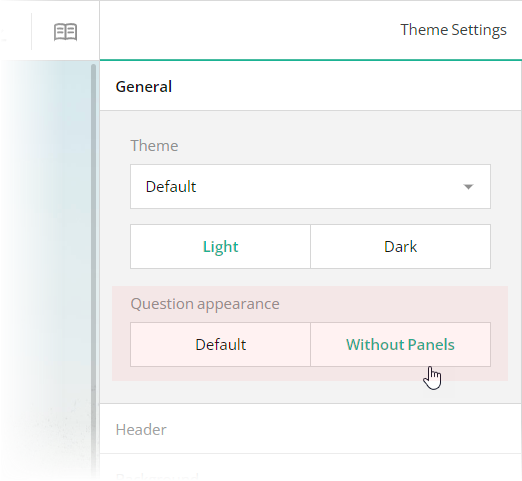
Form fields can be framed by panels or displayed without them. This demo uses the panelless view. To enable it in Theme Editor, switch the **General** > **Question appearance** editor to "Without Panels". This editor is mapped to the [`isPanelless`](https://surveyjs.io/form-library/documentation/api-reference/itheme#isPanelless) property in the theme JSON configuration (see the `theme.js` file).

<img src="/Content/Images/examples/featured-demos/panelless-question-appearance.png" alt="Specify panelless question appearance in SurveyJS Theme Editor" width="100%">

## Add a Background Image

The conference registration form in this demo has a distinct background image. With Theme Editor integrated in Survey Creator, you can add background images to your forms with ease. Open the **Themes** tab in Survey Creator and switch to the **Background** category. Editors under the **Background image** title enable you to add a background image and configure its every aspect.
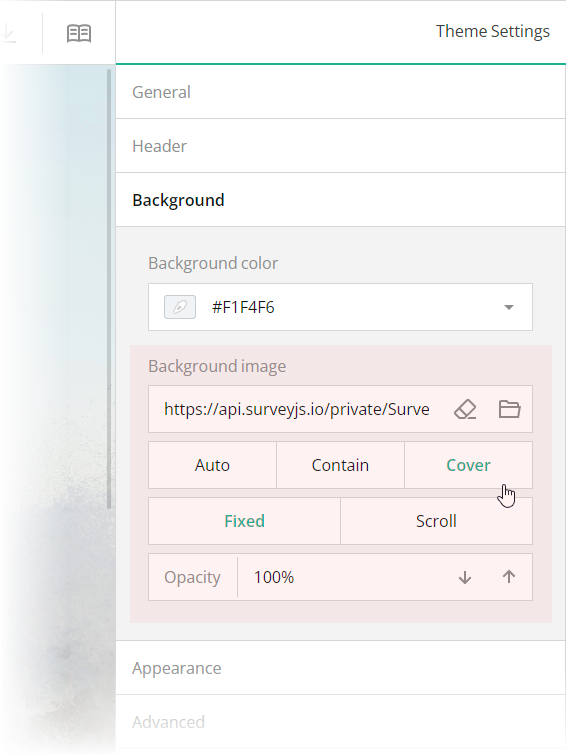
<img src="/Content/Images/examples/featured-demos/background-image.png" alt="Configure a background image in SurveyJS Theme Editor" width="100%">

These editors are mapped to the following theme JSON schema properties, which you can find in the `theme.js` file:

- [`backgroundImage`](https://surveyjs.io/form-library/documentation/api-reference/itheme#backgroundImage): `string`          
An image to display as form background. This property accepts a hyperlink or a data URL.

- [`backgroundImageFit`](https://surveyjs.io/form-library/documentation/api-reference/itheme#backgroundImageFit): `"auto"` | `"contain"` | `"cover"`            
A string value that specifies how to resize the background image to fit it into its container. Refer to the description of the [`background-size`](https://developer.mozilla.org/en-US/docs/Web/CSS/background-size#values) CSS property values on MDN for detailed information on the possible values.

- [`backgroundImageAttachment`](https://surveyjs.io/form-library/documentation/api-reference/itheme#backgroundImageAttachment): `"fixed"` | `"scroll"`          
A string value that specifies whether the background image is fixed in its position (as in this demo) or scrolled along with the survey.

- [`backgroundOpacity`](https://surveyjs.io/form-library/documentation/api-reference/itheme#backgroundOpacity): `number`      
A value from 0 to 1 that specifies how transparent the background image should be: 0 makes the image completely transparent, and 1 makes it opaque. In Theme Editor, the opacity values are mapped to a scale from 0% to 100%.

## Configure the Form Header

A form header usually consists of a form title, short description, and a logo of your company. However, all these elements are optional. In this demo, the form header contains only a title and a logo.

To specify a title text, open the **Designer** tab and enter your text in the **Survey title** editor within the **General** category.
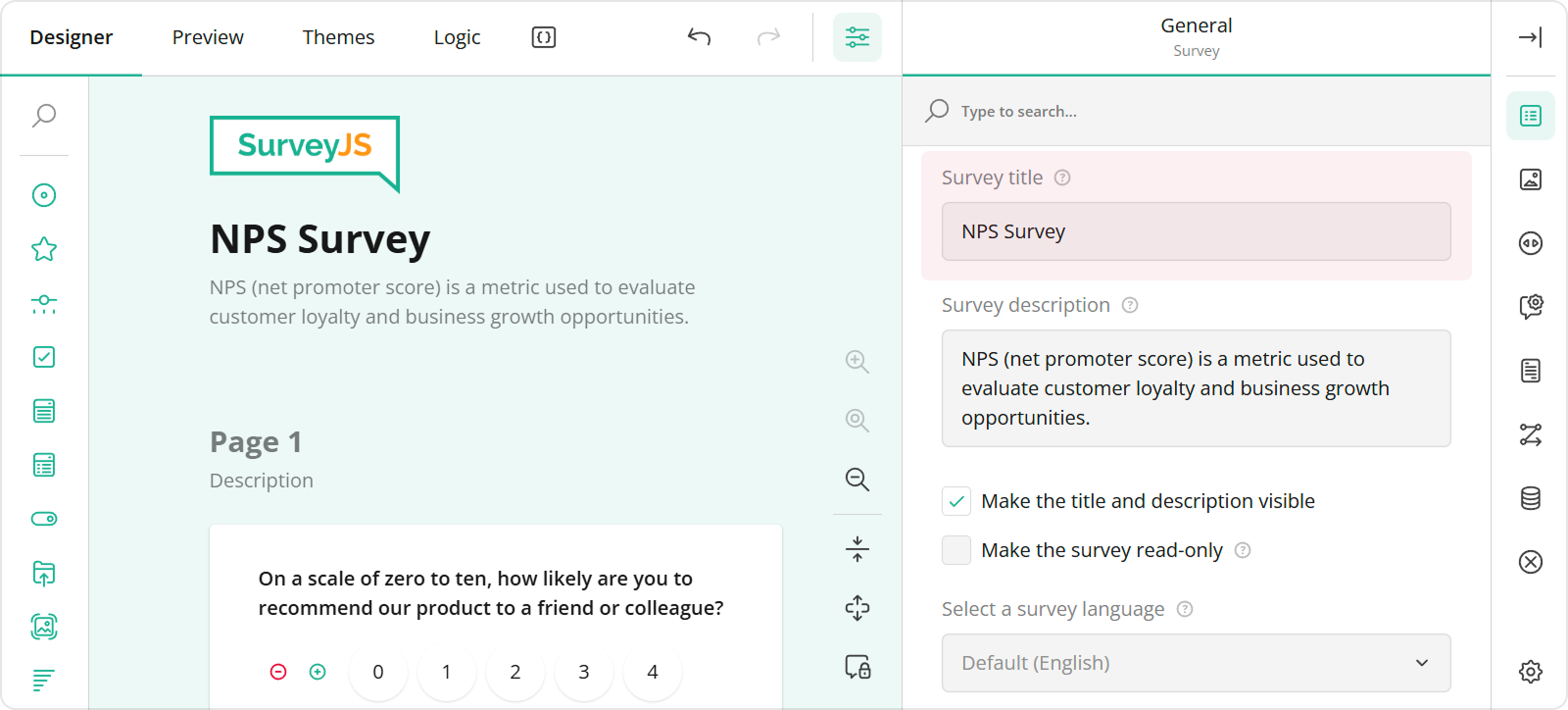
<img src="/Content/Images/examples/featured-demos/survey-title.png" alt="Specify the survey title in SurveyJS Survey Creator" width="100%">

To add and configure a logo for your form in Survey Creator, use editors in the **Logo in the Survey Header** category.
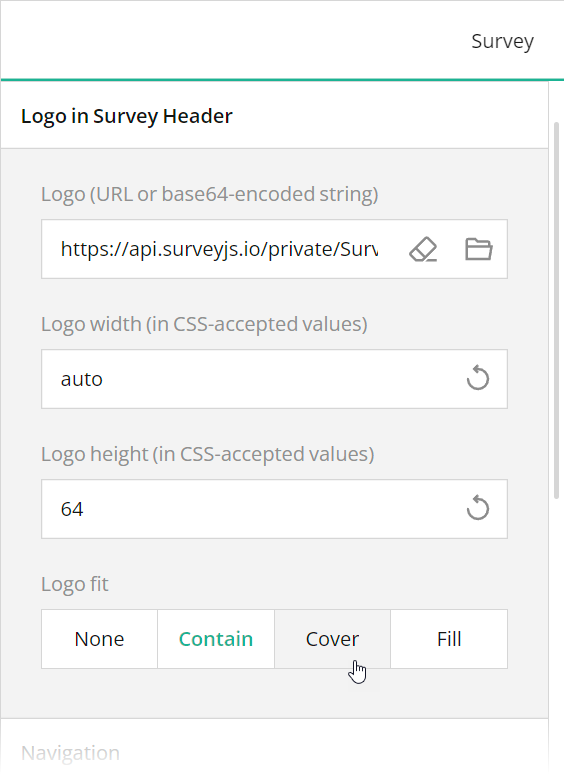
<img src="/Content/Images/examples/featured-demos/logo-settings.png" alt="Specify logo in SurveyJS Survey Creator" width="100%">

These editors are mapped to the following survey JSON properties:

- [`title`](https://surveyjs.io/form-library/documentation/api-reference/survey-data-model#title)
- [`logo`](https://surveyjs.io/form-library/documentation/api-reference/survey-data-model#logo)
- [`logoWidth`](https://surveyjs.io/form-library/documentation/api-reference/survey-data-model#logoWidth)
- [`logoHeight`](https://surveyjs.io/form-library/documentation/api-reference/survey-data-model#logoHeight)
- [`logoFit`](https://surveyjs.io/form-library/documentation/api-reference/survey-data-model#logoFit)

To position a title and logo within a form header, use Theme Editor integrated in Survey Creator. Open the **Themes** tab, switch to the **Header** category in Property Grid, and use the **Logo alignment** and **Survey title alignment** editors to align these elements as required. Ensure that the **View** switch is set to "Advanced".
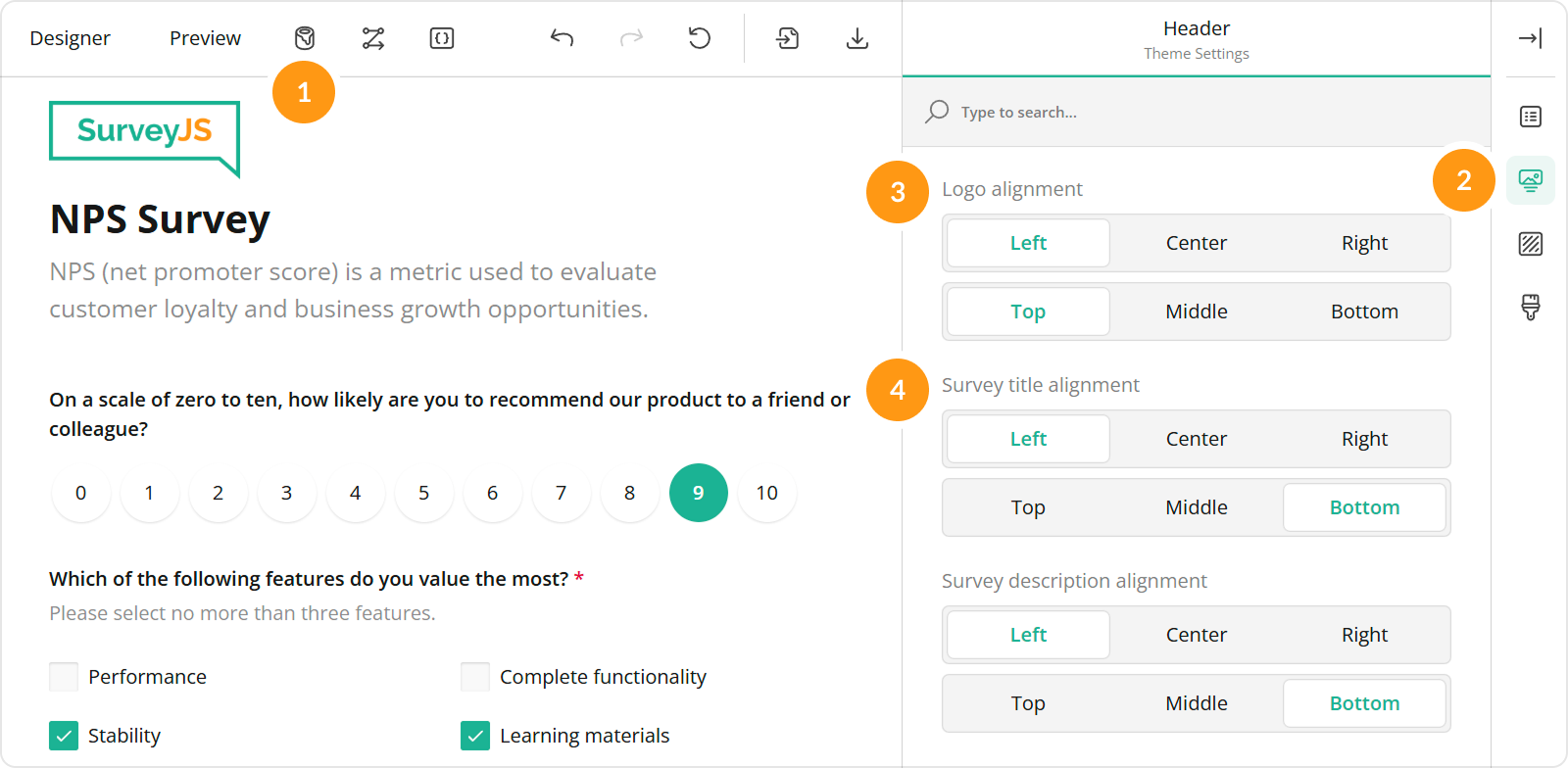
<img src="/Content/Images/examples/featured-demos/title-logo-position.png" alt="Specify logo settings in SurveyJS Survey Creator" width="100%">

You can also use other editors within the **Header** category to configure the form header in greater detail. All editors in the Header category, except font editors and View, are mapped to corresponding [`header`](https://surveyjs.io/form-library/documentation/api-reference/iheader) object properties in the theme JSON schema (see the `theme.js` file).

## Configure Fonts and Colors

The conference registration form in this example has specific fonts and colors. In code, these fonts and colors are set using CSS variables (see the `theme.js` file). Theme Editor by SurveyJS allows you to modify these variables in a user-friendly interface. Click "Edit in Survey Creator" above the demo to open it in Theme Editor.

## Files

### `public/index.html`

```html
<div id="surveyElement" style="position: absolute; top: 0; left: 0; right: 0; bottom: 0; min-height: 100%; height:100%"></div>
```

### `src/SurveyComponent.jsx`

```js
import React from "react";
import { Model } from "survey-core";
import { Survey } from "survey-react-ui";
import "survey-core/survey-core.min.css";
import { themeJson } from "./theme";
import "./index.css";
import { json } from "./json";

function SurveyComponent() {
    const survey = new Model(json);
    survey.applyTheme(themeJson);
    survey.onComplete.add((sender, options) => {
        console.log(JSON.stringify(sender.data, null, 3));
    });
    return (<Survey model={survey} />);
}

export default SurveyComponent;
```

### `src/index.css`

```css
/* You can add your custom CSS here. */
```

### `src/index.js`

```js
import React from "react";
import { createRoot } from "react-dom/client";
import SurveyComponent from "./SurveyComponent";

const root = createRoot(document.getElementById("surveyElement"));
root.render(<SurveyComponent />);
```

### `src/json.js`

```js
export const json = {
  "title": "Conferences ➔ Jun 9–11 Online Hackathon ➔ Jun 5–11",
  "logo": "https://api.surveyjs.io/private/Surveys/files?name=f30775b0-6292-48a7-8dcd-90cdfa3b378f",
  "logoWidth": "auto",
  "logoHeight": "96",
  "logoPosition": "right",
  "completedHtml": "<div style=\"max-width:752px;text-align:center;margin:0px auto 16px auto;\">\n\n<div style=\"padding:0 24px;\">\n<h2>Congrats!</h2>\n<br>\n<h4>You have successfully registered for DEV WEEKEND. Your participation is confirmed, and we can't wait to welcome you.</h4>\n</div>\n\n</div>\n",
  "pages": [
    {
      "name": "page1",
      "elements": [
        {
          "type": "text",
          "name": "last-name",
          "width": "60%",
          "minWidth": "256px",
          "description": "Last name"
        },
        {
          "type": "text",
          "name": "first-name",
          "width": "40%",
          "minWidth": "256px",
          "startWithNewLine": false,
          "description": "First name"
        },
        {
          "type": "text",
          "name": "email",
          "width": "60%",
          "minWidth": "256px",
          "description": "Email address"
        },
        {
          "type": "text",
          "name": "phone",
          "width": "40%",
          "minWidth": "256px",
          "startWithNewLine": false,
          "description": "Phone number"
        },
        {
          "type": "comment",
          "name": "address",
          "width": "100%",
          "minWidth": "256px",
          "description": "Address line 1",
          "autoGrow": true,
          "allowResize": false
        },
        {
          "type": "text",
          "name": "city",
          "width": "60%",
          "minWidth": "256px",
          "description": "City"
        },
        {
          "type": "text",
          "name": "state",
          "width": "20%",
          "minWidth": "128px",
          "startWithNewLine": false,
          "description": "State"
        },
        {
          "type": "text",
          "name": "zip",
          "width": "20%",
          "minWidth": "128px",
          "startWithNewLine": false,
          "description": "Zip code"
        },
        {
          "type": "text",
          "name": "company",
          "width": "60%",
          "minWidth": "256px",
          "description": "Company"
        },
        {
          "type": "dropdown",
          "name": "job-title",
          "width": "40%",
          "minWidth": "256px",
          "startWithNewLine": false,
          "description": "Job title",
          "choices": [
            "Engineering Lead",
            "Designer",
            "Customer Support",
            "Project Manager",
            "Product Manager",
            "Software Developer",
            "CEO / Founder"
          ],
          "choicesOrder": "random",
          "showOtherItem": true,
          "otherText": "Other",
          "placeholder": "",
          "allowClear": false
        }
      ],
      "description": "Thank you for your interest in attending the Dev Weekend 2024. To reserve your seat, please fill out the information below."
    },
    {
      "name": "page2",
      "elements": [
        {
          "type": "radiogroup",
          "name": "fee-type",
          "width": "100%",
          "minWidth": "256px",
          "choices": [
            {
              "value": "full",
              "text": "$399 / Full Conference"
            },
            {
              "value": "one-day",
              "text": "$199 / One-Day Only"
            }
          ]
        },
        {
          "type": "radiogroup",
          "name": "selected-day",
          "visibleIf": "{fee-type} = 'one-day'",
          "width": "100%",
          "minWidth": "256px",
          "choices": [ "Friday", "Saturday", "Sunday" ]
        }
      ],
      "title": "Registration Fee"
    },
    {
      "name": "page3",
      "elements": [
        {
          "type": "rating",
          "name": "payment-method",
          "width": "100%",
          "minWidth": "256px",
          "autoGenerate": false,
          "rateCount": 2,
          "rateValues": [
            {
              "value": "paypal",
              "text": "PayPal"
            },
            {
              "value": "card",
              "text": "Credit/Debit Card"
            }
          ]
        },
        {
          "type": "text",
          "name": "card-number",
          "visibleIf": "{payment-method} = 'card'",
          "width": "60%",
          "minWidth": "256px",
          "description": "Card number"
        },
        {
          "type": "text",
          "name": "card-exp-date",
          "visibleIf": "{payment-method} = 'card'",
          "width": "40%",
          "minWidth": "256px",
          "startWithNewLine": false,
          "description": "Exp. date",
          "inputType": "date"
        },
        {
          "type": "text",
          "name": "cardholder-name",
          "visibleIf": "{payment-method} = 'card'",
          "width": "60%",
          "minWidth": "256px",
          "description": "Cardholder name"
        },
        {
          "type": "text",
          "name": "card-cvc",
          "visibleIf": "{payment-method} = 'card'",
          "width": "40%",
          "minWidth": "256px",
          "startWithNewLine": false,
          "description": "CVC"
        }
      ],
      "title": "Payment Method"
    },
    {
      "name": "page4",
      "elements": [
        {
          "type": "text",
          "name": "billing-address",
          "width": "60%",
          "minWidth": "256px",
          "description": "Address line 1"
        },
        {
          "type": "text",
          "name": "billing-address-city",
          "width": "40%",
          "minWidth": "256px",
          "startWithNewLine": false,
          "description": "City"
        },
        {
          "type": "dropdown",
          "name": "billing-address-country",
          "width": "60%",
          "minWidth": "256px",
          "description": "Country",
          "choicesByUrl": {
            "url": "https://surveyjs.io/api/CountriesExample"
          },
          "placeholder": "",
          "allowClear": false
        },
        {
          "type": "text",
          "name": "billing-address-state",
          "width": "20%",
          "minWidth": "128px",
          "startWithNewLine": false,
          "description": "State"
        },
        {
          "type": "text",
          "name": "billing-address-zip",
          "width": "20%",
          "minWidth": "128px",
          "startWithNewLine": false,
          "description": "Zip code"
        }
      ],
      "title": "Billing Address"
    }
  ],
  "questionTitleLocation": "hidden",
  "questionDescriptionLocation": "underInput",
  "completeText": "Proceed",
  "questionsOnPageMode": "singlePage",
  "widthMode": "static",
  "width": "900"
};
```

### `src/theme.js`

```js
export const themeJson = {
    "backgroundImage": "https://api.surveyjs.io/private/Surveys/files?name=e3cb0700-8696-43d3-ab8a-3309fcd3f637",
    "backgroundImageFit": "cover",
    "backgroundImageAttachment": "scroll",
    "backgroundOpacity": 0.5,
    "isPanelless": true,
  "cssVariables": {
    "--sjs-general-backcolor": "rgba(56, 10, 83, 1)",
    "--sjs-general-backcolor-dark": "rgba(52, 52, 52, 1)",
    "--sjs-general-backcolor-dim": "#380A53",
    "--sjs-general-backcolor-dim-light": "rgba(70, 26, 93, 1)",
    "--sjs-general-backcolor-dim-dark": "rgba(46, 46, 46, 1)",
    "--sjs-general-forecolor": "rgba(255, 255, 255, 0.78)",
    "--sjs-general-forecolor-light": "rgba(255, 255, 255, 0.42)",
    "--sjs-primary-backcolor": "#FF3366",
    "--sjs-primary-backcolor-light": "rgba(70, 26, 93, 1)",
    "--sjs-primary-backcolor-dark": "rgba(70, 26, 93, 1)",
    "--sjs-primary-forecolor": "rgba(255, 255, 255, 1)",
    "--sjs-primary-forecolor-light": "rgba(255, 255, 255, 0.25)",
    "--sjs-base-unit": "10px",
    "--sjs-corner-radius": "8px",
    "--sjs-shadow-small": "0px 0px 0px 2px rgba(13, 1, 19, 1)",
    "--sjs-shadow-medium": "0px 2px 6px 0px rgba(0, 0, 0, 0.2)",
    "--sjs-shadow-large": "0px 8px 16px 0px rgba(0, 0, 0, 0.2)",
    "--sjs-shadow-inner": "0px 0px 0px 2px rgba(13, 1, 19, 1)",
    "--sjs-border-light": "rgba(255, 255, 255, 0.25)",
    "--sjs-border-default": "rgba(255, 255, 255, 0.25)",
    "--sjs-border-inside": "rgba(255, 255, 255, 0.08)",
    "--sjs-special-red": "rgba(254, 76, 108, 1)",
    "--sjs-special-red-light": "rgba(254, 76, 108, 0.1)",
    "--sjs-special-red-forecolor": "rgba(48, 48, 48, 1)",
    "--sjs-special-green": "rgba(36, 197, 164, 1)",
    "--sjs-special-green-light": "rgba(36, 197, 164, 0.1)",
    "--sjs-special-green-forecolor": "rgba(48, 48, 48, 1)",
    "--sjs-special-blue": "rgba(91, 151, 242, 1)",
    "--sjs-special-blue-light": "rgba(91, 151, 242, 0.1)",
    "--sjs-special-blue-forecolor": "rgba(48, 48, 48, 1)",
    "--sjs-special-yellow": "rgba(255, 152, 20, 1)",
    "--sjs-special-yellow-light": "rgba(255, 152, 20, 0.1)",
    "--sjs-special-yellow-forecolor": "rgba(48, 48, 48, 1)",
    "--font-family": "Courier New, monospace",
    "--sjs-editorpanel-backcolor": "rgba(70, 26, 93, 1)",
    "--sjs-editorpanel-hovercolor": "rgba(97, 53, 121, 1)",
    "--sjs-questionpanel-backcolor": "rgba(56, 10, 83, 1)",
    "--sjs-questionpanel-hovercolor": "rgba(70, 26, 93, 1)",
    "--sjs-font-editorfont-color": "rgba(255, 51, 102, 1)",
    "--sjs-font-editorfont-placeholdercolor": "rgba(134, 83, 162, 1)",
    "--sjs-font-questiondescription-color": "rgba(134, 83, 162, 1)",
    "--sjs-font-questiontitle-color": "rgba(134, 83, 162, 1)",
    "--sjs-font-size": "16px",
    "--sjs-editorpanel-cornerRadius": "8px",
    "--sjs-font-pagetitle-color": "rgba(255, 51, 102, 1)",
    "--sjs-font-pagetitle-weight": "600",
    "--sjs-font-questiondescription-size": "18px",
    "--sjs-font-editorfont-weight": "600",
    "--sjs-font-questiondescription-weight": "600",
    "--sjs-font-pagedescription-color": "rgba(134, 83, 162, 1)",
    "--sjs-font-pagedescription-weight": "600",
    "--sjs-font-surveytitle-size": "24px",
    "--sjs-font-pagedescription-size": "18px",
    "--sjs-font-questiontitle-size": "18px",
    "--sjs-font-editorfont-size": "18px",
    "--sjs-header-backcolor": "transparent",
    "--sjs-font-headertitle-color": "rgba(255, 51, 102, 1)",
    "--sjs-font-headertitle-weight": "600",
    "--sjs-font-family": "Courier New, monospace",
    "--sjs-font-headertitle-size": "24px",
    "--sjs-font-pagetitle-size":  "32px",
    "--sjs-font-headerdescription-size":  "20px"
  },
    "themeName": "default",
    "colorPalette": "light",
    "header": {
        "height": 224,
        "inheritWidthFrom": "survey",
        "textAreaWidth": 400,
        "overlapEnabled": false,
        "backgroundImageOpacity": 1,
        "backgroundImageFit": "cover",
        "logoPositionX": "left",
        "logoPositionY": "top",
        "titlePositionX": "right",
        "titlePositionY": "bottom",
        "descriptionPositionX": "right",
        "descriptionPositionY": "top"
    },
    "headerView": "advanced"
};
```

### `package.json`

```json
{
  "dependencies": {
    "react": "latest",
    "react-dom": "latest",
    "survey-core": "latest",
    "survey-react-ui": "latest"
  },
  "devDependencies": {
    "react-scripts": "latest"
  }
}
```

## Other Frameworks

- [Angular](https://surveyjs.io/form-library/examples/conference-registration-form-template-free/angular.md)
- [Vue 3](https://surveyjs.io/form-library/examples/conference-registration-form-template-free/vue3js.md)
- [jQuery](https://surveyjs.io/form-library/examples/conference-registration-form-template-free/jquery.md)
- [Vanilla JS](https://surveyjs.io/form-library/examples/conference-registration-form-template-free/vanillajs.md)