 ## Configure the Form Header
A form header usually consists of a form title, short description, and a logo of your company. It can also display a background image different from the background image of the rest of the form. This section describes how to configure these features.
### Add a Form Title, Description, and Logo
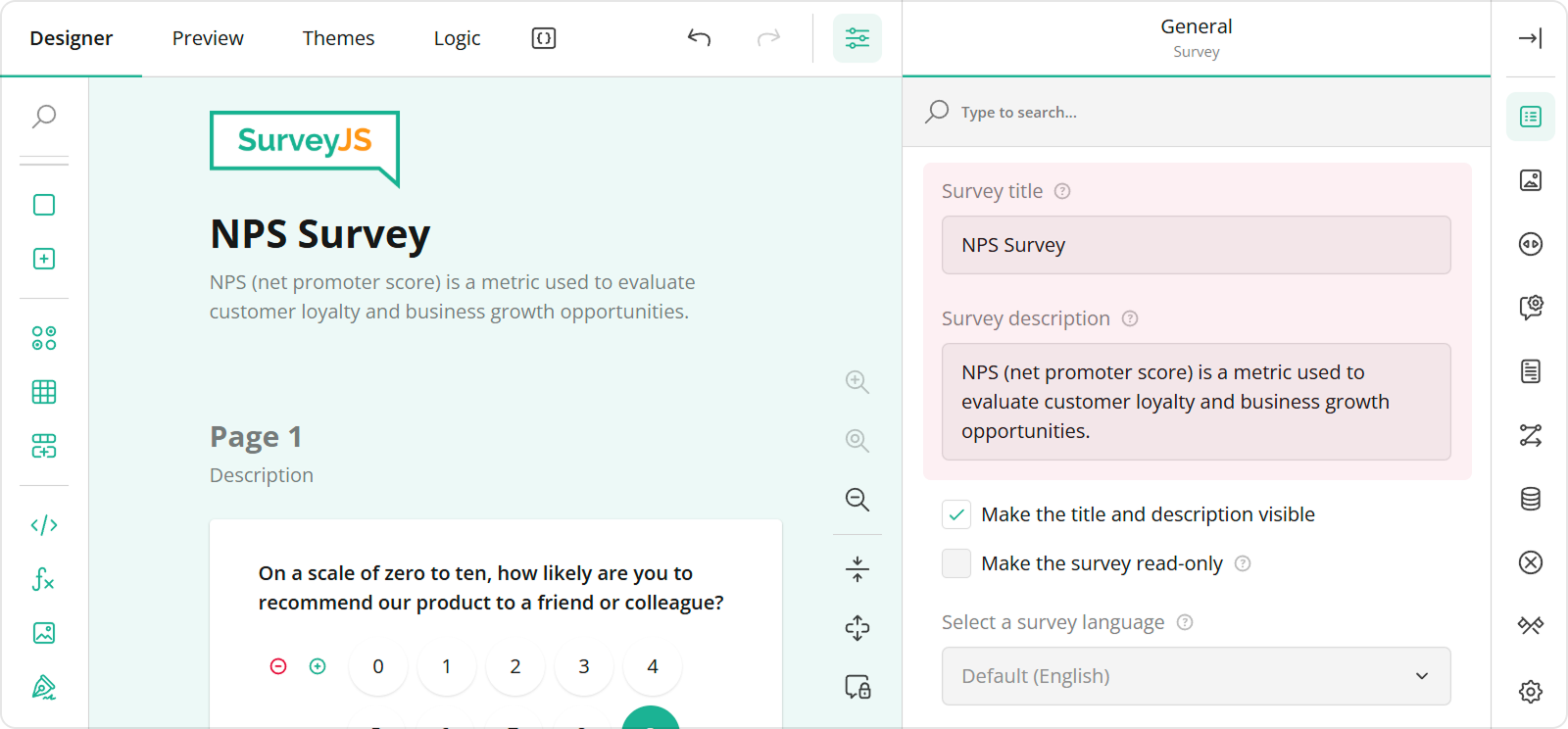
You can specify a form title and description in the Designer tab of Survey Creator. Enter title and description texts in the **Survey title** and **Survey description** editors in the **General** category.
## Configure the Form Header
A form header usually consists of a form title, short description, and a logo of your company. It can also display a background image different from the background image of the rest of the form. This section describes how to configure these features.
### Add a Form Title, Description, and Logo
You can specify a form title and description in the Designer tab of Survey Creator. Enter title and description texts in the **Survey title** and **Survey description** editors in the **General** category.
 To configure a logo, use editors in the **Logo in the Survey Header** category.
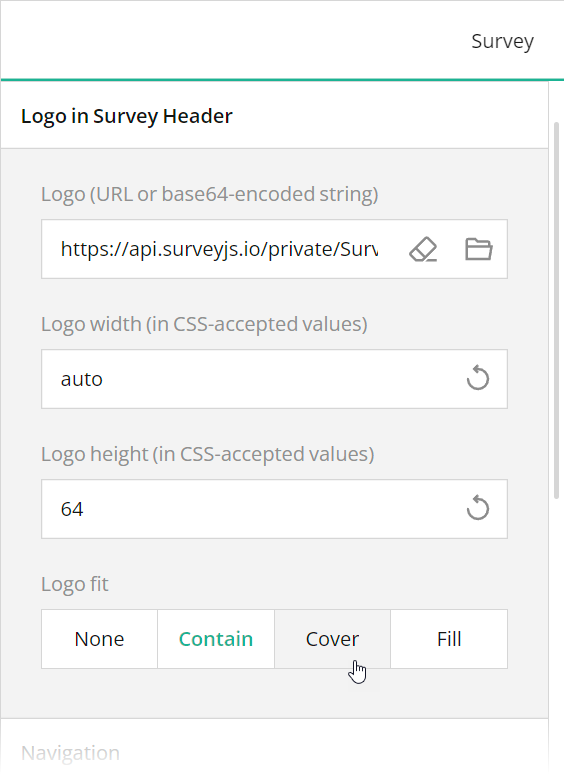 These editors are mapped to the following survey JSON properties:
- [`title`](https://surveyjs.io/form-library/documentation/api-reference/survey-data-model#title)
- [`description`](https://surveyjs.io/form-library/documentation/api-reference/survey-data-model#description)
- [`logo`](https://surveyjs.io/form-library/documentation/api-reference/survey-data-model#logo)
- [`logoWidth`](https://surveyjs.io/form-library/documentation/api-reference/survey-data-model#logoWidth)
- [`logoHeight`](https://surveyjs.io/form-library/documentation/api-reference/survey-data-model#logoHeight)
- [`logoFit`](https://surveyjs.io/form-library/documentation/api-reference/survey-data-model#logoFit)
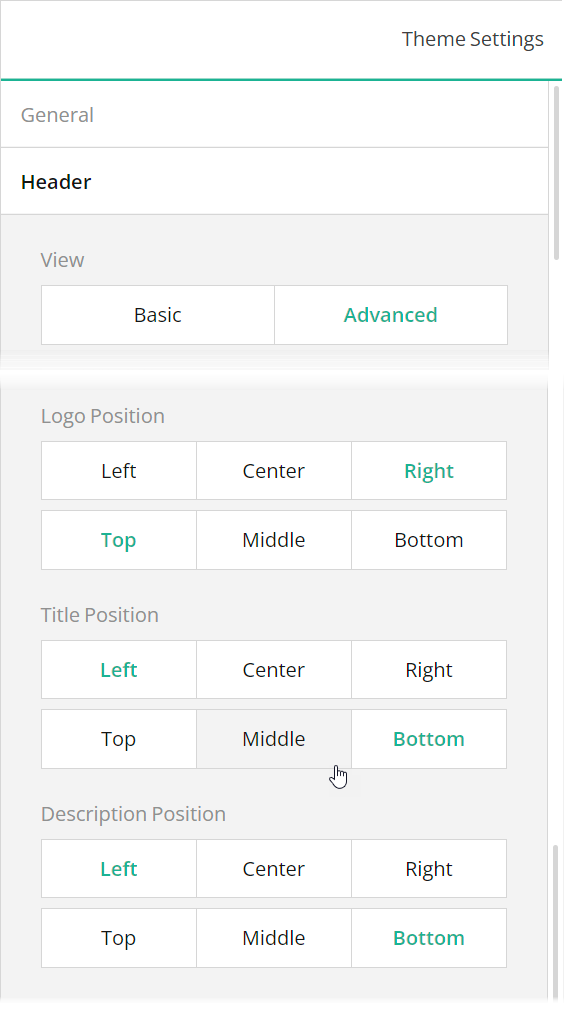
To position a title and description within a form header, use Theme Editor integrated in Survey Creator. Open the Themes tab, switch to the **Header** category in Property Grid, and use the **Logo alignment**, **Survey title alignment**, and **Survey description alignment** editors to align these elements as required. Ensure that the **View** switch is set to "Advanced".
These editors are mapped to the following survey JSON properties:
- [`title`](https://surveyjs.io/form-library/documentation/api-reference/survey-data-model#title)
- [`description`](https://surveyjs.io/form-library/documentation/api-reference/survey-data-model#description)
- [`logo`](https://surveyjs.io/form-library/documentation/api-reference/survey-data-model#logo)
- [`logoWidth`](https://surveyjs.io/form-library/documentation/api-reference/survey-data-model#logoWidth)
- [`logoHeight`](https://surveyjs.io/form-library/documentation/api-reference/survey-data-model#logoHeight)
- [`logoFit`](https://surveyjs.io/form-library/documentation/api-reference/survey-data-model#logoFit)
To position a title and description within a form header, use Theme Editor integrated in Survey Creator. Open the Themes tab, switch to the **Header** category in Property Grid, and use the **Logo alignment**, **Survey title alignment**, and **Survey description alignment** editors to align these elements as required. Ensure that the **View** switch is set to "Advanced".
 ### Add a Background Image to the Form Header
A form header can display a background image that gives your form a more professional look. To add a background image using Theme Editor, open the **Header** category in Property Grid, switch the **View** editor to "Advanced", and use the **Background image** editors.
### Add a Background Image to the Form Header
A form header can display a background image that gives your form a more professional look. To add a background image using Theme Editor, open the **Header** category in Property Grid, switch the **View** editor to "Advanced", and use the **Background image** editors.
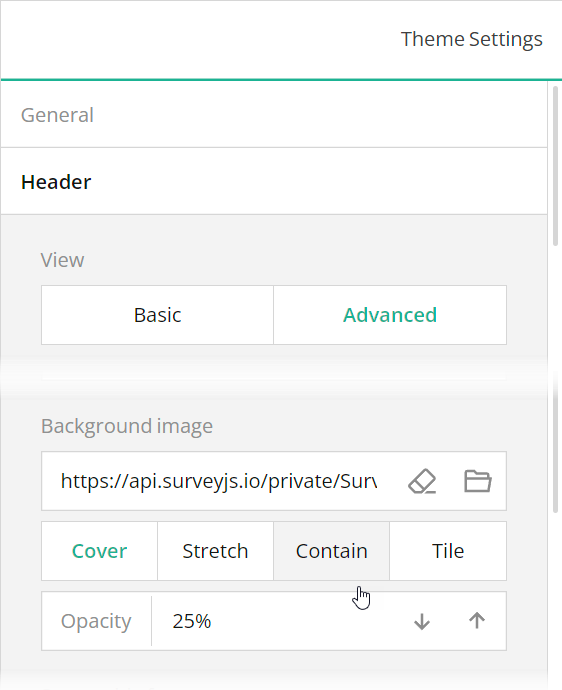 The **Background image** editors are mapped to the following properties in the theme JSON schema (see the `theme.js` file):
- [`header`](https://surveyjs.io/form-library/documentation/api-reference/itheme#header).[`backgroundImage`](https://surveyjs.io/form-library/documentation/api-reference/iheader#backgroundImage)
- [`header`](https://surveyjs.io/form-library/documentation/api-reference/itheme#header).[`backgroundImageOpacity`](https://surveyjs.io/form-library/documentation/api-reference/iheader#backgroundImageOpacity)
- [`header`](https://surveyjs.io/form-library/documentation/api-reference/itheme#header).[`backgroundImageFit`](https://surveyjs.io/form-library/documentation/api-reference/iheader#backgroundImageFit)
## Add Rating Scale Controls
A feedback form usually asks a respondent to evaluate or rate a particular characteristic of a product or service on a predefined scale. If your feedback form includes only one or two such characteristic, you can use [standalone Rating Scale survey elements](/form-library/examples/rating-scale/). This demo shows how to organize multiple rating controls in a neat UI using Multi-Select Matrix elements.
To implement this UI, add a panel to your form and add Multi-Select Matrices to that panel. Distribute all characteristics for evaluation between these matrices and add as many rows to each matrix as there are characteristics for it. For instance, in this demo, six characteristics are split between two matrices.
Each matrix should contain only one column of the Rating Scale type. Set the column's `cellType` property to `"rating"` or change the column's **Cell input type** editor to Rating Scale in Survey Creator. A matrix should also have an inverted layout (columns displayed as rows, and vice versa) in order to add a header to each rating control. Enable the [`transposeData`](/form-library/documentation/api-reference/matrix-table-with-dropdown-list#transposeData) property or select the **Layout** > **Transpose rows to columns** editor in Survey Creator. Refer to the `"food-ratings"` and `"venue-ratings"` matrices in the `survey.json` file for code examples.
## Files
### `public/index.html`
```html
```
### `src/SurveyComponent.jsx`
```js
import React from "react";
import { Model } from "survey-core";
import { Survey } from "survey-react-ui";
import "survey-core/survey-core.min.css";
import { themeJson } from "./theme";
import "./index.css";
import { json } from "./json";
function SurveyComponent() {
const survey = new Model(json);
survey.applyTheme(themeJson);
survey.onComplete.add((sender, options) => {
console.log(JSON.stringify(sender.data, null, 3));
});
return (
The **Background image** editors are mapped to the following properties in the theme JSON schema (see the `theme.js` file):
- [`header`](https://surveyjs.io/form-library/documentation/api-reference/itheme#header).[`backgroundImage`](https://surveyjs.io/form-library/documentation/api-reference/iheader#backgroundImage)
- [`header`](https://surveyjs.io/form-library/documentation/api-reference/itheme#header).[`backgroundImageOpacity`](https://surveyjs.io/form-library/documentation/api-reference/iheader#backgroundImageOpacity)
- [`header`](https://surveyjs.io/form-library/documentation/api-reference/itheme#header).[`backgroundImageFit`](https://surveyjs.io/form-library/documentation/api-reference/iheader#backgroundImageFit)
## Add Rating Scale Controls
A feedback form usually asks a respondent to evaluate or rate a particular characteristic of a product or service on a predefined scale. If your feedback form includes only one or two such characteristic, you can use [standalone Rating Scale survey elements](/form-library/examples/rating-scale/). This demo shows how to organize multiple rating controls in a neat UI using Multi-Select Matrix elements.
To implement this UI, add a panel to your form and add Multi-Select Matrices to that panel. Distribute all characteristics for evaluation between these matrices and add as many rows to each matrix as there are characteristics for it. For instance, in this demo, six characteristics are split between two matrices.
Each matrix should contain only one column of the Rating Scale type. Set the column's `cellType` property to `"rating"` or change the column's **Cell input type** editor to Rating Scale in Survey Creator. A matrix should also have an inverted layout (columns displayed as rows, and vice versa) in order to add a header to each rating control. Enable the [`transposeData`](/form-library/documentation/api-reference/matrix-table-with-dropdown-list#transposeData) property or select the **Layout** > **Transpose rows to columns** editor in Survey Creator. Refer to the `"food-ratings"` and `"venue-ratings"` matrices in the `survey.json` file for code examples.
## Files
### `public/index.html`
```html
```
### `src/SurveyComponent.jsx`
```js
import React from "react";
import { Model } from "survey-core";
import { Survey } from "survey-react-ui";
import "survey-core/survey-core.min.css";
import { themeJson } from "./theme";
import "./index.css";
import { json } from "./json";
function SurveyComponent() {
const survey = new Model(json);
survey.applyTheme(themeJson);
survey.onComplete.add((sender, options) => {
console.log(JSON.stringify(sender.data, null, 3));
});
return (We greatly appreciate your feedback. Your input helps us improve, and we look forward to serving you even better on your next visit.
\nWarm regards,
Pizza House