---
title: Hotel Booking Form
product: Form Library
description: This ready-to-use hotel booking form with a free code example for JavaScript demonstrates the limitless capabilities of our robust and feature-rich SurveyJS Creator. It includes multiple form appearance customization features, all set up in the Theme Editor. You can embed the form in your app as-is or take it a step further with our free form editing tool.
framework: Angular
source: https://surveyjs.io/form-library/examples/hotel-booking-form-template-free/angular
index: https://surveyjs.io/form-library/examples/overview.md
---
# Hotel Booking Form (Angular)
A hotel booking form allows guests to make a reservation at a hotel. Hotel booking forms typically include fields for information related to the guest's stay: name, contact details, identification documents, reservation details, payment information, etc. This demo shows a ready-to-use hotel booking form, which was created and designed using SurveyJS Survey Creator with integrated Theme Editor. The following sections highlight key aspects of the form implementation.
## Enable Panelless View
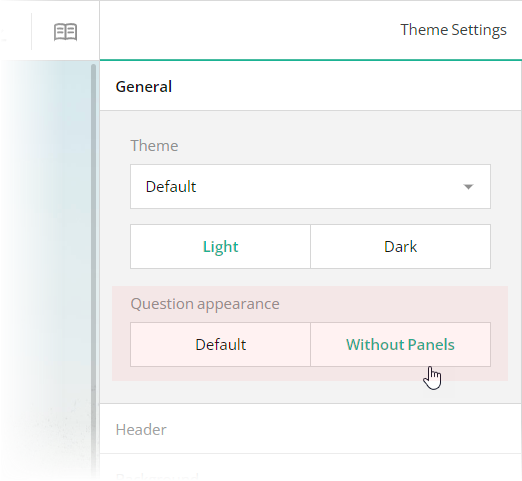
Form fields can be framed by panels or displayed without them. This demo uses the panelless view. To enable it in Theme Editor, switch the **General** > **Question appearance** editor to "Without Panels". This editor is mapped to the [`isPanelless`](https://surveyjs.io/form-library/documentation/api-reference/itheme#isPanelless) property in the theme JSON configuration (see the `theme.js` file).
 ## Add a Background Image
The hotel booking form in this demo has a distinct background image. With Theme Editor by SurveyJS, you can add background images to your forms with ease. Open the **Themes** tab in Survey Creator and switch to the **Background** category. Editors under the **Background image** title enable you to add a background image and configure its every aspect.
## Add a Background Image
The hotel booking form in this demo has a distinct background image. With Theme Editor by SurveyJS, you can add background images to your forms with ease. Open the **Themes** tab in Survey Creator and switch to the **Background** category. Editors under the **Background image** title enable you to add a background image and configure its every aspect.
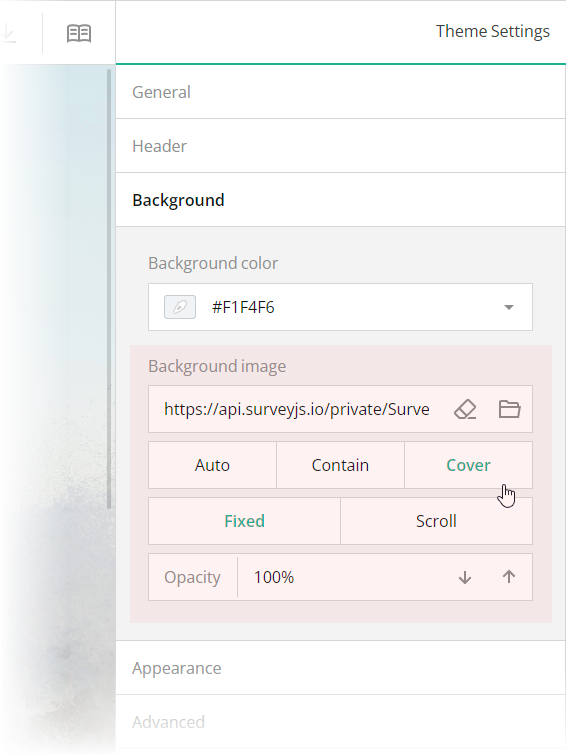 These editors are mapped to the following theme JSON schema properties, which you can find in the `theme.js` file:
- [`backgroundImage`](https://surveyjs.io/form-library/documentation/api-reference/itheme#backgroundImage): `string`
An image to display as form background. This property accepts a hyperlink or a data URL.
- [`backgroundImageFit`](https://surveyjs.io/form-library/documentation/api-reference/itheme#backgroundImageFit): `"auto"` | `"contain"` | `"cover"`
A string value that specifies how to resize the background image to fit it into its container. Refer to the description of the [`background-size`](https://developer.mozilla.org/en-US/docs/Web/CSS/background-size#values) CSS property values on MDN for detailed information on the possible values.
- [`backgroundImageAttachment`](https://surveyjs.io/form-library/documentation/api-reference/itheme#backgroundImageAttachment): `"fixed"` | `"scroll"`
A string value that specifies whether the background image is fixed in its position (as in this demo) or scrolled along with the survey.
- [`backgroundOpacity`](https://surveyjs.io/form-library/documentation/api-reference/itheme#backgroundOpacity): `number`
A value from 0 to 1 that specifies how transparent the background image should be: 0 makes the image completely transparent, and 1 makes it opaque. In Theme Editor, the opacity values are mapped to a scale from 0% to 100%.
## Configure the Form Header
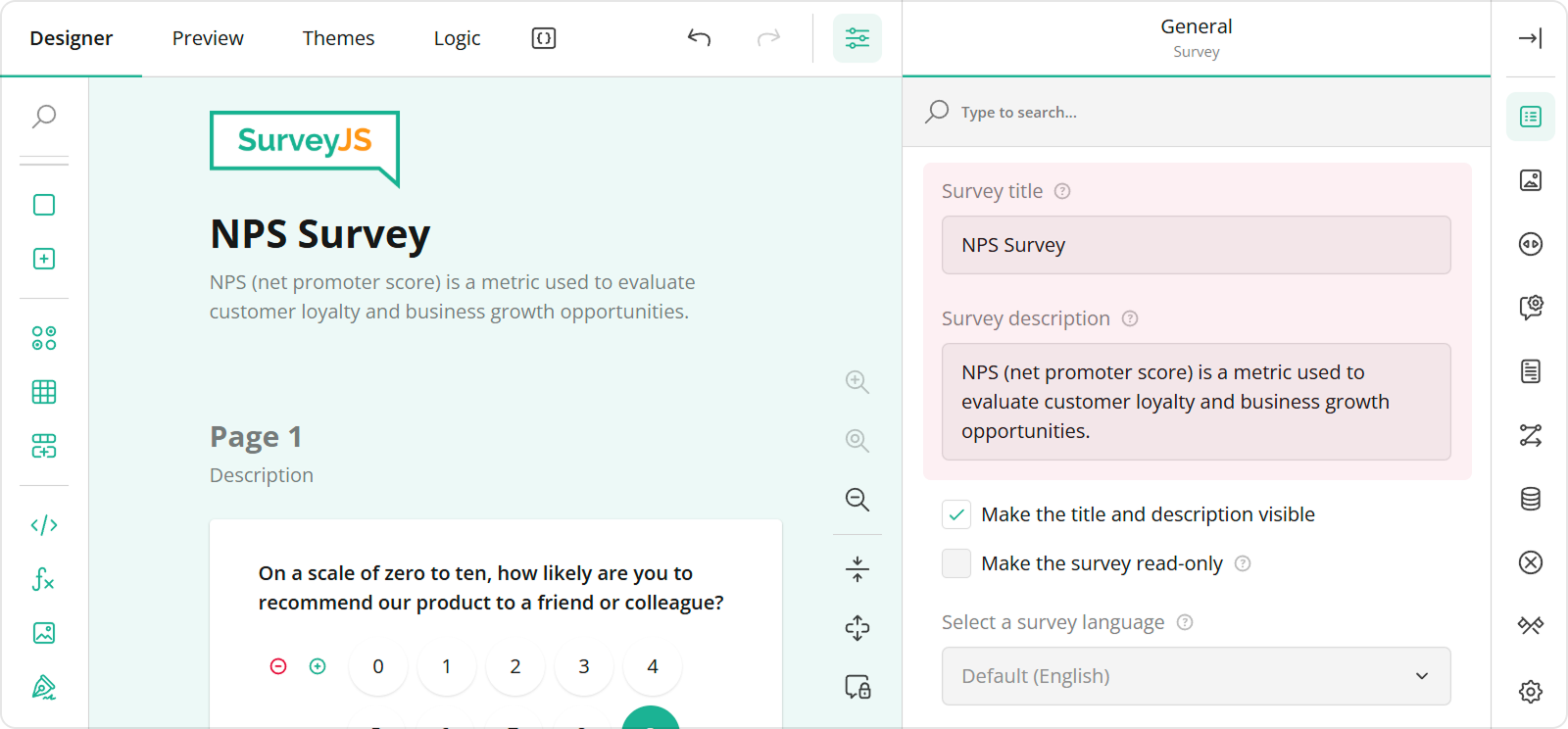
The header of your form typically contains a form title, short description, and a logo of your company. To specify title and description texts, open the Designer tab and enter them in the **Survey title** and **Survey description** editors in the **General** category.
These editors are mapped to the following theme JSON schema properties, which you can find in the `theme.js` file:
- [`backgroundImage`](https://surveyjs.io/form-library/documentation/api-reference/itheme#backgroundImage): `string`
An image to display as form background. This property accepts a hyperlink or a data URL.
- [`backgroundImageFit`](https://surveyjs.io/form-library/documentation/api-reference/itheme#backgroundImageFit): `"auto"` | `"contain"` | `"cover"`
A string value that specifies how to resize the background image to fit it into its container. Refer to the description of the [`background-size`](https://developer.mozilla.org/en-US/docs/Web/CSS/background-size#values) CSS property values on MDN for detailed information on the possible values.
- [`backgroundImageAttachment`](https://surveyjs.io/form-library/documentation/api-reference/itheme#backgroundImageAttachment): `"fixed"` | `"scroll"`
A string value that specifies whether the background image is fixed in its position (as in this demo) or scrolled along with the survey.
- [`backgroundOpacity`](https://surveyjs.io/form-library/documentation/api-reference/itheme#backgroundOpacity): `number`
A value from 0 to 1 that specifies how transparent the background image should be: 0 makes the image completely transparent, and 1 makes it opaque. In Theme Editor, the opacity values are mapped to a scale from 0% to 100%.
## Configure the Form Header
The header of your form typically contains a form title, short description, and a logo of your company. To specify title and description texts, open the Designer tab and enter them in the **Survey title** and **Survey description** editors in the **General** category.
 To configure a logo, use editors in the **Logo in the Survey Header** category.
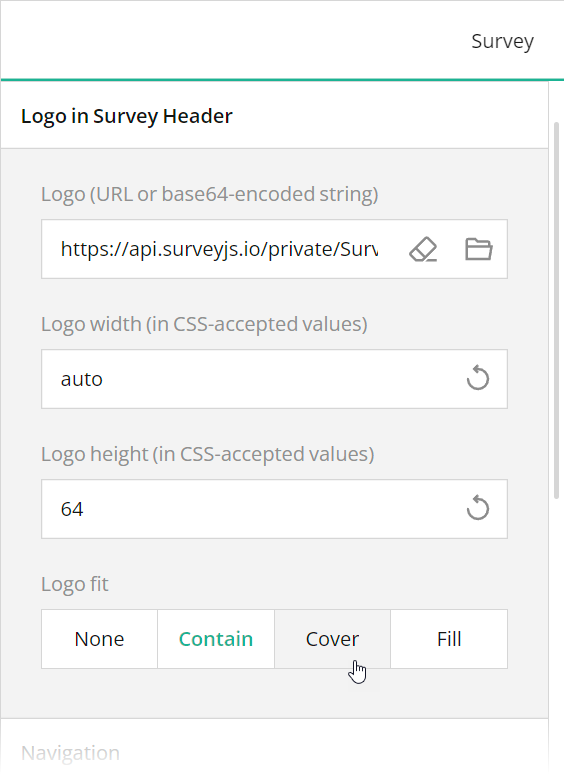 These editors are mapped to the following survey JSON properties:
- [`title`](https://surveyjs.io/form-library/documentation/api-reference/survey-data-model#title)
- [`description`](https://surveyjs.io/form-library/documentation/api-reference/survey-data-model#description)
- [`logo`](https://surveyjs.io/form-library/documentation/api-reference/survey-data-model#logo)
- [`logoWidth`](https://surveyjs.io/form-library/documentation/api-reference/survey-data-model#logoWidth)
- [`logoHeight`](https://surveyjs.io/form-library/documentation/api-reference/survey-data-model#logoHeight)
- [`logoFit`](https://surveyjs.io/form-library/documentation/api-reference/survey-data-model#logoFit)
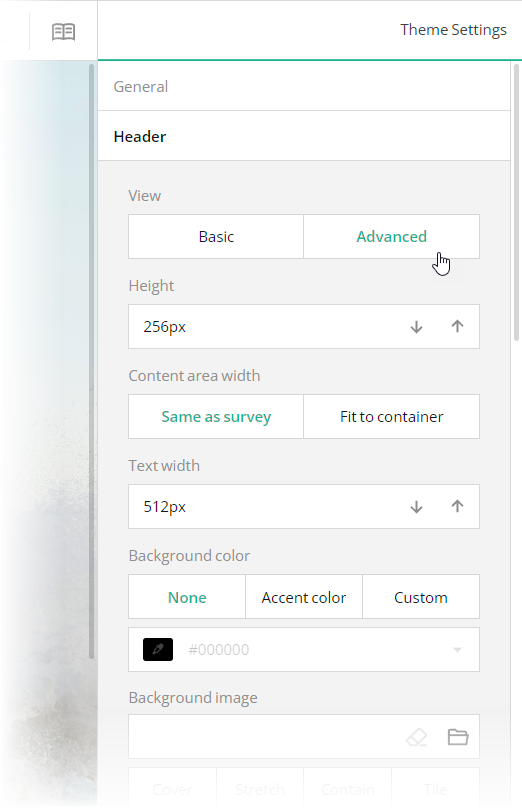
To configure the appearance of the form header, open the Themes tab and use editors in the **Header** category. Ensure that the **View** switch is set to "Advanced". All editors in the Header category, except font editors and View, are mapped to corresponding [`header`](https://surveyjs.io/form-library/documentation/api-reference/iheader) object properties in the theme JSON schema (see the `theme.js` file).
These editors are mapped to the following survey JSON properties:
- [`title`](https://surveyjs.io/form-library/documentation/api-reference/survey-data-model#title)
- [`description`](https://surveyjs.io/form-library/documentation/api-reference/survey-data-model#description)
- [`logo`](https://surveyjs.io/form-library/documentation/api-reference/survey-data-model#logo)
- [`logoWidth`](https://surveyjs.io/form-library/documentation/api-reference/survey-data-model#logoWidth)
- [`logoHeight`](https://surveyjs.io/form-library/documentation/api-reference/survey-data-model#logoHeight)
- [`logoFit`](https://surveyjs.io/form-library/documentation/api-reference/survey-data-model#logoFit)
To configure the appearance of the form header, open the Themes tab and use editors in the **Header** category. Ensure that the **View** switch is set to "Advanced". All editors in the Header category, except font editors and View, are mapped to corresponding [`header`](https://surveyjs.io/form-library/documentation/api-reference/iheader) object properties in the theme JSON schema (see the `theme.js` file).
 ## Use Placeholders for Form Field Titles
If you want to design more compact and neat-looking forms, you can hide form field titles and display title texts as input field placeholders. To implement this layout in your form, follow the steps below:
1. Open the Designer tab.
2. Select a question on the design surface.
3. In the Property Grid, switch to the **General** category.
4. Find and unselect the **Show the title and description** checkbox.
5. Enter the form field title in the **Placeholder text within input field** editor.
## Use Placeholders for Form Field Titles
If you want to design more compact and neat-looking forms, you can hide form field titles and display title texts as input field placeholders. To implement this layout in your form, follow the steps below:
1. Open the Designer tab.
2. Select a question on the design surface.
3. In the Property Grid, switch to the **General** category.
4. Find and unselect the **Show the title and description** checkbox.
5. Enter the form field title in the **Placeholder text within input field** editor.
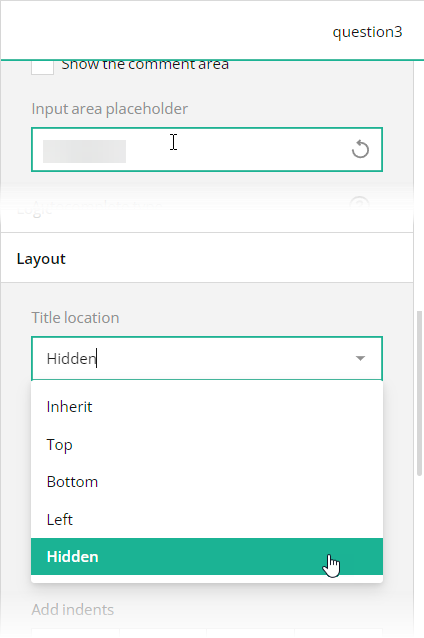 In the survey JSON schema, these editors are mapped to a question's [`titleLocation`](https://surveyjs.io/form-library/documentation/api-reference/text-entry-question-model#titleLocation) and [`placeholder`](https://surveyjs.io/form-library/documentation/api-reference/text-entry-question-model#placeholder) properties.
## Files
### `src/app/components/json.ts`
```ts
export const json = {
"title": "HOTEL BY THE SEA",
"description": "1901 Thornridge Cir. Shiloh, Hawaii 81063 +1 (808) 555-0111",
"logo": "https://api.surveyjs.io/private/Surveys/files?name=cd99ec15-4054-4e75-8e42-9edff605a5d4",
"logoWidth": "auto",
"logoHeight": "80",
"completedHtml": "
In the survey JSON schema, these editors are mapped to a question's [`titleLocation`](https://surveyjs.io/form-library/documentation/api-reference/text-entry-question-model#titleLocation) and [`placeholder`](https://surveyjs.io/form-library/documentation/api-reference/text-entry-question-model#placeholder) properties.
## Files
### `src/app/components/json.ts`
```ts
export const json = {
"title": "HOTEL BY THE SEA",
"description": "1901 Thornridge Cir. Shiloh, Hawaii 81063 +1 (808) 555-0111",
"logo": "https://api.surveyjs.io/private/Surveys/files?name=cd99ec15-4054-4e75-8e42-9edff605a5d4",
"logoWidth": "auto",
"logoHeight": "80",
"completedHtml": "\n\n
\n
Thank you for choosing us.
\n
\n
Dear {firstname-for-complete-page}, we're thrilled to have you on board and excited to be a part of your upcoming journey. Your reservation is confirmed, and we can't wait to make your travel experience exceptional.
\n
\n\n
King Room
\n\nOur King Room offers spacious luxury with a king-sized bed for a great night's sleep. Stay connected with complimentary Wi-Fi, refresh in the private bathroom, and enjoy in-room entertainment with a flat-screen TV. Keep your favorite beverages cool in the mini-fridge, and start your day right with a coffee from the in-room coffee maker. The ideal retreat for your travels.\n
\n\n"
},
{
"type": "image",
"name": "deluxe-king-room-image",
"visibleIf": "{room-type} = 'deluxe-king'",
"width": "37%",
"minWidth": "192px",
"imageLink": "https://api.surveyjs.io/private/Surveys/files?name=4fc633b5-0ac3-48f5-9728-284446e72adf",
"imageFit": "cover",
"imageHeight": "224",
"imageWidth": "1000"
},
{
"type": "html",
"name": "deluxe-king-room-description",
"visibleIf": "{room-type} = 'deluxe-king'",
"width": "63%",
"minWidth": "256px",
"startWithNewLine": false,
"html": "Deluxe King Room
\n\nElevate your stay in our Deluxe King Room. Experience ultimate comfort on a luxurious king-sized bed. Enjoy the convenience of complimentary Wi-Fi, a private bathroom, and entertainment on a flat-screen TV. Stay refreshed with a well-stocked mini-fridge and coffee maker. With added space and upscale amenities, this room offers a touch of luxury for a truly special stay.\n
\n\n"
},
{
"type": "image",
"name": "queen-room-image",
"visibleIf": "{room-type} = 'queen'",
"width": "37%",
"minWidth": "192px",
"imageLink": "https://api.surveyjs.io/private/Surveys/files?name=2e2bc916-6f2e-47ff-b321-74b34118a748",
"imageFit": "cover",
"imageHeight": "224",
"imageWidth": "1000"
},
{
"type": "html",
"name": "queen-room-description",
"visibleIf": "{room-type} = 'queen'",
"width": "63%",
"minWidth": "256px",
"startWithNewLine": false,
"html": "Queen Room
\n\nExperience comfort and convenience in our Queen Room. Unwind on a cozy queen-sized bed, stay connected with complimentary Wi-Fi, and enjoy the convenience of a private bathroom. For your entertainment, there's a flat-screen TV. A mini-fridge and coffee maker are at your disposal for added convenience. Your perfect choice for a relaxing stay.\n
\n\n"
},
{
"type": "image",
"name": "superior-king-room-image",
"visibleIf": "{room-type} = 'superior-king'",
"width": "37%",
"minWidth": "192px",
"imageLink": "https://api.surveyjs.io/private/Surveys/files?name=e16770dd-818c-4847-8b7f-19ee527420c1",
"imageFit": "cover",
"imageHeight": "224",
"imageWidth": "1000"
},
{
"type": "html",
"name": "superior-king-room-description",
"visibleIf": "{room-type} = 'superior-king'",
"width": "63%",
"minWidth": "256px",
"startWithNewLine": false,
"html": "Superior King Room
\n\nIndulge in the epitome of luxury in our Superior King Room. Experience ample space and opulence with a king-sized bed. Complimentary Wi-Fi keeps you connected, while the private bathroom and flat-screen TV provide comfort and entertainment. Enjoy the convenience of a well-equipped mini-fridge and coffee maker. This room is the top choice for a superior and memorable stay.\n
\n\n"
},
{
"type": "dropdown",
"name": "number-of-rooms",
"width": "37%",
"minWidth": "192px",
"titleLocation": "hidden",
"choices": [ 1, 2, 3, 4, 5 ],
"placeholder": "# of rooms",
"allowClear": false
},
{
"type": "checkbox",
"name": "with-pets",
"width": "63%",
"minWidth": "256px",
"startWithNewLine": false,
"titleLocation": "hidden",
"choices": [
{
"value": "true",
"text": "I am traveling with pets"
}
]
},
{
"type": "tagbox",
"name": "extras",
"width": "100%",
"minWidth": "256px",
"titleLocation": "hidden",
"choices": [
"Breakfast",
"Fitness",
"Parking",
"Swimming pool",
"Restaurant",
"Spa"
],
"placeholder": "Extras"
},
{
"type": "comment",
"name": "notes",
"width": "100%",
"minWidth": "256px",
"titleLocation": "hidden",
"placeholder": "Notes...",
"autoGrow": true,
"allowResize": false
}
]
},
{
"name": "page2",
"elements": [
{
"type": "text",
"name": "last-name",
"width": "64%",
"minWidth": "192px",
"titleLocation": "hidden",
"description": "Must match the passport exactly",
"descriptionLocation": "underInput",
"placeholder": "Last name"
},
{
"type": "text",
"name": "first-name",
"width": "36%",
"minWidth": "256px",
"startWithNewLine": false,
"titleLocation": "hidden",
"placeholder": "First name"
},
{
"type": "text",
"name": "address-line-1",
"width": "100%",
"minWidth": "256px",
"titleLocation": "hidden",
"descriptionLocation": "underInput",
"placeholder": "Address line 1"
},
{
"type": "text",
"name": "address-line-2",
"width": "100%",
"minWidth": "256px",
"titleLocation": "hidden",
"placeholder": "Address line 2"
},
{
"type": "text",
"name": "city",
"width": "36%",
"minWidth": "256px",
"titleLocation": "hidden",
"placeholder": "City"
},
{
"type": "text",
"name": "zip",
"width": "28%",
"minWidth": "192px",
"startWithNewLine": false,
"titleLocation": "hidden",
"placeholder": "Zip code"
},
{
"type": "text",
"name": "state",
"width": "36%",
"minWidth": "256px",
"startWithNewLine": false,
"titleLocation": "hidden",
"placeholder": "State"
},
{
"type": "dropdown",
"name": "country",
"width": "36%",
"minWidth": "256px",
"titleLocation": "hidden",
"choicesByUrl": {
"url": "https://surveyjs.io/api/CountriesExample"
},
"placeholder": "Country",
"allowClear": false
},
{
"type": "text",
"name": "phone",
"width": "64%",
"minWidth": "192px",
"startWithNewLine": false,
"titleLocation": "hidden",
"description": "Example: +1 (555) 777-55-22",
"descriptionLocation": "underInput",
"placeholder": "Phone"
}
]
}
],
"calculatedValues": [{
"name": "firstname-for-complete-page",
"expression": "iif({first-name} notempty, {first-name}, guests)"
}],
"showPrevButton": false,
"questionErrorLocation": "bottom",
"pagePrevText": "Booking Details",
"pageNextText": "Traveler Info ➝",
"completeText": "Book Now",
"widthMode": "static",
"width": "904"
};
```
### `src/app/components/survey.component.css`
```css
/* You can add your custom CSS here. */
```
### `src/app/components/survey.component.html`
```html
```
### `src/app/components/survey.component.ts`
```ts
import { Component, OnInit } from "@angular/core";
import { Model } from "survey-core";
import { json } from "./json";
import { themeJson } from "./theme";
import "./survey.component.css";
import "survey-core/survey-core.min.css";
@Component({
// tslint:disable-next-line:component-selector
selector: "component-survey",
templateUrl: "./survey.component.html",
styleUrls: ["./survey.component.css"]
})
export class SurveyComponent implements OnInit {
model: Model;
ngOnInit() {
const survey = new Model(json);
survey.applyTheme(themeJson);
survey.onComplete.add((sender, options) => {
console.log(JSON.stringify(sender.data, null, 3));
});
this.model = survey;
}
}
```
### `src/app/components/theme.ts`
```ts
export const themeJson = {
"backgroundImage": "https://api.surveyjs.io/private/Surveys/files?name=f431e65e-66fb-4ecc-9d56-e7ab74351181",
"backgroundImageFit": "cover",
"backgroundImageAttachment": "fixed",
"backgroundOpacity": 1,
"cssVariables": {
"--sjs-general-backcolor": "rgba(255, 255, 255, 1)",
"--sjs-general-backcolor-dark": "rgba(248, 248, 248, 1)",
"--sjs-general-backcolor-dim": "#F1F4F6",
"--sjs-general-backcolor-dim-light": "rgba(255, 255, 255, 1)",
"--sjs-general-backcolor-dim-dark": "rgba(243, 243, 243, 1)",
"--sjs-general-forecolor": "rgba(0, 0, 0, 0.91)",
"--sjs-general-forecolor-light": "rgba(0, 0, 0, 0.45)",
"--sjs-primary-backcolor": "#4B5D6D",
"--sjs-primary-backcolor-light": "rgba(75, 93, 109, 0.1)",
"--sjs-primary-backcolor-dark": "rgba(65, 80, 94, 1)",
"--sjs-primary-forecolor": "rgba(255, 255, 255, 1)",
"--sjs-primary-forecolor-light": "rgba(255, 255, 255, 0.25)",
"--sjs-base-unit": "8px",
"--sjs-corner-radius": "6px",
"--sjs-shadow-small": "0px 0px 0px 1px rgba(0, 0, 0, 0.03), 0px 1px 3px 0px rgba(0, 0, 0, 0.1), 0px 8px 16px 0px rgba(0, 0, 0, 0.05)",
"--sjs-shadow-medium": "0px 2px 6px 0px rgba(0, 0, 0, 0.1)",
"--sjs-shadow-large": "0px 8px 16px 0px rgba(0, 0, 0, 0.1)",
"--sjs-shadow-inner": "0px 0px 0px 1px rgba(0, 0, 0, 0.03), 0px 1px 3px 0px rgba(0, 0, 0, 0.1), 0px 8px 16px 0px rgba(0, 0, 0, 0.05)",
"--sjs-border-light": "rgba(0, 0, 0, 0.1)",
"--sjs-border-default": "rgba(0, 0, 0, 0.15)",
"--sjs-border-inside": "rgba(0, 0, 0, 0.16)",
"--sjs-special-red": "rgba(229, 10, 62, 1)",
"--sjs-special-red-light": "rgba(229, 10, 62, 0.1)",
"--sjs-special-red-forecolor": "rgba(255, 255, 255, 1)",
"--sjs-special-green": "rgba(25, 179, 148, 1)",
"--sjs-special-green-light": "rgba(25, 179, 148, 0.1)",
"--sjs-special-green-forecolor": "rgba(255, 255, 255, 1)",
"--sjs-special-blue": "rgba(67, 127, 217, 1)",
"--sjs-special-blue-light": "rgba(67, 127, 217, 0.1)",
"--sjs-special-blue-forecolor": "rgba(255, 255, 255, 1)",
"--sjs-special-yellow": "rgba(255, 152, 20, 1)",
"--sjs-special-yellow-light": "rgba(255, 152, 20, 0.1)",
"--sjs-special-yellow-forecolor": "rgba(255, 255, 255, 1)",
"--sjs-editorpanel-hovercolor": "rgba(241, 244, 246, 1)",
"--sjs-font-editorfont-placeholdercolor": "rgba(0, 0, 0, 0.5)",
"--sjs-font-editorfont-color": "rgba(0, 0, 0, 0.9)",
"--sjs-font-questiontitle-color": "rgba(0, 0, 0, 0.9)",
"--sjs-font-pagetitle-color": "rgba(0, 0, 0, 0.9)",
"--sjs-questionpanel-hovercolor": "rgba(241, 244, 246, 1)",
"--sjs-font-questiondescription-color": "rgba(0, 0, 0, 0.5)",
"--sjs-font-surveytitle-size": "24px",
"--sjs-font-questiontitle-weight": "400",
"--sjs-font-headertitle-color": "rgba(0, 0, 0, 0.9)",
"--sjs-font-headerdescription-color": "rgba(0, 0, 0, 0.5)",
"--sjs-font-headertitle-size": "14px",
"--sjs-header-backcolor": "transparent",
"--sjs-font-headerdescription-size": "14px",
"--sjs-font-headertitle-weight": "700",
"--sjs-font-pagetitle-weight": "700"
},
"isPanelless": true,
"themeName": "default",
"colorPalette": "light",
"header": {
"height": 120,
"textAreaWidth": 280,
"inheritWidthFrom": "survey",
"logoPositionX": "left",
"logoPositionY": "middle",
"titlePositionX": "right",
"titlePositionY": "middle",
"descriptionPositionX": "right",
"descriptionPositionY": "middle"
},
"headerView": "advanced"
};
```
### `src/app/app.component.css`
```css
```
### `src/app/app.component.html`
```html
```
### `src/app/app.component.ts`
```ts
import { Component } from "@angular/core";
@Component({
selector: "app-root",
templateUrl: "./app.component.html",
styleUrls: ["./app.component.css"]
})
export class AppComponent {
title = "CodeSandbox";
}
```
### `src/app/app.module.ts`
```ts
import { BrowserModule } from "@angular/platform-browser";
import { NgModule } from "@angular/core";
import { AppComponent } from "./app.component";
import { SurveyModule } from "survey-angular-ui";
import { SurveyComponent } from "./components/survey.component";
@NgModule({
declarations: [AppComponent, SurveyComponent],
imports: [BrowserModule, SurveyModule],
providers: [],
bootstrap: [AppComponent]
})
export class AppModule { }
```
### `src/environments/environment.prod.ts`
```ts
export const environment = {
production: true
};
```
### `src/environments/environment.ts`
```ts
// The file contents for the current environment will overwrite these during build.
// The build system defaults to the dev environment which uses `environment.ts`, but if you do
// `ng build --env=prod` then `environment.prod.ts` will be used instead.
// The list of which env maps to which file can be found in `.angular-cli.json`.
export const environment = {
production: false
};
```
### `src/index.html`
```html
```
### `src/main.ts`
```ts
import { enableProdMode } from "@angular/core";
import { platformBrowserDynamic } from "@angular/platform-browser-dynamic";
import { AppModule } from "./app/app.module";
import { environment } from "./environments/environment";
if (environment.production) {
enableProdMode();
}
platformBrowserDynamic()
.bootstrapModule(AppModule)
.catch(err => console.log(err));
```
### `src/polyfills.ts`
```ts
/**
* This file includes polyfills needed by Angular and is loaded before the app.
* You can add your own extra polyfills to this file.
*
* This file is divided into 2 sections:
* 1. Browser polyfills. These are applied before loading ZoneJS and are sorted by browsers.
* 2. Application imports. Files imported after ZoneJS that should be loaded before your main
* file.
*
* The current setup is for so-called "evergreen" browsers; the last versions of browsers that
* automatically update themselves. This includes Safari >= 10, Chrome >= 55 (including Opera),
* Edge >= 13 on the desktop, and iOS 10 and Chrome on mobile.
*
* Learn more in https://angular.io/docs/ts/latest/guide/browser-support.html
*/
/***************************************************************************************************
* BROWSER POLYFILLS
*/
/** IE9, IE10 and IE11 requires all of the following polyfills. **/
// import 'core-js/es6/symbol';
// import 'core-js/es6/object';
// import 'core-js/es6/function';
// import 'core-js/es6/parse-int';
// import 'core-js/es6/parse-float';
// import 'core-js/es6/number';
// import 'core-js/es6/math';
// import 'core-js/es6/string';
// import 'core-js/es6/date';
// import 'core-js/es6/array';
// import 'core-js/es6/regexp';
// import 'core-js/es6/map';
// import 'core-js/es6/weak-map';
// import 'core-js/es6/set';
/** IE10 and IE11 requires the following for NgClass support on SVG elements */
// import 'classlist.js'; // Run `npm install classlist.js`.
/** IE10 and IE11 requires the following for the Reflect API. */
// import 'core-js/es6/reflect';
/** Evergreen browsers require these. **/
// Used for reflect-metadata in JIT. If you use AOT (and only Angular decorators), you can remove.
import "core-js/proposals/reflect-metadata";
/**
* Required to support Web Animations `@angular/platform-browser/animations`.
* Needed for: All but Chrome, Firefox and Opera. http://caniuse.com/#feat=web-animation
**/
// import 'web-animations-js'; // Run `npm install web-animations-js`.
/***************************************************************************************************
* Zone JS is required by default for Angular itself.
*/
import "zone.js/dist/zone"; // Included with Angular CLI.
/***************************************************************************************************
* APPLICATION IMPORTS
*/
```
### `src/styles.css`
```css
/* You can add your custom CSS here. */
```
### `src/typings.d.ts`
```ts
/* SystemJS module definition */
declare var module: NodeModule;
interface NodeModule {
id: string;
}
```
### `.angular-cli.json`
```json
{
"apps": [
{
"root": "src",
"outDir": "dist",
"assets": [ "assets", "favicon.ico" ],
"index": "index.html",
"main": "main.ts",
"polyfills": "polyfills.ts",
"prefix": "app",
"styles": [ "styles.css" ],
"scripts": [ ],
"environmentSource": "environments/environment.ts",
"environments": {
"dev": "environments/environment.ts",
"prod": "environments/environment.prod.ts"
}
}
]
}
```
### `_tsconfig.json`
```json
{
"compileOnSave": false,
"compilerOptions": {
"baseUrl": "./",
"outDir": "./dist/out-tsc",
"sourceMap": true,
"declaration": false,
"allowSyntheticDefaultImports": true,
"downlevelIteration": true,
"experimentalDecorators": true,
"moduleResolution": "node",
"importHelpers": true,
"resolveJsonModule": true,
"target": "es2015",
"module": "es2020",
"lib": [
"es2018",
"dom"
]
}
}
```
### `package.json`
```json
{
"name": "surveyjs-angular",
"scripts": {
"ng": "ng",
"start": "ng serve",
"build": "ng build --prod",
"test": "ng test",
"lint": "ng lint",
"e2e": "ng e2e"
},
"private": true,
"dependencies": {
"@angular/animations": "14.1.1",
"@angular/cdk": "14.1.1",
"@angular/common": "14.1.1",
"@angular/compiler": "14.1.1",
"@angular/core": "14.1.1",
"@angular/forms": "14.1.1",
"@angular/platform-browser": "14.1.1",
"@angular/platform-browser-dynamic": "14.1.1",
"@angular/router": "14.1.1",
"core-js": "3.6.4",
"rxjs": "6.5.4",
"survey-core": "latest",
"survey-angular-ui": "latest",
"tslib": "1.13.0",
"zone.js": "0.11.7"
},
"devDependencies": {
"@angular/cli": "1.6.6",
"@angular/compiler-cli": "^5.2.0",
"@angular/language-service": "^5.2.0",
"@types/core-js": "0.9.46",
"@types/jasmine": "~2.8.3",
"@types/jasminewd2": "~2.0.2",
"@types/node": "~6.0.60",
"codelyzer": "^4.0.1",
"jasmine-core": "~2.8.0",
"jasmine-spec-reporter": "~4.2.1",
"karma": "~2.0.0",
"karma-chrome-launcher": "~2.2.0",
"karma-coverage-istanbul-reporter": "^1.2.1",
"karma-jasmine": "~1.1.0",
"karma-jasmine-html-reporter": "^0.2.2",
"protractor": "~5.1.2",
"ts-node": "~4.1.0",
"tslint": "~5.9.1",
"typescript": "3.9.7"
},
"keywords": [ "angular", "surveyjs" ],
"description": "SurveyJS-Angular example project"
}
```
## Other Frameworks
- [React](https://surveyjs.io/form-library/examples/hotel-booking-form-template-free/reactjs.md)
- [Vue 3](https://surveyjs.io/form-library/examples/hotel-booking-form-template-free/vue3js.md)
- [jQuery](https://surveyjs.io/form-library/examples/hotel-booking-form-template-free/jquery.md)
- [Vanilla JS](https://surveyjs.io/form-library/examples/hotel-booking-form-template-free/vanillajs.md)