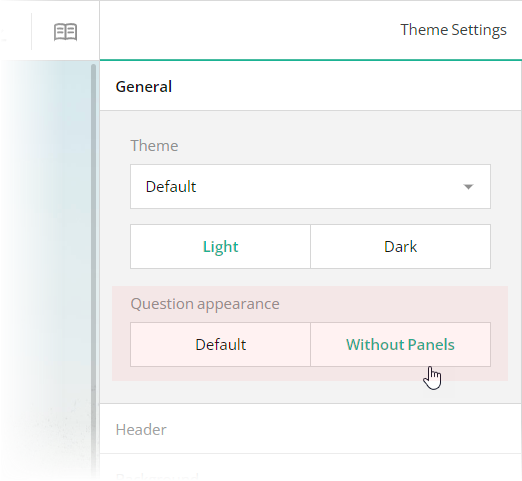
 ## Add a Background Image
The hotel booking form in this demo has a distinct background image. With Theme Editor by SurveyJS, you can add background images to your forms with ease. Open the **Themes** tab in Survey Creator and switch to the **Background** category. Editors under the **Background image** title enable you to add a background image and configure its every aspect.
## Add a Background Image
The hotel booking form in this demo has a distinct background image. With Theme Editor by SurveyJS, you can add background images to your forms with ease. Open the **Themes** tab in Survey Creator and switch to the **Background** category. Editors under the **Background image** title enable you to add a background image and configure its every aspect.
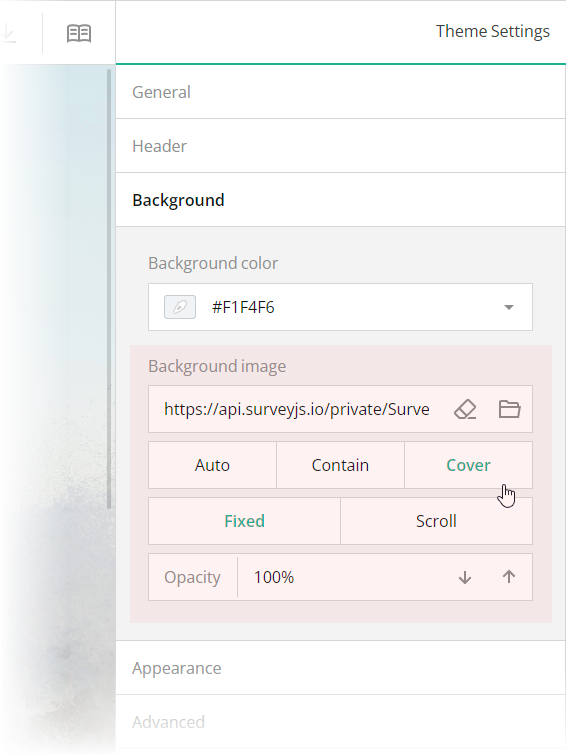 These editors are mapped to the following theme JSON schema properties, which you can find in the `theme.js` file:
- [`backgroundImage`](https://surveyjs.io/form-library/documentation/api-reference/itheme#backgroundImage): `string`
An image to display as form background. This property accepts a hyperlink or a data URL.
- [`backgroundImageFit`](https://surveyjs.io/form-library/documentation/api-reference/itheme#backgroundImageFit): `"auto"` | `"contain"` | `"cover"`
A string value that specifies how to resize the background image to fit it into its container. Refer to the description of the [`background-size`](https://developer.mozilla.org/en-US/docs/Web/CSS/background-size#values) CSS property values on MDN for detailed information on the possible values.
- [`backgroundImageAttachment`](https://surveyjs.io/form-library/documentation/api-reference/itheme#backgroundImageAttachment): `"fixed"` | `"scroll"`
A string value that specifies whether the background image is fixed in its position (as in this demo) or scrolled along with the survey.
- [`backgroundOpacity`](https://surveyjs.io/form-library/documentation/api-reference/itheme#backgroundOpacity): `number`
A value from 0 to 1 that specifies how transparent the background image should be: 0 makes the image completely transparent, and 1 makes it opaque. In Theme Editor, the opacity values are mapped to a scale from 0% to 100%.
## Configure the Form Header
The header of your form typically contains a form title, short description, and a logo of your company. To specify title and description texts, open the Designer tab and enter them in the **Survey title** and **Survey description** editors in the **General** category.
These editors are mapped to the following theme JSON schema properties, which you can find in the `theme.js` file:
- [`backgroundImage`](https://surveyjs.io/form-library/documentation/api-reference/itheme#backgroundImage): `string`
An image to display as form background. This property accepts a hyperlink or a data URL.
- [`backgroundImageFit`](https://surveyjs.io/form-library/documentation/api-reference/itheme#backgroundImageFit): `"auto"` | `"contain"` | `"cover"`
A string value that specifies how to resize the background image to fit it into its container. Refer to the description of the [`background-size`](https://developer.mozilla.org/en-US/docs/Web/CSS/background-size#values) CSS property values on MDN for detailed information on the possible values.
- [`backgroundImageAttachment`](https://surveyjs.io/form-library/documentation/api-reference/itheme#backgroundImageAttachment): `"fixed"` | `"scroll"`
A string value that specifies whether the background image is fixed in its position (as in this demo) or scrolled along with the survey.
- [`backgroundOpacity`](https://surveyjs.io/form-library/documentation/api-reference/itheme#backgroundOpacity): `number`
A value from 0 to 1 that specifies how transparent the background image should be: 0 makes the image completely transparent, and 1 makes it opaque. In Theme Editor, the opacity values are mapped to a scale from 0% to 100%.
## Configure the Form Header
The header of your form typically contains a form title, short description, and a logo of your company. To specify title and description texts, open the Designer tab and enter them in the **Survey title** and **Survey description** editors in the **General** category.
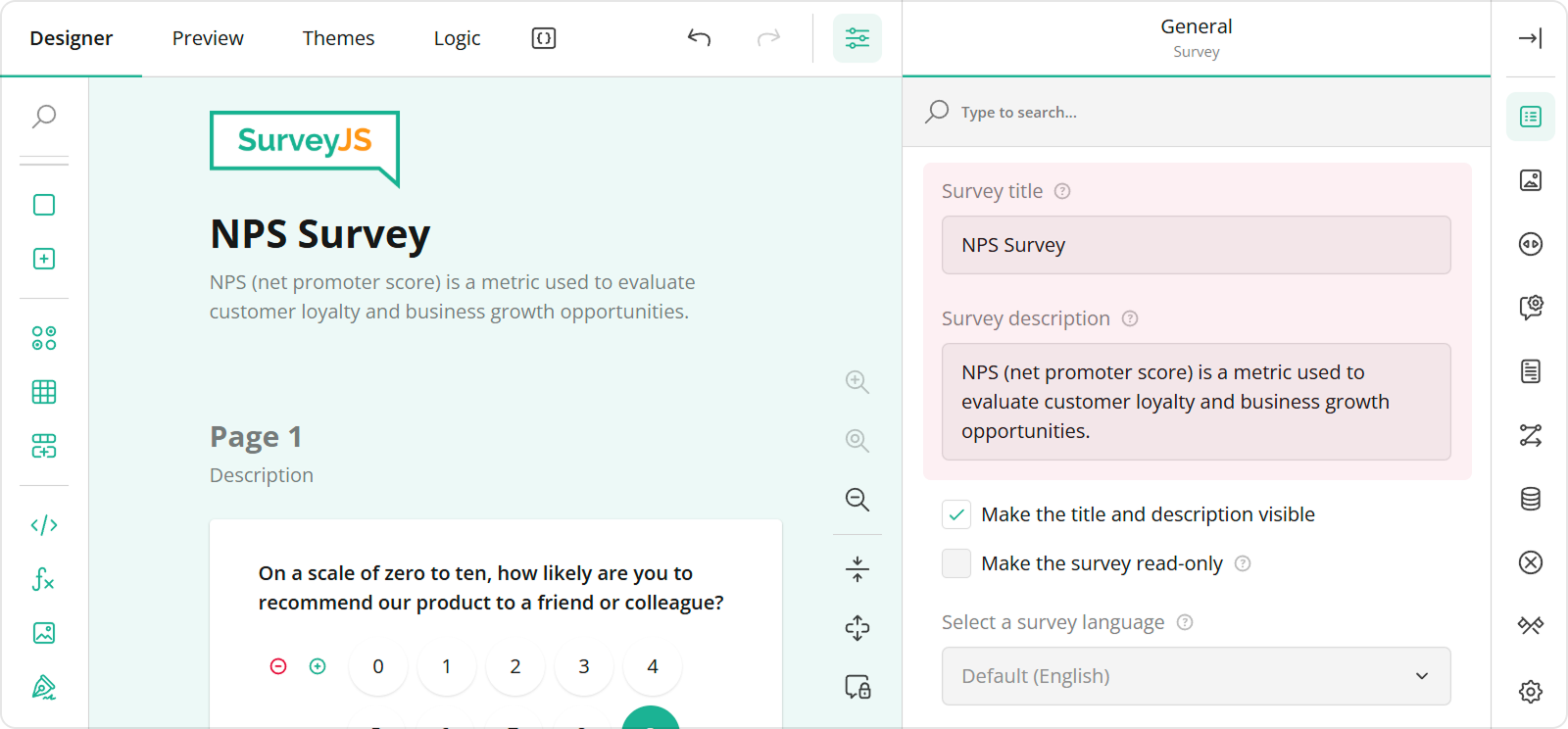 To configure a logo, use editors in the **Logo in the Survey Header** category.
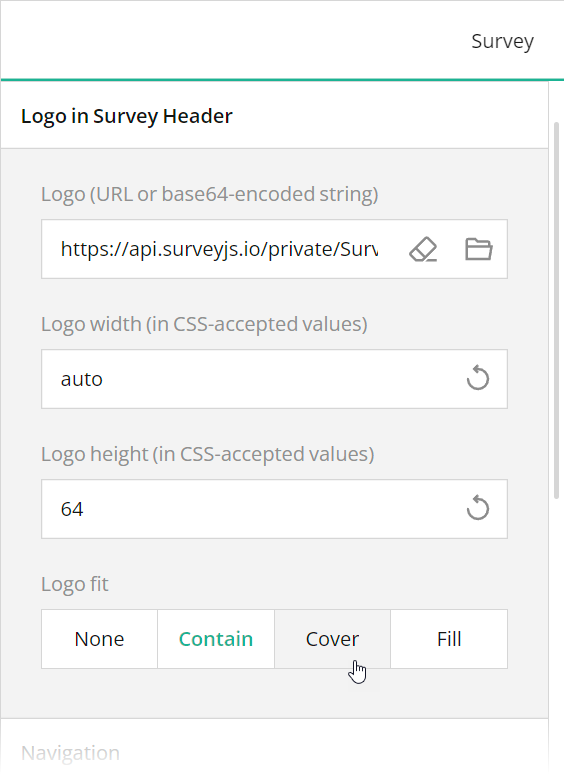 These editors are mapped to the following survey JSON properties:
- [`title`](https://surveyjs.io/form-library/documentation/api-reference/survey-data-model#title)
- [`description`](https://surveyjs.io/form-library/documentation/api-reference/survey-data-model#description)
- [`logo`](https://surveyjs.io/form-library/documentation/api-reference/survey-data-model#logo)
- [`logoWidth`](https://surveyjs.io/form-library/documentation/api-reference/survey-data-model#logoWidth)
- [`logoHeight`](https://surveyjs.io/form-library/documentation/api-reference/survey-data-model#logoHeight)
- [`logoFit`](https://surveyjs.io/form-library/documentation/api-reference/survey-data-model#logoFit)
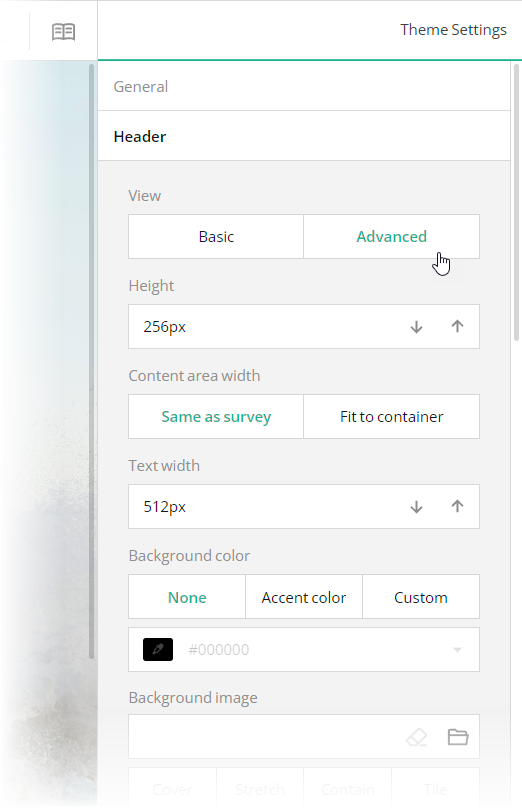
To configure the appearance of the form header, open the Themes tab and use editors in the **Header** category. Ensure that the **View** switch is set to "Advanced". All editors in the Header category, except font editors and View, are mapped to corresponding [`header`](https://surveyjs.io/form-library/documentation/api-reference/iheader) object properties in the theme JSON schema (see the `theme.js` file).
These editors are mapped to the following survey JSON properties:
- [`title`](https://surveyjs.io/form-library/documentation/api-reference/survey-data-model#title)
- [`description`](https://surveyjs.io/form-library/documentation/api-reference/survey-data-model#description)
- [`logo`](https://surveyjs.io/form-library/documentation/api-reference/survey-data-model#logo)
- [`logoWidth`](https://surveyjs.io/form-library/documentation/api-reference/survey-data-model#logoWidth)
- [`logoHeight`](https://surveyjs.io/form-library/documentation/api-reference/survey-data-model#logoHeight)
- [`logoFit`](https://surveyjs.io/form-library/documentation/api-reference/survey-data-model#logoFit)
To configure the appearance of the form header, open the Themes tab and use editors in the **Header** category. Ensure that the **View** switch is set to "Advanced". All editors in the Header category, except font editors and View, are mapped to corresponding [`header`](https://surveyjs.io/form-library/documentation/api-reference/iheader) object properties in the theme JSON schema (see the `theme.js` file).
 ## Use Placeholders for Form Field Titles
If you want to design more compact and neat-looking forms, you can hide form field titles and display title texts as input field placeholders. To implement this layout in your form, follow the steps below:
1. Open the Designer tab.
2. Select a question on the design surface.
3. In the Property Grid, switch to the **General** category.
4. Find and unselect the **Show the title and description** checkbox.
5. Enter the form field title in the **Placeholder text within input field** editor.
## Use Placeholders for Form Field Titles
If you want to design more compact and neat-looking forms, you can hide form field titles and display title texts as input field placeholders. To implement this layout in your form, follow the steps below:
1. Open the Designer tab.
2. Select a question on the design surface.
3. In the Property Grid, switch to the **General** category.
4. Find and unselect the **Show the title and description** checkbox.
5. Enter the form field title in the **Placeholder text within input field** editor.
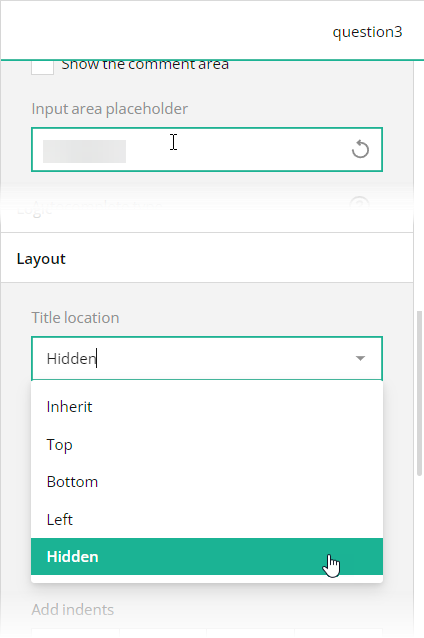 In the survey JSON schema, these editors are mapped to a question's [`titleLocation`](https://surveyjs.io/form-library/documentation/api-reference/text-entry-question-model#titleLocation) and [`placeholder`](https://surveyjs.io/form-library/documentation/api-reference/text-entry-question-model#placeholder) properties.
## Files
### `public/index.html`
```html
```
### `src/SurveyComponent.jsx`
```js
import React from "react";
import { Model } from "survey-core";
import { Survey } from "survey-react-ui";
import "survey-core/survey-core.min.css";
import { themeJson } from "./theme";
import "./index.css";
import { json } from "./json";
function SurveyComponent() {
const survey = new Model(json);
survey.applyTheme(themeJson);
survey.onComplete.add((sender, options) => {
console.log(JSON.stringify(sender.data, null, 3));
});
return (
In the survey JSON schema, these editors are mapped to a question's [`titleLocation`](https://surveyjs.io/form-library/documentation/api-reference/text-entry-question-model#titleLocation) and [`placeholder`](https://surveyjs.io/form-library/documentation/api-reference/text-entry-question-model#placeholder) properties.
## Files
### `public/index.html`
```html
```
### `src/SurveyComponent.jsx`
```js
import React from "react";
import { Model } from "survey-core";
import { Survey } from "survey-react-ui";
import "survey-core/survey-core.min.css";
import { themeJson } from "./theme";
import "./index.css";
import { json } from "./json";
function SurveyComponent() {
const survey = new Model(json);
survey.applyTheme(themeJson);
survey.onComplete.add((sender, options) => {
console.log(JSON.stringify(sender.data, null, 3));
});
return (Dear {firstname-for-complete-page}, we're thrilled to have you on board and excited to be a part of your upcoming journey. Your reservation is confirmed, and we can't wait to make your travel experience exceptional.
\n\nOur King Room offers spacious luxury with a king-sized bed for a great night's sleep. Stay connected with complimentary Wi-Fi, refresh in the private bathroom, and enjoy in-room entertainment with a flat-screen TV. Keep your favorite beverages cool in the mini-fridge, and start your day right with a coffee from the in-room coffee maker. The ideal retreat for your travels.\n
\n\n" }, { "type": "image", "name": "deluxe-king-room-image", "visibleIf": "{room-type} = 'deluxe-king'", "width": "37%", "minWidth": "192px", "imageLink": "https://api.surveyjs.io/private/Surveys/files?name=4fc633b5-0ac3-48f5-9728-284446e72adf", "imageFit": "cover", "imageHeight": "224", "imageWidth": "1000" }, { "type": "html", "name": "deluxe-king-room-description", "visibleIf": "{room-type} = 'deluxe-king'", "width": "63%", "minWidth": "256px", "startWithNewLine": false, "html": "\nElevate your stay in our Deluxe King Room. Experience ultimate comfort on a luxurious king-sized bed. Enjoy the convenience of complimentary Wi-Fi, a private bathroom, and entertainment on a flat-screen TV. Stay refreshed with a well-stocked mini-fridge and coffee maker. With added space and upscale amenities, this room offers a touch of luxury for a truly special stay.\n
\n\n" }, { "type": "image", "name": "queen-room-image", "visibleIf": "{room-type} = 'queen'", "width": "37%", "minWidth": "192px", "imageLink": "https://api.surveyjs.io/private/Surveys/files?name=2e2bc916-6f2e-47ff-b321-74b34118a748", "imageFit": "cover", "imageHeight": "224", "imageWidth": "1000" }, { "type": "html", "name": "queen-room-description", "visibleIf": "{room-type} = 'queen'", "width": "63%", "minWidth": "256px", "startWithNewLine": false, "html": "\nExperience comfort and convenience in our Queen Room. Unwind on a cozy queen-sized bed, stay connected with complimentary Wi-Fi, and enjoy the convenience of a private bathroom. For your entertainment, there's a flat-screen TV. A mini-fridge and coffee maker are at your disposal for added convenience. Your perfect choice for a relaxing stay.\n
\n\n" }, { "type": "image", "name": "superior-king-room-image", "visibleIf": "{room-type} = 'superior-king'", "width": "37%", "minWidth": "192px", "imageLink": "https://api.surveyjs.io/private/Surveys/files?name=e16770dd-818c-4847-8b7f-19ee527420c1", "imageFit": "cover", "imageHeight": "224", "imageWidth": "1000" }, { "type": "html", "name": "superior-king-room-description", "visibleIf": "{room-type} = 'superior-king'", "width": "63%", "minWidth": "256px", "startWithNewLine": false, "html": "\nIndulge in the epitome of luxury in our Superior King Room. Experience ample space and opulence with a king-sized bed. Complimentary Wi-Fi keeps you connected, while the private bathroom and flat-screen TV provide comfort and entertainment. Enjoy the convenience of a well-equipped mini-fridge and coffee maker. This room is the top choice for a superior and memorable stay.\n
\n\n" }, { "type": "dropdown", "name": "number-of-rooms", "width": "37%", "minWidth": "192px", "titleLocation": "hidden", "choices": [ 1, 2, 3, 4, 5 ], "placeholder": "# of rooms", "allowClear": false }, { "type": "checkbox", "name": "with-pets", "width": "63%", "minWidth": "256px", "startWithNewLine": false, "titleLocation": "hidden", "choices": [ { "value": "true", "text": "I am traveling with pets" } ] }, { "type": "tagbox", "name": "extras", "width": "100%", "minWidth": "256px", "titleLocation": "hidden", "choices": [ "Breakfast", "Fitness", "Parking", "Swimming pool", "Restaurant", "Spa" ], "placeholder": "Extras" }, { "type": "comment", "name": "notes", "width": "100%", "minWidth": "256px", "titleLocation": "hidden", "placeholder": "Notes...", "autoGrow": true, "allowResize": false } ] }, { "name": "page2", "elements": [ { "type": "text", "name": "last-name", "width": "64%", "minWidth": "192px", "titleLocation": "hidden", "description": "Must match the passport exactly", "descriptionLocation": "underInput", "placeholder": "Last name" }, { "type": "text", "name": "first-name", "width": "36%", "minWidth": "256px", "startWithNewLine": false, "titleLocation": "hidden", "placeholder": "First name" }, { "type": "text", "name": "address-line-1", "width": "100%", "minWidth": "256px", "titleLocation": "hidden", "descriptionLocation": "underInput", "placeholder": "Address line 1" }, { "type": "text", "name": "address-line-2", "width": "100%", "minWidth": "256px", "titleLocation": "hidden", "placeholder": "Address line 2" }, { "type": "text", "name": "city", "width": "36%", "minWidth": "256px", "titleLocation": "hidden", "placeholder": "City" }, { "type": "text", "name": "zip", "width": "28%", "minWidth": "192px", "startWithNewLine": false, "titleLocation": "hidden", "placeholder": "Zip code" }, { "type": "text", "name": "state", "width": "36%", "minWidth": "256px", "startWithNewLine": false, "titleLocation": "hidden", "placeholder": "State" }, { "type": "dropdown", "name": "country", "width": "36%", "minWidth": "256px", "titleLocation": "hidden", "choicesByUrl": { "url": "https://surveyjs.io/api/CountriesExample" }, "placeholder": "Country", "allowClear": false }, { "type": "text", "name": "phone", "width": "64%", "minWidth": "192px", "startWithNewLine": false, "titleLocation": "hidden", "description": "Example: +1 (555) 777-55-22", "descriptionLocation": "underInput", "placeholder": "Phone" } ] } ], "calculatedValues": [{ "name": "firstname-for-complete-page", "expression": "iif({first-name} notempty, {first-name}, guests)" }], "showPrevButton": false, "questionErrorLocation": "bottom", "pagePrevText": "Booking Details", "pageNextText": "Traveler Info ➝", "completeText": "Book Now", "widthMode": "static", "width": "904" }; ``` ### `src/theme.js` ```js export const themeJson = { "backgroundImage": "https://api.surveyjs.io/private/Surveys/files?name=f431e65e-66fb-4ecc-9d56-e7ab74351181", "backgroundImageFit": "cover", "backgroundImageAttachment": "fixed", "backgroundOpacity": 1, "cssVariables": { "--sjs-general-backcolor": "rgba(255, 255, 255, 1)", "--sjs-general-backcolor-dark": "rgba(248, 248, 248, 1)", "--sjs-general-backcolor-dim": "#F1F4F6", "--sjs-general-backcolor-dim-light": "rgba(255, 255, 255, 1)", "--sjs-general-backcolor-dim-dark": "rgba(243, 243, 243, 1)", "--sjs-general-forecolor": "rgba(0, 0, 0, 0.91)", "--sjs-general-forecolor-light": "rgba(0, 0, 0, 0.45)", "--sjs-primary-backcolor": "#4B5D6D", "--sjs-primary-backcolor-light": "rgba(75, 93, 109, 0.1)", "--sjs-primary-backcolor-dark": "rgba(65, 80, 94, 1)", "--sjs-primary-forecolor": "rgba(255, 255, 255, 1)", "--sjs-primary-forecolor-light": "rgba(255, 255, 255, 0.25)", "--sjs-base-unit": "8px", "--sjs-corner-radius": "6px", "--sjs-shadow-small": "0px 0px 0px 1px rgba(0, 0, 0, 0.03), 0px 1px 3px 0px rgba(0, 0, 0, 0.1), 0px 8px 16px 0px rgba(0, 0, 0, 0.05)", "--sjs-shadow-medium": "0px 2px 6px 0px rgba(0, 0, 0, 0.1)", "--sjs-shadow-large": "0px 8px 16px 0px rgba(0, 0, 0, 0.1)", "--sjs-shadow-inner": "0px 0px 0px 1px rgba(0, 0, 0, 0.03), 0px 1px 3px 0px rgba(0, 0, 0, 0.1), 0px 8px 16px 0px rgba(0, 0, 0, 0.05)", "--sjs-border-light": "rgba(0, 0, 0, 0.1)", "--sjs-border-default": "rgba(0, 0, 0, 0.15)", "--sjs-border-inside": "rgba(0, 0, 0, 0.16)", "--sjs-special-red": "rgba(229, 10, 62, 1)", "--sjs-special-red-light": "rgba(229, 10, 62, 0.1)", "--sjs-special-red-forecolor": "rgba(255, 255, 255, 1)", "--sjs-special-green": "rgba(25, 179, 148, 1)", "--sjs-special-green-light": "rgba(25, 179, 148, 0.1)", "--sjs-special-green-forecolor": "rgba(255, 255, 255, 1)", "--sjs-special-blue": "rgba(67, 127, 217, 1)", "--sjs-special-blue-light": "rgba(67, 127, 217, 0.1)", "--sjs-special-blue-forecolor": "rgba(255, 255, 255, 1)", "--sjs-special-yellow": "rgba(255, 152, 20, 1)", "--sjs-special-yellow-light": "rgba(255, 152, 20, 0.1)", "--sjs-special-yellow-forecolor": "rgba(255, 255, 255, 1)", "--sjs-editorpanel-hovercolor": "rgba(241, 244, 246, 1)", "--sjs-font-editorfont-placeholdercolor": "rgba(0, 0, 0, 0.5)", "--sjs-font-editorfont-color": "rgba(0, 0, 0, 0.9)", "--sjs-font-questiontitle-color": "rgba(0, 0, 0, 0.9)", "--sjs-font-pagetitle-color": "rgba(0, 0, 0, 0.9)", "--sjs-questionpanel-hovercolor": "rgba(241, 244, 246, 1)", "--sjs-font-questiondescription-color": "rgba(0, 0, 0, 0.5)", "--sjs-font-surveytitle-size": "24px", "--sjs-font-questiontitle-weight": "400", "--sjs-font-headertitle-color": "rgba(0, 0, 0, 0.9)", "--sjs-font-headerdescription-color": "rgba(0, 0, 0, 0.5)", "--sjs-font-headertitle-size": "14px", "--sjs-header-backcolor": "transparent", "--sjs-font-headerdescription-size": "14px", "--sjs-font-headertitle-weight": "700", "--sjs-font-pagetitle-weight": "700" }, "isPanelless": true, "themeName": "default", "colorPalette": "light", "header": { "height": 120, "textAreaWidth": 280, "inheritWidthFrom": "survey", "logoPositionX": "left", "logoPositionY": "middle", "titlePositionX": "right", "titlePositionY": "middle", "descriptionPositionX": "right", "descriptionPositionY": "middle" }, "headerView": "advanced" }; ``` ### `package.json` ```json { "dependencies": { "react": "latest", "react-dom": "latest", "survey-core": "latest", "survey-react-ui": "latest" }, "devDependencies": { "react-scripts": "latest" } } ``` ## Other Frameworks - [Angular](https://surveyjs.io/form-library/examples/hotel-booking-form-template-free/angular.md) - [Vue 3](https://surveyjs.io/form-library/examples/hotel-booking-form-template-free/vue3js.md) - [jQuery](https://surveyjs.io/form-library/examples/hotel-booking-form-template-free/jquery.md) - [Vanilla JS](https://surveyjs.io/form-library/examples/hotel-booking-form-template-free/vanillajs.md)