---
title: Issue Report
product: Form Library
description: Embed this issue report into your application to collect bugs and suggestions from users. The template highlights SurveyJS Creator's diverse form appearance settings and offers a free code example for JavaScript. Use it as-is or customize fonts, the background image, add custom placeholder text, and a form subtitle to provide more descriptive and detailed instructions for survey takers.
framework: Angular
source: https://surveyjs.io/form-library/examples/issue-report-template-free/angular
index: https://surveyjs.io/form-library/examples/overview.md
---

# Issue Report (Angular)

<!-- cut -->

An issue report form helps customers report problems, defects, or issues related to a product or service. Issue report forms are commonly used in customer support, software development, quality assurance, and other fields where issues must be identified and resolved as quickly as possible. This demo shows how to create an issue report form using SurveyJS Survey Creator with integrated Theme Editor.

## Add a Background Image

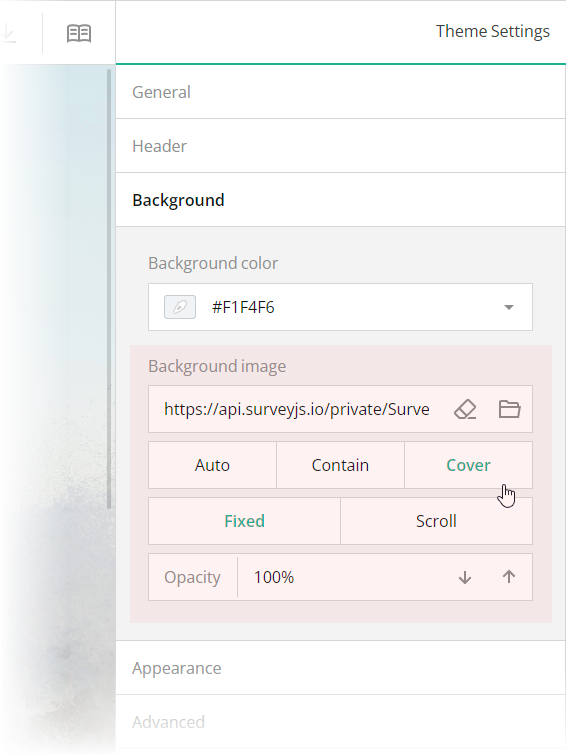
The issue report form in this demo has a distinct background image. With Theme Editor by SurveyJS, you can add background images to your forms with ease. Open the **Themes** tab in Survey Creator and switch to the **Background** category. Editors under the **Background image** title enable you to add a background image and configure its every aspect.

<img src="/Content/Images/examples/featured-demos/background-image.png" alt="Configure a background image in SurveyJS Theme Editor" width="100%">

These editors are mapped to the following theme JSON schema properties, which you can find in the `theme.js` file:

- [`backgroundImage`](https://surveyjs.io/form-library/documentation/api-reference/itheme#backgroundImage): `string`          
An image to display as form background. This property accepts a hyperlink or a data URL.

- [`backgroundImageFit`](https://surveyjs.io/form-library/documentation/api-reference/itheme#backgroundImageFit): `"auto"` | `"contain"` | `"cover"`            
A string value that specifies how to resize the background image to fit it into its container. Refer to the description of the [`background-size`](https://developer.mozilla.org/en-US/docs/Web/CSS/background-size#values) CSS property values on MDN for detailed information on the possible values.

- [`backgroundImageAttachment`](https://surveyjs.io/form-library/documentation/api-reference/itheme#backgroundImageAttachment): `"fixed"` | `"scroll"`          
A string value that specifies whether the background image is fixed in its position (as in this demo) or scrolled along with the survey.

- [`backgroundOpacity`](https://surveyjs.io/form-library/documentation/api-reference/itheme#backgroundOpacity): `number`      
A value from 0 to 1 that specifies how transparent the background image should be: 0 makes the image completely transparent, and 1 makes it opaque. In Theme Editor, the opacity values are mapped to a scale from 0% to 100%.

## Configure the Form Header

The header of your form typically contains a form title, short description, and a logo of your company. To specify title and description texts, open the Designer tab and enter them in the **Survey title** and **Survey description** editors in the **General** category.
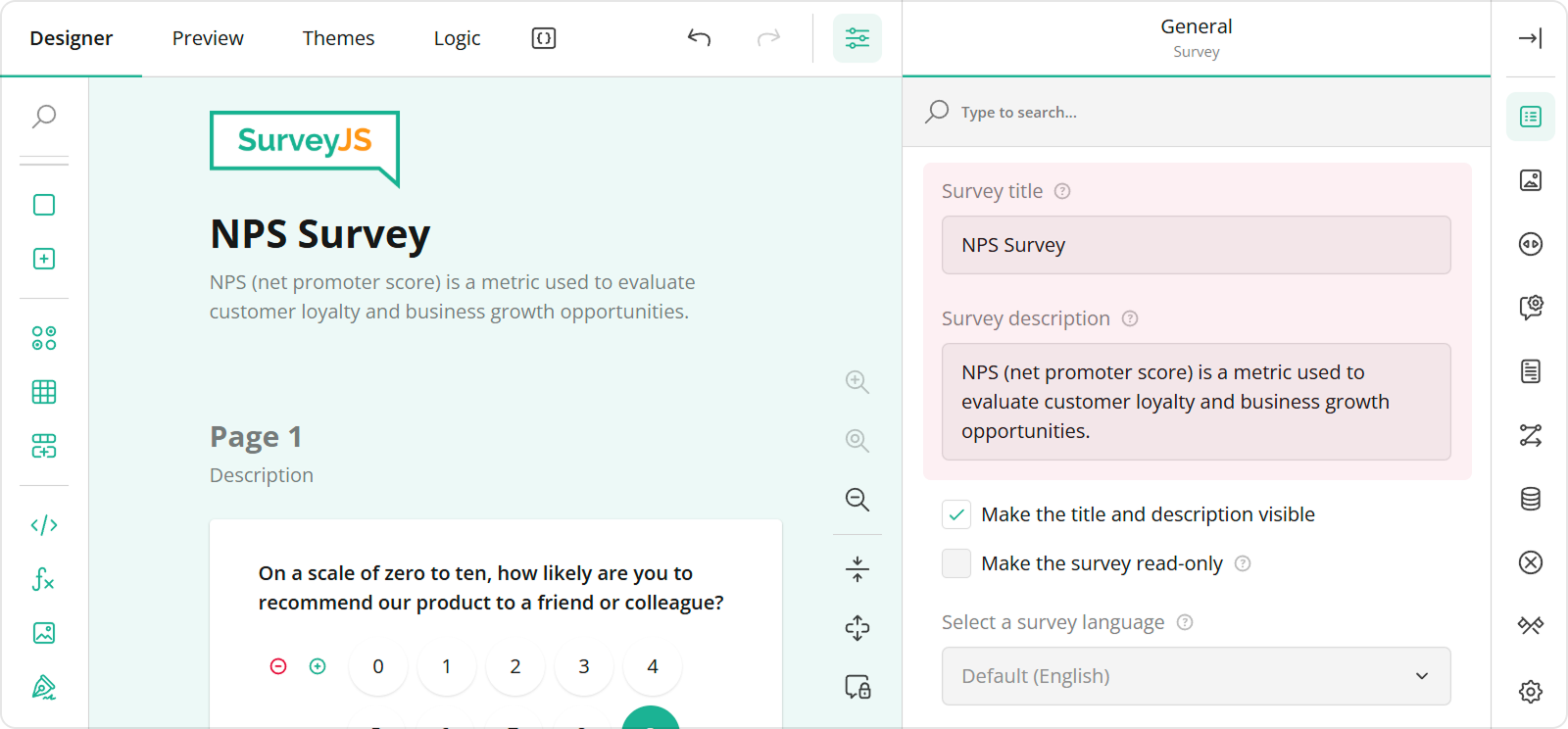
<img src="/Content/Images/examples/featured-demos/survey-title-and-description.png" alt="Specify survey title and description in SurveyJS Survey Creator" width="100%">

To configure a logo, use editors in the **Logo in the Survey Header** category.
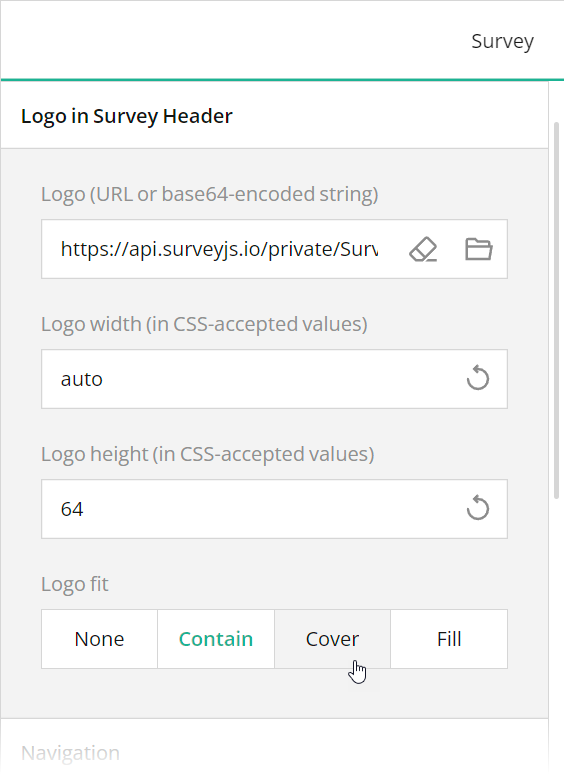
<img src="/Content/Images/examples/featured-demos/logo-settings.png" alt="Specify logo in SurveyJS Survey Creator" width="100%">

These editors are mapped to the following survey JSON properties:

- [`title`](https://surveyjs.io/form-library/documentation/api-reference/survey-data-model#title)
- [`description`](https://surveyjs.io/form-library/documentation/api-reference/survey-data-model#description)
- [`logo`](https://surveyjs.io/form-library/documentation/api-reference/survey-data-model#logo)
- [`logoWidth`](https://surveyjs.io/form-library/documentation/api-reference/survey-data-model#logoWidth)
- [`logoHeight`](https://surveyjs.io/form-library/documentation/api-reference/survey-data-model#logoHeight)
- [`logoFit`](https://surveyjs.io/form-library/documentation/api-reference/survey-data-model#logoFit)

To configure the appearance of the form header, open the Themes tab and use editors in the **Header** category. Ensure that the **View** switch is set to "Advanced". All editors in the Header category, except font editors and View, are mapped to corresponding [`header`](https://surveyjs.io/form-library/documentation/api-reference/iheader) object properties in the theme JSON schema (see the `theme.js` file).
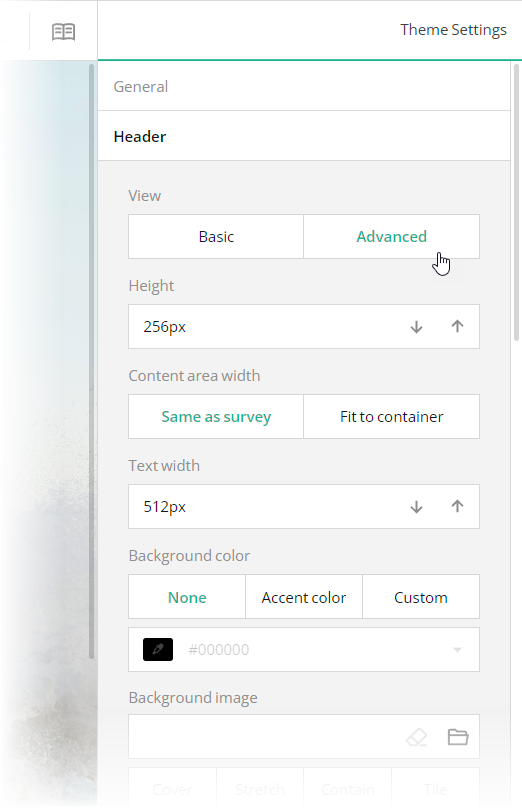
<img src="/Content/Images/examples/featured-demos/header-settings.png" alt="Configure form header in SurveyJS Theme Editor" width="100%">

## Files

### `src/app/components/json.ts`

```ts
export const json = {
 "title": "Report an Issue",
 "description": "This form is designed to report issues and propose suggestions for improvement. Your feedback is invaluable in helping us make our services better and resolve issues promptly. Please complete the form below in as much detail as possible.",
 "completedHtml": "<div style=\"max-width:688px;text-align:center;margin:16px auto;\">\n\n<div style=\"padding:0 24px;\">\n<h4>Thank you.</h4>\n<p>Your message has been sent successfully.</p>\n</div>\n\n</div>\n\n",
 "pages": [
  {
   "name": "page1",
   "elements": [
    {
     "type": "panel",
     "name": "issue-report",
     "elements": [
      {
       "type": "text",
       "name": "issue-title",
       "width": "100%",
       "minWidth": "auto",
       "title": "Title"
      },
      {
       "type": "comment",
       "name": "issue-details",
       "width": "100%",
       "minWidth": "auto",
       "title": "Details",
       "maxLength": 512,
       "rows": 6,
       "placeholder": "Introduce the problem and expand on what you put in the title. Describe what you tried, what you expected to happen, and what actually resulted.",
       "autoGrow": true,
       "allowResize": false
      },
      {
       "type": "rating",
       "name": "issue-priority",
       "title": "Level of priority",
       "autoGenerate": false,
       "rateCount": 3,
       "rateValues": [
        {
         "value": 1,
         "text": "Low"
        },
        {
         "value": 2,
         "text": "Medium"
        },
        {
         "value": 3,
         "text": "High"
        }
       ]
      },
      {
       "type": "file",
       "name": "attached-files",
       "title": "Attachments",
       "allowMultiple": true,
       "filePlaceholder": "Click the button below to select files to upload."
      },
      {
       "type": "text",
       "name": "email",
       "width": "100%",
       "minWidth": "auto",
       "title": "Email address"
      }
     ],
     "width": "100%"
    }
   ]
  }
 ],
 "questionDescriptionLocation": "underInput",
 "questionErrorLocation": "bottom",
 "completeText": "Submit",
 "widthMode": "static",
 "width": "720"
};
```

### `src/app/components/survey.component.css`

```css
/* You can add your custom CSS here. */
```

### `src/app/components/survey.component.html`

```html
<survey [model]="model" style="position: absolute; top: 0; left: 0; right: 0; bottom: 0; height:100%"></survey>
```

### `src/app/components/survey.component.ts`

```ts
import { Component, OnInit } from "@angular/core";
import { Model } from "survey-core";
import { json } from "./json";
import { themeJson } from "./theme";
import "./survey.component.css";
import "survey-core/survey-core.min.css";

@Component({
    // tslint:disable-next-line:component-selector
    selector: "component-survey",
    templateUrl: "./survey.component.html",
    styleUrls: ["./survey.component.css"]
})
export class SurveyComponent implements OnInit {
    model: Model;
    ngOnInit() {
        const survey = new Model(json);
        survey.applyTheme(themeJson);
        survey.onComplete.add((sender, options) => {
            console.log(JSON.stringify(sender.data, null, 3));
        });
        this.model = survey;
    }
}
```

### `src/app/components/theme.ts`

```ts
export const themeJson = {
  "themeName": "custom",
  "colorPalette": "light",
  "isPanelless": false,
  "backgroundImage": "https://api.surveyjs.io/private/Surveys/files?name=7784247a-6d78-4801-9480-dc22fbed404f",
  "backgroundImageFit": "auto",
  "backgroundImageAttachment": "fixed",
  "backgroundOpacity": 1,
  "cssVariables": {
    "--sjs-editorpanel-hovercolor": "rgba(189, 236, 235, 1)",
    "--sjs-questionpanel-hovercolor": "rgba(189, 236, 235, 1)",
    "--sjs-corner-radius": "8px",
    "--sjs-base-unit": "8px",
    "--sjs-shadow-small": "0px 0px 0px 2px rgba(53, 52, 48, 1),2px 2px 0px 2px rgba(53, 52, 48, 1)",
    "--sjs-font-questiontitle-color": "rgba(14, 13, 8, 1)",
    "--sjs-font-questiondescription-color": "rgba(53, 52, 48, 1)",
    "--sjs-shadow-inner": "inset 0px 0px 0px 2px rgba(53, 52, 48, 1)",
    "--sjs-font-editorfont-color": "rgba(14, 13, 8, 1)",
    "--sjs-font-editorfont-placeholdercolor": "rgba(14, 13, 8, 0.5)",
    "--sjs-border-default": "rgba(53, 52, 48, 1)",
    "--sjs-border-light": "rgba(53, 52, 48, 1)",
    "--sjs-general-backcolor": "rgba(252, 246, 232, 1)",
    "--sjs-general-backcolor-dark": "rgba(248, 248, 248, 1)",
    "--sjs-general-backcolor-dim-light": "rgba(255, 255, 255, 0.99)",
    "--sjs-general-backcolor-dim-dark": "rgba(243, 243, 243, 1)",
    "--sjs-general-forecolor": "rgba(0, 0, 0, 0.91)",
    "--sjs-general-forecolor-light": "rgba(0, 0, 0, 0.45)",
    "--sjs-shadow-medium": "0px 2px 6px 0px rgba(0, 0, 0, 0.1)",
    "--sjs-shadow-large": "0px 8px 16px 0px rgba(0, 0, 0, 0.1)",
    "--sjs-border-inside": "rgba(0, 0, 0, 0.16)",
    "--sjs-special-red-forecolor": "rgba(255, 255, 255, 1)",
    "--sjs-special-green": "rgba(25, 179, 148, 1)",
    "--sjs-special-green-light": "rgba(25, 179, 148, 0.1)",
    "--sjs-special-green-forecolor": "rgba(255, 255, 255, 1)",
    "--sjs-special-blue": "rgba(67, 127, 217, 1)",
    "--sjs-special-blue-light": "rgba(67, 127, 217, 0.1)",
    "--sjs-special-blue-forecolor": "rgba(255, 255, 255, 1)",
    "--sjs-special-yellow": "rgba(255, 152, 20, 1)",
    "--sjs-special-yellow-light": "rgba(255, 152, 20, 0.1)",
    "--sjs-special-yellow-forecolor": "rgba(255, 255, 255, 1)",
    "--sjs-general-backcolor-dim": "#FCF6E8",
    "--sjs-primary-backcolor": "rgba(53, 52, 48, 1)",
    "--sjs-primary-backcolor-dark": "rgba(100, 99, 94, 1)",
    "--sjs-primary-backcolor-light": "rgba(53, 52, 48, 0.1)",
    "--sjs-primary-forecolor": "rgba(255, 255, 255, 1)",
    "--sjs-primary-forecolor-light": "rgba(255, 255, 255, 0.25)",
    "--sjs-special-red": "rgba(229, 10, 62, 1)",
    "--sjs-special-red-light": "rgba(229, 10, 62, 0.1)",
    "--sjs-font-headertitle-color": "rgba(14, 13, 8, 1)",
    "--sjs-font-headerdescription-weight": "600",
    "--sjs-font-headerdescription-size": "16px",
    "--sjs-font-headerdescription-color":  "rgba(14, 13, 8, 1)",
    "--sjs-font-headertitle-weight":  "700",
    "--sjs-font-pagetitle-weight":  "700"
  },
  "header": {
    "height": 208,
    "textAreaWidth": 544
  },
  "headerView": "advanced"
};
```

### `src/app/app.component.css`

```css

```

### `src/app/app.component.html`

```html
<component-survey></component-survey>
```

### `src/app/app.component.ts`

```ts
import { Component } from "@angular/core";

@Component({
    selector: "app-root",
    templateUrl: "./app.component.html",
    styleUrls: ["./app.component.css"]
})
export class AppComponent {
    title = "CodeSandbox";
}
```

### `src/app/app.module.ts`

```ts
import { BrowserModule } from "@angular/platform-browser";
import { NgModule } from "@angular/core";

import { AppComponent } from "./app.component";
import { SurveyModule } from "survey-angular-ui";
import { SurveyComponent } from "./components/survey.component";

@NgModule({
    declarations: [AppComponent, SurveyComponent],
    imports: [BrowserModule, SurveyModule],
    providers: [],
    bootstrap: [AppComponent]
})
export class AppModule { }
```

### `src/environments/environment.prod.ts`

```ts
export const environment = {
    production: true
};
```

### `src/environments/environment.ts`

```ts
// The file contents for the current environment will overwrite these during build.
// The build system defaults to the dev environment which uses `environment.ts`, but if you do
// `ng build --env=prod` then `environment.prod.ts` will be used instead.
// The list of which env maps to which file can be found in `.angular-cli.json`.

export const environment = {
    production: false
};
```

### `src/index.html`

```html
<app-root></app-root>
```

### `src/main.ts`

```ts
import { enableProdMode } from "@angular/core";
import { platformBrowserDynamic } from "@angular/platform-browser-dynamic";

import { AppModule } from "./app/app.module";
import { environment } from "./environments/environment";

if (environment.production) {
    enableProdMode();
}

platformBrowserDynamic()
    .bootstrapModule(AppModule)
    .catch(err => console.log(err));
```

### `src/polyfills.ts`

```ts
/**
 * This file includes polyfills needed by Angular and is loaded before the app.
 * You can add your own extra polyfills to this file.
 *
 * This file is divided into 2 sections:
 *   1. Browser polyfills. These are applied before loading ZoneJS and are sorted by browsers.
 *   2. Application imports. Files imported after ZoneJS that should be loaded before your main
 *      file.
 *
 * The current setup is for so-called "evergreen" browsers; the last versions of browsers that
 * automatically update themselves. This includes Safari >= 10, Chrome >= 55 (including Opera),
 * Edge >= 13 on the desktop, and iOS 10 and Chrome on mobile.
 *
 * Learn more in https://angular.io/docs/ts/latest/guide/browser-support.html
 */

/***************************************************************************************************
 * BROWSER POLYFILLS
 */

/** IE9, IE10 and IE11 requires all of the following polyfills. **/
// import 'core-js/es6/symbol';
// import 'core-js/es6/object';
// import 'core-js/es6/function';
// import 'core-js/es6/parse-int';
// import 'core-js/es6/parse-float';
// import 'core-js/es6/number';
// import 'core-js/es6/math';
// import 'core-js/es6/string';
// import 'core-js/es6/date';
// import 'core-js/es6/array';
// import 'core-js/es6/regexp';
// import 'core-js/es6/map';
// import 'core-js/es6/weak-map';
// import 'core-js/es6/set';

/** IE10 and IE11 requires the following for NgClass support on SVG elements */
// import 'classlist.js';  // Run `npm install classlist.js`.

/** IE10 and IE11 requires the following for the Reflect API. */
// import 'core-js/es6/reflect';

/** Evergreen browsers require these. **/
// Used for reflect-metadata in JIT. If you use AOT (and only Angular decorators), you can remove.
import "core-js/proposals/reflect-metadata";

/**
 * Required to support Web Animations `@angular/platform-browser/animations`.
 * Needed for: All but Chrome, Firefox and Opera. http://caniuse.com/#feat=web-animation
 **/
// import 'web-animations-js';  // Run `npm install web-animations-js`.

/***************************************************************************************************
 * Zone JS is required by default for Angular itself.
 */
import "zone.js/dist/zone"; // Included with Angular CLI.

/***************************************************************************************************
 * APPLICATION IMPORTS
 */
```

### `src/styles.css`

```css
/* You can add your custom CSS here. */
```

### `src/typings.d.ts`

```ts
/* SystemJS module definition */
declare var module: NodeModule;
interface NodeModule {
    id: string;
}
```

### `.angular-cli.json`

```json
{
  "apps": [
    {
      "root": "src",
      "outDir": "dist",
      "assets": [ "assets", "favicon.ico" ],
      "index": "index.html",
      "main": "main.ts",
      "polyfills": "polyfills.ts",
      "prefix": "app",
      "styles": [ "styles.css" ],
      "scripts": [ ],
      "environmentSource": "environments/environment.ts",
      "environments": {
        "dev": "environments/environment.ts",
        "prod": "environments/environment.prod.ts"
      }
    }
  ]
}
```

### `_tsconfig.json`

```json
{
  "compileOnSave": false,
  "compilerOptions": {
    "baseUrl": "./",
    "outDir": "./dist/out-tsc",
    "sourceMap": true,
    "declaration": false,
    "allowSyntheticDefaultImports": true,
    "downlevelIteration": true,
    "experimentalDecorators": true,
    "moduleResolution": "node",
    "importHelpers": true,
    "resolveJsonModule": true,
    "target": "es2015",
    "module": "es2020",
    "lib": [
      "es2018",
      "dom"
    ]
  }
}
```

### `package.json`

```json
{
  "name": "surveyjs-angular",
  "scripts": {
    "ng": "ng",
    "start": "ng serve",
    "build": "ng build --prod",
    "test": "ng test",
    "lint": "ng lint",
    "e2e": "ng e2e"
  },
  "private": true,
  "dependencies": {
    "@angular/animations": "14.1.1",
    "@angular/cdk": "14.1.1",
    "@angular/common": "14.1.1",
    "@angular/compiler": "14.1.1",
    "@angular/core": "14.1.1",
    "@angular/forms": "14.1.1",
    "@angular/platform-browser": "14.1.1",
    "@angular/platform-browser-dynamic": "14.1.1",
    "@angular/router": "14.1.1",
    "core-js": "3.6.4",
    "rxjs": "6.5.4",
    "survey-core": "latest",
    "survey-angular-ui": "latest",
    "tslib": "1.13.0",
    "zone.js": "0.11.7"
  },
  "devDependencies": {
    "@angular/cli": "1.6.6",
    "@angular/compiler-cli": "^5.2.0",
    "@angular/language-service": "^5.2.0",
    "@types/core-js": "0.9.46",
    "@types/jasmine": "~2.8.3",
    "@types/jasminewd2": "~2.0.2",
    "@types/node": "~6.0.60",
    "codelyzer": "^4.0.1",
    "jasmine-core": "~2.8.0",
    "jasmine-spec-reporter": "~4.2.1",
    "karma": "~2.0.0",
    "karma-chrome-launcher": "~2.2.0",
    "karma-coverage-istanbul-reporter": "^1.2.1",
    "karma-jasmine": "~1.1.0",
    "karma-jasmine-html-reporter": "^0.2.2",
    "protractor": "~5.1.2",
    "ts-node": "~4.1.0",
    "tslint": "~5.9.1",
    "typescript": "3.9.7"
  },
  "keywords": [ "angular", "surveyjs" ],
  "description": "SurveyJS-Angular example project"
}
```

## Other Frameworks

- [React](https://surveyjs.io/form-library/examples/issue-report-template-free/reactjs.md)
- [Vue 3](https://surveyjs.io/form-library/examples/issue-report-template-free/vue3js.md)
- [jQuery](https://surveyjs.io/form-library/examples/issue-report-template-free/jquery.md)
- [Vanilla JS](https://surveyjs.io/form-library/examples/issue-report-template-free/vanillajs.md)
