---
title: Patient Registration Form
product: Form Library
description: Explore this free patient registration form template with a ready-to-use code example for JavaScript. The form demonstrates some practical features, like image capture to take photos within the form, a dynamic dropdown with a search-as-you-type option, and user-friendly form flow with conditional logic. You can embed the form in your app as-is or enhance it even further with our free form editing tool.
framework: Angular
source: https://surveyjs.io/form-library/examples/patient-registration-form-template-free/angular
index: https://surveyjs.io/form-library/examples/overview.md
---

# Patient Registration Form (Angular)

<!-- cut -->

A patient registration form helps healthcare facilities (hospitals, clinics, medical practices) collect information from individuals seeking medical care. As a rule, patient registration forms request personal information (full name, birthdate, gender, contact details), insurance information, and emergency contacts. This example demonstrates a sample patient registration form, which was fully created and designed using Survey Creator by SurveyJS. In the sections below, we'll give an overview of key solutions implemented in this form.

## Configure the Form Header

A form header usually consists of a form title, short description, and a logo of your company. It can also display a background image different from the background image of the rest of the form. This section describes how to configure these features.

### Add a Form Title, Description, and Logo

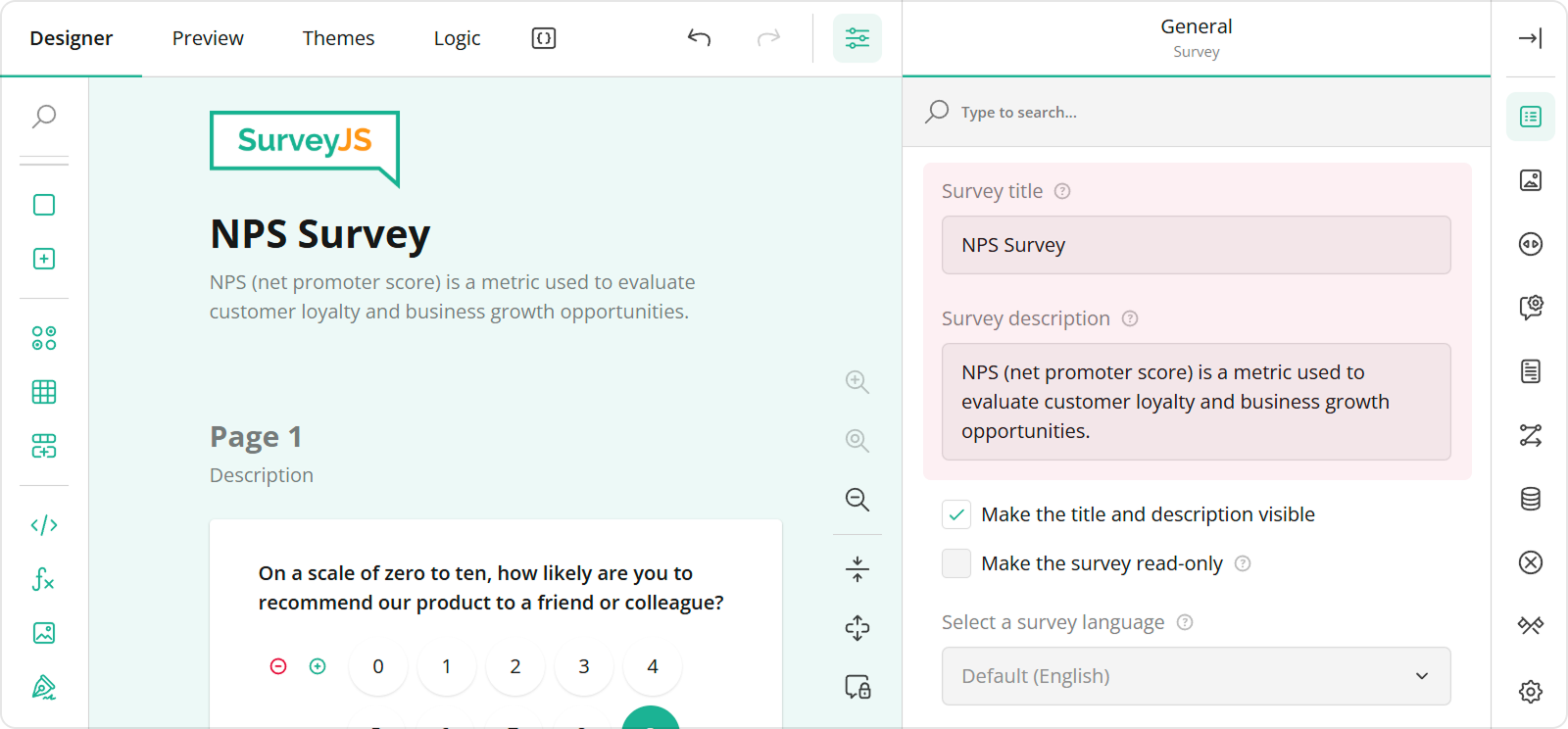
You can specify a form title and description in the Designer tab of Survey Creator. Enter title and description texts in the **Survey title** and **Survey description** editors in the **General** category.

<img src="/Content/Images/examples/featured-demos/survey-title-and-description.png" alt="Specify survey title and description in SurveyJS Survey Creator" width="100%">

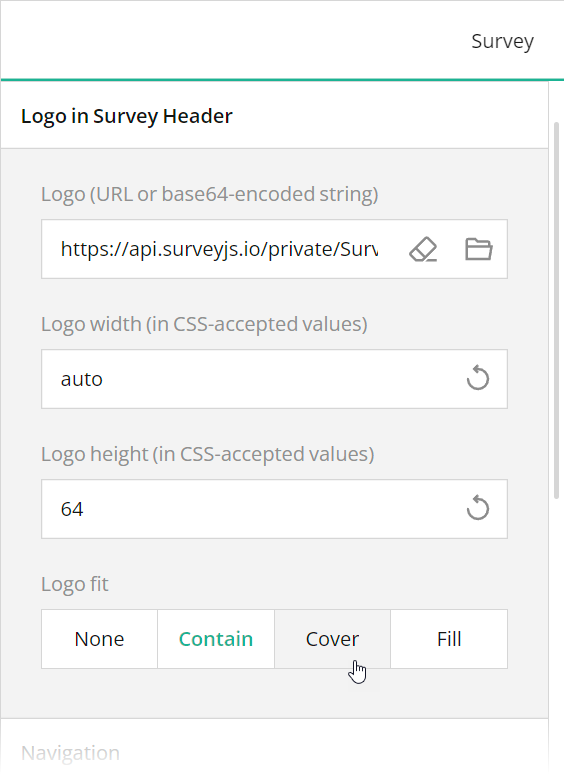
To configure a logo, use editors in the **Logo in the Survey Header** category.
<img src="/Content/Images/examples/featured-demos/logo-settings.png" alt="Specify logo in SurveyJS Survey Creator" width="100%">

These editors are mapped to the following survey JSON properties:

- [`title`](https://surveyjs.io/form-library/documentation/api-reference/survey-data-model#title)
- [`description`](https://surveyjs.io/form-library/documentation/api-reference/survey-data-model#description)
- [`logo`](https://surveyjs.io/form-library/documentation/api-reference/survey-data-model#logo)
- [`logoWidth`](https://surveyjs.io/form-library/documentation/api-reference/survey-data-model#logoWidth)
- [`logoHeight`](https://surveyjs.io/form-library/documentation/api-reference/survey-data-model#logoHeight)
- [`logoFit`](https://surveyjs.io/form-library/documentation/api-reference/survey-data-model#logoFit)

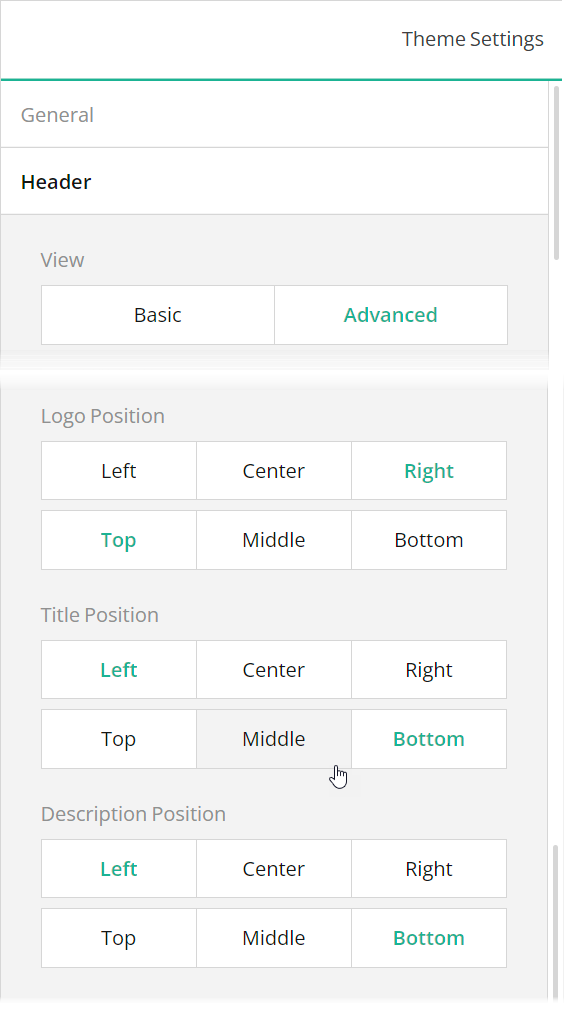
To position a title and description within a form header, use Theme Editor integrated in Survey Creator. Open the Themes tab, switch to the **Header** category in Property Grid, and use the **Logo alignment**, **Survey title alignment**, and **Survey description alignment** editors to align these elements as required. Ensure that the **View** switch is set to "Advanced".
<img src="/Content/Images/examples/featured-demos/title-description-logo-position.png" alt="Specify the positions of title, description, and logo in SurveyJS Survey Creator" width="100%">

### Add a Background Image to the Form Header

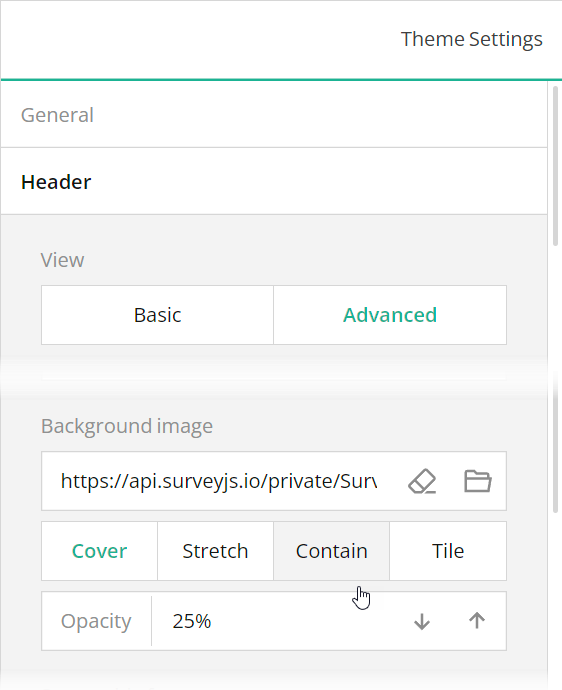
A form header can display a background image that gives your form a more professional look. To add a background image using Theme Editor, open the **Header** category in Property Grid, switch the **View** editor to "Advanced", and use the **Background image** editors.
<img src="/Content/Images/examples/featured-demos/header-background-image.png" alt="Specify a background image for a form header in SurveyJS Survey Creator" width="100%">

The **Background image** editors are mapped to the following properties in the theme JSON schema (see the `theme.js` file):

- [`header`](https://surveyjs.io/form-library/documentation/api-reference/itheme#header).[`backgroundImage`](https://surveyjs.io/form-library/documentation/api-reference/iheader#backgroundImage)
- [`header`](https://surveyjs.io/form-library/documentation/api-reference/itheme#header).[`backgroundImageOpacity`](https://surveyjs.io/form-library/documentation/api-reference/iheader#backgroundImageOpacity)
- [`header`](https://surveyjs.io/form-library/documentation/api-reference/itheme#header).[`backgroundImageFit`](https://surveyjs.io/form-library/documentation/api-reference/iheader#backgroundImageFit)

### Specify the Header Content Width

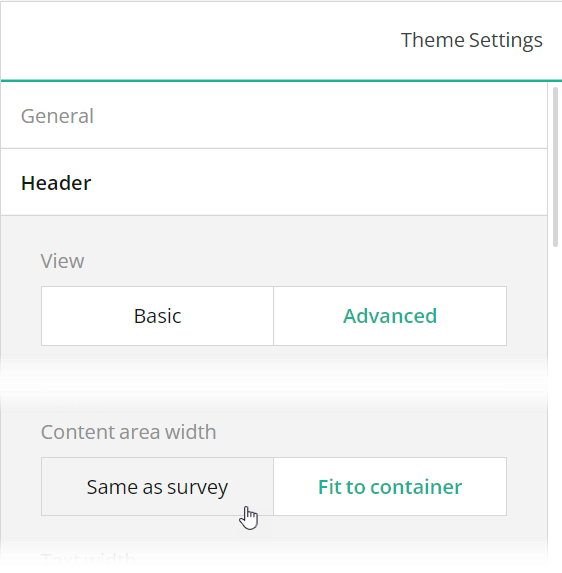
The content area of a form header can have the same width as form contents or span the width of the form container, as in this demo. To specify the preferred mode, use the **Header** > **Content area width** editor, which is mapped to the [`header`](https://surveyjs.io/form-library/documentation/api-reference/itheme#header).[`inheritWidthFrom`](https://surveyjs.io/form-library/documentation/api-reference/iheader#inheritWidthFrom) property.
<img src="/Content/Images/examples/featured-demos/header-content-area-width.png" alt="Specify form header width in SurveyJS Survey Creator" width="100%">

## Enable Image Capture

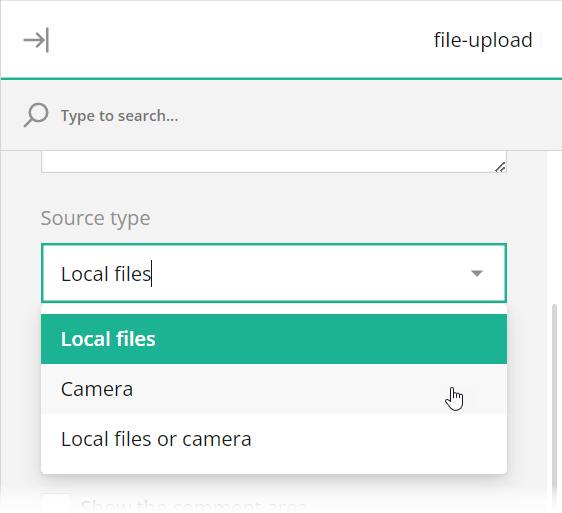
A patient registration form may include a patient's photo. To let users take the photo directly inside the form, add a File Upload question to the designer surface and set the question's **File source type** to "Camera" or "Local file or Camera".
<img src="/Content/Images/examples/featured-demos/file-upload-source-type.png" alt="Enable image capture in SurveyJS Survey Creator" width="100%">

[View Photo Capture Demo](https://surveyjs.io/form-library/examples/photo-capture/ (linkStyle))

## Add Conditional Logic and Branching

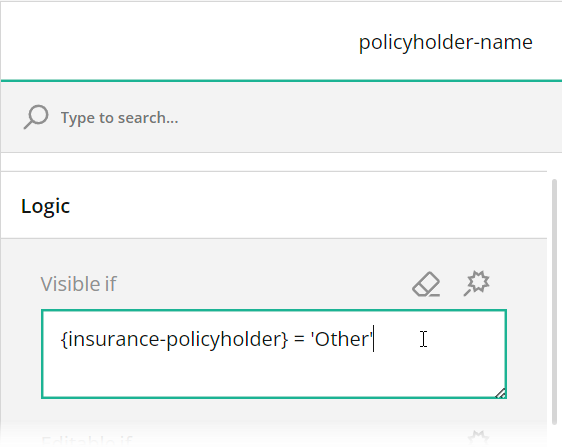
Conditional logic allows you to add and remove optional questions based on answers given to other questions. In this example, when you select "Other" in the Policyholder question, the form displays additional fields that solicit information about the insurance policyholder. To implement this logic, we set a **Make the question visible if** rule for each additional question. In the survey JSON schema, this rule is saved in the question's [`visibleIf`](https://surveyjs.io/form-library/documentation/api-reference/checkbox-question-model) property.
<img src="/Content/Images/examples/featured-demos/visibleif.png" alt="Implement conditional visibility in SurveyJS Survey Creator" width="100%">

For more information on conditional logic and branching, refer to the following help topic: [Conditional Logic and Dynamic Texts](https://surveyjs.io/form-library/documentation/design-survey/conditional-logic).

## Files

### `src/app/components/json.ts`

```ts
export const json = {
  "title": "Patient Registration Form",
  "description": "Your privacy is important to us. All information received through our forms and other communications is subject to our Patient Privacy Policy.",
  "logo": "https://api.surveyjs.io/private/Surveys/files?name=09b0ee2a-d256-4376-b328-8be12d868f14",
  "logoWidth": "auto",
  "logoHeight": "96",
  "completedHtml": "<div style=\"max-width:540px;text-align:left;margin:0px auto 16px auto;border: 1px solid rgba(0,0,0,0.25);padding:40px 48px 48px 48px;background-color:#fff;\">\n\n<h4>Thank you for completing your patient registration form.</h4>\n<br>\n<p>Dear {firstname-for-complete-page},\n<br>\nYour information has been successfully received, and we look forward to providing you with the highest level of care. \n<br><br>\nIf you have any questions or need to schedule an appointment, please don't hesitate to reach out to our office. Our team is here to assist you every step of the way.\n<br><br>\nWarm regards,\n<br>\nCentral Hospital.</p>\n\n</div>",
  "pages": [
    {
      "name": "page1",
      "elements": [
        {
          "type": "panel",
          "name": "personal-information",
          "elements": [
            {
              "type": "text",
              "name": "first-name",
              "width": "50%",
              "minWidth": "256px",
              "title": "First Name"
            },
            {
              "type": "text",
              "name": "last-name",
              "width": "50%",
              "minWidth": "256px",
              "startWithNewLine": false,
              "title": "Last Name"
            },
            {
              "type": "text",
              "name": "ssn",
              "width": "50%",
              "minWidth": "256px",
              "title": "Social Security #"
            },
            {
              "type": "text",
              "name": "birthdate",
              "width": "50%",
              "minWidth": "256px",
              "startWithNewLine": false,
              "title": "Date of Birth",
              "inputType": "date"
            },
            {
              "type": "dropdown",
              "name": "marital-status",
              "width": "50%",
              "minWidth": "256px",
              "title": "Marital Status",
              "choices": [ "Single", "Married", "Widowed", "Divorced", "Separated" ],
              "choicesOrder": "random",
              "placeholder": "",
              "allowClear": false
            },
            {
              "type": "dropdown",
              "name": "gender",
              "width": "50%",
              "minWidth": "256px",
              "startWithNewLine": false,
              "title": "Gender",
              "choices": [ "Male", "Female" ],
              "choicesOrder": "random",
              "placeholder": "",
              "allowClear": false
            }
          ],
          "width": "69%",
          "minWidth": "256px"
        },
        {
          "type": "file",
          "name": "photo",
          "width": "31%",
          "imageWidth": "532",
          "imageHeight": "576",
          "minWidth": "256px",
          "startWithNewLine": false,
          "titleLocation": "hidden",
          "sourceType": "camera",
          "photoPlaceholder": " "
        },
        {
          "type": "panel",
          "name": "contact-information",
          "elements": [
            {
              "type": "text",
              "name": "address",
              "width": "66%",
              "minWidth": "256px",
              "title": "Address"
            },
            {
              "type": "text",
              "name": "apartment-number",
              "width": "34%",
              "minWidth": "128px",
              "startWithNewLine": false,
              "title": "Apartment #"
            },
            {
              "type": "text",
              "name": "city",
              "width": "34%",
              "minWidth": "128px",
              "title": "City"
            },
            {
              "type": "text",
              "name": "state",
              "width": "32%",
              "minWidth": "128px",
              "startWithNewLine": false,
              "title": "State"
            },
            {
              "type": "text",
              "name": "zip",
              "width": "34%",
              "minWidth": "128px",
              "startWithNewLine": false,
              "title": "Zip Code"
            },
            {
              "type": "text",
              "name": "phone",
              "width": "34%",
              "minWidth": "128px",
              "title": "Phone #"
            },
            {
              "type": "text",
              "name": "email",
              "width": "66%",
              "minWidth": "256px",
              "startWithNewLine": false,
              "title": "Email Address"
            }
          ],
          "title": "Contact Information",
          "width": "100%",
          "minWidth": "256px"
        },
        {
          "type": "panel",
          "name": "emergency-contact",
          "elements": [
            {
              "type": "text",
              "name": "emergency-contact-full-name",
              "width": "66%",
              "minWidth": "256px",
              "title": "Full Name"
            },
            {
              "type": "dropdown",
              "name": "emergency-contact-relationship",
              "width": "34%",
              "minWidth": "128px",
              "startWithNewLine": false,
              "title": "Relationship",
              "choices": [ "Family Member", "Friend", "Partner", "Work Colleague" ], 
              "choicesOrder": "random",
              "placeholder": "",
              "allowClear": false
            },
            {
              "type": "text",
              "name": "emergency-contact-phone",
              "width": "34%",
              "minWidth": "128px",
              "title": "Phone #"
            },
            {
              "type": "text",
              "name": "emergency-contact-address",
              "width": "66%",
              "minWidth": "256px",
              "startWithNewLine": false,
              "title": "Address"
            }
          ],
          "title": "Emergency Contact Information",
          "width": "100%",
          "minWidth": "256px"
        },
        {
          "type": "panel",
          "name": "insurance",
          "elements": [
            {
              "type": "text",
              "name": "insurance-company",
              "width": "66%",
              "minWidth": "256px",
              "title": "Insurance Company"
            },
            {
              "type": "text",
              "name": "insurance-policy-number",
              "width": "34%",
              "minWidth": "128px",
              "startWithNewLine": false,
              "title": "Policy #"
            },
            {
              "type": "radiogroup",
              "name": "insurance-policyholder",
              "width": "100%",
              "minWidth": "256px",
              "title": "Policyholder",
              "defaultValue": "Personal",
              "choices": [ "Personal", "Other" ],
              "colCount": 0
            },
            {
              "type": "text",
              "name": "policyholder-name",
              "visibleIf": "{insurance-policyholder} = 'Other'",
              "width": "66%",
              "minWidth": "256px",
              "title": "Holder Name"
            },
            {
              "type": "dropdown",
              "name": "policyholder-relationship",
              "visibleIf": "{insurance-policyholder} = 'Other'",
              "width": "34%",
              "minWidth": "128px",
              "startWithNewLine": false,
              "title": "Relationship",
              "choicesFromQuestion": "emergency-contact-relationship",
              "choicesOrder": "random",
              "placeholder": "",
              "allowClear": false
            },
            {
              "type": "text",
              "name": "policyholder-birthdate",
              "visibleIf": "{insurance-policyholder} = 'Other'",
              "width": "34%",
              "minWidth": "128px",
              "title": "Date of Birth",
              "inputType": "date"
            },
            {
              "type": "text",
              "name": "policyholder-ssn",
              "visibleIf": "{insurance-policyholder} = 'Other'",
              "width": "32%",
              "minWidth": "128px",
              "startWithNewLine": false,
              "title": "Social Security #"
            },
            {
              "type": "text",
              "name": "policyholder-phone",
              "visibleIf": "{insurance-policyholder} = 'Other'",
              "width": "34%",
              "minWidth": "128px",
              "startWithNewLine": false,
              "title": "Phone #"
            },
            {
              "type": "comment",
              "name": "policyholder-address",
              "visibleIf": "{insurance-policyholder} = 'Other'",
              "width": "100%",
              "minWidth": "256px",
              "title": "Address",
              "autoGrow": true,
              "allowResize": false
            }
          ],
          "title": "Insurance Information",
          "width": "100%",
          "minWidth": "256px"
        }
      ]
    }
  ],
  "calculatedValues": [{
    "name": "firstname-for-complete-page",
    "expression": "iif({first-name} notempty, {first-name}, patient)"
  }],
  "questionErrorLocation": "bottom",
  "completeText": "Register",
  "questionsOnPageMode": "singlePage",
  "widthMode": "static",
  "width": "1024"
};
```

### `src/app/components/survey.component.css`

```css
/* You can add your custom CSS here. */
```

### `src/app/components/survey.component.html`

```html
<survey [model]="model" style="position: absolute; top: 0; left: 0; right: 0; bottom: 0; height:100%"></survey>
```

### `src/app/components/survey.component.ts`

```ts
import { Component, OnInit } from "@angular/core";
import { Model } from "survey-core";
import { json } from "./json";
import { themeJson } from "./theme";
import "./survey.component.css";
import "survey-core/survey-core.min.css";

@Component({
    // tslint:disable-next-line:component-selector
    selector: "component-survey",
    templateUrl: "./survey.component.html",
    styleUrls: ["./survey.component.css"]
})
export class SurveyComponent implements OnInit {
    model: Model;
    ngOnInit() {
        const survey = new Model(json);
        survey.applyTheme(themeJson);
        survey.onComplete.add((sender, options) => {
            console.log(JSON.stringify(sender.data, null, 3));
        });
        this.model = survey;
    }
}
```

### `src/app/components/theme.ts`

```ts
export const themeJson = {
  "cssVariables": {
    "--sjs-general-backcolor": "rgba(255, 255, 255, 1)",
    "--sjs-general-backcolor-dark": "rgba(248, 248, 248, 1)",
    "--sjs-general-backcolor-dim": "#F6F4EE",
    "--sjs-general-backcolor-dim-light": "rgba(255, 255, 255, 1)",
    "--sjs-general-backcolor-dim-dark": "rgba(243, 243, 243, 1)",
    "--sjs-general-forecolor": "rgba(0, 0, 0, 0.91)",
    "--sjs-general-forecolor-light": "rgba(0, 0, 0, 0.45)",
    "--sjs-primary-backcolor": "rgba(0, 0, 0, 1)",
    "--sjs-primary-backcolor-light": "rgba(0, 0, 0, 0.1)",
    "--sjs-primary-backcolor-dark": "rgba(0, 0, 0, 0.5)",
    "--sjs-primary-forecolor": "rgba(255, 255, 255, 1)",
    "--sjs-primary-forecolor-light": "rgba(255, 255, 255, 0.25)",
    "--sjs-base-unit": "8px",
    "--sjs-corner-radius": "0px",
    "--sjs-shadow-small": "inset 0px 0px 0px 1px rgba(0, 0, 0, 0.25)",
    "--sjs-shadow-medium": "0px 2px 6px 0px rgba(0, 0, 0, 0.1)",
    "--sjs-shadow-large": "0px 8px 16px 0px rgba(0, 0, 0, 0.1)",
    "--sjs-shadow-inner": "inset 0px 0px 0px 1px rgba(0, 0, 0, 0.25), 0px 0px 0px 4px rgba(0, 0, 0, 0.05)",
    "--sjs-border-light": "rgba(0, 0, 0, 0.25)",
    "--sjs-border-default": "rgba(0, 0, 0, 0.25)",
    "--sjs-border-inside": "rgba(0, 0, 0, 0.16)",
    "--sjs-special-red": "rgba(229, 10, 62, 1)",
    "--sjs-special-red-light": "rgba(229, 10, 62, 0.1)",
    "--sjs-special-red-forecolor": "rgba(255, 255, 255, 1)",
    "--sjs-special-green": "rgba(25, 179, 148, 1)",
    "--sjs-special-green-light": "rgba(25, 179, 148, 0.1)",
    "--sjs-special-green-forecolor": "rgba(255, 255, 255, 1)",
    "--sjs-special-blue": "rgba(67, 127, 217, 1)",
    "--sjs-special-blue-light": "rgba(67, 127, 217, 0.1)",
    "--sjs-special-blue-forecolor": "rgba(255, 255, 255, 1)",
    "--sjs-special-yellow": "rgba(255, 152, 20, 1)",
    "--sjs-special-yellow-light": "rgba(255, 152, 20, 0.1)",
    "--sjs-special-yellow-forecolor": "rgba(255, 255, 255, 1)",
    "--sjs-editorpanel-hovercolor": "rgba(246, 244, 238, 1)",
    "--sjs-font-questiontitle-color": "rgba(0, 0, 0, 1)",
    "--sjs-font-editorfont-color": "rgba(0, 0, 0, 1)",
    "--sjs-font-editorfont-placeholdercolor": "rgba(0, 0, 0, 0.5)",
    "--sjs-questionpanel-hovercolor": "rgba(246, 244, 238, 1)",
    "--sjs-font-surveytitle-size": "28px",
    "--sjs-font-questiontitle-weight": "400",
    "--sjs-font-editorfont-size": "15px",
    "--sjs-font-questiondescription-size": "15px",
    "--sjs-font-questiontitle-size": "15px",
    "--sjs-font-questiondescription-color": "rgba(0, 0, 0, 0.5)",
    "--sjs-header-backcolor": "transparent",
    "--sjs-font-headertitle-color": "rgba(255, 255, 255, 1)",
    "--sjs-font-headerdescription-color": "rgba(255, 255, 255, 1)",
    "--sjs-font-headertitle-size": "24px",
    "--sjs-font-headertitle-weight": "600",
    "--sjs-font-headerdescription-size":  "15px",
    "--sjs-font-pagetitle-weight":  "700"
  },
    "isPanelless": true,
    "themeName": "default",
    "colorPalette": "light",
    "header": {
        "height": 320,
        "inheritWidthFrom": "container",
        "textAreaWidth": 424,
        "backgroundImage": "https://api.surveyjs.io/private/Surveys/files?name=3ed1681f-324e-4bdf-8bc9-a4058fc2075f",
        "backgroundImageOpacity": 1,
        "backgroundImageFit": "cover",
        "logoPositionX": "right",
        "logoPositionY": "top",
        "titlePositionX": "left",
        "titlePositionY": "bottom",
        "descriptionPositionX": "left",
        "descriptionPositionY": "bottom"
    },
    "headerView": "advanced"
};
```

### `src/app/app.component.css`

```css

```

### `src/app/app.component.html`

```html
<component-survey></component-survey>
```

### `src/app/app.component.ts`

```ts
import { Component } from "@angular/core";

@Component({
    selector: "app-root",
    templateUrl: "./app.component.html",
    styleUrls: ["./app.component.css"]
})
export class AppComponent {
    title = "CodeSandbox";
}
```

### `src/app/app.module.ts`

```ts
import { BrowserModule } from "@angular/platform-browser";
import { NgModule } from "@angular/core";

import { AppComponent } from "./app.component";
import { SurveyModule } from "survey-angular-ui";
import { SurveyComponent } from "./components/survey.component";

@NgModule({
    declarations: [AppComponent, SurveyComponent],
    imports: [BrowserModule, SurveyModule],
    providers: [],
    bootstrap: [AppComponent]
})
export class AppModule { }
```

### `src/environments/environment.prod.ts`

```ts
export const environment = {
    production: true
};
```

### `src/environments/environment.ts`

```ts
// The file contents for the current environment will overwrite these during build.
// The build system defaults to the dev environment which uses `environment.ts`, but if you do
// `ng build --env=prod` then `environment.prod.ts` will be used instead.
// The list of which env maps to which file can be found in `.angular-cli.json`.

export const environment = {
    production: false
};
```

### `src/index.html`

```html
<app-root></app-root>
```

### `src/main.ts`

```ts
import { enableProdMode } from "@angular/core";
import { platformBrowserDynamic } from "@angular/platform-browser-dynamic";

import { AppModule } from "./app/app.module";
import { environment } from "./environments/environment";

if (environment.production) {
    enableProdMode();
}

platformBrowserDynamic()
    .bootstrapModule(AppModule)
    .catch(err => console.log(err));
```

### `src/polyfills.ts`

```ts
/**
 * This file includes polyfills needed by Angular and is loaded before the app.
 * You can add your own extra polyfills to this file.
 *
 * This file is divided into 2 sections:
 *   1. Browser polyfills. These are applied before loading ZoneJS and are sorted by browsers.
 *   2. Application imports. Files imported after ZoneJS that should be loaded before your main
 *      file.
 *
 * The current setup is for so-called "evergreen" browsers; the last versions of browsers that
 * automatically update themselves. This includes Safari >= 10, Chrome >= 55 (including Opera),
 * Edge >= 13 on the desktop, and iOS 10 and Chrome on mobile.
 *
 * Learn more in https://angular.io/docs/ts/latest/guide/browser-support.html
 */

/***************************************************************************************************
 * BROWSER POLYFILLS
 */

/** IE9, IE10 and IE11 requires all of the following polyfills. **/
// import 'core-js/es6/symbol';
// import 'core-js/es6/object';
// import 'core-js/es6/function';
// import 'core-js/es6/parse-int';
// import 'core-js/es6/parse-float';
// import 'core-js/es6/number';
// import 'core-js/es6/math';
// import 'core-js/es6/string';
// import 'core-js/es6/date';
// import 'core-js/es6/array';
// import 'core-js/es6/regexp';
// import 'core-js/es6/map';
// import 'core-js/es6/weak-map';
// import 'core-js/es6/set';

/** IE10 and IE11 requires the following for NgClass support on SVG elements */
// import 'classlist.js';  // Run `npm install classlist.js`.

/** IE10 and IE11 requires the following for the Reflect API. */
// import 'core-js/es6/reflect';

/** Evergreen browsers require these. **/
// Used for reflect-metadata in JIT. If you use AOT (and only Angular decorators), you can remove.
import "core-js/proposals/reflect-metadata";

/**
 * Required to support Web Animations `@angular/platform-browser/animations`.
 * Needed for: All but Chrome, Firefox and Opera. http://caniuse.com/#feat=web-animation
 **/
// import 'web-animations-js';  // Run `npm install web-animations-js`.

/***************************************************************************************************
 * Zone JS is required by default for Angular itself.
 */
import "zone.js/dist/zone"; // Included with Angular CLI.

/***************************************************************************************************
 * APPLICATION IMPORTS
 */
```

### `src/styles.css`

```css
/* You can add your custom CSS here. */
```

### `src/typings.d.ts`

```ts
/* SystemJS module definition */
declare var module: NodeModule;
interface NodeModule {
    id: string;
}
```

### `.angular-cli.json`

```json
{
  "apps": [
    {
      "root": "src",
      "outDir": "dist",
      "assets": [ "assets", "favicon.ico" ],
      "index": "index.html",
      "main": "main.ts",
      "polyfills": "polyfills.ts",
      "prefix": "app",
      "styles": [ "styles.css" ],
      "scripts": [ ],
      "environmentSource": "environments/environment.ts",
      "environments": {
        "dev": "environments/environment.ts",
        "prod": "environments/environment.prod.ts"
      }
    }
  ]
}
```

### `_tsconfig.json`

```json
{
  "compileOnSave": false,
  "compilerOptions": {
    "baseUrl": "./",
    "outDir": "./dist/out-tsc",
    "sourceMap": true,
    "declaration": false,
    "allowSyntheticDefaultImports": true,
    "downlevelIteration": true,
    "experimentalDecorators": true,
    "moduleResolution": "node",
    "importHelpers": true,
    "resolveJsonModule": true,
    "target": "es2015",
    "module": "es2020",
    "lib": [
      "es2018",
      "dom"
    ]
  }
}
```

### `package.json`

```json
{
  "name": "surveyjs-angular",
  "scripts": {
    "ng": "ng",
    "start": "ng serve",
    "build": "ng build --prod",
    "test": "ng test",
    "lint": "ng lint",
    "e2e": "ng e2e"
  },
  "private": true,
  "dependencies": {
    "@angular/animations": "14.1.1",
    "@angular/cdk": "14.1.1",
    "@angular/common": "14.1.1",
    "@angular/compiler": "14.1.1",
    "@angular/core": "14.1.1",
    "@angular/forms": "14.1.1",
    "@angular/platform-browser": "14.1.1",
    "@angular/platform-browser-dynamic": "14.1.1",
    "@angular/router": "14.1.1",
    "core-js": "3.6.4",
    "rxjs": "6.5.4",
    "survey-core": "latest",
    "survey-angular-ui": "latest",
    "tslib": "1.13.0",
    "zone.js": "0.11.7"
  },
  "devDependencies": {
    "@angular/cli": "1.6.6",
    "@angular/compiler-cli": "^5.2.0",
    "@angular/language-service": "^5.2.0",
    "@types/core-js": "0.9.46",
    "@types/jasmine": "~2.8.3",
    "@types/jasminewd2": "~2.0.2",
    "@types/node": "~6.0.60",
    "codelyzer": "^4.0.1",
    "jasmine-core": "~2.8.0",
    "jasmine-spec-reporter": "~4.2.1",
    "karma": "~2.0.0",
    "karma-chrome-launcher": "~2.2.0",
    "karma-coverage-istanbul-reporter": "^1.2.1",
    "karma-jasmine": "~1.1.0",
    "karma-jasmine-html-reporter": "^0.2.2",
    "protractor": "~5.1.2",
    "ts-node": "~4.1.0",
    "tslint": "~5.9.1",
    "typescript": "3.9.7"
  },
  "keywords": [ "angular", "surveyjs" ],
  "description": "SurveyJS-Angular example project"
}
```

## Other Frameworks

- [React](https://surveyjs.io/form-library/examples/patient-registration-form-template-free/reactjs.md)
- [Vue 3](https://surveyjs.io/form-library/examples/patient-registration-form-template-free/vue3js.md)
- [jQuery](https://surveyjs.io/form-library/examples/patient-registration-form-template-free/jquery.md)
- [Vanilla JS](https://surveyjs.io/form-library/examples/patient-registration-form-template-free/vanillajs.md)
