---
title: Sales Contract Form
product: Form Library
description: Explore our sales contract form template, highlighting some key question types, such as a signature pad for electronic signature capture, a fill-in-the-blank option for adding missing details, and various appearance customization settings. You can embed the form in your JavaScript app as-is or take it a step further with our free form editing tool.
framework: Angular
source: https://surveyjs.io/form-library/examples/sales-contract-form-template-free/angular
index: https://surveyjs.io/form-library/examples/overview.md
---
# Sales Contract Form (Angular)
A sales contract, or sales agreement, is a legally binding document that outlines the terms and conditions of a sale between a buyer and a seller. Sales contracts are used in various industries to minimize misunderstandings and protect the interests of both parties involved in a transaction. This example shows how to create a sales contract form using SurveyJS Survey Creator with integrated Theme Editor.
## Create a Fill-in-the-Blanks Form
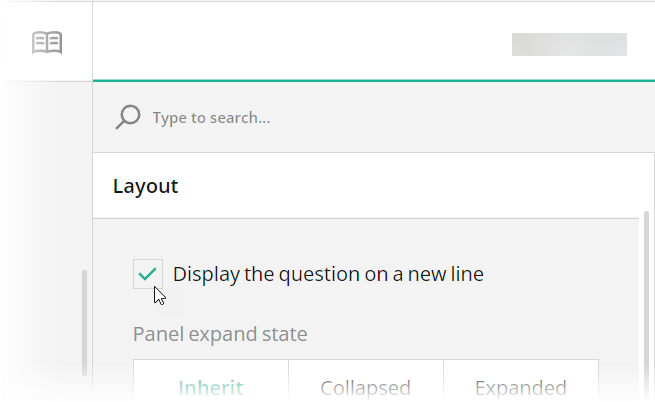
The main building blocks for a fill-in-the-blanks form are text input fields, which represent blanks, and HTML survey elements, which display the rest of the content. To arrange them on the form, use different width settings and the [`startWithNewLine`](https://surveyjs.io/form-library/documentation/api-reference/question#startWithNewLine) property. Disable this property to display a survey element inline with the previous element. In Survey Creator, you can find this property in the **Layout** category:
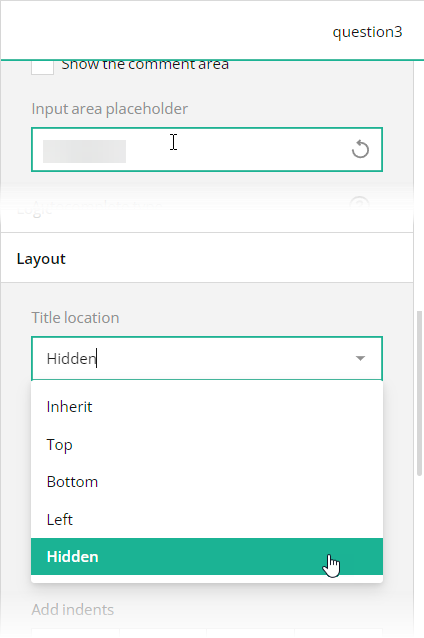
 Since the fill-in-the blanks form layout doesn't allow input fields to have labels, use placeholders to give users a hint of what they are expected to enter. In code, use the [`placeholder`](https://surveyjs.io/form-library/documentation/api-reference/text-entry-question-model#placeholder) property for this purpose. You should also hide titles for these questions by setting the [`titleLocation`](https://surveyjs.io/form-library/documentation/api-reference/text-entry-question-model#titleLocation) property to `"hidden"`
In Survey Creator, select the needed question on the design surface, open the **General** category in Property Grid, unselect the **Show the title and description** checkbox, and enter placeholder text in the **Placeholder text within input field** editor:
Since the fill-in-the blanks form layout doesn't allow input fields to have labels, use placeholders to give users a hint of what they are expected to enter. In code, use the [`placeholder`](https://surveyjs.io/form-library/documentation/api-reference/text-entry-question-model#placeholder) property for this purpose. You should also hide titles for these questions by setting the [`titleLocation`](https://surveyjs.io/form-library/documentation/api-reference/text-entry-question-model#titleLocation) property to `"hidden"`
In Survey Creator, select the needed question on the design surface, open the **General** category in Property Grid, unselect the **Show the title and description** checkbox, and enter placeholder text in the **Placeholder text within input field** editor:
 ## Add a Background Image
The sales contract form in this demo has a distinct background image. With Theme Editor by SurveyJS, you can add background images to your forms with ease. Open the **Themes** tab in Survey Creator and expand the **Background** category. Editors under the **Background image** title enable you to add a background image and configure its every aspect.
## Add a Background Image
The sales contract form in this demo has a distinct background image. With Theme Editor by SurveyJS, you can add background images to your forms with ease. Open the **Themes** tab in Survey Creator and expand the **Background** category. Editors under the **Background image** title enable you to add a background image and configure its every aspect.
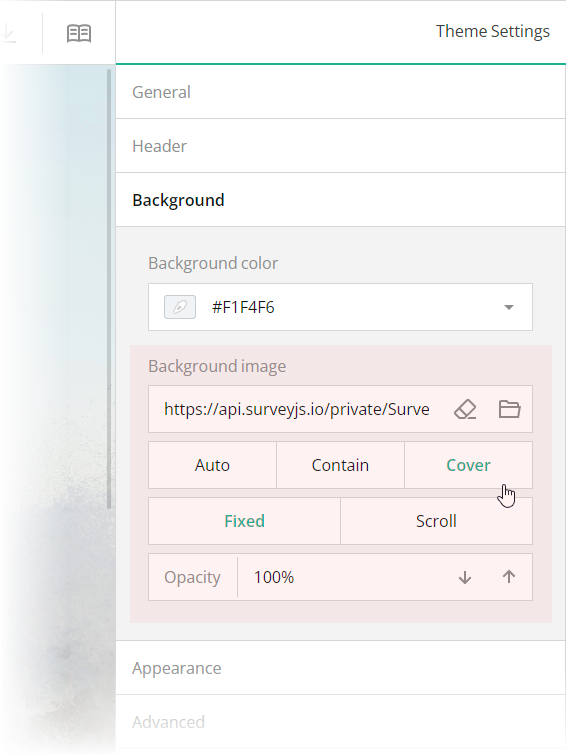 These editors are mapped to the following theme JSON schema properties, which you can find in the `theme.js` file:
- [`backgroundImage`](https://surveyjs.io/form-library/documentation/api-reference/itheme#backgroundImage): `string`
An image to display as form background. This property accepts a hyperlink or a data URL.
- [`backgroundImageFit`](https://surveyjs.io/form-library/documentation/api-reference/itheme#backgroundImageFit): `"auto"` | `"contain"` | `"cover"`
A string value that specifies how to resize the background image to fit it into its container. Refer to the description of the [`background-size`](https://developer.mozilla.org/en-US/docs/Web/CSS/background-size#values) CSS property values on MDN for detailed information on the possible values.
- [`backgroundImageAttachment`](https://surveyjs.io/form-library/documentation/api-reference/itheme#backgroundImageAttachment): `"fixed"` | `"scroll"`
A string value that specifies whether the background image is fixed in its position (as in this demo) or scrolled along with the survey.
- [`backgroundOpacity`](https://surveyjs.io/form-library/documentation/api-reference/itheme#backgroundOpacity): `number`
A value from 0 to 1 that specifies how transparent the background image should be: 0 makes the image completely transparent, and 1 makes it opaque. In Theme Editor, the opacity values are mapped to a scale from 0% to 100%.
## Configure the Form Header
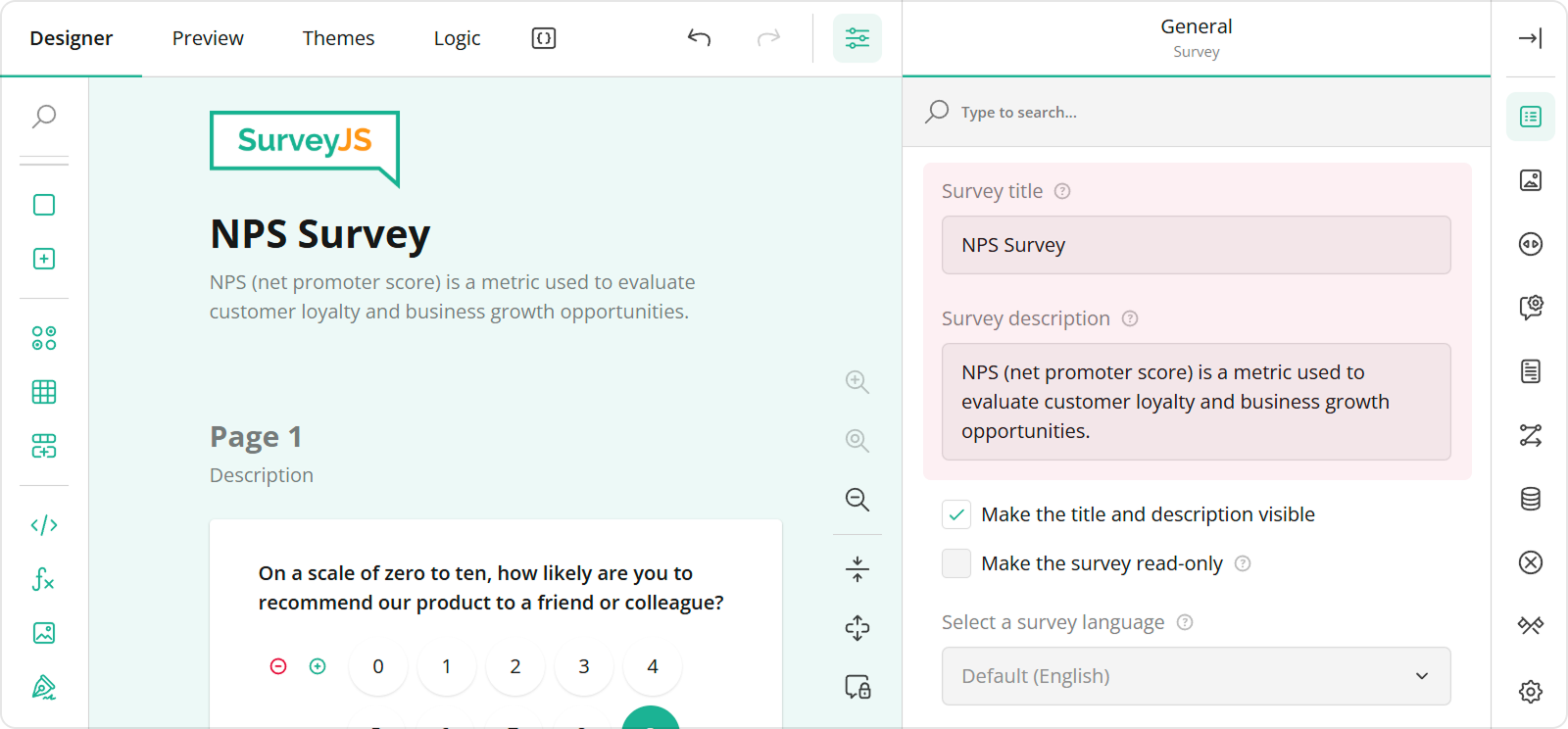
The header of your form typically contains a form title, short description, and a logo of your company. To specify title and description texts, open the Designer tab and enter them in the **Survey title** and **Survey description** editors in the **General** category.
These editors are mapped to the following theme JSON schema properties, which you can find in the `theme.js` file:
- [`backgroundImage`](https://surveyjs.io/form-library/documentation/api-reference/itheme#backgroundImage): `string`
An image to display as form background. This property accepts a hyperlink or a data URL.
- [`backgroundImageFit`](https://surveyjs.io/form-library/documentation/api-reference/itheme#backgroundImageFit): `"auto"` | `"contain"` | `"cover"`
A string value that specifies how to resize the background image to fit it into its container. Refer to the description of the [`background-size`](https://developer.mozilla.org/en-US/docs/Web/CSS/background-size#values) CSS property values on MDN for detailed information on the possible values.
- [`backgroundImageAttachment`](https://surveyjs.io/form-library/documentation/api-reference/itheme#backgroundImageAttachment): `"fixed"` | `"scroll"`
A string value that specifies whether the background image is fixed in its position (as in this demo) or scrolled along with the survey.
- [`backgroundOpacity`](https://surveyjs.io/form-library/documentation/api-reference/itheme#backgroundOpacity): `number`
A value from 0 to 1 that specifies how transparent the background image should be: 0 makes the image completely transparent, and 1 makes it opaque. In Theme Editor, the opacity values are mapped to a scale from 0% to 100%.
## Configure the Form Header
The header of your form typically contains a form title, short description, and a logo of your company. To specify title and description texts, open the Designer tab and enter them in the **Survey title** and **Survey description** editors in the **General** category.
 To configure a logo, use editors in the **Logo in the Survey Header** category.
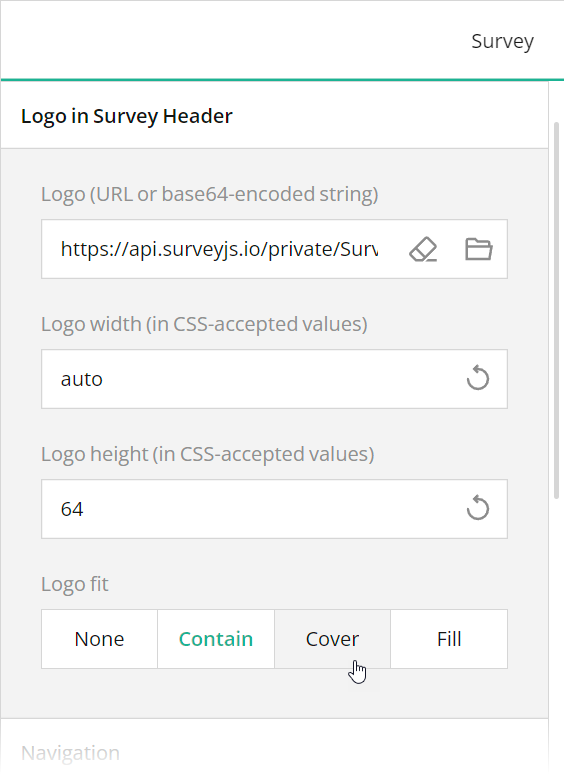 These editors are mapped to the following survey JSON properties:
- [`title`](https://surveyjs.io/form-library/documentation/api-reference/survey-data-model#title)
- [`description`](https://surveyjs.io/form-library/documentation/api-reference/survey-data-model#description)
- [`logo`](https://surveyjs.io/form-library/documentation/api-reference/survey-data-model#logo)
- [`logoWidth`](https://surveyjs.io/form-library/documentation/api-reference/survey-data-model#logoWidth)
- [`logoHeight`](https://surveyjs.io/form-library/documentation/api-reference/survey-data-model#logoHeight)
- [`logoFit`](https://surveyjs.io/form-library/documentation/api-reference/survey-data-model#logoFit)
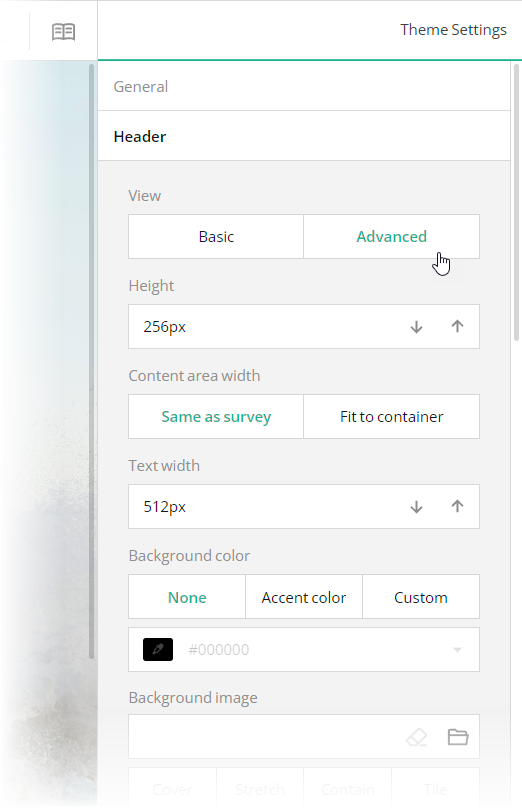
To configure the appearance of the form header, open the Themes tab and use editors in the **Header** category. Ensure that the **View** switch is set to "Advanced". All editors in the Header category, except font editors and View, are mapped to corresponding [`header`](https://surveyjs.io/form-library/documentation/api-reference/iheader) object properties in the theme JSON schema (see the `theme.js` file).
These editors are mapped to the following survey JSON properties:
- [`title`](https://surveyjs.io/form-library/documentation/api-reference/survey-data-model#title)
- [`description`](https://surveyjs.io/form-library/documentation/api-reference/survey-data-model#description)
- [`logo`](https://surveyjs.io/form-library/documentation/api-reference/survey-data-model#logo)
- [`logoWidth`](https://surveyjs.io/form-library/documentation/api-reference/survey-data-model#logoWidth)
- [`logoHeight`](https://surveyjs.io/form-library/documentation/api-reference/survey-data-model#logoHeight)
- [`logoFit`](https://surveyjs.io/form-library/documentation/api-reference/survey-data-model#logoFit)
To configure the appearance of the form header, open the Themes tab and use editors in the **Header** category. Ensure that the **View** switch is set to "Advanced". All editors in the Header category, except font editors and View, are mapped to corresponding [`header`](https://surveyjs.io/form-library/documentation/api-reference/iheader) object properties in the theme JSON schema (see the `theme.js` file).
 ## Add an E-Signature Field
A fill-in-the-blanks template is often used for different kinds of contract and agreement documents. These documents require a signature. SurveyJS Form Library ships with a [Signature](https://surveyjs.io/form-library/examples/signature-pad-widget-javascript/) question type, which allows users to leave their e-signature on your form.
To add a Signature question to your form using Survey Creator, simply drag this question from the Toolbox onto the design surface. For information on how to add a Signature question programmatically, refer to the Signature demo.
[Signature Demo](https://surveyjs.io/form-library/examples/signature-pad-widget-javascript/ (linkStyle))
## Files
### `src/app/components/json.ts`
```ts
export const json = {
"description": "4517 Washington Ave. Manchester, Kentucky 39495 Phone + 1(603) 555-01-23",
"logo": "https://api.surveyjs.io/private/Surveys/files?name=4ebcc722-41e0-44e9-b6b3-f7de10bb61c7",
"logoWidth": "auto",
"logoHeight": "24",
"logoPosition": "right",
"completedHtml": "
## Add an E-Signature Field
A fill-in-the-blanks template is often used for different kinds of contract and agreement documents. These documents require a signature. SurveyJS Form Library ships with a [Signature](https://surveyjs.io/form-library/examples/signature-pad-widget-javascript/) question type, which allows users to leave their e-signature on your form.
To add a Signature question to your form using Survey Creator, simply drag this question from the Toolbox onto the design surface. For information on how to add a Signature question programmatically, refer to the Signature demo.
[Signature Demo](https://surveyjs.io/form-library/examples/signature-pad-widget-javascript/ (linkStyle))
## Files
### `src/app/components/json.ts`
```ts
export const json = {
"description": "4517 Washington Ave. Manchester, Kentucky 39495 Phone + 1(603) 555-01-23",
"logo": "https://api.surveyjs.io/private/Surveys/files?name=4ebcc722-41e0-44e9-b6b3-f7de10bb61c7",
"logoWidth": "auto",
"logoHeight": "24",
"logoPosition": "right",
"completedHtml": "\n\n
You're done.
\n",
"pages": [
{
"name": "page1",
"elements": [
{
"type": "html",
"name": "html1",
"width": "100%",
"minWidth": "256px",
"html": "\nThis sales contract (hereinafter referred to as the \"Agreement\") is entered into as of\n
"
},
{
"type": "text",
"name": "date",
"width": "30%",
"minWidth": "64px",
"maxWidth": "",
"defaultValueExpression": "today()",
"inputType": "date",
"placeholder": "date"
},
{
"type": "html",
"name": "html2",
"width": "144px",
"minWidth": "144px",
"maxWidth": "",
"startWithNewLine": false,
"html": "\nby and between\n
"
},
{
"type": "text",
"name": "seller-name",
"minWidth": "256px",
"maxWidth": "",
"startWithNewLine": false,
"placeholder": "seller's full legal name"
},
{
"type": "html",
"name": "html3",
"width": "208px",
"minWidth": "208px",
"maxWidth": "",
"html": "\nwith a mailing address of\n
"
},
{
"type": "text",
"name": "seller-address-line-1",
"minWidth": "64px",
"maxWidth": "",
"startWithNewLine": false,
"placeholder": "seller's address"
},
{
"type": "text",
"name": "seller-address-line-2",
"width": "100%",
"minWidth": "256px"
},
{
"type": "html",
"name": "html4",
"width": "344px",
"minWidth": "344px",
"maxWidth": "",
"html": "\n(hereinafter referred to as the \"Seller\") and\n
"
},
{
"type": "text",
"name": "buyer-name",
"minWidth": "256px",
"maxWidth": "",
"startWithNewLine": false,
"placeholder": "buyer's full legal name"
},
{
"type": "html",
"name": "html5",
"width": "208px",
"minWidth": "208px",
"maxWidth": "",
"html": "\nwith a mailing address of\n
"
},
{
"type": "text",
"name": "buyer-address-line-1",
"minWidth": "64px",
"maxWidth": "",
"startWithNewLine": false,
"placeholder": "buyer's address"
},
{
"type": "text",
"name": "buyer-address-line-2",
"width": "100%",
"minWidth": "256px"
},
{
"type": "html",
"name": "html6",
"width": "100%",
"minWidth": "256px",
"html": "\n(hereinafter referred to as the \"Buyer\"), collectively referred to as the \"Parties\", both\nof whom agree to be bound by this Agreement.\n
"
},
{
"type": "html",
"name": "html7",
"width": "100%",
"minWidth": "256px",
"maxWidth": "",
"html": "\nThe Seller is the manufacturer and distributor of the following product(s):\n
"
},
{
"type": "comment",
"name": "goods",
"width": "100%",
"minWidth": "256px",
"rows": 1,
"placeholder": "detailed description of the goods",
"autoGrow": true,
"allowResize": false
},
{
"type": "html",
"name": "html8",
"width": "100%",
"minWidth": "256px",
"html": "\n(hereinafter referred to as the \"Goods\"). \n
\nThe Buyer wishes to purchase the\naforementioned product(s).\n
"
},
{
"type": "html",
"name": "html9",
"width": "100%",
"minWidth": "256px",
"html": "\nTHEREFORE, the Parties agree as follows:\n
\n1. Sale of Goods. The Seller shall make available for sale, and the Buyer shall purchase the Goods.\n
\n2. Delivery and Shipping.\n
"
},
{
"type": "comment",
"name": "delivery-details",
"width": "100%",
"minWidth": "256px",
"rows": 1,
"placeholder": "include details regarding the delivery and shipping terms",
"autoGrow": true,
"allowResize": false
},
{
"type": "html",
"name": "html10",
"width": "100%",
"minWidth": "256px",
"html": "\n3. Purchase Price and Payments. \n
"
},
{
"type": "html",
"name": "html11",
"width": "400px",
"minWidth": "400px",
"maxWidth": "",
"html": "\nThe Seller agrees to sell the Goods to the Buyer for\n
"
},
{
"type": "text",
"name": "price",
"minWidth": "64px",
"maxWidth": "",
"startWithNewLine": false
},
{
"type": "html",
"name": "html12",
"width": "208px",
"minWidth": "208px",
"maxWidth": "",
"startWithNewLine": false,
"html": "\neuros.\n
"
},
{
"type": "html",
"name": "html13",
"width": "100%",
"minWidth": "256px",
"html": "\nThe Seller will provide an invoice to the Buyer at the time of delivery or pick-up.\n
"
},
{
"type": "html",
"name": "html14",
"width": "312px",
"minWidth": "312px",
"maxWidth": "",
"html": "\nAll invoices must be paid, in full, within\n
"
},
{
"type": "text",
"name": "terms",
"minWidth": "64px",
"maxWidth": "",
"startWithNewLine": false
},
{
"type": "html",
"name": "html15",
"width": "272px",
"minWidth": "272px",
"maxWidth": "",
"startWithNewLine": false,
"html": "\ndays.\n
"
},
{
"type": "html",
"name": "html16",
"width": "240px",
"minWidth": "240px",
"maxWidth": "",
"html": "\nAny balances not paid within\n
"
},
{
"type": "text",
"name": "grace-period",
"minWidth": "48px",
"maxWidth": "",
"startWithNewLine": false
},
{
"type": "html",
"name": "html17",
"width": "200px",
"minWidth": "200px",
"maxWidth": "",
"startWithNewLine": false,
"html": "\ndays will be subject to a\n
"
},
{
"type": "text",
"name": "penalty-percentage",
"minWidth": "48px",
"maxWidth": "",
"startWithNewLine": false
},
{
"type": "html",
"name": "html18",
"width": "208px",
"minWidth": "208px",
"maxWidth": "",
"html": "\n% late payment penalty.\n
"
},
{
"type": "html",
"name": "html19",
"width": "100%",
"minWidth": "256px",
"html": "\n4. Inspection of Goods and Rejection. The Buyer is entitled to inspect the Goods promptly upon delivery or receipt. The Buyer shall have a reasonable period, not exceeding\n
"
},
{
"type": "text",
"name": "inspect-period",
"minWidth": "64px",
"maxWidth": ""
},
{
"type": "html",
"name": "html20",
"width": "560px",
"minWidth": "256px",
"maxWidth": "",
"startWithNewLine": false,
"html": "\ndays, from the date of delivery to thoroughly inspect the Goods and\n
"
},
{
"type": "html",
"name": "html21",
"width": "208px",
"minWidth": "208px",
"maxWidth": "",
"html": "\nensure they conform to the specifications and quality agreed upon in this Agreement. If the Goods do not meet the agreed-upon standards or are found to be damaged, the Buyer has the right to reject the Goods.\n
"
},
{
"type": "signaturepad",
"name": "seller-signature",
"minWidth": "256px",
"signatureWidth": 480,
"signatureHeight": 260,
"signatureAutoScaleEnabled": true,
"placeholder": "Seller signature"
},
{
"type": "signaturepad",
"name": "buyer-signature",
"minWidth": "256px",
"startWithNewLine": false,
"signatureWidth": 480,
"signatureHeight": 260,
"signatureAutoScaleEnabled": true,
"placeholder": "Buyer signature"
},
{
"type": "html",
"name": "html22",
"html": ""
}
],
"questionTitleLocation": "hidden",
"title": "Sales Contract"
}
],
"questionTitleLocation": "left",
"questionErrorLocation": "bottom",
"completeText": "Sign",
"questionsOnPageMode": "singlePage",
"widthMode": "static",
"width": "55%"
};
```
### `src/app/components/survey.component.css`
```css
/* You can add your custom CSS here. */
```
### `src/app/components/survey.component.html`
```html
```
### `src/app/components/survey.component.ts`
```ts
import { Component, OnInit } from "@angular/core";
import { Model } from "survey-core";
import { json } from "./json";
import { themeJson } from "./theme";
import "./survey.component.css";
import "survey-core/survey-core.min.css";
@Component({
// tslint:disable-next-line:component-selector
selector: "component-survey",
templateUrl: "./survey.component.html",
styleUrls: ["./survey.component.css"]
})
export class SurveyComponent implements OnInit {
model: Model;
ngOnInit() {
const survey = new Model(json);
survey.applyTheme(themeJson);
survey.onComplete.add((sender, options) => {
console.log(JSON.stringify(sender.data, null, 3));
});
this.model = survey;
}
}
```
### `src/app/components/theme.ts`
```ts
export const themeJson = {
"backgroundImage": "https://api.surveyjs.io/private/Surveys/files?name=fff9c109-c767-467f-b0f7-f8f1e4f5b53a",
"backgroundImageFit": "cover",
"backgroundImageAttachment": "fixed",
"backgroundOpacity": 1,
"isPanelless": true,
"cssVariables": {
"--sjs-general-backcolor": "rgba(255, 255, 255, 1)",
"--sjs-general-backcolor-dark": "rgba(248, 248, 248, 1)",
"--sjs-general-backcolor-dim": "rgba(255, 255, 255, 1)",
"--sjs-general-backcolor-dim-light": "rgba(249, 249, 249, 0)",
"--sjs-general-backcolor-dim-dark": "rgba(243, 243, 243, 1)",
"--sjs-general-forecolor": "rgba(0, 0, 0, 0.91)",
"--sjs-general-forecolor-light": "rgba(0, 0, 0, 0.45)",
"--sjs-primary-backcolor": "rgba(0, 0, 0, 1)",
"--sjs-primary-backcolor-light": "rgba(0, 0, 0, 0.1)",
"--sjs-primary-backcolor-dark": "rgba(-15, -15, -15, 1)",
"--sjs-primary-forecolor": "rgba(255, 255, 255, 1)",
"--sjs-primary-forecolor-light": "rgba(255, 255, 255, 0.25)",
"--sjs-base-unit": "4px",
"--sjs-corner-radius": "4px",
"--sjs-shadow-small": "inset 0px 0px 0px 1px rgba(0, 0, 0, 0.2)",
"--sjs-shadow-medium": "0px 2px 6px 0px rgba(0, 0, 0, 0.1)",
"--sjs-shadow-large": "0px 8px 16px 0px rgba(0, 0, 0, 0.1)",
"--sjs-shadow-inner": "0px 1px 0px 0px rgba(0, 0, 0, 0.2)",
"--sjs-border-light": "rgba(0, 0, 0, 0.25)",
"--sjs-border-default": "rgba(0, 0, 0, 0.25)",
"--sjs-border-inside": "rgba(0, 0, 0, 0.16)",
"--sjs-special-red": "rgba(229, 10, 62, 1)",
"--sjs-special-red-light": "rgba(229, 10, 62, 0.1)",
"--sjs-special-red-forecolor": "rgba(255, 255, 255, 1)",
"--sjs-special-green": "rgba(25, 179, 148, 1)",
"--sjs-special-green-light": "rgba(25, 179, 148, 0.1)",
"--sjs-special-green-forecolor": "rgba(255, 255, 255, 1)",
"--sjs-special-blue": "rgba(67, 127, 217, 1)",
"--sjs-special-blue-light": "rgba(67, 127, 217, 0.1)",
"--sjs-special-blue-forecolor": "rgba(255, 255, 255, 1)",
"--sjs-special-yellow": "rgba(255, 152, 20, 1)",
"--sjs-special-yellow-light": "rgba(255, 152, 20, 0.1)",
"--sjs-special-yellow-forecolor": "rgba(255, 255, 255, 1)",
"--sjs-editorpanel-backcolor": "rgba(249, 249, 249, 0)",
"--sjs-editorpanel-hovercolor": "rgba(243, 243, 243, 1)",
"--sjs-editorpanel-cornerRadius": "0px",
"--sjs-font-size": "16px",
"--font-family": "Open Sans",
"--sjs-font-editorfont-color": "rgba(0, 0, 0, 1)",
"--sjs-font-editorfont-placeholdercolor": "rgba(0, 0, 0, 0.35)",
"--sjs-font-surveytitle-size": "24px",
"--sjs-font-pagetitle-color": "rgba(0, 0, 0, 0.9)",
"--sjs-font-questiontitle-color": "rgba(0, 0, 0, 0.9)",
"--sjs-font-questiondescription-color": "rgba(0, 0, 0, 0.35)",
"--sjs-header-backcolor": "transparent",
"--sjs-font-headerdescription-color": "rgba(0, 0, 0, 0.9)",
"--sjs-font-headerdescription-weight": "700",
"--sjs-font-headerdescription-size": "14px",
"--sjs-font-headertitle-weight": "700",
"--sjs-font-pagetitle-weight": "700"
},
"themeName": "default",
"colorPalette": "light",
"header": {
"height": 176,
"inheritWidthFrom": "survey",
"textAreaWidth": 360,
"overlapEnabled": false,
"backgroundImageOpacity": 1,
"backgroundImageFit": "cover",
"logoPositionX": "right",
"logoPositionY": "middle",
"titlePositionX": "right",
"titlePositionY": "middle",
"descriptionPositionX": "right",
"descriptionPositionY": "middle"
},
"headerView": "advanced"
};
```
### `src/app/app.component.css`
```css
```
### `src/app/app.component.html`
```html
```
### `src/app/app.component.ts`
```ts
import { Component } from "@angular/core";
@Component({
selector: "app-root",
templateUrl: "./app.component.html",
styleUrls: ["./app.component.css"]
})
export class AppComponent {
title = "CodeSandbox";
}
```
### `src/app/app.module.ts`
```ts
import { BrowserModule } from "@angular/platform-browser";
import { NgModule } from "@angular/core";
import { AppComponent } from "./app.component";
import { SurveyModule } from "survey-angular-ui";
import { SurveyComponent } from "./components/survey.component";
@NgModule({
declarations: [AppComponent, SurveyComponent],
imports: [BrowserModule, SurveyModule],
providers: [],
bootstrap: [AppComponent]
})
export class AppModule { }
```
### `src/environments/environment.prod.ts`
```ts
export const environment = {
production: true
};
```
### `src/environments/environment.ts`
```ts
// The file contents for the current environment will overwrite these during build.
// The build system defaults to the dev environment which uses `environment.ts`, but if you do
// `ng build --env=prod` then `environment.prod.ts` will be used instead.
// The list of which env maps to which file can be found in `.angular-cli.json`.
export const environment = {
production: false
};
```
### `src/index.html`
```html
```
### `src/main.ts`
```ts
import { enableProdMode } from "@angular/core";
import { platformBrowserDynamic } from "@angular/platform-browser-dynamic";
import { AppModule } from "./app/app.module";
import { environment } from "./environments/environment";
if (environment.production) {
enableProdMode();
}
platformBrowserDynamic()
.bootstrapModule(AppModule)
.catch(err => console.log(err));
```
### `src/polyfills.ts`
```ts
/**
* This file includes polyfills needed by Angular and is loaded before the app.
* You can add your own extra polyfills to this file.
*
* This file is divided into 2 sections:
* 1. Browser polyfills. These are applied before loading ZoneJS and are sorted by browsers.
* 2. Application imports. Files imported after ZoneJS that should be loaded before your main
* file.
*
* The current setup is for so-called "evergreen" browsers; the last versions of browsers that
* automatically update themselves. This includes Safari >= 10, Chrome >= 55 (including Opera),
* Edge >= 13 on the desktop, and iOS 10 and Chrome on mobile.
*
* Learn more in https://angular.io/docs/ts/latest/guide/browser-support.html
*/
/***************************************************************************************************
* BROWSER POLYFILLS
*/
/** IE9, IE10 and IE11 requires all of the following polyfills. **/
// import 'core-js/es6/symbol';
// import 'core-js/es6/object';
// import 'core-js/es6/function';
// import 'core-js/es6/parse-int';
// import 'core-js/es6/parse-float';
// import 'core-js/es6/number';
// import 'core-js/es6/math';
// import 'core-js/es6/string';
// import 'core-js/es6/date';
// import 'core-js/es6/array';
// import 'core-js/es6/regexp';
// import 'core-js/es6/map';
// import 'core-js/es6/weak-map';
// import 'core-js/es6/set';
/** IE10 and IE11 requires the following for NgClass support on SVG elements */
// import 'classlist.js'; // Run `npm install classlist.js`.
/** IE10 and IE11 requires the following for the Reflect API. */
// import 'core-js/es6/reflect';
/** Evergreen browsers require these. **/
// Used for reflect-metadata in JIT. If you use AOT (and only Angular decorators), you can remove.
import "core-js/proposals/reflect-metadata";
/**
* Required to support Web Animations `@angular/platform-browser/animations`.
* Needed for: All but Chrome, Firefox and Opera. http://caniuse.com/#feat=web-animation
**/
// import 'web-animations-js'; // Run `npm install web-animations-js`.
/***************************************************************************************************
* Zone JS is required by default for Angular itself.
*/
import "zone.js/dist/zone"; // Included with Angular CLI.
/***************************************************************************************************
* APPLICATION IMPORTS
*/
```
### `src/styles.css`
```css
/* You can add your custom CSS here. */
```
### `src/typings.d.ts`
```ts
/* SystemJS module definition */
declare var module: NodeModule;
interface NodeModule {
id: string;
}
```
### `.angular-cli.json`
```json
{
"apps": [
{
"root": "src",
"outDir": "dist",
"assets": [ "assets", "favicon.ico" ],
"index": "index.html",
"main": "main.ts",
"polyfills": "polyfills.ts",
"prefix": "app",
"styles": [ "styles.css" ],
"scripts": [ ],
"environmentSource": "environments/environment.ts",
"environments": {
"dev": "environments/environment.ts",
"prod": "environments/environment.prod.ts"
}
}
]
}
```
### `_tsconfig.json`
```json
{
"compileOnSave": false,
"compilerOptions": {
"baseUrl": "./",
"outDir": "./dist/out-tsc",
"sourceMap": true,
"declaration": false,
"allowSyntheticDefaultImports": true,
"downlevelIteration": true,
"experimentalDecorators": true,
"moduleResolution": "node",
"importHelpers": true,
"resolveJsonModule": true,
"target": "es2015",
"module": "es2020",
"lib": [
"es2018",
"dom"
]
}
}
```
### `package.json`
```json
{
"name": "surveyjs-angular",
"scripts": {
"ng": "ng",
"start": "ng serve",
"build": "ng build --prod",
"test": "ng test",
"lint": "ng lint",
"e2e": "ng e2e"
},
"private": true,
"dependencies": {
"@angular/animations": "14.1.1",
"@angular/cdk": "14.1.1",
"@angular/common": "14.1.1",
"@angular/compiler": "14.1.1",
"@angular/core": "14.1.1",
"@angular/forms": "14.1.1",
"@angular/platform-browser": "14.1.1",
"@angular/platform-browser-dynamic": "14.1.1",
"@angular/router": "14.1.1",
"core-js": "3.6.4",
"rxjs": "6.5.4",
"survey-core": "latest",
"survey-angular-ui": "latest",
"tslib": "1.13.0",
"zone.js": "0.11.7"
},
"devDependencies": {
"@angular/cli": "1.6.6",
"@angular/compiler-cli": "^5.2.0",
"@angular/language-service": "^5.2.0",
"@types/core-js": "0.9.46",
"@types/jasmine": "~2.8.3",
"@types/jasminewd2": "~2.0.2",
"@types/node": "~6.0.60",
"codelyzer": "^4.0.1",
"jasmine-core": "~2.8.0",
"jasmine-spec-reporter": "~4.2.1",
"karma": "~2.0.0",
"karma-chrome-launcher": "~2.2.0",
"karma-coverage-istanbul-reporter": "^1.2.1",
"karma-jasmine": "~1.1.0",
"karma-jasmine-html-reporter": "^0.2.2",
"protractor": "~5.1.2",
"ts-node": "~4.1.0",
"tslint": "~5.9.1",
"typescript": "3.9.7"
},
"keywords": [ "angular", "surveyjs" ],
"description": "SurveyJS-Angular example project"
}
```
## Other Frameworks
- [React](https://surveyjs.io/form-library/examples/sales-contract-form-template-free/reactjs.md)
- [Vue 3](https://surveyjs.io/form-library/examples/sales-contract-form-template-free/vue3js.md)
- [jQuery](https://surveyjs.io/form-library/examples/sales-contract-form-template-free/jquery.md)
- [Vanilla JS](https://surveyjs.io/form-library/examples/sales-contract-form-template-free/vanillajs.md)