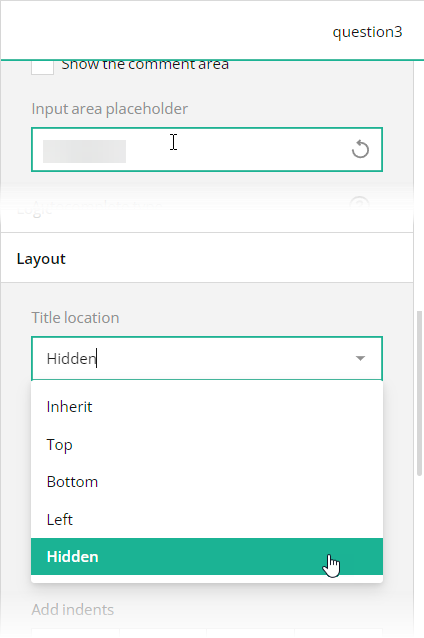
 Since the fill-in-the blanks form layout doesn't allow input fields to have labels, use placeholders to give users a hint of what they are expected to enter. In code, use the [`placeholder`](https://surveyjs.io/form-library/documentation/api-reference/text-entry-question-model#placeholder) property for this purpose. You should also hide titles for these questions by setting the [`titleLocation`](https://surveyjs.io/form-library/documentation/api-reference/text-entry-question-model#titleLocation) property to `"hidden"`
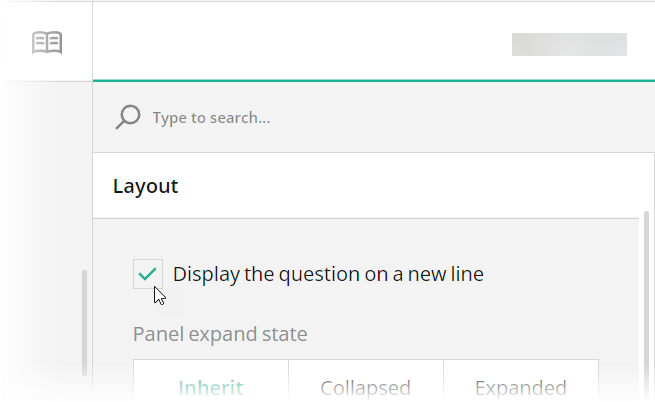
In Survey Creator, select the needed question on the design surface, open the **General** category in Property Grid, unselect the **Show the title and description** checkbox, and enter placeholder text in the **Placeholder text within input field** editor:
Since the fill-in-the blanks form layout doesn't allow input fields to have labels, use placeholders to give users a hint of what they are expected to enter. In code, use the [`placeholder`](https://surveyjs.io/form-library/documentation/api-reference/text-entry-question-model#placeholder) property for this purpose. You should also hide titles for these questions by setting the [`titleLocation`](https://surveyjs.io/form-library/documentation/api-reference/text-entry-question-model#titleLocation) property to `"hidden"`
In Survey Creator, select the needed question on the design surface, open the **General** category in Property Grid, unselect the **Show the title and description** checkbox, and enter placeholder text in the **Placeholder text within input field** editor:
 ## Add a Background Image
The sales contract form in this demo has a distinct background image. With Theme Editor by SurveyJS, you can add background images to your forms with ease. Open the **Themes** tab in Survey Creator and expand the **Background** category. Editors under the **Background image** title enable you to add a background image and configure its every aspect.
## Add a Background Image
The sales contract form in this demo has a distinct background image. With Theme Editor by SurveyJS, you can add background images to your forms with ease. Open the **Themes** tab in Survey Creator and expand the **Background** category. Editors under the **Background image** title enable you to add a background image and configure its every aspect.
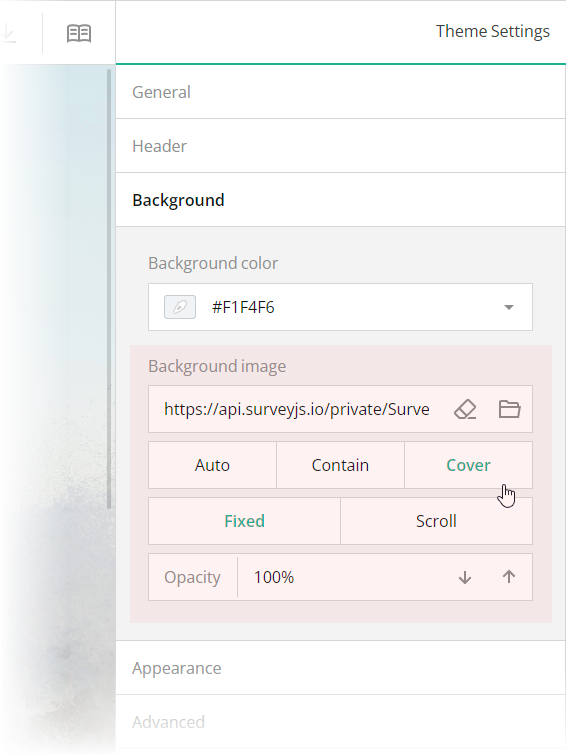 These editors are mapped to the following theme JSON schema properties, which you can find in the `theme.js` file:
- [`backgroundImage`](https://surveyjs.io/form-library/documentation/api-reference/itheme#backgroundImage): `string`
An image to display as form background. This property accepts a hyperlink or a data URL.
- [`backgroundImageFit`](https://surveyjs.io/form-library/documentation/api-reference/itheme#backgroundImageFit): `"auto"` | `"contain"` | `"cover"`
A string value that specifies how to resize the background image to fit it into its container. Refer to the description of the [`background-size`](https://developer.mozilla.org/en-US/docs/Web/CSS/background-size#values) CSS property values on MDN for detailed information on the possible values.
- [`backgroundImageAttachment`](https://surveyjs.io/form-library/documentation/api-reference/itheme#backgroundImageAttachment): `"fixed"` | `"scroll"`
A string value that specifies whether the background image is fixed in its position (as in this demo) or scrolled along with the survey.
- [`backgroundOpacity`](https://surveyjs.io/form-library/documentation/api-reference/itheme#backgroundOpacity): `number`
A value from 0 to 1 that specifies how transparent the background image should be: 0 makes the image completely transparent, and 1 makes it opaque. In Theme Editor, the opacity values are mapped to a scale from 0% to 100%.
## Configure the Form Header
The header of your form typically contains a form title, short description, and a logo of your company. To specify title and description texts, open the Designer tab and enter them in the **Survey title** and **Survey description** editors in the **General** category.
These editors are mapped to the following theme JSON schema properties, which you can find in the `theme.js` file:
- [`backgroundImage`](https://surveyjs.io/form-library/documentation/api-reference/itheme#backgroundImage): `string`
An image to display as form background. This property accepts a hyperlink or a data URL.
- [`backgroundImageFit`](https://surveyjs.io/form-library/documentation/api-reference/itheme#backgroundImageFit): `"auto"` | `"contain"` | `"cover"`
A string value that specifies how to resize the background image to fit it into its container. Refer to the description of the [`background-size`](https://developer.mozilla.org/en-US/docs/Web/CSS/background-size#values) CSS property values on MDN for detailed information on the possible values.
- [`backgroundImageAttachment`](https://surveyjs.io/form-library/documentation/api-reference/itheme#backgroundImageAttachment): `"fixed"` | `"scroll"`
A string value that specifies whether the background image is fixed in its position (as in this demo) or scrolled along with the survey.
- [`backgroundOpacity`](https://surveyjs.io/form-library/documentation/api-reference/itheme#backgroundOpacity): `number`
A value from 0 to 1 that specifies how transparent the background image should be: 0 makes the image completely transparent, and 1 makes it opaque. In Theme Editor, the opacity values are mapped to a scale from 0% to 100%.
## Configure the Form Header
The header of your form typically contains a form title, short description, and a logo of your company. To specify title and description texts, open the Designer tab and enter them in the **Survey title** and **Survey description** editors in the **General** category.
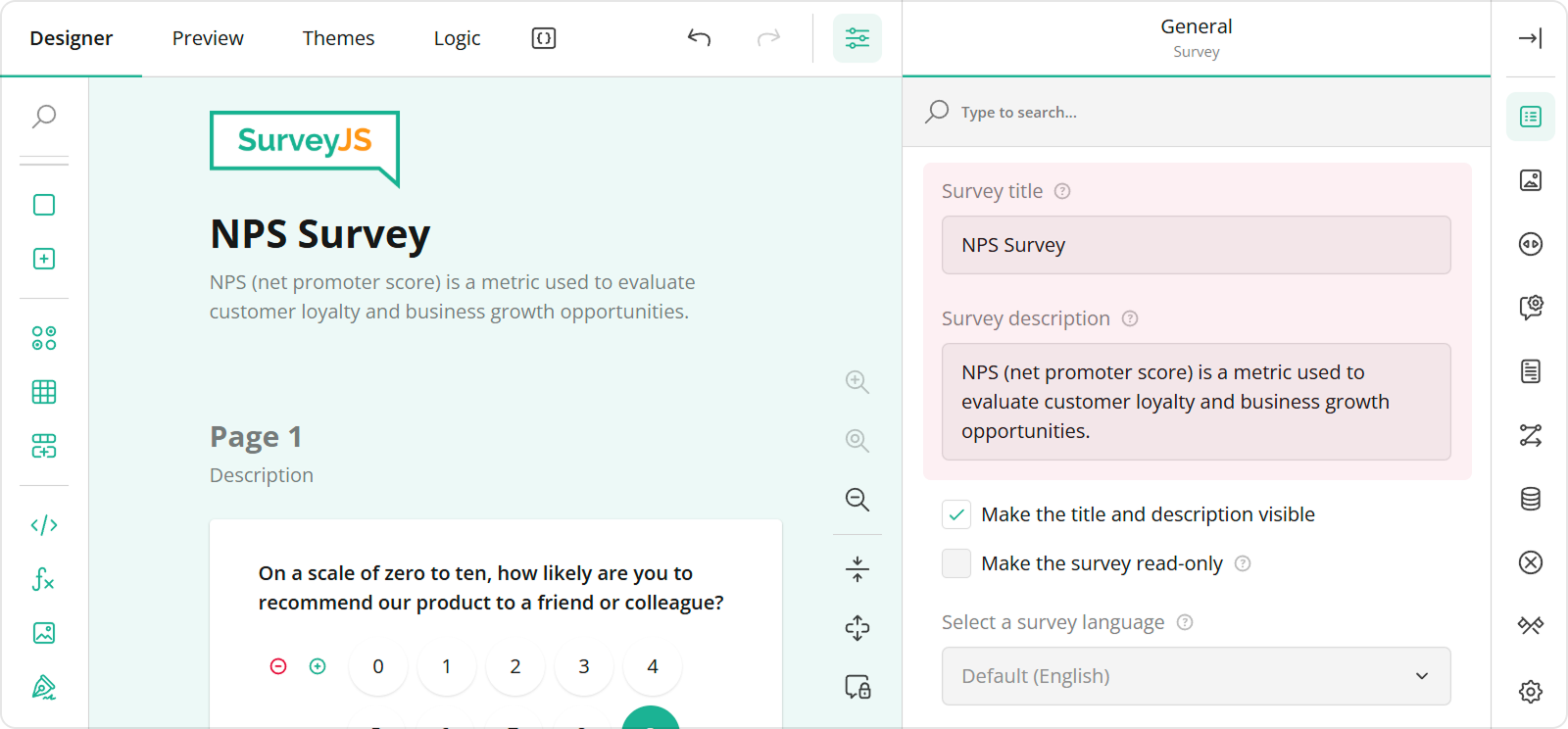 To configure a logo, use editors in the **Logo in the Survey Header** category.
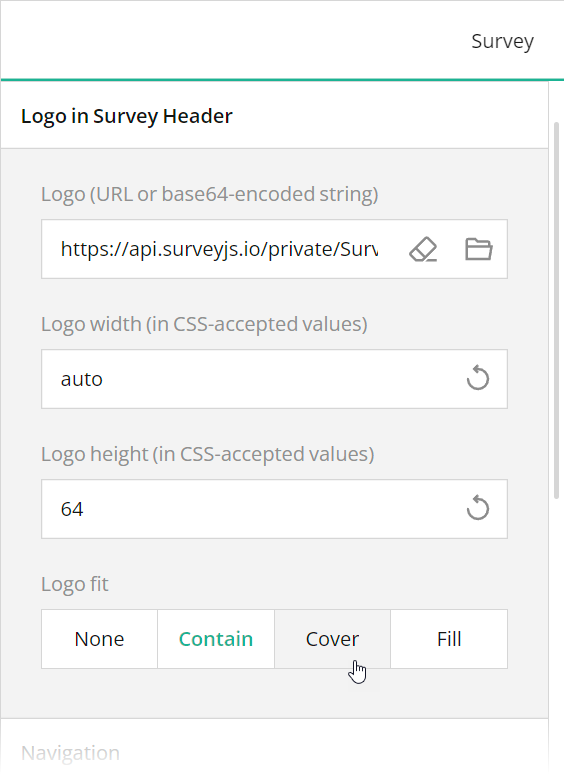 These editors are mapped to the following survey JSON properties:
- [`title`](https://surveyjs.io/form-library/documentation/api-reference/survey-data-model#title)
- [`description`](https://surveyjs.io/form-library/documentation/api-reference/survey-data-model#description)
- [`logo`](https://surveyjs.io/form-library/documentation/api-reference/survey-data-model#logo)
- [`logoWidth`](https://surveyjs.io/form-library/documentation/api-reference/survey-data-model#logoWidth)
- [`logoHeight`](https://surveyjs.io/form-library/documentation/api-reference/survey-data-model#logoHeight)
- [`logoFit`](https://surveyjs.io/form-library/documentation/api-reference/survey-data-model#logoFit)
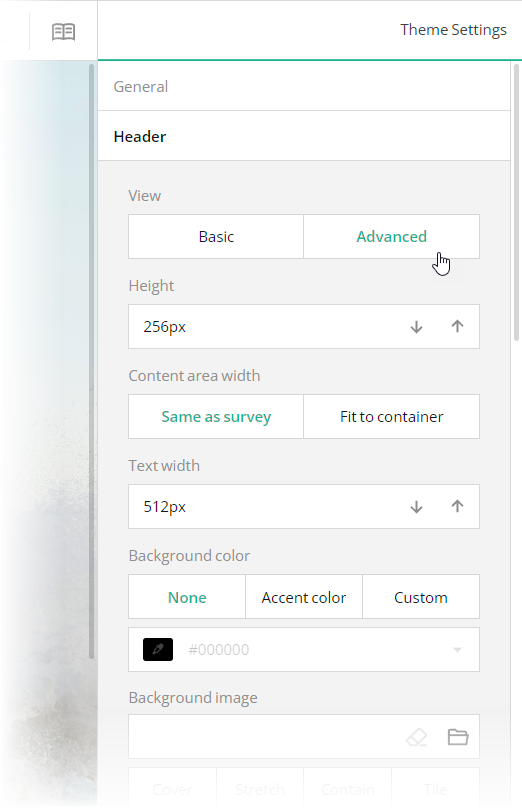
To configure the appearance of the form header, open the Themes tab and use editors in the **Header** category. Ensure that the **View** switch is set to "Advanced". All editors in the Header category, except font editors and View, are mapped to corresponding [`header`](https://surveyjs.io/form-library/documentation/api-reference/iheader) object properties in the theme JSON schema (see the `theme.js` file).
These editors are mapped to the following survey JSON properties:
- [`title`](https://surveyjs.io/form-library/documentation/api-reference/survey-data-model#title)
- [`description`](https://surveyjs.io/form-library/documentation/api-reference/survey-data-model#description)
- [`logo`](https://surveyjs.io/form-library/documentation/api-reference/survey-data-model#logo)
- [`logoWidth`](https://surveyjs.io/form-library/documentation/api-reference/survey-data-model#logoWidth)
- [`logoHeight`](https://surveyjs.io/form-library/documentation/api-reference/survey-data-model#logoHeight)
- [`logoFit`](https://surveyjs.io/form-library/documentation/api-reference/survey-data-model#logoFit)
To configure the appearance of the form header, open the Themes tab and use editors in the **Header** category. Ensure that the **View** switch is set to "Advanced". All editors in the Header category, except font editors and View, are mapped to corresponding [`header`](https://surveyjs.io/form-library/documentation/api-reference/iheader) object properties in the theme JSON schema (see the `theme.js` file).
 ## Add an E-Signature Field
A fill-in-the-blanks template is often used for different kinds of contract and agreement documents. These documents require a signature. SurveyJS Form Library ships with a [Signature](https://surveyjs.io/form-library/examples/signature-pad-widget-javascript/) question type, which allows users to leave their e-signature on your form.
To add a Signature question to your form using Survey Creator, simply drag this question from the Toolbox onto the design surface. For information on how to add a Signature question programmatically, refer to the Signature demo.
[Signature Demo](https://surveyjs.io/form-library/examples/signature-pad-widget-javascript/ (linkStyle))
## Files
### `public/index.html`
```html
```
### `src/SurveyComponent.jsx`
```js
import React from "react";
import { Model } from "survey-core";
import { Survey } from "survey-react-ui";
import "survey-core/survey-core.min.css";
import { themeJson } from "./theme";
import "./index.css";
import { json } from "./json";
function SurveyComponent() {
const survey = new Model(json);
survey.applyTheme(themeJson);
survey.onComplete.add((sender, options) => {
console.log(JSON.stringify(sender.data, null, 3));
});
return (
## Add an E-Signature Field
A fill-in-the-blanks template is often used for different kinds of contract and agreement documents. These documents require a signature. SurveyJS Form Library ships with a [Signature](https://surveyjs.io/form-library/examples/signature-pad-widget-javascript/) question type, which allows users to leave their e-signature on your form.
To add a Signature question to your form using Survey Creator, simply drag this question from the Toolbox onto the design surface. For information on how to add a Signature question programmatically, refer to the Signature demo.
[Signature Demo](https://surveyjs.io/form-library/examples/signature-pad-widget-javascript/ (linkStyle))
## Files
### `public/index.html`
```html
```
### `src/SurveyComponent.jsx`
```js
import React from "react";
import { Model } from "survey-core";
import { Survey } from "survey-react-ui";
import "survey-core/survey-core.min.css";
import { themeJson } from "./theme";
import "./index.css";
import { json } from "./json";
function SurveyComponent() {
const survey = new Model(json);
survey.applyTheme(themeJson);
survey.onComplete.add((sender, options) => {
console.log(JSON.stringify(sender.data, null, 3));
});
return (\nThis sales contract (hereinafter referred to as the \"Agreement\") is entered into as of\n
" }, { "type": "text", "name": "date", "width": "30%", "minWidth": "64px", "maxWidth": "", "defaultValueExpression": "today()", "inputType": "date", "placeholder": "date" }, { "type": "html", "name": "html2", "width": "144px", "minWidth": "144px", "maxWidth": "", "startWithNewLine": false, "html": "\nby and between\n
" }, { "type": "text", "name": "seller-name", "minWidth": "256px", "maxWidth": "", "startWithNewLine": false, "placeholder": "seller's full legal name" }, { "type": "html", "name": "html3", "width": "208px", "minWidth": "208px", "maxWidth": "", "html": "\nwith a mailing address of\n
" }, { "type": "text", "name": "seller-address-line-1", "minWidth": "64px", "maxWidth": "", "startWithNewLine": false, "placeholder": "seller's address" }, { "type": "text", "name": "seller-address-line-2", "width": "100%", "minWidth": "256px" }, { "type": "html", "name": "html4", "width": "344px", "minWidth": "344px", "maxWidth": "", "html": "\n(hereinafter referred to as the \"Seller\") and\n
" }, { "type": "text", "name": "buyer-name", "minWidth": "256px", "maxWidth": "", "startWithNewLine": false, "placeholder": "buyer's full legal name" }, { "type": "html", "name": "html5", "width": "208px", "minWidth": "208px", "maxWidth": "", "html": "\nwith a mailing address of\n
" }, { "type": "text", "name": "buyer-address-line-1", "minWidth": "64px", "maxWidth": "", "startWithNewLine": false, "placeholder": "buyer's address" }, { "type": "text", "name": "buyer-address-line-2", "width": "100%", "minWidth": "256px" }, { "type": "html", "name": "html6", "width": "100%", "minWidth": "256px", "html": "\n(hereinafter referred to as the \"Buyer\"), collectively referred to as the \"Parties\", both\nof whom agree to be bound by this Agreement.\n
" }, { "type": "html", "name": "html7", "width": "100%", "minWidth": "256px", "maxWidth": "", "html": "\nThe Seller is the manufacturer and distributor of the following product(s):\n
" }, { "type": "comment", "name": "goods", "width": "100%", "minWidth": "256px", "rows": 1, "placeholder": "detailed description of the goods", "autoGrow": true, "allowResize": false }, { "type": "html", "name": "html8", "width": "100%", "minWidth": "256px", "html": "\n(hereinafter referred to as the \"Goods\"). \n
\nThe Buyer wishes to purchase the\naforementioned product(s).\n
\nTHEREFORE, the Parties agree as follows:\n
\n1. Sale of Goods. The Seller shall make available for sale, and the Buyer shall purchase the Goods.\n
\n2. Delivery and Shipping.\n
\n3. Purchase Price and Payments. \n
" }, { "type": "html", "name": "html11", "width": "400px", "minWidth": "400px", "maxWidth": "", "html": "\nThe Seller agrees to sell the Goods to the Buyer for\n
" }, { "type": "text", "name": "price", "minWidth": "64px", "maxWidth": "", "startWithNewLine": false }, { "type": "html", "name": "html12", "width": "208px", "minWidth": "208px", "maxWidth": "", "startWithNewLine": false, "html": "\neuros.\n
" }, { "type": "html", "name": "html13", "width": "100%", "minWidth": "256px", "html": "\nThe Seller will provide an invoice to the Buyer at the time of delivery or pick-up.\n
" }, { "type": "html", "name": "html14", "width": "312px", "minWidth": "312px", "maxWidth": "", "html": "\nAll invoices must be paid, in full, within\n
" }, { "type": "text", "name": "terms", "minWidth": "64px", "maxWidth": "", "startWithNewLine": false }, { "type": "html", "name": "html15", "width": "272px", "minWidth": "272px", "maxWidth": "", "startWithNewLine": false, "html": "\ndays.\n
" }, { "type": "html", "name": "html16", "width": "240px", "minWidth": "240px", "maxWidth": "", "html": "\nAny balances not paid within\n
" }, { "type": "text", "name": "grace-period", "minWidth": "48px", "maxWidth": "", "startWithNewLine": false }, { "type": "html", "name": "html17", "width": "200px", "minWidth": "200px", "maxWidth": "", "startWithNewLine": false, "html": "\ndays will be subject to a\n
" }, { "type": "text", "name": "penalty-percentage", "minWidth": "48px", "maxWidth": "", "startWithNewLine": false }, { "type": "html", "name": "html18", "width": "208px", "minWidth": "208px", "maxWidth": "", "html": "\n% late payment penalty.\n
" }, { "type": "html", "name": "html19", "width": "100%", "minWidth": "256px", "html": "\n4. Inspection of Goods and Rejection. The Buyer is entitled to inspect the Goods promptly upon delivery or receipt. The Buyer shall have a reasonable period, not exceeding\n
" }, { "type": "text", "name": "inspect-period", "minWidth": "64px", "maxWidth": "" }, { "type": "html", "name": "html20", "width": "560px", "minWidth": "256px", "maxWidth": "", "startWithNewLine": false, "html": "\ndays, from the date of delivery to thoroughly inspect the Goods and\n
" }, { "type": "html", "name": "html21", "width": "208px", "minWidth": "208px", "maxWidth": "", "html": "\nensure they conform to the specifications and quality agreed upon in this Agreement. If the Goods do not meet the agreed-upon standards or are found to be damaged, the Buyer has the right to reject the Goods.\n
" }, { "type": "signaturepad", "name": "seller-signature", "minWidth": "256px", "signatureWidth": 480, "signatureHeight": 260, "signatureAutoScaleEnabled": true, "placeholder": "Seller signature" }, { "type": "signaturepad", "name": "buyer-signature", "minWidth": "256px", "startWithNewLine": false, "signatureWidth": 480, "signatureHeight": 260, "signatureAutoScaleEnabled": true, "placeholder": "Buyer signature" }, { "type": "html", "name": "html22", "html": "" } ], "questionTitleLocation": "hidden", "title": "Sales Contract" } ], "questionTitleLocation": "left", "questionErrorLocation": "bottom", "completeText": "Sign", "questionsOnPageMode": "singlePage", "widthMode": "static", "width": "55%" }; ``` ### `src/theme.js` ```js export const themeJson = { "backgroundImage": "https://api.surveyjs.io/private/Surveys/files?name=fff9c109-c767-467f-b0f7-f8f1e4f5b53a", "backgroundImageFit": "cover", "backgroundImageAttachment": "fixed", "backgroundOpacity": 1, "isPanelless": true, "cssVariables": { "--sjs-general-backcolor": "rgba(255, 255, 255, 1)", "--sjs-general-backcolor-dark": "rgba(248, 248, 248, 1)", "--sjs-general-backcolor-dim": "rgba(255, 255, 255, 1)", "--sjs-general-backcolor-dim-light": "rgba(249, 249, 249, 0)", "--sjs-general-backcolor-dim-dark": "rgba(243, 243, 243, 1)", "--sjs-general-forecolor": "rgba(0, 0, 0, 0.91)", "--sjs-general-forecolor-light": "rgba(0, 0, 0, 0.45)", "--sjs-primary-backcolor": "rgba(0, 0, 0, 1)", "--sjs-primary-backcolor-light": "rgba(0, 0, 0, 0.1)", "--sjs-primary-backcolor-dark": "rgba(-15, -15, -15, 1)", "--sjs-primary-forecolor": "rgba(255, 255, 255, 1)", "--sjs-primary-forecolor-light": "rgba(255, 255, 255, 0.25)", "--sjs-base-unit": "4px", "--sjs-corner-radius": "4px", "--sjs-shadow-small": "inset 0px 0px 0px 1px rgba(0, 0, 0, 0.2)", "--sjs-shadow-medium": "0px 2px 6px 0px rgba(0, 0, 0, 0.1)", "--sjs-shadow-large": "0px 8px 16px 0px rgba(0, 0, 0, 0.1)", "--sjs-shadow-inner": "0px 1px 0px 0px rgba(0, 0, 0, 0.2)", "--sjs-border-light": "rgba(0, 0, 0, 0.25)", "--sjs-border-default": "rgba(0, 0, 0, 0.25)", "--sjs-border-inside": "rgba(0, 0, 0, 0.16)", "--sjs-special-red": "rgba(229, 10, 62, 1)", "--sjs-special-red-light": "rgba(229, 10, 62, 0.1)", "--sjs-special-red-forecolor": "rgba(255, 255, 255, 1)", "--sjs-special-green": "rgba(25, 179, 148, 1)", "--sjs-special-green-light": "rgba(25, 179, 148, 0.1)", "--sjs-special-green-forecolor": "rgba(255, 255, 255, 1)", "--sjs-special-blue": "rgba(67, 127, 217, 1)", "--sjs-special-blue-light": "rgba(67, 127, 217, 0.1)", "--sjs-special-blue-forecolor": "rgba(255, 255, 255, 1)", "--sjs-special-yellow": "rgba(255, 152, 20, 1)", "--sjs-special-yellow-light": "rgba(255, 152, 20, 0.1)", "--sjs-special-yellow-forecolor": "rgba(255, 255, 255, 1)", "--sjs-editorpanel-backcolor": "rgba(249, 249, 249, 0)", "--sjs-editorpanel-hovercolor": "rgba(243, 243, 243, 1)", "--sjs-editorpanel-cornerRadius": "0px", "--sjs-font-size": "16px", "--font-family": "Open Sans", "--sjs-font-editorfont-color": "rgba(0, 0, 0, 1)", "--sjs-font-editorfont-placeholdercolor": "rgba(0, 0, 0, 0.35)", "--sjs-font-surveytitle-size": "24px", "--sjs-font-pagetitle-color": "rgba(0, 0, 0, 0.9)", "--sjs-font-questiontitle-color": "rgba(0, 0, 0, 0.9)", "--sjs-font-questiondescription-color": "rgba(0, 0, 0, 0.35)", "--sjs-header-backcolor": "transparent", "--sjs-font-headerdescription-color": "rgba(0, 0, 0, 0.9)", "--sjs-font-headerdescription-weight": "700", "--sjs-font-headerdescription-size": "14px", "--sjs-font-headertitle-weight": "700", "--sjs-font-pagetitle-weight": "700" }, "themeName": "default", "colorPalette": "light", "header": { "height": 176, "inheritWidthFrom": "survey", "textAreaWidth": 360, "overlapEnabled": false, "backgroundImageOpacity": 1, "backgroundImageFit": "cover", "logoPositionX": "right", "logoPositionY": "middle", "titlePositionX": "right", "titlePositionY": "middle", "descriptionPositionX": "right", "descriptionPositionY": "middle" }, "headerView": "advanced" }; ``` ### `package.json` ```json { "dependencies": { "react": "latest", "react-dom": "latest", "survey-core": "latest", "survey-react-ui": "latest" }, "devDependencies": { "react-scripts": "latest" } } ``` ## Other Frameworks - [Angular](https://surveyjs.io/form-library/examples/sales-contract-form-template-free/angular.md) - [Vue 3](https://surveyjs.io/form-library/examples/sales-contract-form-template-free/vue3js.md) - [jQuery](https://surveyjs.io/form-library/examples/sales-contract-form-template-free/jquery.md) - [Vanilla JS](https://surveyjs.io/form-library/examples/sales-contract-form-template-free/vanillajs.md)