---
title: Load a Survey from SurveyJS Demo Service
product: Form Library
description: SurveyJS Creator comes with a free full-scale demo for JavaScript and Azure storage that you can use to save your test forms. This example explains how to load a survey from the SurveyJS Azure storage and save test survey results on it.
framework: Angular
source: https://surveyjs.io/form-library/examples/save-survey-results-and-load-surveys-from-surveyjs-service/angular
index: https://surveyjs.io/form-library/examples/overview.md
---
# Load a Survey from SurveyJS Demo Service (Angular)
SurveyJS Demo Service allows you to create a test survey and store its JSON schema in a database that uses our Azure storage. You can also load surveys from the database, complete them, and send the results back to the service to ensure that your surveys work correctly. This demo shows how to configure SurveyJS Form Library so that it will work with the service.
> SurveyJS Demo Service is meant as a demonstration of what you can build with SurveyJS products. SurveyJS assumes no responsibility for any consequence of misusing or violating any sensitive data communicated via the service. In real-world applications, we strongly recommend storing survey results and JSON schemas [in your own database](https://surveyjs.io/form-library/documentation/handle-survey-results-store#store-survey-results-in-your-own-database).
Follow the steps below to start using SurveyJS Demo Service:
1. [Log in or register](https://surveyjs.io/Account/Login) on the SurveyJS website.
2. [Create a new survey](https://surveyjs.io/Service/MySurveys).
3. Copy the Survey ID and Post ID:
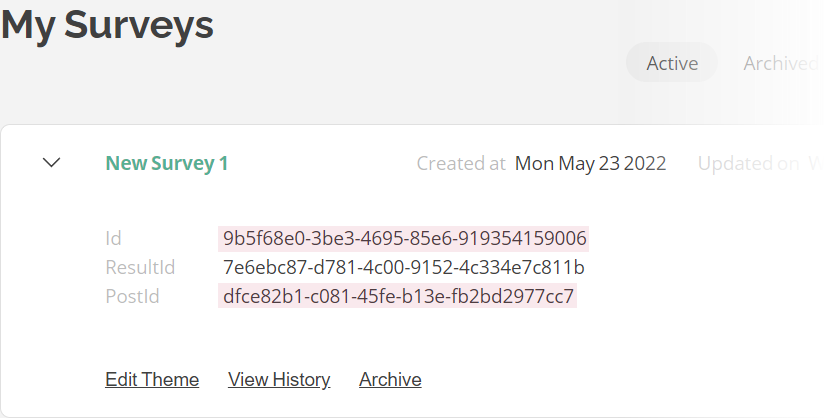 4. Assign the IDs to the `surveyId` and `surveyPostId` properties (see the `json.js` file).
5. Implement a function that loads a survey JSON schema with a specified `surveyId` and a function that sends survey results to the service with a specified `surveyPostId` (see the `loadSurvey()` and `postResults()` functions in code).
6. Call the `loadSurvey()` function after you instantiate a [`SurveyModel`](https://surveyjs.io/form-library/documentation/api-reference/survey-data-model) and call the `postResults()` function within the [`onComplete`](https://surveyjs.io/form-library/documentation/api-reference/survey-data-model#onComplete) event handler.
## Files
### `src/app/components/json.ts`
```ts
export const json = {
"surveyId": "5af48e08-a0a5-44a5-83f4-1c90e8e98de1",
"surveyPostId": "3ce10f8b-2d8a-4ca2-a110-2994b9e697a1"
};
```
### `src/app/components/survey.component.css`
```css
/* You can add your custom CSS here. */
```
### `src/app/components/survey.component.html`
```html
```
### `src/app/components/survey.component.ts`
```ts
import { Component, OnInit } from "@angular/core";
import { Model } from "survey-core";
import { json } from "./json";
import "./survey.component.css";
import "survey-core/survey-core.min.css";
const surveyServiceUrl = "https://api.surveyjs.io/public/v1/Survey";
const surveyIOMaxPostSize = 65536;
function loadSurvey(survey: Model, surveyId: string) {
survey.beginLoading();
fetch(surveyServiceUrl + "/getSurvey?surveyId=" + surveyId)
.then(response => {
if (response.ok) {
return response.json();
}
throw new Error("Could not load the survey JSON schema");
})
.then(data => {
survey.fromJSON(data);
survey.endLoading();
})
.catch(error => console.log(error));
}
function postResults(survey: Model, options: any, surveyPostId: string) {
const resultAsStr = JSON.stringify(survey.data);
// Display an error if survey results exceed the maximum post size
if (resultAsStr.length >= surveyIOMaxPostSize) {
options.showSaveError(survey.getLocalizationString("savingExceedSize"))
return;
}
// Display the "Saving..." message (pass a string value to display a custom message)
options.showSaveInProgress();
const dataObj = { postId: surveyPostId, surveyResult: resultAsStr };
const dataStr = JSON.stringify(dataObj);
const headers = new Headers({ "Content-Type": "application/json; charset=utf-8" });
fetch(surveyServiceUrl + "/post/", {
method: "POST",
body: dataStr,
headers: headers
}).then(response => {
if (!response.ok) {
throw new Error("Could not post the survey results");
}
// Display the "Success" message (pass a string value to display a custom message)
options.showSaveSuccess();
// Alternatively, you can clear all messages:
// options.clearSaveMessages();
}).catch(error => {
// Display the "Error" message (pass a string value to display a custom message)
options.showSaveError();
console.log(error);
});
}
@Component({
// tslint:disable-next-line:component-selector
selector: "component-survey",
templateUrl: "./survey.component.html",
styleUrls: ["./survey.component.css"]
})
export class SurveyComponent implements OnInit {
model: Model;
ngOnInit() {
const survey = new Model();
loadSurvey(survey, json.surveyId);
survey.onComplete.add((survey, options) => {
postResults(survey, options, json.surveyPostId)
});
this.model = survey;
}
}
```
### `src/app/components/theme.ts`
```ts
export const themeJson = {};
```
### `src/app/app.component.css`
```css
```
### `src/app/app.component.html`
```html
```
### `src/app/app.component.ts`
```ts
import { Component } from "@angular/core";
@Component({
selector: "app-root",
templateUrl: "./app.component.html",
styleUrls: ["./app.component.css"]
})
export class AppComponent {
title = "CodeSandbox";
}
```
### `src/app/app.module.ts`
```ts
import { BrowserModule } from "@angular/platform-browser";
import { NgModule } from "@angular/core";
import { AppComponent } from "./app.component";
import { SurveyModule } from "survey-angular-ui";
import { SurveyComponent } from "./components/survey.component";
@NgModule({
declarations: [AppComponent, SurveyComponent],
imports: [BrowserModule, SurveyModule],
providers: [],
bootstrap: [AppComponent]
})
export class AppModule { }
```
### `src/environments/environment.prod.ts`
```ts
export const environment = {
production: true
};
```
### `src/environments/environment.ts`
```ts
// The file contents for the current environment will overwrite these during build.
// The build system defaults to the dev environment which uses `environment.ts`, but if you do
// `ng build --env=prod` then `environment.prod.ts` will be used instead.
// The list of which env maps to which file can be found in `.angular-cli.json`.
export const environment = {
production: false
};
```
### `src/index.html`
```html
```
### `src/main.ts`
```ts
import { enableProdMode } from "@angular/core";
import { platformBrowserDynamic } from "@angular/platform-browser-dynamic";
import { AppModule } from "./app/app.module";
import { environment } from "./environments/environment";
if (environment.production) {
enableProdMode();
}
platformBrowserDynamic()
.bootstrapModule(AppModule)
.catch(err => console.log(err));
```
### `src/polyfills.ts`
```ts
/**
* This file includes polyfills needed by Angular and is loaded before the app.
* You can add your own extra polyfills to this file.
*
* This file is divided into 2 sections:
* 1. Browser polyfills. These are applied before loading ZoneJS and are sorted by browsers.
* 2. Application imports. Files imported after ZoneJS that should be loaded before your main
* file.
*
* The current setup is for so-called "evergreen" browsers; the last versions of browsers that
* automatically update themselves. This includes Safari >= 10, Chrome >= 55 (including Opera),
* Edge >= 13 on the desktop, and iOS 10 and Chrome on mobile.
*
* Learn more in https://angular.io/docs/ts/latest/guide/browser-support.html
*/
/***************************************************************************************************
* BROWSER POLYFILLS
*/
/** IE9, IE10 and IE11 requires all of the following polyfills. **/
// import 'core-js/es6/symbol';
// import 'core-js/es6/object';
// import 'core-js/es6/function';
// import 'core-js/es6/parse-int';
// import 'core-js/es6/parse-float';
// import 'core-js/es6/number';
// import 'core-js/es6/math';
// import 'core-js/es6/string';
// import 'core-js/es6/date';
// import 'core-js/es6/array';
// import 'core-js/es6/regexp';
// import 'core-js/es6/map';
// import 'core-js/es6/weak-map';
// import 'core-js/es6/set';
/** IE10 and IE11 requires the following for NgClass support on SVG elements */
// import 'classlist.js'; // Run `npm install classlist.js`.
/** IE10 and IE11 requires the following for the Reflect API. */
// import 'core-js/es6/reflect';
/** Evergreen browsers require these. **/
// Used for reflect-metadata in JIT. If you use AOT (and only Angular decorators), you can remove.
import "core-js/proposals/reflect-metadata";
/**
* Required to support Web Animations `@angular/platform-browser/animations`.
* Needed for: All but Chrome, Firefox and Opera. http://caniuse.com/#feat=web-animation
**/
// import 'web-animations-js'; // Run `npm install web-animations-js`.
/***************************************************************************************************
* Zone JS is required by default for Angular itself.
*/
import "zone.js/dist/zone"; // Included with Angular CLI.
/***************************************************************************************************
* APPLICATION IMPORTS
*/
```
### `src/styles.css`
```css
/* You can add your custom CSS here. */
```
### `src/typings.d.ts`
```ts
/* SystemJS module definition */
declare var module: NodeModule;
interface NodeModule {
id: string;
}
```
### `.angular-cli.json`
```json
{
"apps": [
{
"root": "src",
"outDir": "dist",
"assets": [ "assets", "favicon.ico" ],
"index": "index.html",
"main": "main.ts",
"polyfills": "polyfills.ts",
"prefix": "app",
"styles": [ "styles.css" ],
"scripts": [ ],
"environmentSource": "environments/environment.ts",
"environments": {
"dev": "environments/environment.ts",
"prod": "environments/environment.prod.ts"
}
}
]
}
```
### `_tsconfig.json`
```json
{
"compileOnSave": false,
"compilerOptions": {
"baseUrl": "./",
"outDir": "./dist/out-tsc",
"sourceMap": true,
"declaration": false,
"allowSyntheticDefaultImports": true,
"downlevelIteration": true,
"experimentalDecorators": true,
"moduleResolution": "node",
"importHelpers": true,
"resolveJsonModule": true,
"target": "es2015",
"module": "es2020",
"lib": [
"es2018",
"dom"
]
}
}
```
### `package.json`
```json
{
"name": "surveyjs-angular",
"scripts": {
"ng": "ng",
"start": "ng serve",
"build": "ng build --prod",
"test": "ng test",
"lint": "ng lint",
"e2e": "ng e2e"
},
"private": true,
"dependencies": {
"@angular/animations": "14.1.1",
"@angular/cdk": "14.1.1",
"@angular/common": "14.1.1",
"@angular/compiler": "14.1.1",
"@angular/core": "14.1.1",
"@angular/forms": "14.1.1",
"@angular/platform-browser": "14.1.1",
"@angular/platform-browser-dynamic": "14.1.1",
"@angular/router": "14.1.1",
"core-js": "3.6.4",
"rxjs": "6.5.4",
"survey-core": "latest",
"survey-angular-ui": "latest",
"tslib": "1.13.0",
"zone.js": "0.11.7"
},
"devDependencies": {
"@angular/cli": "1.6.6",
"@angular/compiler-cli": "^5.2.0",
"@angular/language-service": "^5.2.0",
"@types/core-js": "0.9.46",
"@types/jasmine": "~2.8.3",
"@types/jasminewd2": "~2.0.2",
"@types/node": "~6.0.60",
"codelyzer": "^4.0.1",
"jasmine-core": "~2.8.0",
"jasmine-spec-reporter": "~4.2.1",
"karma": "~2.0.0",
"karma-chrome-launcher": "~2.2.0",
"karma-coverage-istanbul-reporter": "^1.2.1",
"karma-jasmine": "~1.1.0",
"karma-jasmine-html-reporter": "^0.2.2",
"protractor": "~5.1.2",
"ts-node": "~4.1.0",
"tslint": "~5.9.1",
"typescript": "3.9.7"
},
"keywords": [ "angular", "surveyjs" ],
"description": "SurveyJS-Angular example project"
}
```
## Other Frameworks
- [React](https://surveyjs.io/form-library/examples/save-survey-results-and-load-surveys-from-surveyjs-service/reactjs.md)
- [Vue 3](https://surveyjs.io/form-library/examples/save-survey-results-and-load-surveys-from-surveyjs-service/vue3js.md)
- [jQuery](https://surveyjs.io/form-library/examples/save-survey-results-and-load-surveys-from-surveyjs-service/jquery.md)
- [Vanilla JS](https://surveyjs.io/form-library/examples/save-survey-results-and-load-surveys-from-surveyjs-service/vanillajs.md)
4. Assign the IDs to the `surveyId` and `surveyPostId` properties (see the `json.js` file).
5. Implement a function that loads a survey JSON schema with a specified `surveyId` and a function that sends survey results to the service with a specified `surveyPostId` (see the `loadSurvey()` and `postResults()` functions in code).
6. Call the `loadSurvey()` function after you instantiate a [`SurveyModel`](https://surveyjs.io/form-library/documentation/api-reference/survey-data-model) and call the `postResults()` function within the [`onComplete`](https://surveyjs.io/form-library/documentation/api-reference/survey-data-model#onComplete) event handler.
## Files
### `src/app/components/json.ts`
```ts
export const json = {
"surveyId": "5af48e08-a0a5-44a5-83f4-1c90e8e98de1",
"surveyPostId": "3ce10f8b-2d8a-4ca2-a110-2994b9e697a1"
};
```
### `src/app/components/survey.component.css`
```css
/* You can add your custom CSS here. */
```
### `src/app/components/survey.component.html`
```html
```
### `src/app/components/survey.component.ts`
```ts
import { Component, OnInit } from "@angular/core";
import { Model } from "survey-core";
import { json } from "./json";
import "./survey.component.css";
import "survey-core/survey-core.min.css";
const surveyServiceUrl = "https://api.surveyjs.io/public/v1/Survey";
const surveyIOMaxPostSize = 65536;
function loadSurvey(survey: Model, surveyId: string) {
survey.beginLoading();
fetch(surveyServiceUrl + "/getSurvey?surveyId=" + surveyId)
.then(response => {
if (response.ok) {
return response.json();
}
throw new Error("Could not load the survey JSON schema");
})
.then(data => {
survey.fromJSON(data);
survey.endLoading();
})
.catch(error => console.log(error));
}
function postResults(survey: Model, options: any, surveyPostId: string) {
const resultAsStr = JSON.stringify(survey.data);
// Display an error if survey results exceed the maximum post size
if (resultAsStr.length >= surveyIOMaxPostSize) {
options.showSaveError(survey.getLocalizationString("savingExceedSize"))
return;
}
// Display the "Saving..." message (pass a string value to display a custom message)
options.showSaveInProgress();
const dataObj = { postId: surveyPostId, surveyResult: resultAsStr };
const dataStr = JSON.stringify(dataObj);
const headers = new Headers({ "Content-Type": "application/json; charset=utf-8" });
fetch(surveyServiceUrl + "/post/", {
method: "POST",
body: dataStr,
headers: headers
}).then(response => {
if (!response.ok) {
throw new Error("Could not post the survey results");
}
// Display the "Success" message (pass a string value to display a custom message)
options.showSaveSuccess();
// Alternatively, you can clear all messages:
// options.clearSaveMessages();
}).catch(error => {
// Display the "Error" message (pass a string value to display a custom message)
options.showSaveError();
console.log(error);
});
}
@Component({
// tslint:disable-next-line:component-selector
selector: "component-survey",
templateUrl: "./survey.component.html",
styleUrls: ["./survey.component.css"]
})
export class SurveyComponent implements OnInit {
model: Model;
ngOnInit() {
const survey = new Model();
loadSurvey(survey, json.surveyId);
survey.onComplete.add((survey, options) => {
postResults(survey, options, json.surveyPostId)
});
this.model = survey;
}
}
```
### `src/app/components/theme.ts`
```ts
export const themeJson = {};
```
### `src/app/app.component.css`
```css
```
### `src/app/app.component.html`
```html
```
### `src/app/app.component.ts`
```ts
import { Component } from "@angular/core";
@Component({
selector: "app-root",
templateUrl: "./app.component.html",
styleUrls: ["./app.component.css"]
})
export class AppComponent {
title = "CodeSandbox";
}
```
### `src/app/app.module.ts`
```ts
import { BrowserModule } from "@angular/platform-browser";
import { NgModule } from "@angular/core";
import { AppComponent } from "./app.component";
import { SurveyModule } from "survey-angular-ui";
import { SurveyComponent } from "./components/survey.component";
@NgModule({
declarations: [AppComponent, SurveyComponent],
imports: [BrowserModule, SurveyModule],
providers: [],
bootstrap: [AppComponent]
})
export class AppModule { }
```
### `src/environments/environment.prod.ts`
```ts
export const environment = {
production: true
};
```
### `src/environments/environment.ts`
```ts
// The file contents for the current environment will overwrite these during build.
// The build system defaults to the dev environment which uses `environment.ts`, but if you do
// `ng build --env=prod` then `environment.prod.ts` will be used instead.
// The list of which env maps to which file can be found in `.angular-cli.json`.
export const environment = {
production: false
};
```
### `src/index.html`
```html
```
### `src/main.ts`
```ts
import { enableProdMode } from "@angular/core";
import { platformBrowserDynamic } from "@angular/platform-browser-dynamic";
import { AppModule } from "./app/app.module";
import { environment } from "./environments/environment";
if (environment.production) {
enableProdMode();
}
platformBrowserDynamic()
.bootstrapModule(AppModule)
.catch(err => console.log(err));
```
### `src/polyfills.ts`
```ts
/**
* This file includes polyfills needed by Angular and is loaded before the app.
* You can add your own extra polyfills to this file.
*
* This file is divided into 2 sections:
* 1. Browser polyfills. These are applied before loading ZoneJS and are sorted by browsers.
* 2. Application imports. Files imported after ZoneJS that should be loaded before your main
* file.
*
* The current setup is for so-called "evergreen" browsers; the last versions of browsers that
* automatically update themselves. This includes Safari >= 10, Chrome >= 55 (including Opera),
* Edge >= 13 on the desktop, and iOS 10 and Chrome on mobile.
*
* Learn more in https://angular.io/docs/ts/latest/guide/browser-support.html
*/
/***************************************************************************************************
* BROWSER POLYFILLS
*/
/** IE9, IE10 and IE11 requires all of the following polyfills. **/
// import 'core-js/es6/symbol';
// import 'core-js/es6/object';
// import 'core-js/es6/function';
// import 'core-js/es6/parse-int';
// import 'core-js/es6/parse-float';
// import 'core-js/es6/number';
// import 'core-js/es6/math';
// import 'core-js/es6/string';
// import 'core-js/es6/date';
// import 'core-js/es6/array';
// import 'core-js/es6/regexp';
// import 'core-js/es6/map';
// import 'core-js/es6/weak-map';
// import 'core-js/es6/set';
/** IE10 and IE11 requires the following for NgClass support on SVG elements */
// import 'classlist.js'; // Run `npm install classlist.js`.
/** IE10 and IE11 requires the following for the Reflect API. */
// import 'core-js/es6/reflect';
/** Evergreen browsers require these. **/
// Used for reflect-metadata in JIT. If you use AOT (and only Angular decorators), you can remove.
import "core-js/proposals/reflect-metadata";
/**
* Required to support Web Animations `@angular/platform-browser/animations`.
* Needed for: All but Chrome, Firefox and Opera. http://caniuse.com/#feat=web-animation
**/
// import 'web-animations-js'; // Run `npm install web-animations-js`.
/***************************************************************************************************
* Zone JS is required by default for Angular itself.
*/
import "zone.js/dist/zone"; // Included with Angular CLI.
/***************************************************************************************************
* APPLICATION IMPORTS
*/
```
### `src/styles.css`
```css
/* You can add your custom CSS here. */
```
### `src/typings.d.ts`
```ts
/* SystemJS module definition */
declare var module: NodeModule;
interface NodeModule {
id: string;
}
```
### `.angular-cli.json`
```json
{
"apps": [
{
"root": "src",
"outDir": "dist",
"assets": [ "assets", "favicon.ico" ],
"index": "index.html",
"main": "main.ts",
"polyfills": "polyfills.ts",
"prefix": "app",
"styles": [ "styles.css" ],
"scripts": [ ],
"environmentSource": "environments/environment.ts",
"environments": {
"dev": "environments/environment.ts",
"prod": "environments/environment.prod.ts"
}
}
]
}
```
### `_tsconfig.json`
```json
{
"compileOnSave": false,
"compilerOptions": {
"baseUrl": "./",
"outDir": "./dist/out-tsc",
"sourceMap": true,
"declaration": false,
"allowSyntheticDefaultImports": true,
"downlevelIteration": true,
"experimentalDecorators": true,
"moduleResolution": "node",
"importHelpers": true,
"resolveJsonModule": true,
"target": "es2015",
"module": "es2020",
"lib": [
"es2018",
"dom"
]
}
}
```
### `package.json`
```json
{
"name": "surveyjs-angular",
"scripts": {
"ng": "ng",
"start": "ng serve",
"build": "ng build --prod",
"test": "ng test",
"lint": "ng lint",
"e2e": "ng e2e"
},
"private": true,
"dependencies": {
"@angular/animations": "14.1.1",
"@angular/cdk": "14.1.1",
"@angular/common": "14.1.1",
"@angular/compiler": "14.1.1",
"@angular/core": "14.1.1",
"@angular/forms": "14.1.1",
"@angular/platform-browser": "14.1.1",
"@angular/platform-browser-dynamic": "14.1.1",
"@angular/router": "14.1.1",
"core-js": "3.6.4",
"rxjs": "6.5.4",
"survey-core": "latest",
"survey-angular-ui": "latest",
"tslib": "1.13.0",
"zone.js": "0.11.7"
},
"devDependencies": {
"@angular/cli": "1.6.6",
"@angular/compiler-cli": "^5.2.0",
"@angular/language-service": "^5.2.0",
"@types/core-js": "0.9.46",
"@types/jasmine": "~2.8.3",
"@types/jasminewd2": "~2.0.2",
"@types/node": "~6.0.60",
"codelyzer": "^4.0.1",
"jasmine-core": "~2.8.0",
"jasmine-spec-reporter": "~4.2.1",
"karma": "~2.0.0",
"karma-chrome-launcher": "~2.2.0",
"karma-coverage-istanbul-reporter": "^1.2.1",
"karma-jasmine": "~1.1.0",
"karma-jasmine-html-reporter": "^0.2.2",
"protractor": "~5.1.2",
"ts-node": "~4.1.0",
"tslint": "~5.9.1",
"typescript": "3.9.7"
},
"keywords": [ "angular", "surveyjs" ],
"description": "SurveyJS-Angular example project"
}
```
## Other Frameworks
- [React](https://surveyjs.io/form-library/examples/save-survey-results-and-load-surveys-from-surveyjs-service/reactjs.md)
- [Vue 3](https://surveyjs.io/form-library/examples/save-survey-results-and-load-surveys-from-surveyjs-service/vue3js.md)
- [jQuery](https://surveyjs.io/form-library/examples/save-survey-results-and-load-surveys-from-surveyjs-service/jquery.md)
- [Vanilla JS](https://surveyjs.io/form-library/examples/save-survey-results-and-load-surveys-from-surveyjs-service/vanillajs.md)