---
title: Load a Survey from SurveyJS Demo Service
product: Form Library
description: SurveyJS Creator comes with a free full-scale demo for JavaScript and Azure storage that you can use to save your test forms. This example explains how to load a survey from the SurveyJS Azure storage and save test survey results on it.
framework: React
source: https://surveyjs.io/form-library/examples/save-survey-results-and-load-surveys-from-surveyjs-service/reactjs
index: https://surveyjs.io/form-library/examples/overview.md
---
# Load a Survey from SurveyJS Demo Service (React)
SurveyJS Demo Service allows you to create a test survey and store its JSON schema in a database that uses our Azure storage. You can also load surveys from the database, complete them, and send the results back to the service to ensure that your surveys work correctly. This demo shows how to configure SurveyJS Form Library so that it will work with the service.
> SurveyJS Demo Service is meant as a demonstration of what you can build with SurveyJS products. SurveyJS assumes no responsibility for any consequence of misusing or violating any sensitive data communicated via the service. In real-world applications, we strongly recommend storing survey results and JSON schemas [in your own database](https://surveyjs.io/form-library/documentation/handle-survey-results-store#store-survey-results-in-your-own-database).
Follow the steps below to start using SurveyJS Demo Service:
1. [Log in or register](https://surveyjs.io/Account/Login) on the SurveyJS website.
2. [Create a new survey](https://surveyjs.io/Service/MySurveys).
3. Copy the Survey ID and Post ID:
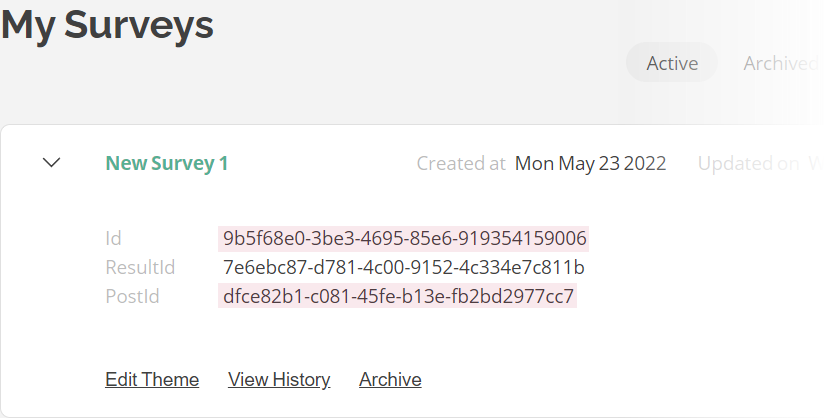 4. Assign the IDs to the `surveyId` and `surveyPostId` properties (see the `json.js` file).
5. Implement a function that loads a survey JSON schema with a specified `surveyId` and a function that sends survey results to the service with a specified `surveyPostId` (see the `loadSurvey()` and `postResults()` functions in code).
6. Call the `loadSurvey()` function after you instantiate a [`SurveyModel`](https://surveyjs.io/form-library/documentation/api-reference/survey-data-model) and call the `postResults()` function within the [`onComplete`](https://surveyjs.io/form-library/documentation/api-reference/survey-data-model#onComplete) event handler.
## Files
### `public/index.html`
```html
```
### `src/SurveyComponent.jsx`
```js
import React from "react";
import { Model } from "survey-core";
import { Survey } from "survey-react-ui";
import "survey-core/survey-core.min.css";
import "./index.css";
import { json } from "./json";
const surveyServiceUrl = "https://api.surveyjs.io/public/v1/Survey";
const surveyIOMaxPostSize = 65536;
function loadSurvey(survey, surveyId) {
survey.beginLoading();
fetch(surveyServiceUrl + "/getSurvey?surveyId=" + surveyId)
.then(response => {
if (response.ok) {
return response.json();
}
throw new Error("Could not load the survey JSON schema");
})
.then(data => {
survey.fromJSON(data);
survey.endLoading();
})
.catch(error => console.log(error));
}
function postResults(survey, options, surveyPostId) {
const resultAsStr = JSON.stringify(survey.data);
// Display an error if survey results exceed the maximum post size
if (resultAsStr.length >= surveyIOMaxPostSize) {
options.showSaveError(survey.getLocalizationString("savingExceedSize"))
return;
}
// Display the "Saving..." message (pass a string value to display a custom message)
options.showSaveInProgress();
const dataObj = { postId: surveyPostId, surveyResult: resultAsStr };
const dataStr = JSON.stringify(dataObj);
const headers = new Headers({ "Content-Type": "application/json; charset=utf-8" });
fetch(surveyServiceUrl + "/post/", {
method: "POST",
body: dataStr,
headers: headers
}).then(response => {
if (!response.ok) {
throw new Error("Could not post the survey results");
}
// Display the "Success" message (pass a string value to display a custom message)
options.showSaveSuccess();
// Alternatively, you can clear all messages:
// options.clearSaveMessages();
}).catch(error => {
// Display the "Error" message (pass a string value to display a custom message)
options.showSaveError();
console.log(error);
});
}
function SurveyComponent() {
const survey = new Model();
survey.onComplete.add((sender, options) => {
console.log(JSON.stringify(sender.data, null, 3));
});
loadSurvey(survey, json.surveyId);
survey.onComplete.add((survey, options) => {
postResults(survey, options, json.surveyPostId)
});
return ();
}
export default SurveyComponent;
```
### `src/index.css`
```css
/* You can add your custom CSS here. */
```
### `src/index.js`
```js
import React from "react";
import { createRoot } from "react-dom/client";
import SurveyComponent from "./SurveyComponent";
const root = createRoot(document.getElementById("surveyElement"));
root.render();
```
### `src/json.js`
```js
export const json = {
"surveyId": "5af48e08-a0a5-44a5-83f4-1c90e8e98de1",
"surveyPostId": "3ce10f8b-2d8a-4ca2-a110-2994b9e697a1"
};
```
### `src/theme.js`
```js
export const themeJson = {};
```
### `package.json`
```json
{
"dependencies": {
"react": "latest",
"react-dom": "latest",
"survey-core": "latest",
"survey-react-ui": "latest"
},
"devDependencies": {
"react-scripts": "latest"
}
}
```
## Other Frameworks
- [Angular](https://surveyjs.io/form-library/examples/save-survey-results-and-load-surveys-from-surveyjs-service/angular.md)
- [Vue 3](https://surveyjs.io/form-library/examples/save-survey-results-and-load-surveys-from-surveyjs-service/vue3js.md)
- [jQuery](https://surveyjs.io/form-library/examples/save-survey-results-and-load-surveys-from-surveyjs-service/jquery.md)
- [Vanilla JS](https://surveyjs.io/form-library/examples/save-survey-results-and-load-surveys-from-surveyjs-service/vanillajs.md)
4. Assign the IDs to the `surveyId` and `surveyPostId` properties (see the `json.js` file).
5. Implement a function that loads a survey JSON schema with a specified `surveyId` and a function that sends survey results to the service with a specified `surveyPostId` (see the `loadSurvey()` and `postResults()` functions in code).
6. Call the `loadSurvey()` function after you instantiate a [`SurveyModel`](https://surveyjs.io/form-library/documentation/api-reference/survey-data-model) and call the `postResults()` function within the [`onComplete`](https://surveyjs.io/form-library/documentation/api-reference/survey-data-model#onComplete) event handler.
## Files
### `public/index.html`
```html
```
### `src/SurveyComponent.jsx`
```js
import React from "react";
import { Model } from "survey-core";
import { Survey } from "survey-react-ui";
import "survey-core/survey-core.min.css";
import "./index.css";
import { json } from "./json";
const surveyServiceUrl = "https://api.surveyjs.io/public/v1/Survey";
const surveyIOMaxPostSize = 65536;
function loadSurvey(survey, surveyId) {
survey.beginLoading();
fetch(surveyServiceUrl + "/getSurvey?surveyId=" + surveyId)
.then(response => {
if (response.ok) {
return response.json();
}
throw new Error("Could not load the survey JSON schema");
})
.then(data => {
survey.fromJSON(data);
survey.endLoading();
})
.catch(error => console.log(error));
}
function postResults(survey, options, surveyPostId) {
const resultAsStr = JSON.stringify(survey.data);
// Display an error if survey results exceed the maximum post size
if (resultAsStr.length >= surveyIOMaxPostSize) {
options.showSaveError(survey.getLocalizationString("savingExceedSize"))
return;
}
// Display the "Saving..." message (pass a string value to display a custom message)
options.showSaveInProgress();
const dataObj = { postId: surveyPostId, surveyResult: resultAsStr };
const dataStr = JSON.stringify(dataObj);
const headers = new Headers({ "Content-Type": "application/json; charset=utf-8" });
fetch(surveyServiceUrl + "/post/", {
method: "POST",
body: dataStr,
headers: headers
}).then(response => {
if (!response.ok) {
throw new Error("Could not post the survey results");
}
// Display the "Success" message (pass a string value to display a custom message)
options.showSaveSuccess();
// Alternatively, you can clear all messages:
// options.clearSaveMessages();
}).catch(error => {
// Display the "Error" message (pass a string value to display a custom message)
options.showSaveError();
console.log(error);
});
}
function SurveyComponent() {
const survey = new Model();
survey.onComplete.add((sender, options) => {
console.log(JSON.stringify(sender.data, null, 3));
});
loadSurvey(survey, json.surveyId);
survey.onComplete.add((survey, options) => {
postResults(survey, options, json.surveyPostId)
});
return ();
}
export default SurveyComponent;
```
### `src/index.css`
```css
/* You can add your custom CSS here. */
```
### `src/index.js`
```js
import React from "react";
import { createRoot } from "react-dom/client";
import SurveyComponent from "./SurveyComponent";
const root = createRoot(document.getElementById("surveyElement"));
root.render();
```
### `src/json.js`
```js
export const json = {
"surveyId": "5af48e08-a0a5-44a5-83f4-1c90e8e98de1",
"surveyPostId": "3ce10f8b-2d8a-4ca2-a110-2994b9e697a1"
};
```
### `src/theme.js`
```js
export const themeJson = {};
```
### `package.json`
```json
{
"dependencies": {
"react": "latest",
"react-dom": "latest",
"survey-core": "latest",
"survey-react-ui": "latest"
},
"devDependencies": {
"react-scripts": "latest"
}
}
```
## Other Frameworks
- [Angular](https://surveyjs.io/form-library/examples/save-survey-results-and-load-surveys-from-surveyjs-service/angular.md)
- [Vue 3](https://surveyjs.io/form-library/examples/save-survey-results-and-load-surveys-from-surveyjs-service/vue3js.md)
- [jQuery](https://surveyjs.io/form-library/examples/save-survey-results-and-load-surveys-from-surveyjs-service/jquery.md)
- [Vanilla JS](https://surveyjs.io/form-library/examples/save-survey-results-and-load-surveys-from-surveyjs-service/vanillajs.md)