SurveyJS v3.2.2
Released: October 20, 2026
SurveyJS v3.2.2 adds paging in Multi-Select Matrix, Dynamic Matrix, and Dynamic Panel questions, letter shortcuts for selecting choices, and dependency tracking for calculated values. This release also improves theme adapter integration and introduces custom histogram intervals in Dashboard.
For an overview of the major features introduced in SurveyJS v3.0, see:
[Theme Adapters] Improved Design System Integration
The new setupThemeAdapter() function complements theme adapter stylesheets by aligning form layout defaults and Survey Creator's Property Grid options with Bootstrap, MUI, or shadcn/ui.
Import the matching adapter stylesheet and call the function before creating a survey or a Survey Creator instance:
import { setupThemeAdapter } from "survey-core";
import "survey-core/survey-core.css";
import "survey-core/themes/adapters/mui.css";

setupThemeAdapter("mui"); // or "bootstrap" | "shadcn"
Explicit settings in existing survey definitions take precedence over these defaults.
Paging in Multi-Select Matrix, Dynamic Matrix, and Dynamic Panel
Multi-Select Matrix, Dynamic Matrix, and Dynamic Panel questions now support paging. Only the rows or panels on the current data page are rendered, so respondents can work with long lists without scrolling through every item. Navigation controls below the question let respondents switch between data pages.
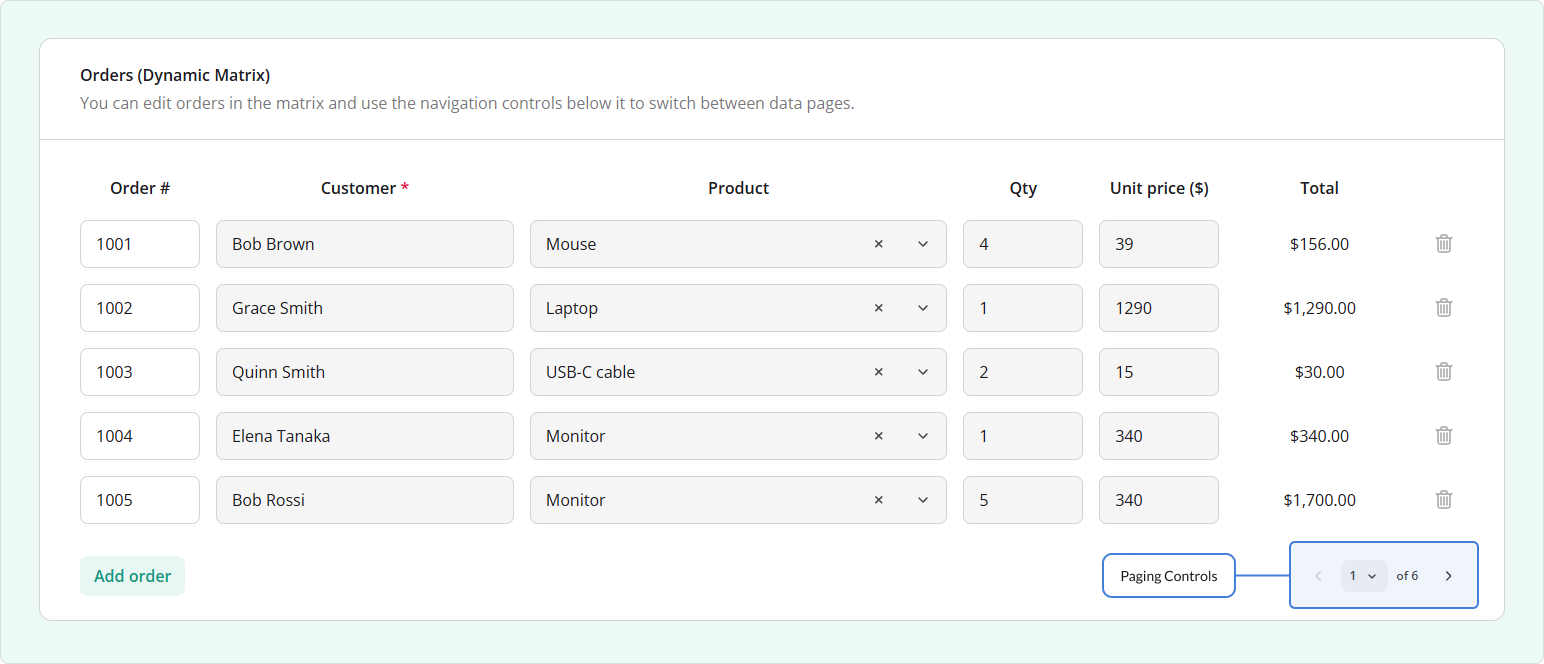
To enable paging, set the question's pageSize property to the number of rows or panels per data page. The default value, 0, disables paging.
{
  "elements": [
    {
      "type": "matrixdynamic",
      "name": "items",
      "pageSize": 5,
      "rowCount": 10,
      "columns": [
        {
          "name": "product",
          "title": "Product",
          "cellType": "text"
        }
      ]
    }
  ]
}
The effective page size is limited by the global settings.maxPageSize property. Set it to 0 if you want to remove this limit.
In addition, pageIndex lets you read or change the current data page index, while pageCount gives you access to the total number of data pages.
In Survey Creator's Property Grid, the page size setting appears under General as Rows per page or Entries per page.
Keyboard Input Enhancements
Letter Shortcuts for Selecting Choices
Radio Button Group, Checkboxes, and Image Picker questions now support optional letter shortcuts (A, B, ..., Z, AA, ...). Typing a code while the question has focus selects the corresponding choice or toggles it in questions that allow multiple selections.
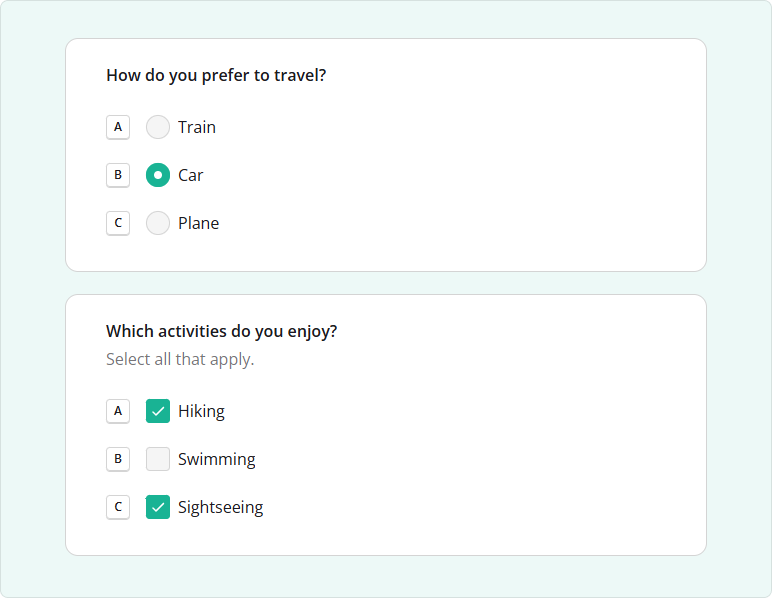
To enable shortcuts in your survey JSON schema, set the survey-level choiceShortcutsEnabled property to true. Questions inherit this setting unless they specify their own choiceShortcutsEnabled value.
In the example below, transport inherits the survey-level setting, while activities disables shortcuts explicitly:
{
  "choiceShortcutsEnabled": true,
  "pages": [
    {
      "name": "preferences",
      "elements": [
        {
          "type": "radiogroup",
          "name": "transport",
          "title": "How do you prefer to travel?",
          "choices": ["Train", "Car", "Plane"]
        },
        {
          "type": "checkbox",
          "name": "activities",
          "title": "Which activities do you enjoy?",
          "choiceShortcutsEnabled": false,
          "choices": ["Hiking", "Swimming", "Sightseeing"]
        }
      ]
    }
  ]
}
You can also enable or disable shortcuts in JavaScript:
survey.choiceShortcutsEnabled = true; // Enable shortcuts survey-wide
// Disable shortcuts for the `activities` question
survey.getQuestionByName("activities").choiceShortcutsEnabled = false;
Press Enter to Advance
The auto-advance feature now handles keyboard input as follows:
- For Checkboxes, Multi-Select Dropdown (Tag Box), Image Picker with
multiSelect: true, Ranking, Yes/No (Boolean) rendered as a checkbox, and Long Text, respondents must press Enter after answering to trigger auto-advance. - For Radio Button Group and single-select Image Picker, a mouse or touch selection triggers auto-advance. After a keyboard selection, respondents must press Enter to trigger auto-advance.
Example: Press Enter to Advance
Dependency Tracking for Calculated Values
SurveyJS v3.2.2 introduces a global calculatedValueTrackDependencies property that controls when calculated values are recalculated.
By default, this setting is true, and calculated values recalculate only in the following cases:
- During the initial evaluation
- When all expressions are re-evaluated
- When the calculated value's expression or owner changes
- When a value or variable referenced in the expression changes
This behavior can improve performance in surveys that contain many calculated values.
To recalculate on every survey value change, set calculatedValueTrackDependencies to false:
import { settings } from "survey-core";

settings.calculatedValueTrackDependencies = false;
Expressions that use parameterless functions recalculate on every value change, regardless of this setting.
[Dashboard] Histogram: Specify Axis Intervals
Histograms now support custom intervals in each dashboard item's visualizer settings. Provide an intervals array with start, end, and label properties to control how response values are grouped and labeled.
In the following code, responses to a numeric age question are grouped into three ranges:
import { Dashboard } from "survey-analytics";

const dashboard = new Dashboard({
  questions: survey.getAllQuestions(),
  data: surveyResults,
  items: [{
    name: "age",
    type: "histogram",
    visualizer: {
      intervals: [
        { start: 0, end: 30, label: "Under 30" },
        { start: 30, end: 50, label: "30-49" },
        { start: 50, end: 100, label: "50+" }
      ]
    }
  }]
});
Example: Custom Histogram Intervals
Bug Fixes and Minor Enhancements
Form Library
- Dynamic Panel: Collapsed panels are displayed incorrectly (#10048)
- Linter incorrectly reports an error for expressions that reference a field in the previous Dynamic Panel entry (#12014)
- Progress bar doesn't visually indicate pages with unanswered fields (#11999)
- Ranking question incorrectly allows the Answer Count validation (#5859)
- Empty navigation bar retains its padding (#12062)
- Single-Select Matrix: Missing spacing around the comment box (#12011)
- File Upload:
onDownloadFileis not raised when the question is nested in a Multi-Select Matrix detail section (#12024) - Question indentation is not applied to questions nested in a panel (#12031)
Survey Creator
- Property Grid: Inconsistent spacing between editors (#3780)
- Property Grid: Text editor overlaps the focus border of title actions (#8061)
Dashboard
- Dashboard globally enables data labels for unrelated Chart.js charts (#869)
PDF Generator
- Dynamic or Multi-Select Matrix with Totals: Generated PDF shows an empty cell in columns without totals (#580)
- PDF generation fails for Multi-Select Matrix with
transposeData: trueand totals:lowvalue must be lower than or equal tohighvalue (#581) - Read-only Multi-Select Matrix has misaligned cell borders in generated PDFs (#582)
How to Update SurveyJS Libraries in Your Application
To update your application to SurveyJS v3.2.2, install the packages you use or replace your existing script and stylesheet links with the versioned links below:
Angular
npm i survey-core@3.2.2 survey-angular-ui@3.2.2
npm i survey-creator-core@3.2.2 survey-creator-angular@3.2.2
npm i survey-analytics@3.2.2
npm i survey-pdf@3.2.2
React
npm i survey-core@3.2.2 survey-react-ui@3.2.2
npm i survey-creator-core@3.2.2 survey-creator-react@3.2.2
npm i survey-analytics@3.2.2
npm i survey-pdf@3.2.2
Vue.js
npm i survey-core@3.2.2 survey-vue3-ui@3.2.2
npm i survey-creator-core@3.2.2 survey-creator-vue@3.2.2
npm i survey-analytics@3.2.2
npm i survey-pdf@3.2.2
HTML/CSS/JavaScript
<link href="https://unpkg.com/survey-core@3.2.2/survey-core.min.css" type="text/css" rel="stylesheet">
<script type="text/javascript" src="https://unpkg.com/survey-core@3.2.2/survey.core.min.js"></script>
<script type="text/javascript" src="https://unpkg.com/survey-js-ui@3.2.2/survey-js-ui.min.js"></script>

<script src="https://unpkg.com/survey-core@3.2.2/themes/index.min.js"></script>

<link href="https://unpkg.com/survey-creator-core@3.2.2/survey-creator-core.min.css" type="text/css" rel="stylesheet">
<script src="https://unpkg.com/survey-creator-core@3.2.2/survey-creator-core.min.js"></script>
<script src="https://unpkg.com/survey-creator-js@3.2.2/survey-creator-js.min.js"></script>

<link href="https://unpkg.com/survey-analytics@3.2.2/survey.analytics.min.css" rel="stylesheet">
<script src="https://unpkg.com/survey-analytics@3.2.2/survey.analytics.min.js"></script>

<link href="https://unpkg.com/survey-analytics@3.2.2/survey.analytics.tabulator.min.css" rel="stylesheet">
<script src="https://unpkg.com/survey-analytics@3.2.2/survey.analytics.tabulator.min.js"></script>

<script src="https://unpkg.com/survey-pdf@3.2.2/survey.pdf.min.js"></script>
<script src="https://unpkg.com/survey-pdf@3.2.2/pdf-form-filler.min.js"></script>
If you are upgrading from v2.x, review the breaking changes introduced in SurveyJS v3.0 and subsequent updates.