Build a Dynamic Form in Laravel Blade with Bootstrap and SurveyJS
A purchase request starts with a few fields. Then employees need to enter multiple items, see the total as they edit, and explain requests of €1,000 or more. In a Blade form, even a small part of that behavior might live in a JavaScript event handler.
// In the script for the existing Blade form:
itemsTable.addEventListener("input", updateTotalAndJustification);
itemsTable.addEventListener("change", updateTotalAndJustification);
The same calculation has to run after a row is added or removed. You also have to maintain the code that creates those rows and applies the conditional requirement. In this tutorial, we'll use SurveyJS Form Library for that client-side behavior. Blade still renders the page, Bootstrap styles it, and Laravel validates and stores the purchase request.
1. Start with the Laravel Demo
We'll start with the SurveyJS Laravel integration demo and add a purchase request form. The demo provides the Blade and Vite setup and uses Model and renderSurvey to mount forms. We'll adapt its response-saving example to send purchase requests to a dedicated Laravel route.
The demo's lockfiles specify Laravel 13.35.0 and SurveyJS 3.2.3. We'll add Bootstrap 5.3.8 for the purchase request page. You'll need PHP 8.5.12 or later in the 8.5 series, the PHP extensions required by the repository, including PDO SQLite and Fileinfo, plus Composer and Node.js 24.
From a terminal, clone the repo and run its setup script. This creates the local environment and seeds the SQLite demo database.
git clone https://github.com/surveyjs/surveyjs-php-laravel.git
cd surveyjs-php-laravel
git checkout --detach d4acab808f69f0eadc66f8d49be1e9763d29785c
composer setup
npm install --save-exact bootstrap@5.3.8
The Laravel demo uses Tailwind, so the purchase request page loads Bootstrap through its own Vite entry. If your Blade layout already loads Bootstrap 5.3 on that page, skip the Bootstrap CSS import below and keep the SurveyJS and Bootstrap adapter imports.
2. Add a Bootstrap Entry and Mount the Form
In vite.config.js, add this line to the existing laravel({ input: [...] }) list. Keep the other entries and plugins in place. For details, see the Laravel Vite documentation.
'resources/js/purchase-request/index.js',
The Blade view exposes the submission URL, a session CSRF token, and a unique request ID. It loads just the new entry. If you're following along in your own Bootstrap application, you can put the same mount element and controls inside your existing Blade layout.
Create resources/views/purchase-requests/create.blade.php.
<!doctype html>
<html lang="en">
<head>
    <meta charset="utf-8">
    <meta name="viewport" content="width=device-width, initial-scale=1">
    <meta name="csrf-token" content="{{ csrf_token() }}">
    <title>New purchase request</title>
    @vite('resources/js/purchase-request/index.js')
</head>
<body>
    <main class="container py-4">
        <h1>New purchase request</h1>
        <div id="purchase-request"
             data-url="{{ route('purchase-requests.store') }}"
             data-request-id="{{ Illuminate\Support\Str::uuid() }}"></div>
        <div class="mt-3" id="purchase-status" role="status"></div>
        <button class="btn btn-primary mt-3" type="button"
                id="purchase-submit" disabled>Submit request</button>
    </main>
</body>
</html>
Import the stylesheets in this order: Bootstrap, the SurveyJS base stylesheet, and the SurveyJS Bootstrap adapter. If your Blade layout already loads Bootstrap 5.3 on this page, omit the first import. Call setupThemeAdapter("bootstrap") before creating the survey model to apply the adapter's layout defaults. See the SurveyJS Bootstrap theme adapter setup for details.
The Submit request button in the Blade template calls survey.validate() to check the form before sending it to Laravel. The form stays visible in read-only mode while the request is pending, and the submit button is disabled. If Laravel returns a validation error or the request fails, the page displays a message, restores editing, and re-enables the button so users can retry with their answers intact. For details on client-side validation, see the SurveyJS validate() API reference.
Create resources/js/purchase-request/index.js.
import "bootstrap/dist/css/bootstrap.min.css";
import "survey-core/survey-core.css";
import "survey-core/themes/adapters/bootstrap-default.css";

import { Model, setupThemeAdapter } from "survey-core";
import { renderSurvey } from "survey-js-ui";
import "./policy.js";
import definition from "./form.json";

setupThemeAdapter("bootstrap");

const container = document.getElementById("purchase-request");
const button = document.getElementById("purchase-submit");
const status = document.getElementById("purchase-status");
const csrfToken = document.querySelector('meta[name="csrf-token"]').content;
const survey = new Model(definition);

renderSurvey(survey, container);
button.disabled = false;

button.addEventListener("click", async () => {
  status.textContent = "";
  if (!survey.validate(true, true)) return;

  const { items, justification } = survey.data;
  const payload = {
    request_id: container.dataset.requestId,
    items: items.map(({ item, category, quantity, unit_price }) => ({
      item, category, quantity: String(quantity), unit_price: String(unit_price)
    })),
    justification: justification ?? null
  };

  button.disabled = true;
  survey.readOnly = true;
  status.textContent = "Saving your request…";
  let saved = false;

  try {
    const response = await fetch(container.dataset.url, {
      method: "POST",
      headers: {
        "Accept": "application/json",
        "Content-Type": "application/json",
        "X-CSRF-TOKEN": csrfToken
      },
      body: JSON.stringify(payload)
    });

    if (response.status === 422) {
      const { errors } = await response.json();
      status.textContent = Object.values(errors).flat().join(" ");
      return;
    }

    if (response.status === 409) {
      status.textContent = "This page already saved a different version of the request.";
      return;
    }

    if (!response.ok) throw new Error("Save failed");
    const { id } = await response.json();
    if (!Number.isInteger(id) || id < 1) throw new Error("Missing request ID");

    saved = true;
    status.textContent = `Purchase request #${id} saved.`;
  } catch {
    status.textContent = "The save could not be confirmed. Try submitting again.";
  } finally {
    if (!saved) {
      survey.readOnly = false;
      button.disabled = false;
    }
  }
});
3. Define the Items, Total, and Justification
Use a Dynamic Matrix for the line items. Each row has an item name, a category, a whole-number quantity, and a unit price in euros. The two categories use stable values, equipment and supplies, so policy expressions and Laravel validation can use the same identifiers. See the Dynamic Matrix API.
Create resources/js/purchase-request/form.json.
{
  "showNavigationButtons": false,
  "textUpdateMode": "onTyping",
  "clearInvisibleValues": "onHidden",
  "calculatedValues": [
    {
      "name": "totalCents",
      "expression": "purchaseTotalCents({items})"
    }
  ],
  "elements": [
    {
      "type": "matrixdynamic",
      "name": "items",
      "title": "Purchase items",
      "isRequired": true,
      "rowCount": 1,
      "minRowCount": 1,
      "maxRowCount": 25,
      "columns": [
        {
          "name": "item",
          "title": "Item",
          "cellType": "text",
          "isRequired": true,
          "maxLength": 120
        },
        {
          "name": "category",
          "title": "Category",
          "cellType": "dropdown",
          "isRequired": true,
          "choices": [
            {
              "value": "equipment",
              "text": "Equipment"
            },
            {
              "value": "supplies",
              "text": "Supplies"
            }
          ]
        },
        {
          "name": "quantity",
          "title": "Quantity",
          "cellType": "text",
          "isRequired": true,
          "validators": [
            {
              "type": "regex",
              "regex": "^[1-9][0-9]{0,2}$",
              "text": "Enter a whole number from 1 to 999."
            }
          ]
        },
        {
          "name": "unit_price",
          "title": "Unit price (\u20ac)",
          "cellType": "text",
          "isRequired": true,
          "validators": [
            {
              "type": "regex",
              "regex": "^(0|[1-9][0-9]{0,4})([.][0-9]{1,2})?$",
              "text": "Enter an amount from 0 to 99999.99 with up to two decimal places."
            }
          ]
        }
      ],
      "addRowText": "Add item"
    },
    {
      "type": "expression",
      "name": "total",
      "title": "Request total",
      "expression": "{totalCents} / 100",
      "displayStyle": "currency",
      "currency": "EUR",
      "minimumFractionDigits": 2,
      "maximumFractionDigits": 2
    },
    {
      "type": "comment",
      "name": "justification",
      "title": "Purchase justification",
      "maxLength": 1000,
      "visibleIf": "{totalCents} >= 100000",
      "requiredIf": "{totalCents} >= 100000"
    }
  ]
}
The price field accepts a decimal point and up to two fractional digits. The calculation converts the digits into integer cents before multiplying. While an entry is incomplete or invalid, it contributes zero to the preview total, and the field validators prevent submission. Register the calculation as a SurveyJS expression function so the model reevaluates it whenever the matrix value changes. See Custom Functions in Expressions to learn more.
Create resources/js/purchase-request/policy.js.
import { FunctionFactory } from "survey-core";

FunctionFactory.Instance.register("purchaseTotalCents", ([items]) => {
  if (!Array.isArray(items)) return 0;

  return items.reduce((total, row) => {
    const quantity = String(row.quantity ?? "");
    const price = String(row.unit_price ?? "");

    if (!/^[1-9][0-9]{0,2}$/.test(quantity) ||
        !/^(0|[1-9][0-9]{0,4})([.][0-9]{1,2})?$/.test(price)) {
      return total;
    }

    const [euros, fraction = ""] = price.split(".");
    const cents = Number(euros) * 100 + Number(fraction.padEnd(2, "0"));
    return total + Number(quantity) * cents;
  }, 0);
});
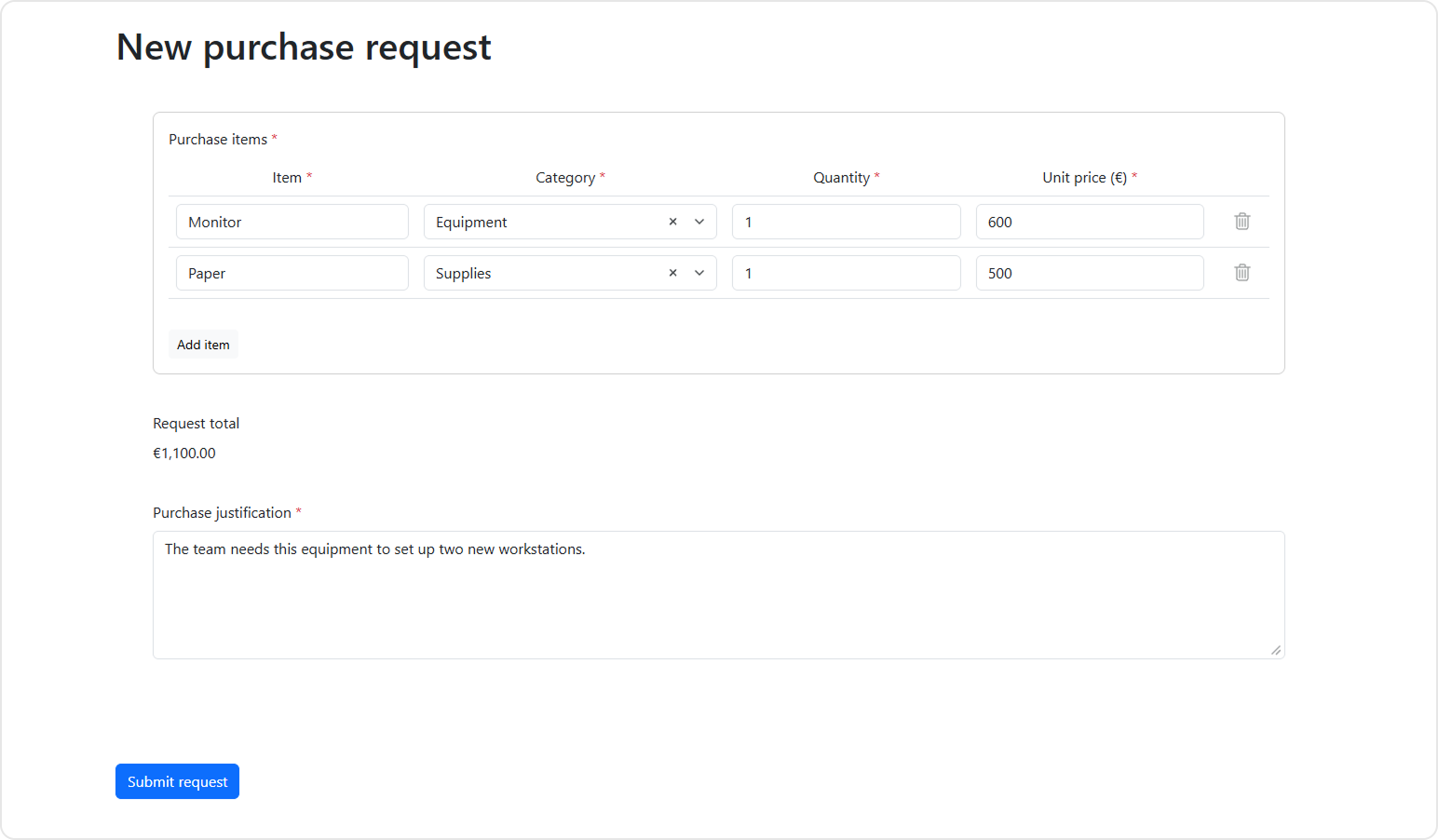
Add a line for one monitor at €600 and a second for supplies at €500. At €1,100, visibleIf reveals the justification and requiredIf makes it mandatory. Remove the second line and the total drops to €600. The field disappears, and clearInvisibleValues: "onHidden" clears its answer. For more on how SurveyJS shows fields and makes them required based on other answers, see the Conditional Logic and Dynamic Texts guide.
4. Validate and Save the Request in Laravel
Add the controller import alongside the existing imports in routes/web.php.
use App\Http\Controllers\PurchaseRequestController;
Add both routes to routes/web.php so Laravel applies its web middleware, including session handling and CSRF protection. The demo runs without sign-in. In an internal app, require users to sign in and check that they have permission to create purchase requests on both routes. For details, see Laravel's CSRF protection documentation.
Route::view('/purchase-requests/create', 'purchase-requests.create');
Route::post('/purchase-requests', [PurchaseRequestController::class, 'store'])
    ->name('purchase-requests.store');
For this workflow, each request is saved as one row. The item snapshot is JSON, the authoritative total is stored in cents, and the request ID has a unique index for retries.
Create database/migrations/2026_11_11_000000_create_purchase_requests_table.php.
<?php

use Illuminate\Database\Migrations\Migration;
use Illuminate\Database\Schema\Blueprint;
use Illuminate\Support\Facades\Schema;

return new class extends Migration
{
    public function up(): void
    {
        Schema::create('purchase_requests', function (Blueprint $table) {
            $table->id();
            $table->uuid('request_id')->unique();
            $table->char('payload_hash', 64);
            $table->json('items');
            $table->unsignedBigInteger('total_cents');
            $table->text('justification')->nullable();
            $table->timestamp('created_at');
        });
    }

    public function down(): void
    {
        Schema::dropIfExists('purchase_requests');
    }
};
The controller validates each item and recalculates the total from the submitted quantities and prices. If the policy requires a justification, Laravel rejects a missing or blank answer. Under the demo's standard web input normalization, whitespace-only input becomes null. If the policy does not require a justification, Laravel stores null even if a client sends one. The request body does not include the displayed total. For details on input normalization and validation rules, see the Laravel validation documentation.
The upsert inserts a new row or leaves the previously stored data intact. If the response was lost after the database write, retrying the same request from the same page returns the original ID. If that ID already belongs to a different normalized payload, the endpoint returns 409 so an edited retry cannot overwrite a saved request. For details on the database operation, see Upserts in the Laravel query builder documentation.
Create app/Http/Controllers/PurchaseRequestController.php.
<?php

namespace App\Http\Controllers;

use Illuminate\Http\JsonResponse;
use Illuminate\Http\Request;
use Illuminate\Support\Facades\DB;
use Illuminate\Validation\ValidationException;

class PurchaseRequestController
{
    public function store(Request $request): JsonResponse
    {
        $data = $request->validate([
            'request_id' => ['required', 'uuid'],
            'items' => ['required', 'array', 'list', 'min:1', 'max:25'],
            'items.*' => ['required', 'array:item,category,quantity,unit_price'],
            'items.*.item' => ['required', 'string', 'max:120'],
            'items.*.category' => ['required', 'in:equipment,supplies'],
            'items.*.quantity' => ['required', 'string', 'regex:/^[1-9][0-9]{0,2}$/D'],
            'items.*.unit_price' => [
                'required', 'string', 'regex:/^(0|[1-9][0-9]{0,4})([.][0-9]{1,2})?$/D',
            ],
            'justification' => ['nullable', 'string', 'max:1000'],
        ], [
            'items.*.quantity.regex' => 'Enter a whole number from 1 to 999 in row :position.',
        ]);

        $items = [];
        $totalCents = 0;
        foreach ($data['items'] as $row) {
            [$euros, $fraction] = array_pad(explode('.', $row['unit_price'], 2), 2, '');
            $unitCents = (int) $euros * 100 + (int) str_pad($fraction, 2, '0');
            $quantity = (int) $row['quantity'];
            $totalCents += $unitCents * $quantity;

            $items[] = [
                'item' => $row['item'],
                'category' => $row['category'],
                'quantity' => $quantity,
                'unit_price_cents' => $unitCents,
            ];
        }

        $requiresJustification = $totalCents >= 100_000;
        $justification = $requiresJustification ? ($data['justification'] ?? null) : null;
        if ($requiresJustification && $justification === null) {
            throw ValidationException::withMessages([
                'justification' => 'Enter a purchase justification.',
            ]);
        }

        $itemsJson = json_encode($items, JSON_THROW_ON_ERROR);
        $hash = hash('sha256', json_encode([$items, $justification], JSON_THROW_ON_ERROR));
        DB::table('purchase_requests')->upsert([
            'request_id' => $data['request_id'],
            'payload_hash' => $hash,
            'items' => $itemsJson,
            'total_cents' => $totalCents,
            'justification' => $justification,
            'created_at' => now(),
        ], ['request_id'], ['request_id']);

        $saved = DB::table('purchase_requests')
            ->where('request_id', $data['request_id'])
            ->first();

        if ($saved->payload_hash !== $hash) {
            return response()->json(['message' => 'This request ID has already been used.'], 409);
        }

        return response()->json(['id' => (int) $saved->id], 200);
    }
}
With the files in place, run the migration and build from the project root. Use the default local SQLite setup with DEMO_MODE=false in .env.
php artisan migrate
npm run build
composer start
Open http://127.0.0.1:8000/purchase-requests/create. For a single €600 supplies line, the browser sends a request body like this to POST /purchase-requests. The CSRF token travels in the X-CSRF-TOKEN header.
{
  "request_id": "39fba34f-d229-4cf1-bbb4-a234b5f502d4",
  "items": [
    { "item": "Printer supplies", "category": "supplies", "quantity": "1", "unit_price": "600" }
  ],
  "justification": null
}
If the server receives "quantity": "0" in the first item, its JSON validation response has this shape. Laravel uses zero-based indices in error keys and substitutes the one-based row number for :position in the message.
{
  "message": "Enter a whole number from 1 to 999 in row 1.",
  "errors": {
    "items.0.quantity": [
      "Enter a whole number from 1 to 999 in row 1."
    ]
  }
}
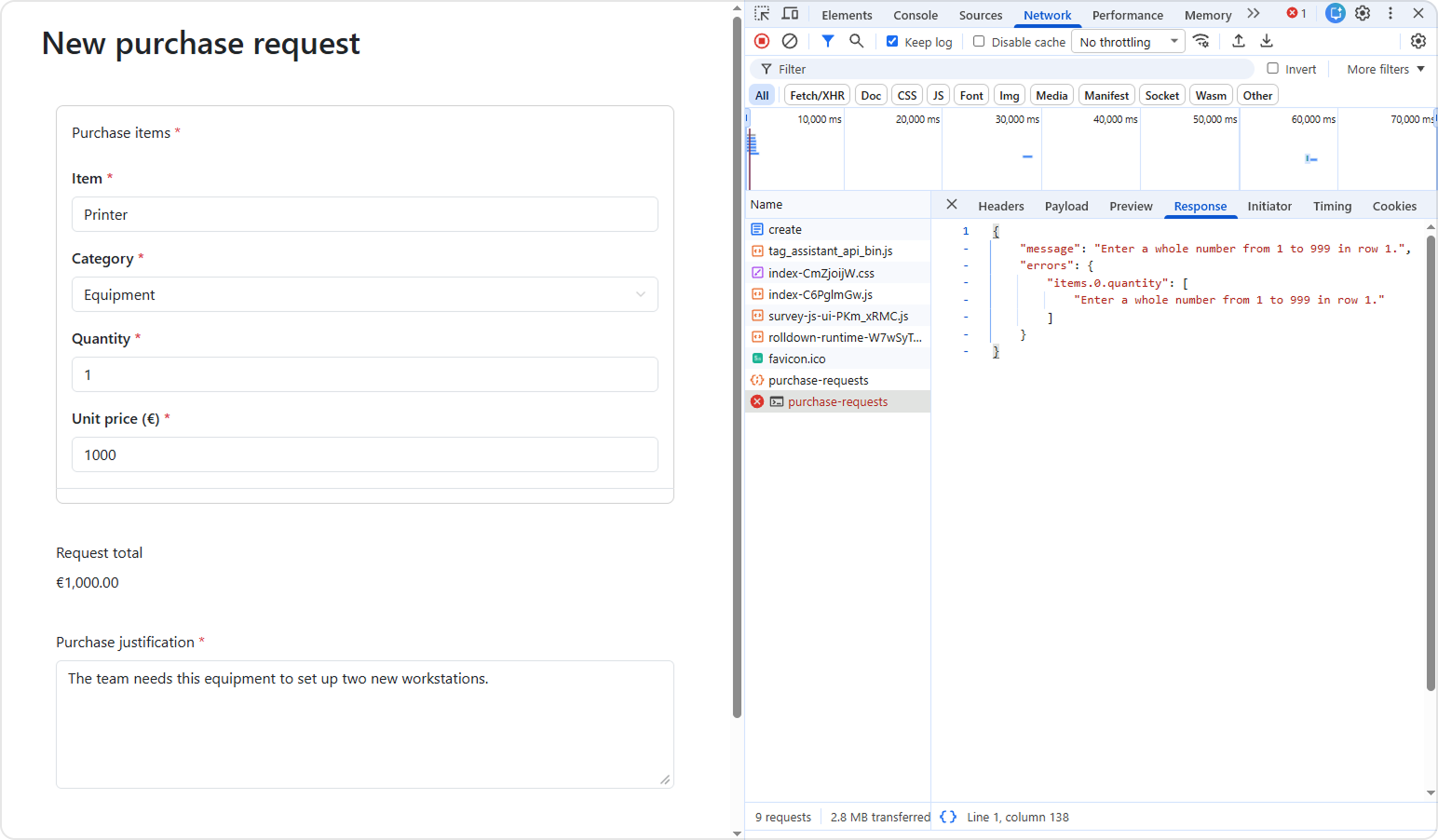
Because the page requests JSON with Accept: application/json, Laravel returns the validation errors with status 422. The form stays available for correction with its answers intact. When Laravel returns a saved ID, the page displays the confirmation and leaves the submitted answers visible in read-only mode. For an example of the JSON error structure, see Laravel's validation error response format.
5. Change the Purchase Policy
Suppose procurement now requires justification whenever a request includes equipment, even below €1,000.
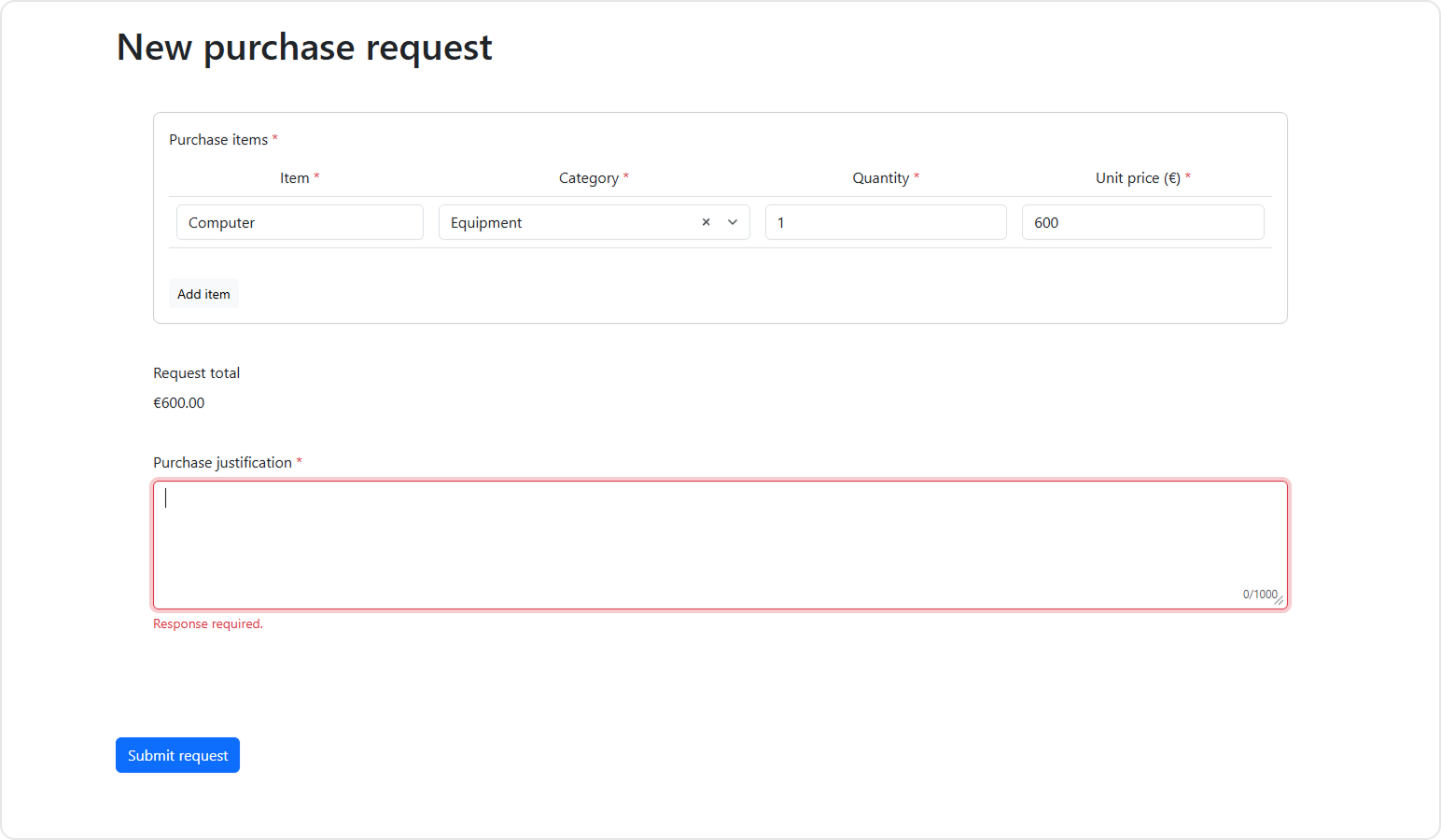
In resources/js/purchase-request/form.json, add an equipment condition to both expressions. The third argument to countInArray filters matrix rows by category. To learn more, see the countInArray function reference.
-      "visibleIf": "{totalCents} >= 100000",
-      "requiredIf": "{totalCents} >= 100000"
+      "visibleIf": "{totalCents} >= 100000 or countInArray({items}, 'category', {category} = 'equipment') > 0",
+      "requiredIf": "{totalCents} >= 100000 or countInArray({items}, 'category', {category} = 'equipment') > 0"
Make the matching change in app/Http/Controllers/PurchaseRequestController.php.
-        $requiresJustification = $totalCents >= 100_000;
+        $requiresJustification = $totalCents >= 100_000
+            || in_array('equipment', array_column($items, 'category'), true);
Rebuild the assets with npm run build and reload the page. A €600 equipment request now reveals the field and requires an answer. A €600 supplies request still goes through without one. The browser gives employees immediate feedback, and Laravel enforces the same rule before saving.
When This Integration Makes Sense
SurveyJS Form Library pays off when you start writing the same form behavior across multiple Blade pages. In the purchase request form, SurveyJS renders the fields from a JSON definition, lets users add and remove line items, and reevaluates the total and justification rules as answers change. You provide the calculation and business rules. SurveyJS handles when to run them and how to update the form.
That matters when requirements change. To require justification for equipment purchases below €1,000, you update the conditions in the form definition and the corresponding server-side rule in Laravel. There's no need to rework the code that manages rows or reacts to input changes. You can use the same integration for expense reports, inventory requests, and other forms with repeatable items and conditional fields.
The SurveyJS Bootstrap theme adapter styles the form to match your Bootstrap interface, and Laravel continues to validate submissions and saves them to your database. To let business users edit forms directly in your application, embed Survey Creator, a drag-and-drop editor for SurveyJS forms.