SurveyJS v3.0.3
Released: September 3, 2026
This release includes a security fix, other bug fixes, and minor enhancements for SurveyJS v3.0. It also introduces the SurveyJS Linter, which detects logic defects in survey JSON schemas, and adds Table View support for data from comment fields and questions nested within choice options.
[Security Vulnerability] Table View: XSS Vulnerability in Question Title Tooltips
SurveyJS Dashboard Table View did not sanitize question titles before displaying them in column header tooltips. An attacker who could supply or modify a survey JSON schema could include malicious JavaScript in a question title. When results for that survey were displayed in Table View, the code could execute when a user hovered over the corresponding table column header.
Exploitation requires the malicious survey schema to be subsequently used to visualize survey data in Dashboard Table View.
This vulnerability is fixed in SurveyJS v2.5.41 and v3.0.3. Question titles are now sanitized before being displayed in tooltips to prevent cross-site scripting (XSS) attacks. Please update to the latest SurveyJS version if you allow users to edit survey JSON schemas in Survey Creator and use those schemas to visualize data in Table View.
SurveyJS Linter
The SurveyJS Linter is a static analyzer that detects logic defects in survey JSON schemas before they reach runtime.
The linter can find:
- Misspelled question references
- Conditions that can never be true
- Calculated-value and trigger cycles
- Invalid choice comparisons
- Other issues that survey model validation does not report
Pass a survey JSON schema to the lintSurvey function to analyze it.
The example below contains a typo in the visibleIf expression. The linter reports reference/unknown and suggests hasInsurance.
import { lintSurvey, renderFindings } from "survey-core/linter";

const surveyJson = {
  pages: [{
    name: "page1",
    elements: [
      {
        type: "radiogroup",
        name: "hasInsurance",
        choices: ["yes", "no"]
      },
      {
        type: "text",
        name: "provider",
        visibleIf: "{hasInsurnce} = 'yes'"
      }
    ]
  }]
};

const result = lintSurvey(surveyJson);

if (result.errorCount > 0) {
  console.log(renderFindings(result));
}
[Dashboard] Table View Visualizes Content Nested in Choices
Starting with v3.0.3, Dashboard Table View can visualize data from comment fields and questions nested in choice options. This feature is enabled by default.
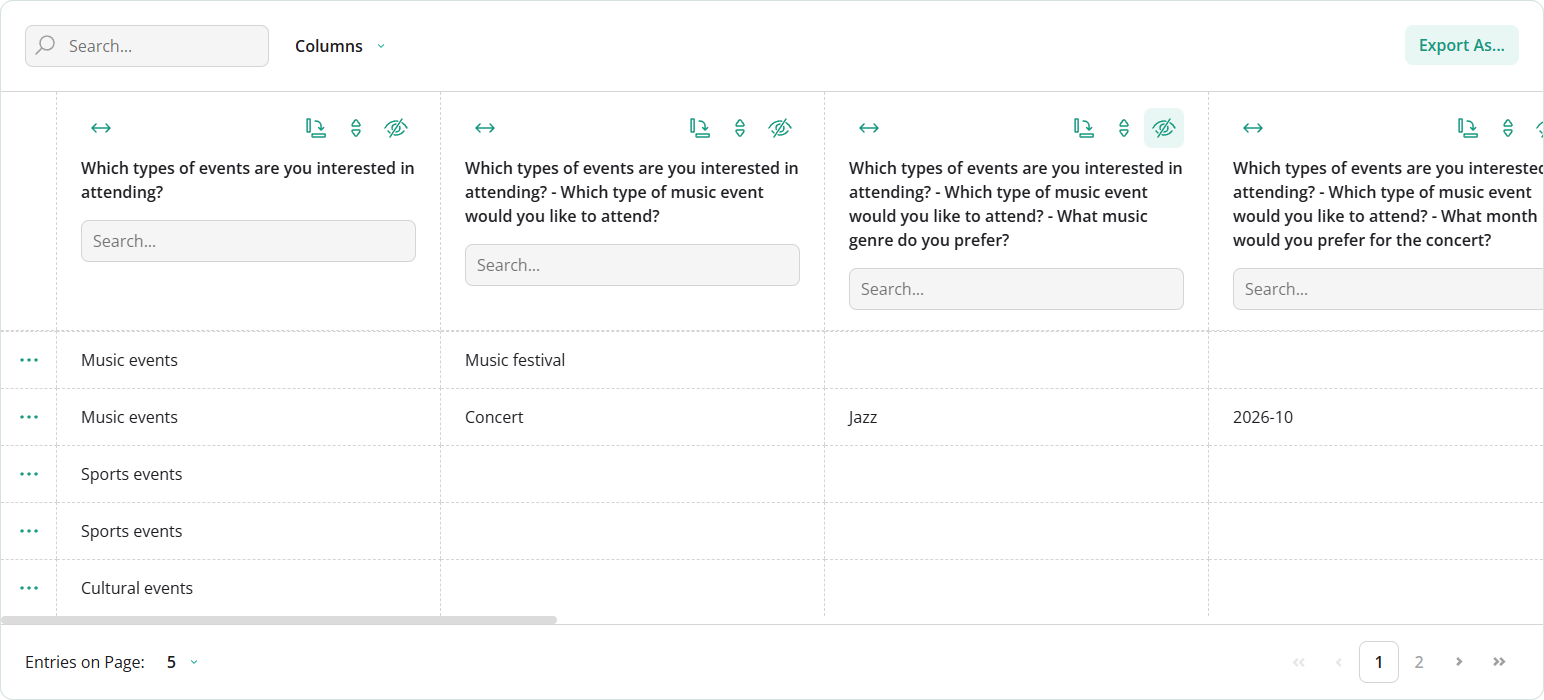
Bug Fixes and Minor Enhancements
Form Library
- Form Library v3.0 causes CSP violations (#11742)
- [Survey Creator] Preview mode: Hide the "Edit" button for pages with no input questions (#11776)
- [Survey Creator] Preview tab enters an infinite render loop for a matrix question when the advanced survey header is enabled (#11778)
- Default progress bar doesn't work with the question-per-page survey layout (#11773)
- Progress bar: Step checkboxes become checked when values on the corresponding pages are assigned by expressions or triggers (#11740)
- shadcn/ui Theme Adapter: Selected radio button state is not visible on hover (#11795)
Survey Creator
onElementGetDisplayNameis not raised in all places whereuseElementTitlesis applied (#7972)
Dashboard
- Bar chart: Move labels that overflow the bars to tooltips (#847)
- [React in StrictMode] Calling
render()afterclear()throws an error (#837) - Date range editors are missing ARIA labels (#843)
Dashboard.destroy()throws an error when date range editors are visible (#841)- Visualizer footer title cannot be customized using design tokens because its color is hardcoded (#846)
How to Update SurveyJS Libraries in Your Application
To migrate your application to the SurveyJS v3.0 product line (v3.0.3), install the following npm packages or replace old source links with the new links:
Angular
npm i survey-core@3.0.3 survey-angular-ui@3.0.3
npm i survey-creator-core@3.0.3 survey-creator-angular@3.0.3
npm i survey-analytics@3.0.3
npm i survey-pdf@3.0.3
React
npm i survey-core@3.0.3 survey-react-ui@3.0.3
npm i survey-creator-core@3.0.3 survey-creator-react@3.0.3
npm i survey-analytics@3.0.3
npm i survey-pdf@3.0.3
Vue.js
npm i survey-core@3.0.3 survey-vue3-ui@3.0.3
npm i survey-creator-core@3.0.3 survey-creator-vue@3.0.3
npm i survey-analytics@3.0.3
npm i survey-pdf@3.0.3
HTML/CSS/JavaScript
<link href="https://unpkg.com/survey-core@3.0.3/survey-core.min.css" type="text/css" rel="stylesheet">
<script type="text/javascript" src="https://unpkg.com/survey-core@3.0.3/survey.core.min.js"></script>
<script type="text/javascript" src="https://unpkg.com/survey-js-ui@3.0.3/survey-js-ui.min.js"></script>

<script src="https://unpkg.com/survey-core@3.0.3/themes/index.min.js"></script>

<link href="https://unpkg.com/survey-creator-core@3.0.3/survey-creator-core.min.css" type="text/css" rel="stylesheet">
<script src="https://unpkg.com/survey-creator-core@3.0.3/survey-creator-core.min.js"></script>
<script src="https://unpkg.com/survey-creator-js@3.0.3/survey-creator-js.min.js"></script>

<link href="https://unpkg.com/survey-analytics@3.0.3/survey.analytics.min.css" rel="stylesheet">
<script src="https://unpkg.com/survey-analytics@3.0.3/survey.analytics.min.js"></script>

<link href="https://unpkg.com/survey-analytics@3.0.3/survey.analytics.tabulator.min.css" rel="stylesheet">
<script src="https://unpkg.com/survey-analytics@3.0.3/survey.analytics.tabulator.min.js"></script>

<script src="https://unpkg.com/survey-pdf@3.0.3/survey.pdf.min.js"></script>
<script src="https://unpkg.com/survey-pdf@3.0.3/pdf-form-filler.min.js"></script>
After that, you need to get acquainted with breaking changes introduced in SurveyJS v3.0 and update your code as described.