SurveyJS v3.0.4
Released: September 10, 2026
SurveyJS v3.0.4 lets you choose the default camera for File Upload questions, update multiple survey variables in a single call, and use expressions to control row and panel counts in Dynamic Matrix and Dynamic Panel questions. Input masks now offer translated date and time placeholders and better support for right-to-left (RTL) languages. This release also includes two breaking changes: SurveyJS packages no longer bundle fonts, and Form Library uses the advanced survey header by default.
For an overview of other recently released features, see:
[Breaking Change] Fonts Are No Longer Included in the Package
SurveyJS v3.0.4 no longer bundles fonts with Form Library, Survey Creator, and Dashboard. This reduces package size and gives you control over how fonts are loaded, including the option to host them yourself or use a font provider.
We recommend using SurveyJS components with the Open Sans font. Choose one of the following ways to load it.
Modular Applications
If your application uses a bundler that supports CSS imports, install the Fontsource Open Sans package:
npm install @fontsource/open-sans
Import the required font weights in your application's entry file or root layout, alongside your global stylesheet imports:
import "@fontsource/open-sans/400.css";
import "@fontsource/open-sans/600.css";
import "@fontsource/open-sans/700.css";
The bundler includes the font files in your application's assets, so they are served from your own host. These imports register the Open Sans font family used by the default SurveyJS themes.
Google Fonts
Alternatively, add the following links to the <head> of your application's HTML document:
<link rel="preconnect" href="https://fonts.googleapis.com">
<link rel="preconnect" href="https://fonts.gstatic.com" crossorigin>
<link href="https://fonts.googleapis.com/css2?family=Open+Sans:wght@400;600;700&display=swap" rel="stylesheet">
If your application already loads Open Sans, no additional font setup is needed. If the font specified by your SurveyJS theme is unavailable, the browser uses a fallback font, which may change the appearance and spacing of your forms.
[Breaking Change] Advanced Survey Header Is Now Used by Default
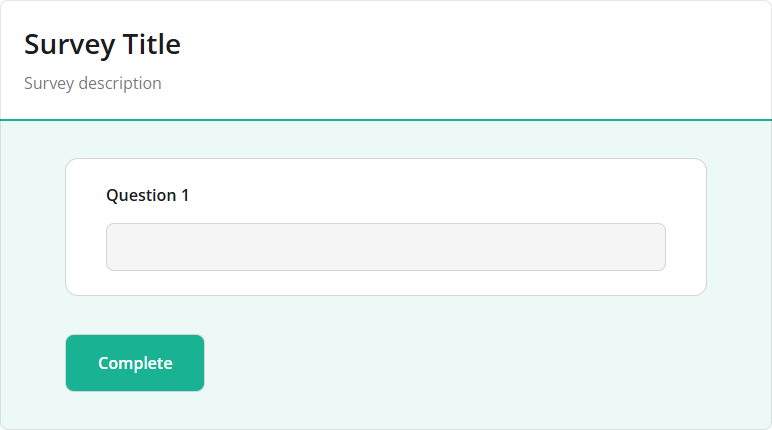
Starting with SurveyJS v3.0.4, Form Library uses the advanced survey header view by default. The advanced header provides a more modern appearance and better aligns with the updated SurveyJS design.
Previously:
Now:
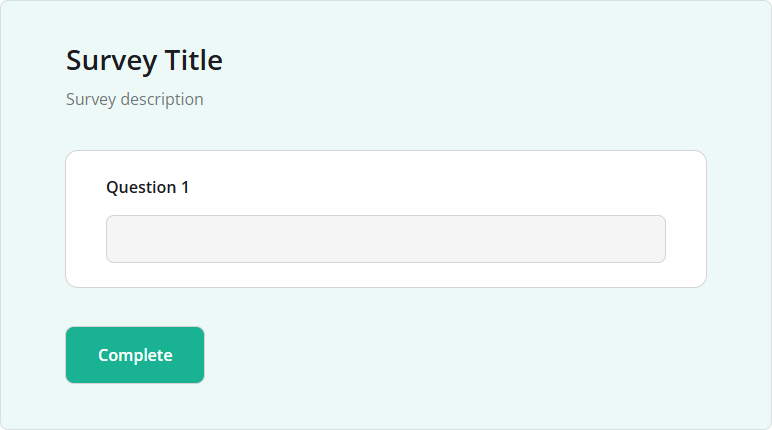
To restore the basic header view, set the headerView property to "basic" in the survey JSON schema or on a SurveyModel instance:
import { Model } from "survey-core";

// Option 1: Enable the basic header in the survey JSON schema
const surveyJson = {
  // ...
  "headerView": "basic"
};

// Option 2: Enable the basic header on the survey model instance
const survey = new Model(surveyJson);
survey.headerView = "basic";
File Upload: Specify the Default Camera
File Upload questions now include a cameraFacingMode property that specifies the preferred camera for photo capture:
"user"(default) – Prefer the front-facing camera"environment"– Prefer the rear-facing camera
This property applies when sourceType is "camera" or "file-camera". The following example allows respondents to upload a file or take a photo, with the rear-facing camera preferred:
const surveyJson = {
  "elements": [
    {
      "type": "file",
      "name": "photo",
      "title": "Upload or take a photo",
      "sourceType": "file-camera",
      "cameraFacingMode": "environment"
    }
  ]
};
Respondents can switch cameras using the Flip button. The question remembers their selection when they close and reopen the camera. Actual camera selection depends on browser and device support.
Dynamic Matrix / Dynamic Panel: Calculate Row and Panel Counts Using Expressions
Dynamic Matrix and Dynamic Panel questions now support the rowCountExpression and panelCountExpression properties, respectively. Use them to calculate the number of rows or panels from survey answers. The count updates automatically when a referenced answer changes.
For example, a registration form can create one matrix row and one panel for each attendee. In the following example, respondents specify the number of attendees, then enter their names in a Dynamic Matrix and their meal preferences in a Dynamic Panel:
const surveyJson = {
  "elements": [
    {
      "type": "text",
      "name": "attendeeCount",
      "title": "How many people are attending?",
      "inputType": "number",
      "min": 1,
      "max": 10,
      "defaultValue": 1
    },
    {
      "type": "matrixdynamic",
      "name": "attendees",
      "titleLocation": "hidden",
      "rowCountExpression": "{attendeeCount}",
      "minRowCount": 1,
      "maxRowCount": 10,
      "columns": [
        {
          "name": "fullName",
          "title": "Attendee names",
          "cellType": "text"
        }
      ]
    },
    {
      "type": "paneldynamic",
      "name": "mealPreferences",
      "title": "Meal preferences",
      "templateTitle": "Attendee #{panelIndex}",
      "panelCountExpression": "{attendeeCount}",
      "minPanelCount": 1,
      "maxPanelCount": 10,
      "templateElements": [
        {
          "type": "comment",
          "name": "dietaryRequirements",
          "title": "Dietary requirements"
        }
      ]
    }
  ]
};
When a count expression is set, the following applies:
- The expression overrides the static
rowCountorpanelCountsetting. - Results below the minimum are raised to
minRowCountorminPanelCount. Results above the maximum are limited tomaxRowCountormaxPanelCount. Global row and panel limits also apply. - Respondents cannot manually add or remove rows or panels.
Example: Calculate Row and Panel Counts Using Expressions
Set Multiple Survey Variables in a Single Call
The new setVariables(variables, clearPrevious) method lets you create or update multiple survey variables at once. It updates all supplied variables before recalculating expressions and running triggers, so expressions are never evaluated with a partially updated set of variables.
survey.setVariables({ tier: "gold", yearsInBusiness: 12 });
By default, the clearPrevious parameter is false: the supplied values are merged with existing variables, and variables omitted from the object are preserved. Pass true to delete variables omitted from the object. This is the only way to remove a survey variable.
// Update tier and remove all other variables
survey.setVariables({ tier: "silver" }, true);
console.log(survey.getVariableNames()); // Outputs [ "tier" ]

// Remove all variables
survey.setVariables({}, true);
For more information, refer to the following help topic:
Input Masks: Translated Date and Time Placeholders and Right-to-Left Support
Date and time input masks now display placeholder letters in the survey's language. These letters show respondents where to enter each part of a date or time. For example, the default date mask displays mm/dd/yyyy in English, jj/mm/aaaa in French, and gg/mm/aaaa in Italian. If you specify a custom pattern, its order and separators stay the same; only the placeholder letters change.
Example: Translated Date and Time Placeholders
Input masks now offer better support for right-to-left (RTL) languages, including Arabic, Hebrew, and Persian. Numbers, date components, and separators stay in the correct order as respondents type.
Example: Support for RTL Languages
Bug Fixes and Minor Enhancements
Form Library
- [Survey Creator] Default and correct values are not updated after a referenced choice option is deleted (#11800)
- Specialized question type properties are missing from matrix columns (#11806)
- Slider and Expression questions: Expression result is not recalculated when an expression-based property is set at runtime (#11798)
Survey Creator
- Editor definitions for types added to
matrixDropdownColumnTypesare not applied automatically (#7976) - Translation tab: Page selector displays Markdown page titles as raw text (#7984)
How to Update SurveyJS Libraries in Your Application
To update your application to SurveyJS v3.0.4, install the packages you use or replace your existing script and stylesheet links with the versioned links below:
Angular
npm i survey-core@3.0.4 survey-angular-ui@3.0.4
npm i survey-creator-core@3.0.4 survey-creator-angular@3.0.4
npm i survey-analytics@3.0.4
npm i survey-pdf@3.0.4
React
npm i survey-core@3.0.4 survey-react-ui@3.0.4
npm i survey-creator-core@3.0.4 survey-creator-react@3.0.4
npm i survey-analytics@3.0.4
npm i survey-pdf@3.0.4
Vue.js
npm i survey-core@3.0.4 survey-vue3-ui@3.0.4
npm i survey-creator-core@3.0.4 survey-creator-vue@3.0.4
npm i survey-analytics@3.0.4
npm i survey-pdf@3.0.4
HTML/CSS/JavaScript
<link href="https://unpkg.com/survey-core@3.0.4/survey-core.min.css" type="text/css" rel="stylesheet">
<script type="text/javascript" src="https://unpkg.com/survey-core@3.0.4/survey.core.min.js"></script>
<script type="text/javascript" src="https://unpkg.com/survey-js-ui@3.0.4/survey-js-ui.min.js"></script>

<script src="https://unpkg.com/survey-core@3.0.4/themes/index.min.js"></script>

<link href="https://unpkg.com/survey-creator-core@3.0.4/survey-creator-core.min.css" type="text/css" rel="stylesheet">
<script src="https://unpkg.com/survey-creator-core@3.0.4/survey-creator-core.min.js"></script>
<script src="https://unpkg.com/survey-creator-js@3.0.4/survey-creator-js.min.js"></script>

<link href="https://unpkg.com/survey-analytics@3.0.4/survey.analytics.min.css" rel="stylesheet">
<script src="https://unpkg.com/survey-analytics@3.0.4/survey.analytics.min.js"></script>

<link href="https://unpkg.com/survey-analytics@3.0.4/survey.analytics.tabulator.min.css" rel="stylesheet">
<script src="https://unpkg.com/survey-analytics@3.0.4/survey.analytics.tabulator.min.js"></script>

<script src="https://unpkg.com/survey-pdf@3.0.4/survey.pdf.min.js"></script>
<script src="https://unpkg.com/survey-pdf@3.0.4/pdf-form-filler.min.js"></script>
Review the breaking changes described above and update your application as needed. If you are upgrading from v2.x, also review the breaking changes introduced in SurveyJS v3.0.