SurveyJS v3.2.3
Released: October 27, 2026
SurveyJS v3.2.3 delivers major performance gains for large surveys in Form Library and Survey Creator, adds position-based progress in question-per-page and input-per-page modes, extends Clear button support to more question types, and reorganizes existing row and entry settings in the Property Grid. It also includes bug fixes and minor enhancements.
Major Performance Improvements
SurveyJS v3.2.3 brings major performance improvements across Form Library and Survey Creator, from answering complex surveys to editing forms with thousands of elements. In our latest benchmarks, loading a survey model in survey-core took 90% less time, and repeated answer processing took 98% less time. Creator's Translation tab opened in about 0.1 seconds, down from 6.8 seconds, and the initial Designer DOM contained 67% fewer nodes.
The benchmark used two demanding surveys:
- Form Library – A customer survey with 111 pages, 4,305 expressions, and 202 calculated values.
- Survey Creator – A large test survey with 109 pages and 4,333 elements.
The figures below compare the published npm packages for v3.2.0 and v3.2.3. The gains reflect cumulative October optimizations.
Faster Survey Loading and Answer Processing
Large surveys now spend substantially less time loading and recalculating their logic. In the browser, the tested form reached its first paint in about half a second, and subsequent answer updates reached the screen in 23 milliseconds. Respondents can now work through the form without the one-second pauses measured in earlier builds.
| Operation | v3.2.0 | v3.2.3 | Time reduction |
|---|---|---|---|
| Load survey model, Node.js | 7.11–7.49 s | 668–720 ms | 90% |
| First matrix answer, Node.js | 2.48–2.65 s | 77–82 ms | 97% |
| Subsequent answers, Node.js | 1.24–1.31 s | 22–24 ms | 98% |
| Load to first paint, React UI | 4.51–4.61 s | 530–532 ms | 88% |
| First matrix click to paint, React UI | 2.15–2.27 s | 71–72 ms | 96% |
| Subsequent clicks to paint, React UI | 1.08–1.10 s | 23 ms | 98% |
The complex survey produced the same final answers, variables, visible questions, choices, and rows in both tested versions.
Faster Editing and Tab Switching in Survey Creator
The improvements also make a substantial difference when authoring large forms. On the 4,333-element survey, the Translation tab opened in about 0.1 seconds, down from 6.8 seconds. Opening the element list took about 0.36 seconds, down from 2.5 seconds, and the Preview and Logic tabs also opened more quickly.
| Survey Creator operation | v3.2.0 | v3.2.3 | Time reduction |
|---|---|---|---|
| Load survey into Designer | 1.22–1.25 s | 800–817 ms | 30% |
| Open element list | 2.50–2.51 s | 357 ms | 84% |
| Open Preview tab | 744–747 ms | 397–409 ms | 42% |
| Open Logic tab | 1.11 s | 596–617 ms | 40% |
| Open Translation tab | 6.81–6.88 s | 108–119 ms | 98% |
Survey Creator also builds a much smaller rendered interface. The initial Designer DOM shrank from 11,456 to 3,764 nodes, a 67% reduction, while the Translation tab's DOM shrank from 90,252 to 1,368 nodes. Fewer nodes reduce the amount of content the browser must create, lay out, and update.
Optimizations Behind the Performance Gains
These gains come from coordinated improvements to survey logic, rendering, and editor workflows:
Faster expression parsing and lookups
A new handwritten expression parser replaces the generated implementation and reduces parsing overhead. Indexed access to values, variables, and matrix rows further shortens survey initialization and avoids repeated scans.Fewer repeated calculations
Dependency tracking reduces unnecessary re-evaluation of calculated values, default-value expressions, and choice, row, and column conditions. Question-trigger checks also perform less work after an answer.Less rendering work
Survey Creator uses lighter page placeholders, and popup content is rendered when first opened. Lazy-rendered rows share scroll listeners—the large-survey test used 8 listeners instead of 3,795.More efficient editor operations
Bulk updates to element lists, cheaper dependency collection, and a smaller translation model reduce the cost of opening lists and switching tabs.Faster JSON serialization
On the large test survey, serialization visited 114,843 properties instead of 343,146, while producing the same JSON output.
See the performance improvements in action with a large, content-heavy survey:
Demo: Content-Heavy Forms in Survey Creator
Tests used the same surveys and Windows 11 machine, with React UI in the browser. Results summarize repeated runs and may vary by survey and environment.
Position-Based Progress for Questions and Input Fields
When questionsOnPageMode is "questionPerPage" or "inputPerPage", the progress bar now shows the respondent's position among the visible steps. For example, Question 2 of 5 indicates the second step, and the bar shows 40% progress. Moving forward or back updates the indicator, while answering the current question does not change the position.
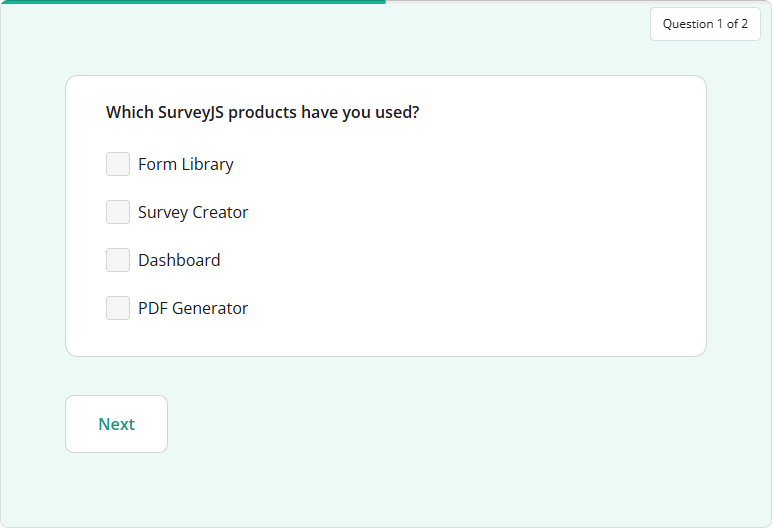
In question-per-page mode, each displayed question or panel counts as one step. In input-per-page mode, the count includes individual inputs and summary screens for dynamic questions. The total updates when conditional visibility changes or dynamic rows and panels are added or removed.
To display the indicator, set showProgressBar to true. Position-based progress applies automatically in these two modes and takes precedence over progressBarType. Survey Creator hides the progress-bar type and page-navigation settings while either mode is selected.
Clear Button Support for More Question Types
The Clear button in the question title is now available for more question types:
- Single-Line Input
- Long Text
- Multiple Textboxes
- Radio Button Group
- Checkboxes
- Ranking
- Rating Scale
- Slider
- Yes/No (Boolean)
- Image Picker
- Single-Select Matrix
- Multi-Select Matrix
Set allowClear to true to show the button. Clicking it resets the question to an empty value.
For example, enable the button for a Long Text question in your survey JSON schema:
{
  "elements": [
    {
      "type": "comment",
      "name": "feedback",
      "title": "Your feedback",
      "allowClear": true
    }
  ]
}
[Survey Creator] Reorganized Row and Entry Settings in the Property Grid
Survey Creator's Property Grid now groups row and entry settings into dedicated Rows and Entries categories for Multi-Select Matrix, Dynamic Matrix, and Dynamic Panel questions. This reorganization keeps related settings together and reduces the number of settings in the General category.
| Question type | Category | Settings |
|---|---|---|
| Multi-Select Matrix | Rows | Row order, rows per page, alternating row colors, row details, and transposition. |
| Dynamic Matrix | Rows | Initial, minimum, and maximum row counts, adding, removing, and reordering rows, rows per page, and row details. |
| Dynamic Panel | Entries | Initial, minimum, and maximum entry counts, adding and removing entries, entries per page, display mode, entry titles, and navigation. |
The Advanced and Expert UI presets follow the same category structure.
New and Updated Demos
Survey Creator: Manage Toolbox Subitems
New Case Studies
Pollarix — AI Survey Creation Platform
New Blog Posts
Is a Form Builder Still Worth It When AI Writes the Code?
Bug Fixes and Minor Enhancements
Form Library
- Progress bar info text is displayed incorrectly in
"questions"mode when the progress bar is positioned at the bottom (#12071) - [Survey Creator] Multi-Select and Dynamic Matrix: Columns editor is displayed incorrectly in Advanced preset (#12092)
sumInArrayreturns an incorrect result whensaveMaskedValueis enabled (#12122)- Expression parser throws an error when a function argument is
nullorundefined(#12130) - Linter doesn't recognize default values for matrix column totals (#12117)
Survey Creator
- Question title is displayed incorrectly on the design surface when the question is collapsed and
titleLocationis set to"left"(#8076) - Copying choices between questions can introduce circular references (#8096)
- Element subtype selector doesn't highlight the selected subtype when its definition includes
choices,columns, orrows(#8102)
Dashboard
- Vertical Histogram cannot be enabled programmatically (#873)
- Chart selection dropdown is clipped by its parent card (#874)
- Yes/No (Boolean) question visualizer: Chart selection dropdown contains an unexpected
visualizer_visualizeritem (#875) - Published package source maps reference files outside the package, causing ENOENT errors under
node_modules/src(#852) - [React] Table View can trigger a
ResizeObserverruntime error (#420)
How to Update SurveyJS Libraries in Your Application
To update your application to SurveyJS v3.2.3, install the packages you use or replace your existing script and stylesheet links with the versioned links below:
Angular
npm i survey-core@3.2.3 survey-angular-ui@3.2.3
npm i survey-creator-core@3.2.3 survey-creator-angular@3.2.3
npm i survey-analytics@3.2.3
npm i survey-pdf@3.2.3
React
npm i survey-core@3.2.3 survey-react-ui@3.2.3
npm i survey-creator-core@3.2.3 survey-creator-react@3.2.3
npm i survey-analytics@3.2.3
npm i survey-pdf@3.2.3
Vue.js
npm i survey-core@3.2.3 survey-vue3-ui@3.2.3
npm i survey-creator-core@3.2.3 survey-creator-vue@3.2.3
npm i survey-analytics@3.2.3
npm i survey-pdf@3.2.3
HTML/CSS/JavaScript
<link href="https://unpkg.com/survey-core@3.2.3/survey-core.min.css" type="text/css" rel="stylesheet">
<script type="text/javascript" src="https://unpkg.com/survey-core@3.2.3/survey.core.min.js"></script>
<script type="text/javascript" src="https://unpkg.com/survey-js-ui@3.2.3/survey-js-ui.min.js"></script>

<script src="https://unpkg.com/survey-core@3.2.3/themes/index.min.js"></script>

<link href="https://unpkg.com/survey-creator-core@3.2.3/survey-creator-core.min.css" type="text/css" rel="stylesheet">
<script src="https://unpkg.com/survey-creator-core@3.2.3/survey-creator-core.min.js"></script>
<script src="https://unpkg.com/survey-creator-js@3.2.3/survey-creator-js.min.js"></script>

<link href="https://unpkg.com/survey-analytics@3.2.3/survey.analytics.min.css" rel="stylesheet">
<script src="https://unpkg.com/survey-analytics@3.2.3/survey.analytics.min.js"></script>

<link href="https://unpkg.com/survey-analytics@3.2.3/survey.analytics.tabulator.min.css" rel="stylesheet">
<script src="https://unpkg.com/survey-analytics@3.2.3/survey.analytics.tabulator.min.js"></script>

<script src="https://unpkg.com/survey-pdf@3.2.3/survey.pdf.min.js"></script>
<script src="https://unpkg.com/survey-pdf@3.2.3/pdf-form-filler.min.js"></script>
If you are upgrading from v2.x, review the breaking changes introduced in SurveyJS v3.0 and subsequent updates.