SurveyJS v2.5.18
Released: March 31, 2026
SurveyJS v2.5.18 introduces two enhancements: the Survey Creator toolbox search now includes subitems, and Table View can split multi-option columns from Checkbox and Multi-Select Dropdown questions into separate columns, with selected options displayed as checkmarks or numbered by selection order.
Survey Creator: Toolbox Search Includes Subitems
Survey Creator now allows users to search for subitems within the toolbox. When a search string is entered, the toolbox filters to show only items whose subitems match the query. This feature is enabled by default.
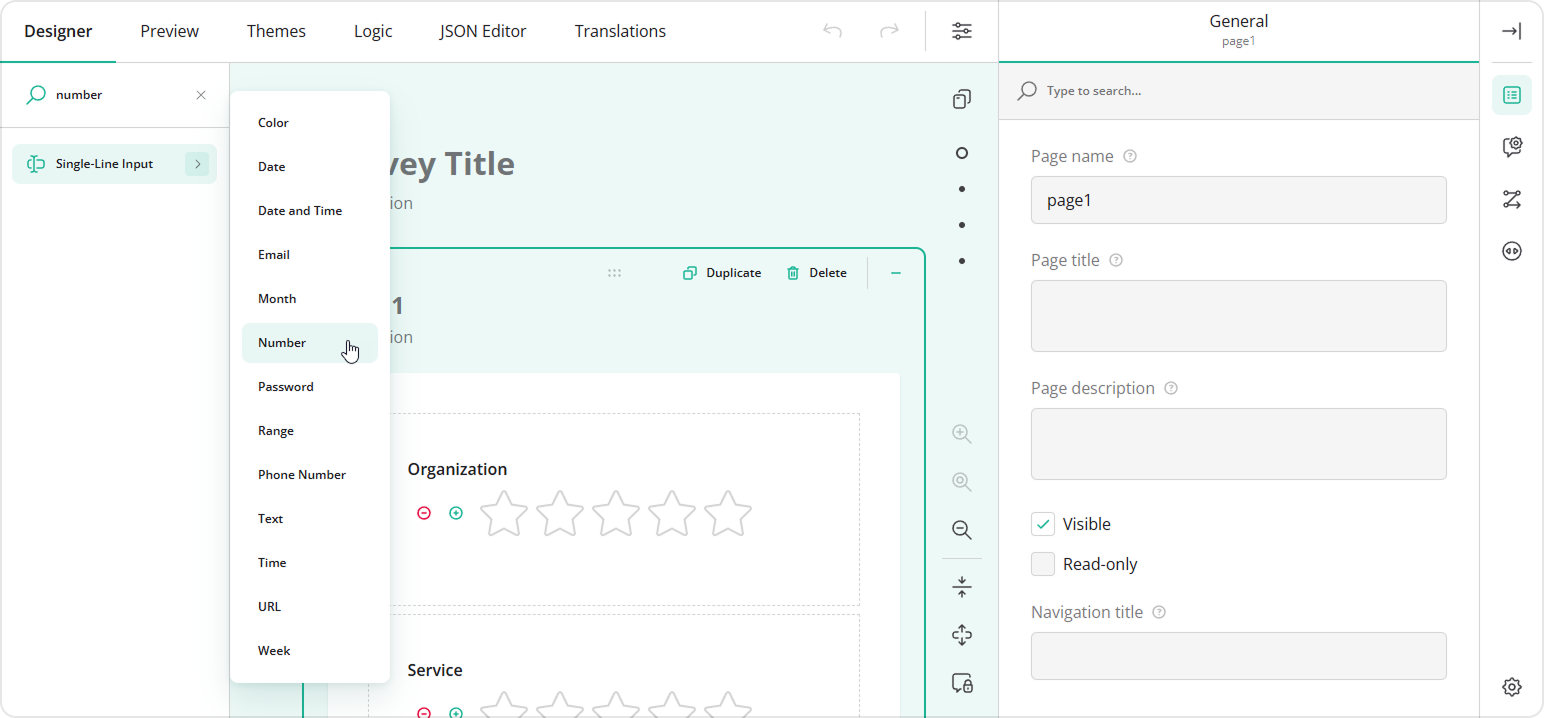
Table View: Split Multi-Option Columns
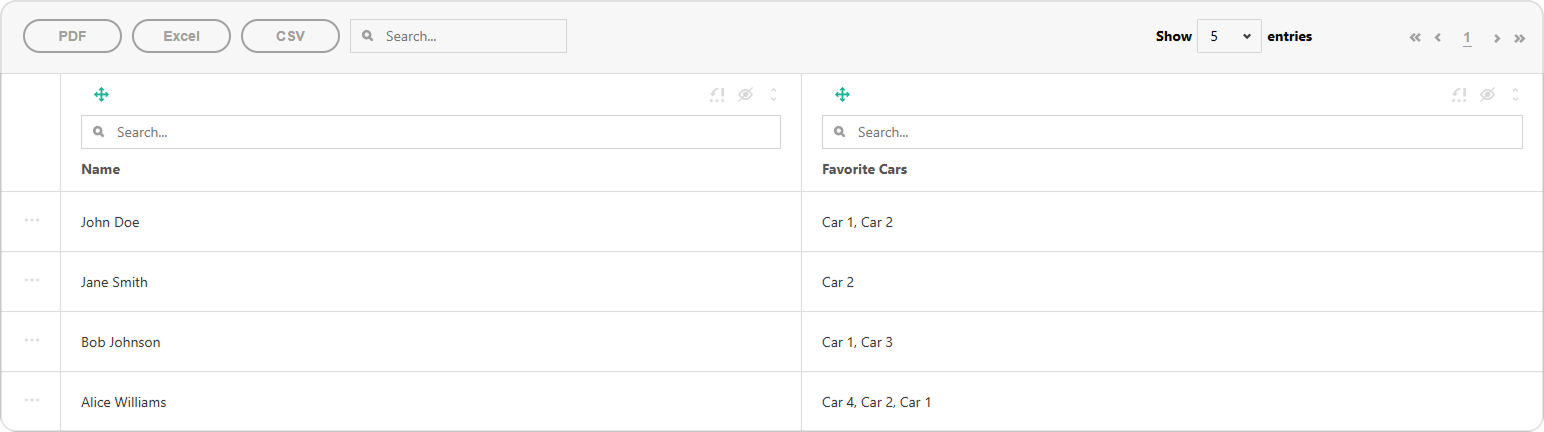
Previously, Checkboxes and Multi-Select Dropdown (Tag Box) questions produced an array of values displayed as a single column in Table View:
This release introduces an option to split the list between multiple columns, one for each choice option:
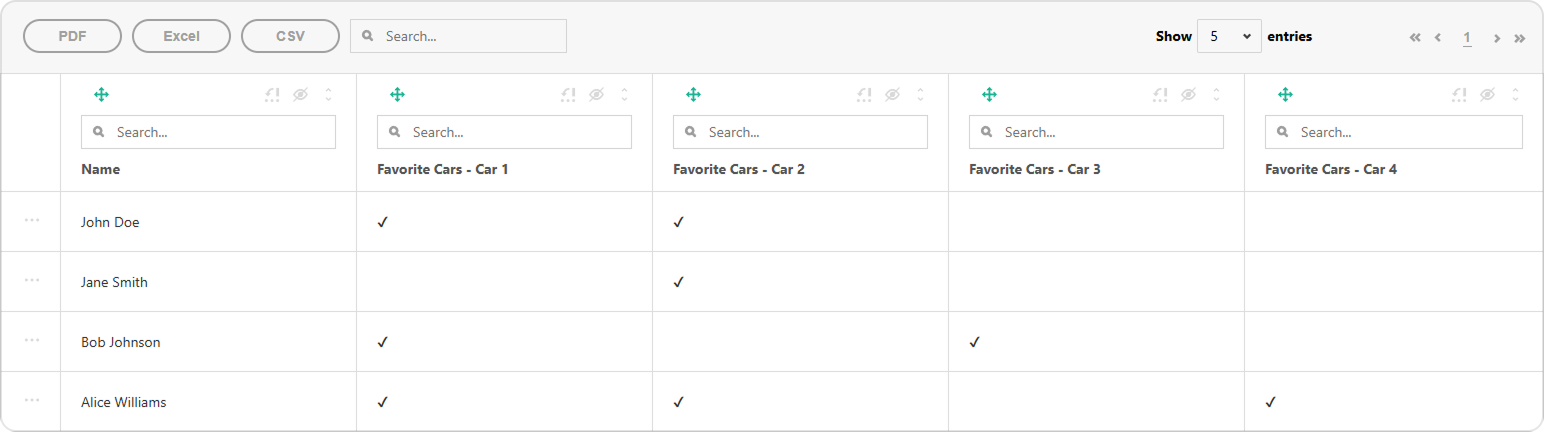
Selected choice options can be marked with a checkbox (as illustrated above) or with a number that indicates their selection order in the list:
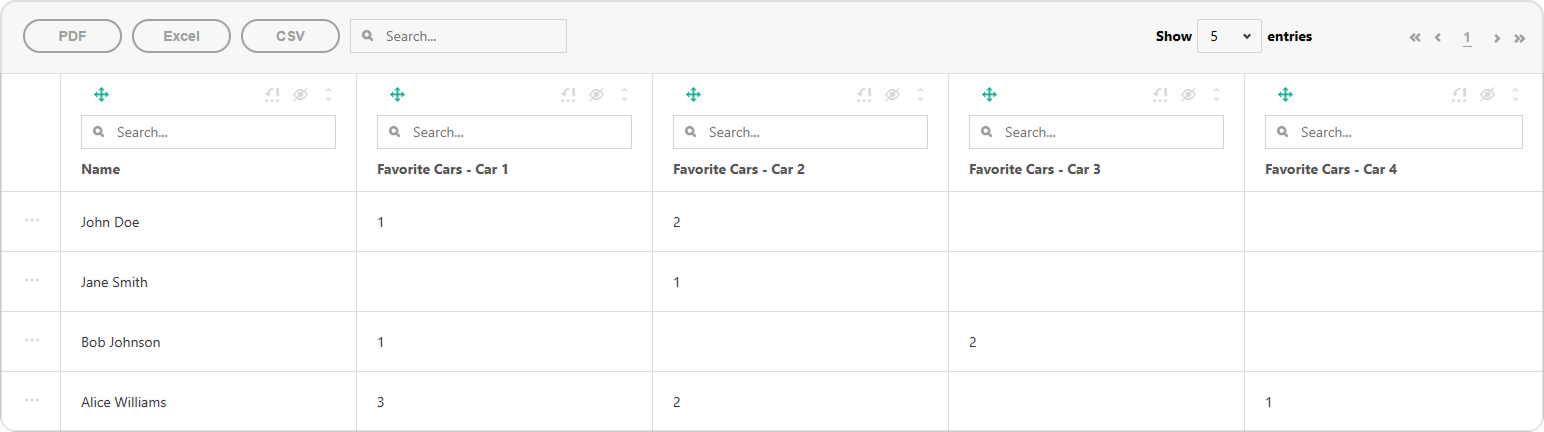
To enable this behavior, set the splitMultiSelectIntoColumns property to true when initializing the Tabulator instance. To display selection order instead of checkmarks, set multiSelectColumnValueFormat to "selectionOrder":
import { Tabulator } from "survey-analytics/survey.analytics.tabulator";
/**
 * Omitted: `SurveyModel` instantiation and data loading
 */
const tableView = new Tabulator(
  survey,
  data, {
    splitMultiSelectIntoColumns: true,
    multiSelectColumnValueFormat: "selectionOrder" // default: "checkmark"
  }
);
tableView.render("tableViewContainer");
Bug Fixes and Minor Enhancements
Form Library
- TypeScript: Missing declaration file for module 'survey-core/themes' (#11071)
- Dynamic Matrix: Adding or removing rows reduces performance with 150+ rows when using detail panels (#11095)
- Rating Scale dropdown shows min/max descriptions instead of actual values (#11060)
- Single-Line Input with
inputTypedoes not display an appropriate error message for invalid values (#11088) LocalizableString: Assigning default value to locale text neither removes empty locale entry nor triggers change notification (#11091)- Adding a comment field to a choice option breaks conditional visibility referencing the option (#11099)
- The following strings are not localized: "Bytes", "KB", "MB", "GB", "TB" (#11090)
Survey Creator
- Dark theme: “Accepted file categories” dropdown renders with a white background (#7577)
- Property Grid - Triggers table: "Target question" dropdown overflows parent container with long names (#7494)
PDF Generator
PDFFormFiller: Callingraw("dataurlstring")triggers maximum call stack size exceeded error on large PDFs (#468)
How to Update SurveyJS Libraries in Your Application
Angular
npm i survey-core@v2.5.18 survey-angular-ui@v2.5.18 --save
npm i survey-creator-core@v2.5.18 survey-creator-angular@v2.5.18 --save
npm i survey-analytics@v2.5.18 --save
npm i survey-pdf@v2.5.18 --save
React
npm i survey-core@v2.5.18 survey-react-ui@v2.5.18 --save
npm i survey-creator-core@v2.5.18 survey-creator-react@v2.5.18 --save
npm i survey-analytics@v2.5.18 --save
npm i survey-pdf@v2.5.18 --save
Vue.js
npm i survey-core@v2.5.18 survey-vue3-ui@v2.5.18 --save
npm i survey-creator-core@v2.5.18 survey-creator-vue@2.5.18 --save
npm i survey-analytics@2.5.18 --save
npm i survey-pdf@2.5.18 --save
HTML/CSS/JavaScript
<link href="https://unpkg.com/survey-core@2.5.18/survey-core.min.css" type="text/css" rel="stylesheet">
<script type="text/javascript" src="https://unpkg.com/survey-core@2.5.18/survey.core.min.js"></script>
<script type="text/javascript" src="https://unpkg.com/survey-js-ui@2.5.18/survey-js-ui.min.js"></script>

<script src="https://unpkg.com/survey-core@2.5.18/themes/index.min.js"></script>
<script src="https://unpkg.com/survey-creator-core@2.5.18/themes/index.min.js"></script>

<link href="https://unpkg.com/survey-creator-core@2.5.18/survey-creator-core.min.css" type="text/css" rel="stylesheet">
<script src="https://unpkg.com/survey-creator-core@2.5.18/survey-creator-core.min.js"></script>
<script src="https://unpkg.com/survey-creator-js@2.5.18/survey-creator-js.min.js"></script>

<link href="https://unpkg.com/survey-analytics@2.5.18/survey.analytics.min.css" rel="stylesheet">
<script src="https://unpkg.com/survey-analytics@2.5.18/survey.analytics.min.js"></script>

<script src="https://unpkg.com/survey-pdf@2.5.18/survey.pdf.min.js"></script>
<script src="https://unpkg.com/survey-pdf@2.5.18/pdf-form-filler.min.js"></script>