SurveyJS v2.5.22
Released: April 28, 2026
SurveyJS v2.5.22 introduces a capability to hide question descriptions. Bug fixes and minor enhancements are included as well.
Hiding Question Descriptions
Previously, question descriptions could only be hidden together with question titles by setting the question's titleLocation or the survey's questionTitleLocation property to "hidden".
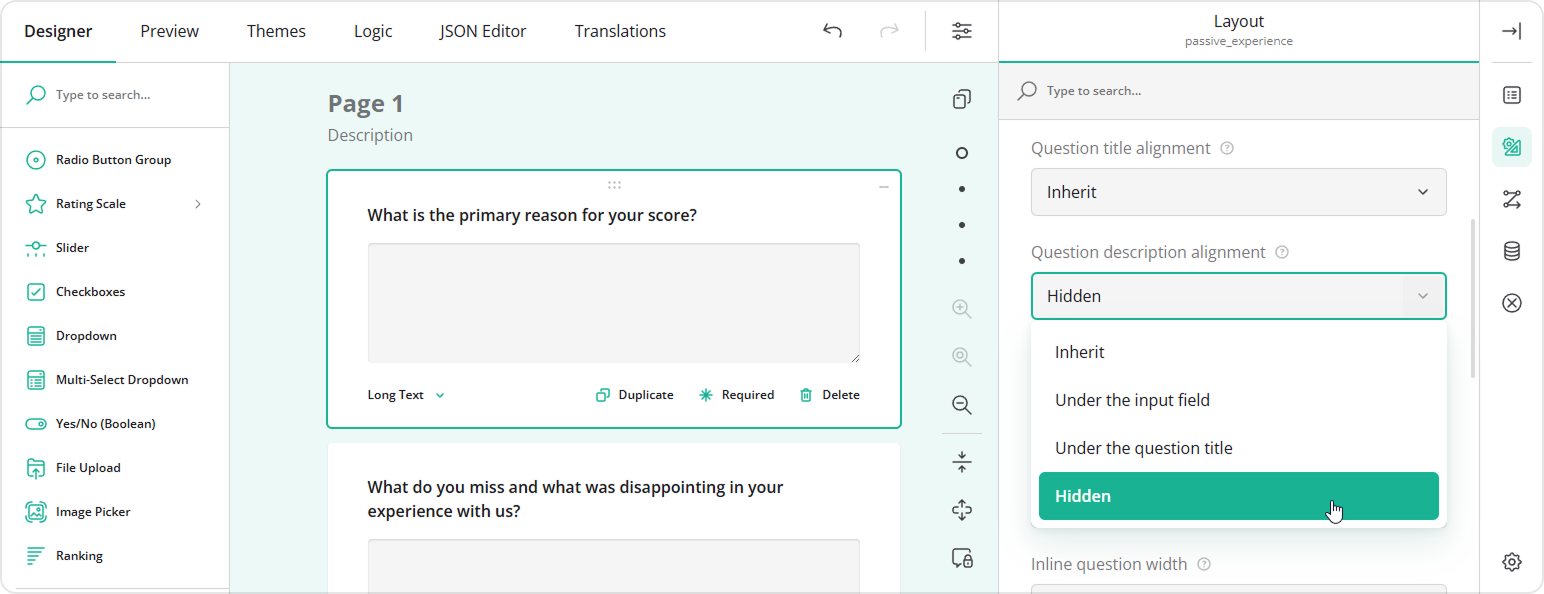
This release introduces a new "hidden" value for the question-level descriptionLocation and the survey-level questionDescriptionLocation property. You can use this value to hide descriptions globally for all questions in a survey or selectively for individual questions. Question-level settings override the survey-level configuration.
import { Model } from "survey-core";

const surveyJson = {
  "questionDescriptionLocation": "hidden", // Hide all question descriptions by default
  "elements": [
    {
      "type": "text",
      "name": "question1",
      "title": "Question Title",
      "description": "This description will be shown",
      "descriptionLocation": "underInput" // Overrides the global setting
    },
    // ...
  ]
};
const survey = new Model(surveyJson);
When configuring a survey in Survey Creator, you can now select Hidden in the Question description alignment dropdown:
Bug Fixes and Minor Enhancements
Form Library
- Expressions: Cannot access panel and page properties using
{$pageName.propName}and{$panelName.propName}(#11198) - [React Strict Mode] Conditional panel visibility fails to render nested elements when lazy rendering is enabled (#11191)
- Masked date and time input does not display default value when
saveMaskedValueis enabled (#11195) - [Survey Creator] Multi-Select Matrix: UI freezes when moving a row in the Property Grid due to full table re-rendering (#11212)
Survey Creator
- Error occurs when attempting to remove a newly added question in the
onQuestionAddedevent handler (#7652)
How to Update SurveyJS Libraries in Your Application
Angular
npm i survey-core@v2.5.22 survey-angular-ui@v2.5.22 --save
npm i survey-creator-core@v2.5.22 survey-creator-angular@v2.5.22 --save
npm i survey-analytics@v2.5.22 --save
npm i survey-pdf@v2.5.22 --save
React
npm i survey-core@v2.5.22 survey-react-ui@v2.5.22 --save
npm i survey-creator-core@v2.5.22 survey-creator-react@v2.5.22 --save
npm i survey-analytics@v2.5.22 --save
npm i survey-pdf@v2.5.22 --save
Vue.js
npm i survey-core@v2.5.22 survey-vue3-ui@v2.5.22 --save
npm i survey-creator-core@v2.5.22 survey-creator-vue@2.5.22 --save
npm i survey-analytics@2.5.22 --save
npm i survey-pdf@2.5.22 --save
HTML/CSS/JavaScript
<link href="https://unpkg.com/survey-core@2.5.22/survey-core.min.css" type="text/css" rel="stylesheet">
<script type="text/javascript" src="https://unpkg.com/survey-core@2.5.22/survey.core.min.js"></script>
<script type="text/javascript" src="https://unpkg.com/survey-js-ui@2.5.22/survey-js-ui.min.js"></script>

<script src="https://unpkg.com/survey-core@2.5.22/themes/index.min.js"></script>
<script src="https://unpkg.com/survey-creator-core@2.5.22/themes/index.min.js"></script>

<link href="https://unpkg.com/survey-creator-core@2.5.22/survey-creator-core.min.css" type="text/css" rel="stylesheet">
<script src="https://unpkg.com/survey-creator-core@2.5.22/survey-creator-core.min.js"></script>
<script src="https://unpkg.com/survey-creator-js@2.5.22/survey-creator-js.min.js"></script>

<link href="https://unpkg.com/survey-analytics@2.5.22/survey.analytics.min.css" rel="stylesheet">
<script src="https://unpkg.com/survey-analytics@2.5.22/survey.analytics.min.js"></script>

<script src="https://unpkg.com/survey-pdf@2.5.22/survey.pdf.min.js"></script>
<script src="https://unpkg.com/survey-pdf@2.5.22/pdf-form-filler.min.js"></script>