Building CMS-Driven Dynamic Forms with Node.js and SurveyJS
TL;DR: Typeform doesn't deploy every time someone edits a question. Neither should you. Here's how to build the same server-driven form infrastructure they're running under the hood—with your own Next.js frontend and Node.js backend.
Introduction
If you've ever used platforms like Typeform or SurveyMonkey, you've already used a CMS-driven form architecture without realizing it.
You opened a UI, edited a field, and the form updated everywhere it was embedded—web apps, mobile apps, internal dashboards, emails. No redeploys, pull requests, or frontend change were required.
Under the hood, these systems all work the same way: the form definition lives on a server, and every client application simply renders it.
If you're a frontend dev, however, you're probably used to forms being built in the opposite direction: the form as a React component, with validation rules living in a Zod schema and conditional visibility rules in JSX. This only works well until the business starts owning the questions while engineering continues owning the code, and those two things start changing at different speeds, creating drift.
Imagine a compliance team needs to add one dropdown to a KYC form. Suddenly a developer is pulled in, a PR is opened, a review happens, CI runs, and a deployment goes out—all for a single field.
This article walks through a different model: the one used by large form platforms internally. We'll build a server-driven form system where:
- Node.js backend stores form schemas
- Next.js frontend fetches those schemas
- SurveyJS renders the form dynamically
- Backend owns every rule and validation
Adding a field then becomes a simple database update instead of a deploy.
Conceptually, the architecture looks like this:
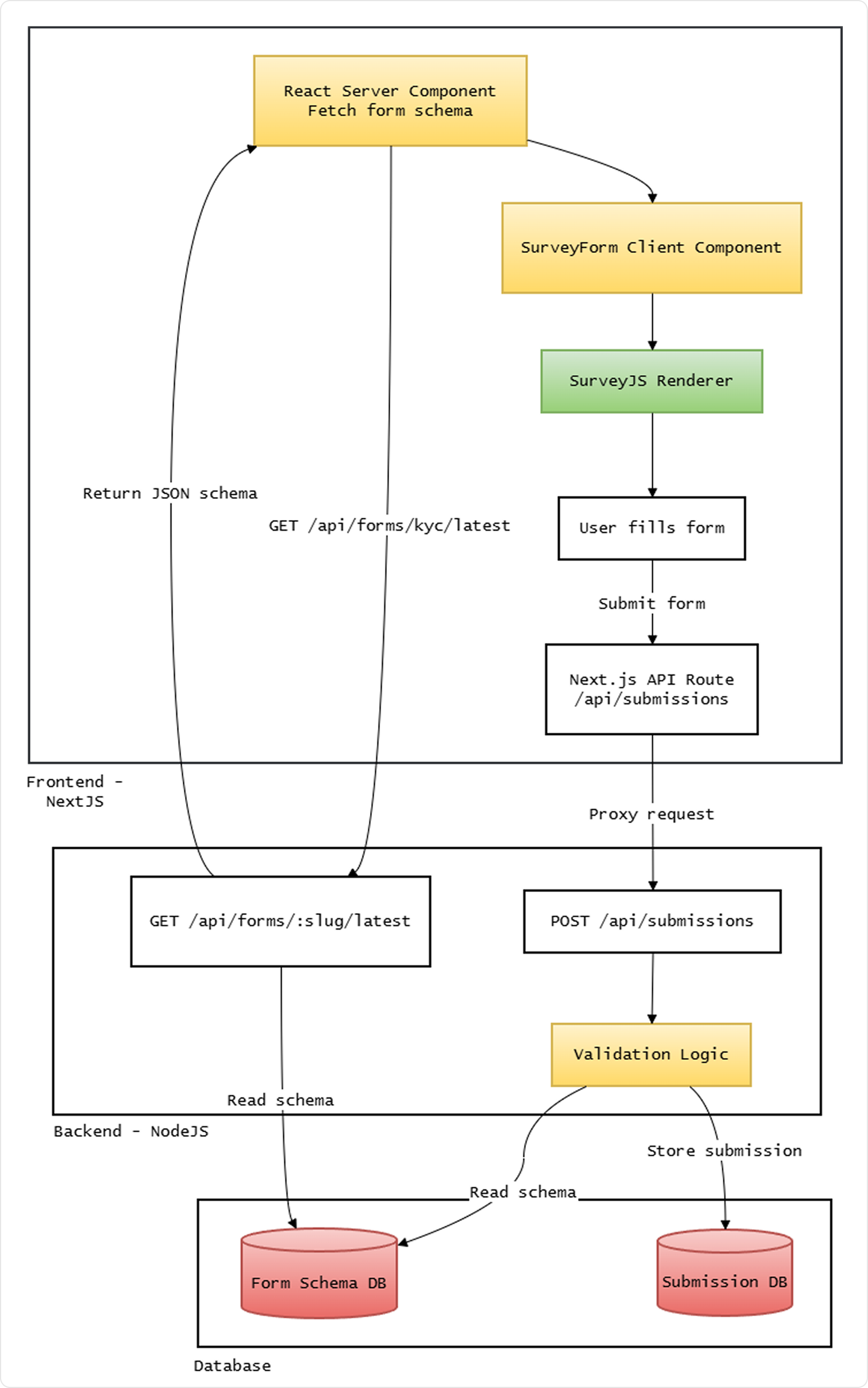
Once you adopt this pattern, the form definition behaves much more like content in a CMS than code in a repository.
We're only focusing on a typical fetch-render-validate pipeline. In a real system, schemas are authored as JSON and seeded into the database—either directly, via a raw JSON admin editor, or a schema builder UI. That's a natural next step but outside the scope of this article.
Requirements
Prerequisites: Docker (for PostgreSQL), Node.js 18 or later
The two main packages you'll need are:
survey-core
The platform-agnostic SurveyJS core library (logic, validation, schema handling). We'll use it in both backend (server-side validation) and frontend.survey-react-ui
A frontend library of SurveyJS React components that renders surveys from a JSON schema. Equivalent packages are available for other frameworks, including Angular and Vue 3.
On the backend, you will also need common infrastructure libraries such as Express, pg, cors, and dotenv. On the frontend, a Next.js application is assumed.
This article focuses on the CMS-driven form pattern and SurveyJS integration. Database schema design (PostgreSQL), Express server setup, and Next.js project scaffolding are intentionally out of scope.
The Backend: Schemas as a First-Class Resource
First of all, in a server-driven form architecture, the schema itself becomes a primary resource in your backend.
Using SurveyJS—which is a schema based, JSON-driven form system—you store form definitions as files, say, a kyc-v3.json. SurveyJS model schemas define structure and questions (read more here).
This JSON is going to be our KYC form used throughout this article:
{
  "title": "KYC Verification",
  "pages": [
    {
      "name": "identity",
      "elements": [
        {
          "type": "text",
          "name": "firstName",
          "title": "First Name",
          "isRequired": true
        },
        {
          "type": "text",
          "name": "lastName",
          "title": "Last Name",
          "isRequired": true
        },
        {
          "type": "text",
          "name": "email",
          "title": "Email",
          "inputType": "email",
          "isRequired": true,
          "validators": [
            {
              "type": "email",
              "text": "Please enter a valid email address"
            }
          ]
        },
        {
          "type": "text",
          "name": "dateOfBirth",
          "title": "Date of Birth",
          "inputType": "date",
          "isRequired": true
        },
        {
          "type": "panel",
          "name": "addressPanel",
          "title": "Address (optional)",
          "state": "collapsed",
          "elements": [
            {
              "type": "text",
              "name": "street",
              "title": "Street"
            },
            {
              "type": "text",
              "name": "city",
              "title": "City"
            },
            {
              "type": "text",
              "name": "postalCode",
              "title": "Postal Code"
            }
          ]
        }
      ]
    }
  ]
}
Properties used:
- Top-level:
title(survey heading),pages(array of pages). - Page:
name,elements(questions and panels). - Element:
type(e.g."text","panel"),name(unique key in submission data),title(display label). - Text question:
inputType("email","date", etc.),isRequired,validators(e.g. email format). - Panel: a
panelgroups related questions;state: "collapsed"renders it expandable.
But for production, instead of loading these schema files from object storage at runtime or having them be static files in the project, a better (and more secure) approach is storing these form definitions in a database, as a JSONB field, with associated metadata fields.
What would such a table for storing forms in our database look like? Here:
CREATE TABLE forms (
  id         SERIAL PRIMARY KEY,
  slug       TEXT    NOT NULL,
  version    INTEGER NOT NULL,
  status     TEXT    NOT NULL DEFAULT 'draft', -- draft | published | archived
  schema     JSONB   NOT NULL,
  created_at TIMESTAMP DEFAULT now(),
  UNIQUE (slug, version)
);
A few design choices here need to be clarified.
Why store form definition as a JSONB?
If you're using PostgreSQL, storing the schema as JSONB allows you to query it efficiently. You can search for specific field names, detect patterns across schemas, or run bulk updates across stored schema definitions with just SQL—none of which are practical with plain TEXT or a flat file.
But if your database doesn't support JSONB—SQLite (JSON as TEXT with json_extract()), MySQL (native JSON type with -> / ->> operators), or SQL Server (NVARCHAR(MAX) with JSON_VALUE / OPENJSON)—consider storing that schema in a text column and parse it in application code. You'll lose efficient in-database JSON queries, but the form-definition-as-data pattern still works: fetch, parse, validate, and serve the schema from your API.
For read-heavy workloads where you mostly fetch the full schema by slug and version, this is usually sufficient.
Why version a column?
This allows the backend to answer questions like:
- What is the latest schema?
- Which schema produced a given submission?
- Which versions are currently active?
With schemas stored this way, exposing them via an API becomes straightforward.
Here is a minimal Express.js route for serving these forms from an endpoint. Assume db is your PostgreSQL client (e.g. pg Pool) with query(sql, params):
import express from "express";
import db from "../db/index.js";
const router = express.Router();
router.get("/api/forms/:slug/:version", async (req, res) => {
  const { slug, version } = req.params;
  let result;
  if (version === "latest") {
    result = await db.query(
      `SELECT schema, version FROM forms
       WHERE slug = $1 AND status = 'published'
       ORDER BY version DESC
       LIMIT 1`,
      [slug]
    );
  } else {
    result = await db.query(
      `SELECT schema, version FROM forms
       WHERE slug = $1 AND version = $2 AND status = 'published'`,
      [slug, parseInt(version, 10)]
    );
  }

  if (!result.rows.length) {
    return res.status(404).json({ error: "Form not found" });
  }

  const { schema, version: resolvedVersion } = result.rows[0];
  res.json({ schema, version: resolvedVersion });
});

export default router;
Two interesting things worth noting here.
- First of all, the endpoint returns both
schemaandversion—the resolved version number is important when a client requestslatest, because the client needs to know the exact version it received in order to include it in submissions later. - Second, only
publishedschemas are served;draftandarchivedversions are invisible to consumers.
The key architectural idea is simple: the form definition travels over the network just like content.
Once this endpoint exists, any client—web, mobile, or internal tooling—can hit it, and render the same form from the same schema.
The Frontend: Fetching, Rendering, Submitting
On the frontend, Next.js has a very simple role: fetch the schema and render it.
Because the schema is known ahead of time, fetching it server-side in a React Server Component (RSC) works well. This avoids loading flashes and ensures the form is available at render time with no client-side fetch waterfall.
However, SurveyJS requires interactivity—event handlers, stateful model instantiation—so the actual rendering must happen in a Client Component. The RSC's job is purely to fetch and pass the schema down.
So our page might look like:
// app/forms/kyc/page.tsx (React Server Component)
import { SurveyForm } from "@/components/SurveyForm";
const API_BASE = process.env.FORMS_API_URL ?? "http://localhost:3001";
export default async function KycFormPage() {
  const res = await fetch(`${API_BASE}/api/forms/kyc/latest`, {
    cache: "no-store", // so form schemas are always fetched fresh (Next.js defaults to force-cache)
  });
  if (!res.ok) {
    throw new Error("Failed to load form");
  }
  const { schema, version } = await res.json();
  return (
    <SurveyForm
      schema={schema}
      schemaVersion={version}
      formSlug="kyc"
    />
  );
}
And then:
// components/SurveyForm.tsx (Client Component)
"use client";
import { useMemo } from "react";
import { Model } from "survey-core";
import { Survey } from "survey-react-ui";
import "survey-core/survey-core.css";
interface SurveyFormProps {
  schema: object;
  schemaVersion: number;
}

export function SurveyForm({ schema, schemaVersion, formSlug }: SurveyFormProps) {
  const survey = useMemo(() => {
    const s = new Model(schema);
    s.onComplete.add(async (sender) => {
      const res = await fetch("/api/submissions", {
        method: "POST",
        headers: { "Content-Type": "application/json" },
        body: JSON.stringify({
          data: sender.data,
          schema_version: schemaVersion,
          form_slug: formSlug,
        }),
      });

      if (!res.ok) {
        const err = await res.json().catch(() => ({}));
        alert(err.error ?? "Submission failed");
        return;
      }

      alert("Thank you! Your response has been recorded.");
    });
    return s;
  }, [schema, schemaVersion, formSlug]);

  return (
    <main style={{ maxWidth: 640, margin: "2rem auto", padding: "0 1rem" }}>
      <Survey model={survey} />
    </main>
  );
}
The client posts to /api/submissions (a Next.js API route), which proxies to the Node backend.
So we add an app/api/submissions/route.ts here:
// app/api/submissions/route.ts
const API_BASE = process.env.FORMS_API_URL || "http://localhost:3001";
export async function POST(request: Request) {
  let body;
  // wrapping in try-catch avoids unhandled rejection on invalid JSON
  try {
    body = await request.json();
  } catch {
    return Response.json({ error: "Invalid JSON" }, { status: 400 });
  }
  const res = await fetch(`${API_BASE}/api/submissions`, {
    method: "POST",
    headers: { "Content-Type": "application/json" },
    body: JSON.stringify(body),
  });

  const data = await res.json().catch(() => ({}));
  return Response.json(data, { status: res.status });
}
The frontend logic is intentionally thin:
- Fetch the schema (server-side, in the RSC) from the backend API.
- Pass schema + resolved version to the Client Component.
- SurveyJS renders and enforces the schema rules in the browser.
- On completion, POST to
/api/submissionswithdata,schema_version, andform_slug. The Next.js API route proxies this to the Node backend.
Use
useMemofor theModelso it isn't recreated every render. Also, includeform_slugin the payload so the backend knows which form to validate against (useful when you have multiple forms).
The client does not own validation logic. It relies on SurveyJS enforcing the schema rules in the browser, but the server validates independently. The schema_version and form_slug in the submission payload tie everything together—they tell the backend exactly which schema to validate against and which version to store alongside the response.
Server-Side Validation with SurveyJS
Even though the client evaluates visibility rules, conditional fields, and validators, the server must enforce the same rules.
Two reasons make this non-negotiable:
- Clients cannot be trusted.
- Direct API calls bypass the frontend entirely.
Fortunately, the SurveyJS survey-core is platform-independent—no DOM dependency. The same validation logic that runs in the browser can run in Node.js.
So our submission endpoint might look like this, now:
import express from "express";
import { Model } from "survey-core";
import db from "../db/index.js";
const router = express.Router();
async function getSchema(slug, version) {
  const result = await db.query(
    `SELECT schema FROM forms
     WHERE slug = $1 AND version = $2 AND status = 'published'`,
    [slug, version]
  );

  if (!result.rows.length) return null;
  return result.rows[0].schema;
}

async function saveSubmission({ form_slug, schema_version, data }) {
  await db.query(
    `INSERT INTO submissions (form_slug, schema_version, data)
     VALUES ($1, $2, $3)`,
    [form_slug, schema_version, data]
  );
}

router.post("/api/submissions", express.json(), async (req, res) => {
  const { data, schema_version, form_slug = "kyc" } = req.body;
  if (!data || schema_version == null) {
    return res.status(400).json({ error: "Missing data or schema_version" });
  }

  // Fetch the specific schema version that the client rendered…
  // …NOT "latest", which may have changed since the form was served.

  const schema = await getSchema(form_slug, schema_version);
  if (!schema) {
    return res.status(400).json({ error: "Unknown schema version" });
  }

  const survey = new Model(schema);
  survey.data = data;
  survey.clearIncorrectValues(true); // strips invalid choices and unknown keys
  const isValid = survey.validate();

  if (!isValid) {
    return res.status(400).json({ error: "Validation failed" });
  }

  await saveSubmission({
    form_slug,
    schema_version,
    data: survey.data, // use sanitized data, not raw payload
  });

  res.status(200).json({ success: true });
});

export default router;
An easy thing to miss—note that we validate against the specific version the client rendered, not latest. If a user loaded v2 of a form and a v3 was published while they were filling it out, validating against v3 would be wrong—it may have required fields the user was never shown.
Also note that survey.data after clearIncorrectValues is used for storage, not the raw req.body.data. This gives you sanitized, schema-conformant data at the point of persistence.
If validation logic were duplicated between client schema and server business logic, they would eventually diverge. A rule added to the frontend might never reach the backend, or vice versa. Using survey-core on both sides makes the JSON schema our single authoritative definition, one that is evaluated identically in both environments.
Other Production Concerns for CMS-Driven Forms
Some other gotchas to cover—not specific to SurveyJS—but they apply to any system where form definitions live on the server.
Schema Versioning
When submissions are still arriving for older form versions, you need to know which schema produced each one.
Store the schema version alongside each submission:
CREATE TABLE submissions (
  id                  SERIAL PRIMARY KEY,
  form_slug           TEXT,
  schema_version      INTEGER,
  data                JSONB,
  submitted_at        TIMESTAMP DEFAULT now()
);
Every submission references the exact schema that generated it. Historical data remains interpretable even as the form evolves—including by your own validation logic when you need to replay or audit old responses.
Backward Compatibility
Suppose v3 of a form adds a required field. v2 submissions won't contain it.
There is no perfect solution here—only tradeoffs. Common strategies:
- Additive-only schema changes: new fields are always optional in the version they're introduced.
- Nullable fields for anything newly required.
- Treating schema updates like database migrations: planned, versioned, and reviewed before publish.
In practice, mature teams apply the same discipline to schema changes that they apply to schema migrations. The UNIQUE (slug, version) constraint on the forms table enforces that versions are immutable once written—if you need to change something, you cut a new version.
Governance
Once schemas become data instead of code, someone must control how they change.
The status column introduced in the forms table earlier handles the draft → published → archived flow directly.
A publishing endpoint can enforce this transition:
app.post("/api/forms/:id/publish", requireRole("admin"), async (req, res) => {
  await db.query(
    `UPDATE forms SET status = 'published' WHERE id = $1 AND status = 'draft'`,
    [req.params.id]
  );

  res.json({ success: true });
});
In a low-stakes internal tool, anyone can publish. In a regulated workflow—KYC, insurance, healthcare—publishing may require an explicit approval step and a second reviewer. The mechanism is the same; the middleware and policy around it changes.
The key point is that schema publishing becomes an operational action, not a code change.
Audit Trails
In compliance-heavy workflows, it isn't enough to know the current form structure. You need to know who changed it and when.
A simple audit table:
CREATE TABLE schema_audit (
  id         SERIAL PRIMARY KEY,
  form_id    INTEGER REFERENCES forms(id),
  version    INTEGER,
  changed_by TEXT,
  action     TEXT,    -- 'created' | 'published' | 'archived'
  snapshot   JSONB,   -- full schema at the time of the action
  timestamp  TIMESTAMP DEFAULT now()
);
Insert a row whenever a schema transitions state:
await db.query(
  `INSERT INTO schema_audit (form_id, version, changed_by, action, snapshot)
   VALUES ($1, $2, $3, $4, $5)`,
  [formId, version, req.user.id, "published", schema]
);
Storing full snapshots rather than diffs is probably better for simplicity. Storage is cheap, after all; being able to reconstruct exactly what a user saw when they filled out a form two years ago is not something you want to approximate.
Because submissions stores schema_version, and schema_audit records who published each version and when, every submitted response can be traced back to:
- The exact schema that rendered it.
- The user who approved and published that schema.
This level of traceability becomes important quickly in regulated systems—and it emerges naturally once you start treating schemas as data.
When to Use Server-Driven Dynamic Forms
The CMS-driven dynamic forms model is flexible and scalable, but it's important to understand that not every form should be server-driven.
For login pages, checkout flows, and simple settings screens, a standard React stack—React Hook Form plus Zod—is simpler, faster to build, and undoubtedly the right tool. The architecture described here is meant for a very specific need, and introduces real backend complexity:
- Schema storage and versioning
- Governance and approval workflows
- Dual validation infrastructure
- Audit trails
Smaller projects rarely benefit from this overhead.
The indication that you need this architecture will usually be organizational, not technical. When the business owns the questions and engineering owns the code—and those two things change at different speeds—no amount of cleaner JSX solves the underlying mismatch. Simple changes shouldn't need to go through the whole dev-focused CI/CD flow, or need a PR opened, after all.
What we've built here is the same architectural pattern used by Typeform, SurveyMonkey, and every serious form platform. The form is a database record, with the frontend as a thin renderer only. Every change is a data operation, not a full redeploy.
Now you know how to build your own version of it—but more importantly, you know when it's actually worth it.