Data Entry Software: Definition, Types, Features, Benefits, and the Best Tools in 2025
Data entry software refers to a category of applications designed to capture, validate, and store structured or unstructured information. These systems replace or augment manual data entry workflows and help organizations reduce errors, accelerate data processing, and integrate collected data into downstream applications. This article explains what data entry software is, how different types of data entry programs work, their common features, and industry use cases. Examples from the market are included, along with references to SurveyJS as an option for building custom and extensible data entry tools.
Definition and Purpose of Data Entry Software
Data entry software is used to capture data from users, documents, images, or external systems and transform it into structured digital formats ready for storage, processing, or analysis. These tools aim to standardize the data collection process, enforce validation rules, ensure accuracy, and streamline integration with databases, CRMs, ERPs, or analytics platforms. The overarching purpose is to improve consistency and efficiency in data capture workflows and reduce human error and operational costs.
Typical Inputs for Data Entry Software
Inputs are the raw or semi-structured data fed into the software for processing. These can come from various sources and formats, often requiring manual or automated entry.
| Input Type | Description | Examples |
|---|---|---|
| Manual Entry | Data typed directly by the user into fields or forms. | Keyboard input for respondent names, addresses, or numerical values like quantities. |
| File Imports | Bulk data from external files. | CSV, Excel (.xlsx), JSON, or XML files containing lists of products or survey responses. |
| Scanned/OCR Data | Data digitized from physical documents. | Scanned invoices, receipts, or forms converted via Optical Character Recognition (OCR) to editable text. |
| API/Integrations | Real-time data pulled from other systems. | Customer info from a CRM like Salesforce or transaction logs from an e-commerce API. |
| Multimedia | Non-text data that needs transcription or tagging. | Audio recordings (for voice-to-text) or images (for metadata entry like photo descriptions). |
Typical Outputs for Data Entry Software
Outputs are the processed, validated, and organized results, ready for storage, analysis, and further use. These often include error logs and summaries.
| Output Type | Description | Examples |
|---|---|---|
| Databases/Records | Structured storage of entered data. | Updated SQL database rows for inventory levels or employee records in an HR system. |
| Reports & Summaries | Aggregated views or analytics. | PDF reports on sales totals or Excel dashboards summarizing entered sales data. |
| Exported Files | Formatted data for sharing or backup. | Cleaned CSV files for import into accounting software or JSON exports for web apps. |
| Notifications/Alerts | Automated responses to data events. | Email confirmations for completed entries or validation error flags (e.g., "Invalid email format"). |
| Visualizations | Graphical representations. | Charts in tools like SurveyJS Dashboard showing trends from collected survey data. |
Types of Data Entry Software
Data entry software can be broadly categorized based on the level of human involvement, automation, and specific functionalities. The three main categories include manual, semi-automated, and automated/OCR/AI-driven solutions.
| Type | Description | Examples |
|---|---|---|
| Manual Data Entry Software | Tools that rely on human users to input and organize data directly, often through spreadsheets or multistep forms. These are straightforward but prone to errors and time-consuming for large volumes. | Microsoft Excel, Google Sheets |
| Automated Data Entry Software | AI-powered tools that extract, validate, and input data with minimal manual effort, using technologies like Optical Character Recognition (OCR), Natural Language Processing (NLP), or Robotic Process Automation (RPA). Ideal for high-volume, repetitive tasks. | Parseur, UiPath, super.AI's Intelligent Document Processing (IDP), docAlpha |
| Form Builder Software | Platforms for creating customizable digital forms to collect and structure data from users, often with validation features to ensure accuracy during entry. | SurveyJS, Typeform, Google Forms, Zoho Forms |
| Database Management Systems (DBMS) | Software for storing, retrieving, and managing large datasets entered via structured interfaces, supporting queries and integrations for complex data handling. | Microsoft Access, Airtable |
Key Features of Data Entry Software
Manual Data Entry Software
These tools (e.g., Microsoft Excel, Google Sheets) rely on human input but include basic aids to reduce errors. They're ideal for low-volume, customizable tasks but can be time-intensive.
| Feature | Description |
|---|---|
| Simple Input Interfaces | Keyboard-based entry into spreadsheets, forms, or grids with autofill and copy-paste support for quick population. |
| Basic Data Validation | Format rules (e.g., date checks, required fields) and range limits to catch errors during typing. |
| Collaboration Tools | Real-time multi-user editing and version history for team-based entry. |
| Export/Import Options | Support for CSV, Excel, and PDF exports; basic import from files for bulk setup. |
| Customizable Templates | Pre-built sheets or forms for recurring data like invoices or inventories. |
Automated Data Entry Software
AI-driven tools (e.g., Parseur, UiPath, Docsumo) minimize manual work through extraction and processing, achieving significant error reduction in high-volume scenarios.
| Feature | Description |
|---|---|
| AI-Based Extraction | Template-free OCR and NLP for pulling data from PDFs, scans, emails, and images without manual setup. |
| Intelligent Validation | Auto-cleansing, duplicate detection, and rule-based checks (e.g., fraud detection). |
| Workflow Automation | RPA bots for routing, approvals, and integrations with CRMs/ERPs like Salesforce or QuickBooks. |
| Real-Time Processing | Instant data parsing and predictive entry using ML to anticipate and fill fields. |
| Scalable Integrations | API connectors for exporting to databases or tools like Zapier, with analytics dashboards. |
Form Builder Software
Platforms like SurveyJS, Typeform, and Jotform excel at user-facing data collection, with drag-and-drop design for creating of structured digital surveys and forms.
| Feature | Description |
|---|---|
| Drag-and-Drop Editor | No-code interface for building multistep forms with conditional logic (e.g., show/hide fields based on responses). |
| Mobile-Responsive Design | Adaptive layouts for desktop/mobile, including offline mode and conversational formats for higher engagement. |
| Validation Rules | Enforces accuracy with constraints such as regex, ranges, required fields, and custom logic. |
| Analytics and Reporting | Built-in dashboards for response tracking and trend analysis. |
| AI-Generated Elements | Auto-suggest questions or entire forms using prompts, with additional customization via CSS editors. |
| Data Storage and Export | SurveyJS saves data in JSON in your own database or also allows you to export it to Excel or CSV. SaaS platforms like Typesform or Jotform store data in 3rd-party clouds. |
Database Management Systems (DBMS)
Tools like Microsoft Access and Airtable handle structured entry into databases.
| Feature | Description |
|---|---|
| Structured Input Forms | Custom queries and interfaces for entering data into tables with relationships and constraints. |
| Access Controls & Security | Role-based permissions, encryption, and audit logs to protect sensitive entries. |
| Query & Indexing Tools | SQL-like searching, full-text indexing, and concurrent transaction handling for efficient retrieval. |
| Backup & Recovery | Automated versioning, clustering, and disaster recovery to ensure data integrity. |
Benefits of Using Data Entry Software
Accuracy and Consistency
Validation rules reduce human errors by catching incorrect or inconsistent input at the time of entry and ensure data accuracy without custom coding. SurveyJS excels here with built-in and custom client-side validation, along with server-side validation when a request to a server is required. SurveyJS Survey Creator supports input masking, including numeric, date and time, currency, and regex-based patterns for phone numbers or codes.
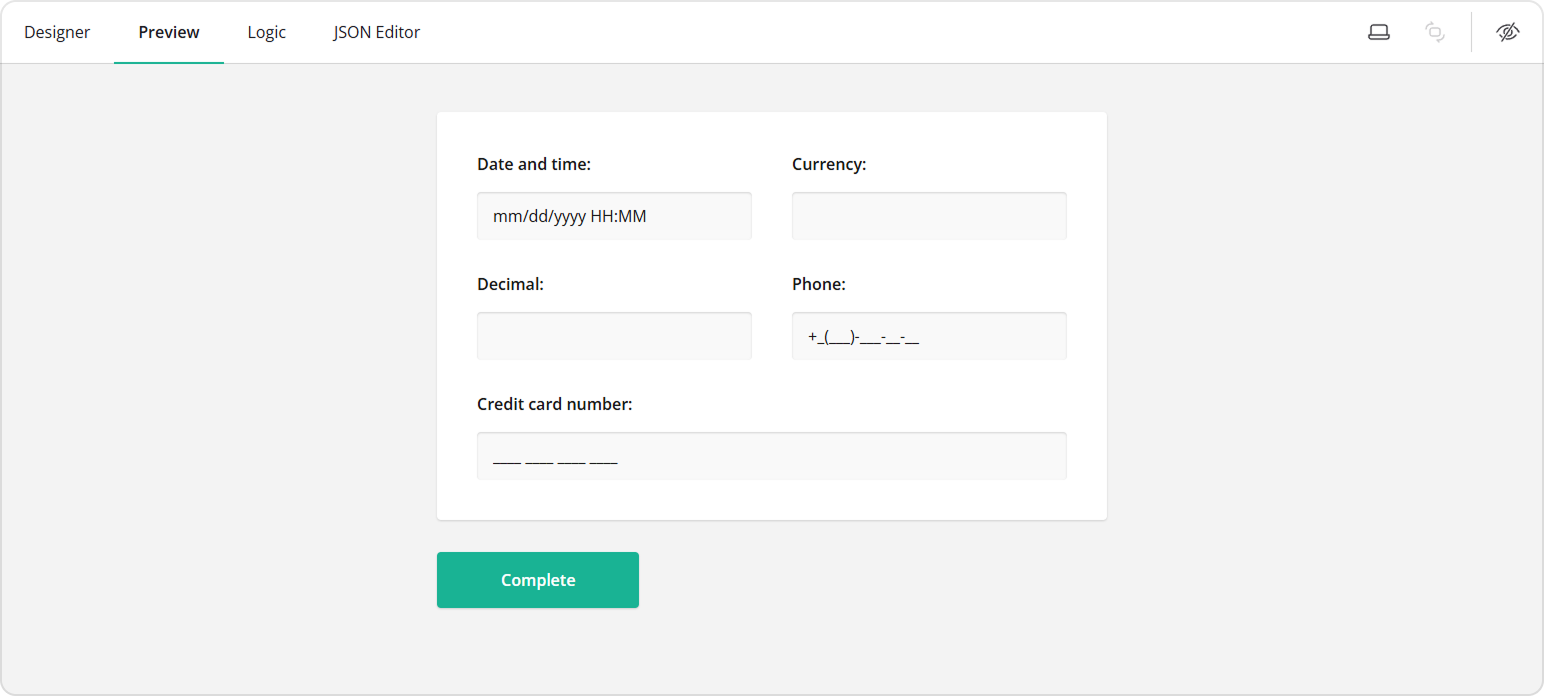
You can also configure the survey to show feedback immediately after user input or when the respondent proceeds to the next page. If built-in input validation options fall short, you can create custom validation rules using validators. For instance, you can create a rule to verify that the respondent has turned 18:
{
  "elements": [
    {
      "type": "text",
      "name": "dob",
      "title": "Date of birth",
      "inputType": "date"
    },
    {
      "type": "text",
      "name": "age",
      "title": "How old are you?",
      "setValueExpression": "age({dob})",
      "validators": [
        {
          "type": "numeric",
          "text": "Age must be over 18",
          "minValue": 18
        }
      ],
      "inputType": "number"
    }
  ]
}
Speed and Efficiency
Automated and semi-automated systems significantly reduce processing time, especially when handling repetitive or high-volume tasks.
Structured and Standardized Data
Data entry tools generate predictable outputs, improving compatibility with downstream workflows. SurveyJS rendering component returns responses in JSON format, which you can send to your backend and store in a database. From there, you can easily export the stored results to CSV or Excel using your server-side tools or libraries.
Integration with Existing Systems
Modern data entry platforms can connect directly with internal APIs, databases, or data pipelines. For example, SurveyJS provides flexible backend integration with any server-database combination.
Cost Reduction
Automation decreases reliance on manual entry teams, reducing long-term operational costs.
Use Cases by Industry
Data entry software is widely used across industries that rely on structured data capture.
Healthcare
- Patient intake forms
- Medical histories
- Insurance claim submissions
- Clinical trial data collection
SurveyJS is often used for healthcare questionnaires and EMR systems due to its schema-driven design and customization and integration flexibility.
Market Research
- Surveys
- Product feedback forms
- Customer experience evaluations
Tools like SurveyJS, Qualtrics, and SurveyMonkey dominate this space.
Finance
- Loan applications
- Financial disclosures
- KYC (Know Your Customer) forms
- Bank statements
Insurance
- Claims processing
- Policyholder onboarding
- Incident reporting
Education
- Enrollment forms
- Assessments and tests
- Student feedback data
SurveyJS is frequently used to build customized academic assessment tools.
Architecture of Modern Data Entry Systems
A typical data entry system consists of:
- User Interface (UI) — Form builder and form renderer with support for file upload.
- Validation Layer — Rules applied to inputs.
- Automation Layer — Conditional logic, workflows, calculated values.
- Storage Layer — Databases or data lakes.
- Integration Layer — APIs, webhooks, or ETL pipelines.
- Security Layer — Authentication, authorization, encryption.
SurveyJS follows a client-side, JSON schema-based architecture. With SurveyJS, you can create forms, export them to PDF, and collect and visualize responses on the client. To use the SurveyJS UI libraries in your application, you'll need to integrate them with your own server and database. Users of your form management system can then define form structures in JSON using a no-code form builder, and the SurveyJS Form Library will dynamically generate the form UI based on that JSON schema.
Schema-Based Field Definition in SurveyJS
This schema becomes a rendered form inside any JavaScript environment (React, Angular, Vue, or Vanilla JS), making it suitable for enterprise-level data entry systems.
{
  "title": "Customer Data Entry Form",
  "elements": [
    {
      "type": "text",
      "name": "fullName",
      "title": "Full Name",
      "isRequired": true
    },
    {
      "type": "text",
      "name": "email",
      "title": "Email Address",
      "inputType": "email",
      "validators": [
        { "type": "email" }
      ]
    },
    {
      "type": "dropdown",
      "name": "industry",
      "title": "Industry",
      "choices": [
        "Healthcare", "Finance", "Education", "Insurance"
      ]
    }
  ]
}
Why SurveyJS Works Well for Custom Data Entry Solutions
SurveyJS is not a traditional SaaS data entry program. Instead, it is a set of JavaScript libraries for creating custom form management platforms, data entry tools, and data-heavy applications. It is suitable for technical teams of enterprises that need:
- Schema-driven form generation
- Advanced validation and conditional logic
- Full UI customization
- Integration with existing JavaScript applications and backend systems
- Ability to store data anywhere (because SurveyJS is frontend-only)
For organizations building specialized or proprietary data entry systems, SurveyJS provides a flexible foundation that can integrate with AI services, connect to their own databases through APIs, and adapt to any industry-specific workflow.