SurveyJS v2.5.19
Released: April 7, 2026
SurveyJS v2.5.19 introduces two enhancements: an option to display language names in English across Survey Creator UI, and nested tables support in the Dashboard's Table View for improved visualization of hierarchical data.
Survey Creator: Display Language Names in English
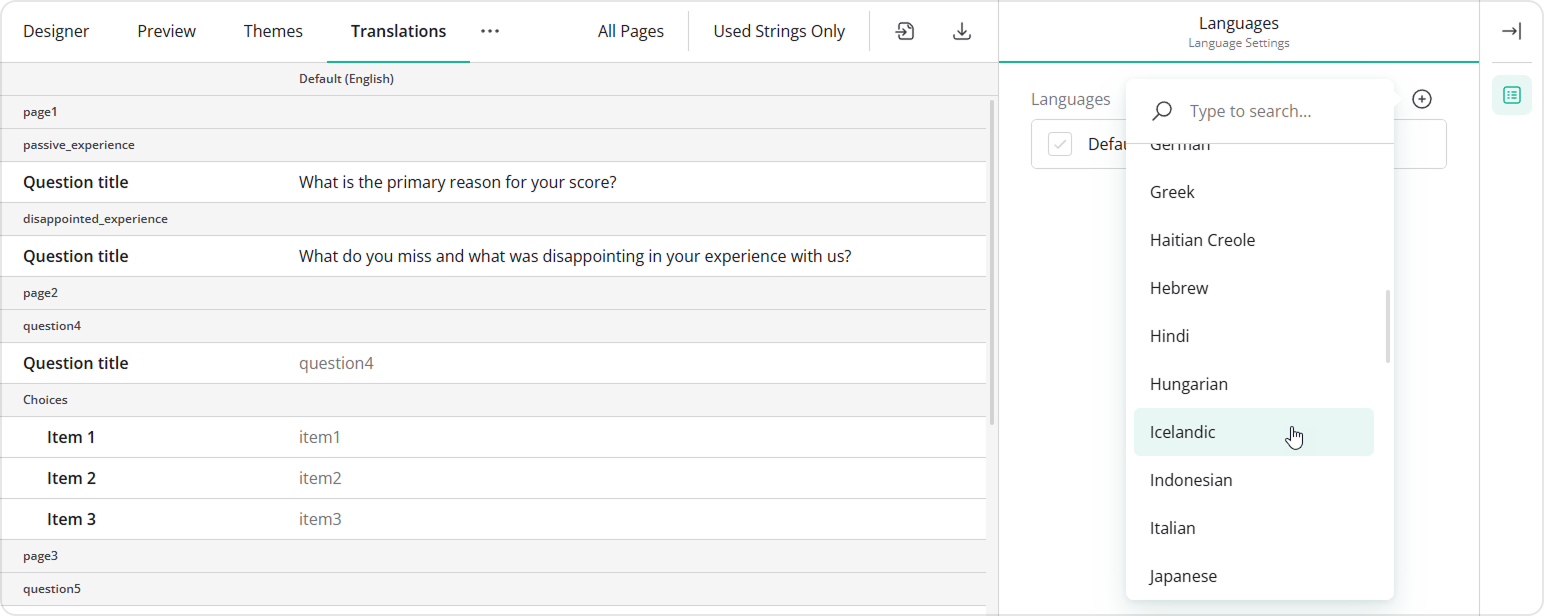
This release adds a new useEnglishLanguageNames property to ICreatorOptions. Enable this property to display language names in English across the Translations tab, the survey language dropdown, and other Survey Creator UI elements, instead of their native names:
import { SurveyCreatorModel } from "survey-creator-core";

const creatorOptions = {
  useEnglishLanguageNames: true
};
const creator = new SurveyCreatorModel(creatorOptions);
[Dashboard] Table View: Nested Tables Support
Table View now supports nested tables for visualizing responses to questions that produce hierarchical data structures, such as Dynamic Matrix and Dynamic Panel questions.
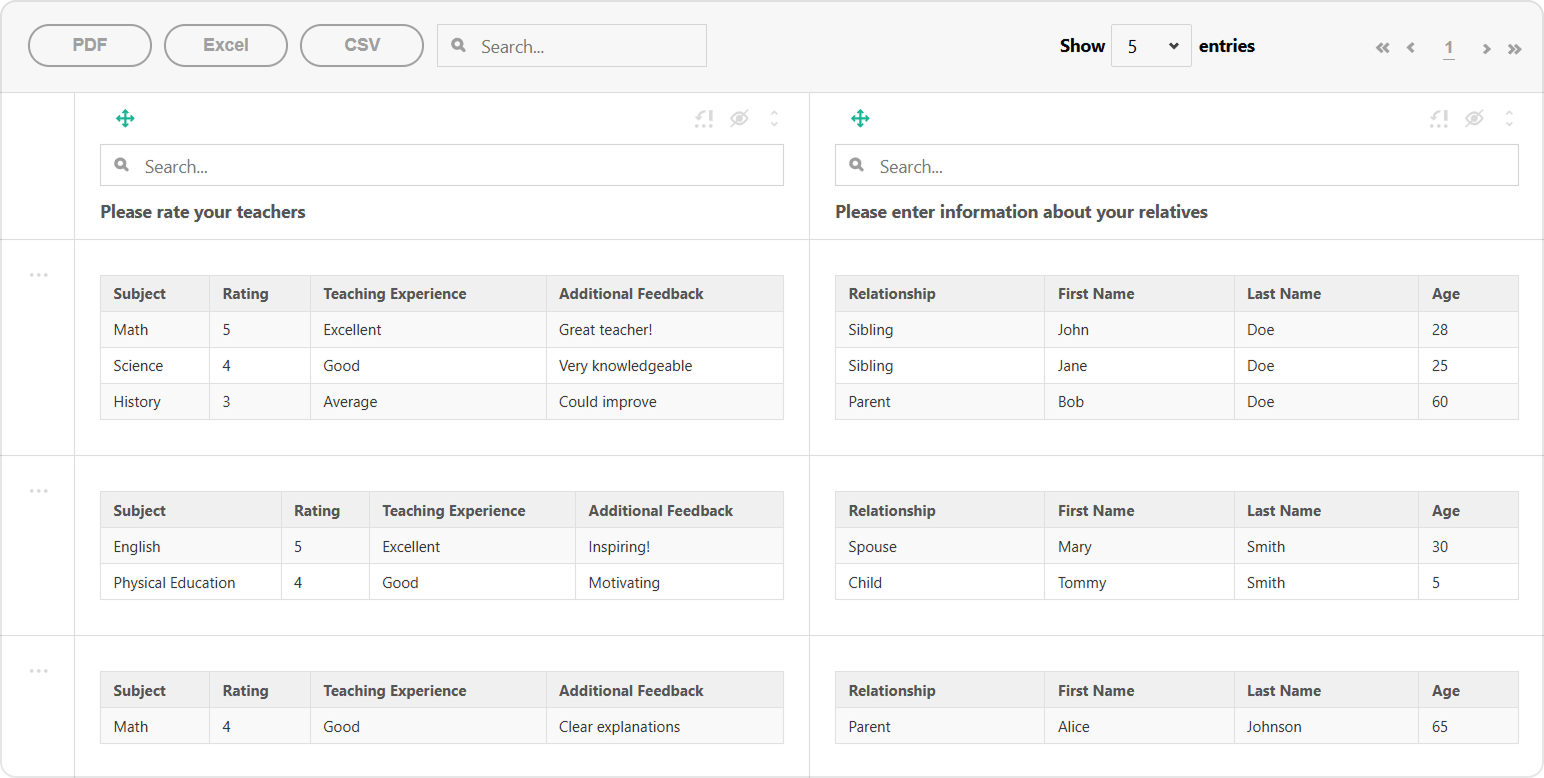
This feature is enabled by default. If you want to disable it, set the useNestedTables property to false when creating a Tabulator instance:
import { Model } from 'survey-core';
import { Tabulator } from 'survey-analytics/survey.analytics.tabulator';

const surveyJson = { /* Survey JSON schema */};
const survey = new Model(surveyJson);
const data = [ /* Survey responses */ ];

const tableView = new Tabulator(
  survey,
  data,
  {
    useNestedTables: false // Disable nested tables
  }
);
New Blog Post
Building CMS-Driven Dynamic Forms with Node.js and SurveyJS
Bug Fixes and Minor Enhancements
Form Library
validateExpressions()incorrectly reportsUnknownVariablefor...InArrayfunctions (#11082)- Required validation errors appear for read-only panels (#11136)
- Panel visibility doesn't evaluate correctly when expressions reference element properties (#11126)
- Matrix column visibility doesn't evaluate correctly when expressions reference element properties (#11127)
- Multiple Textboxes: Item title padding appears on right instead of left in RTL (#11117)
- Single-Line Input: Date input placeholder color is black instead of gray (#11096)
Survey Creator
- Designer tab: Page navigator scrolls to the wrong page in long surveys (#7599)
- Matrix column titles do not auto-increment numbers when a new column is added (#7597)
Dashboard
setFilter()does not allow clearing the filter via the UI (#729)hideEmptyAnswersfails to hide empty answers when a filter is applied to the visualized dataset (#731)
How to Update SurveyJS Libraries in Your Application
Angular
npm i survey-core@v2.5.19 survey-angular-ui@v2.5.19 --save
npm i survey-creator-core@v2.5.19 survey-creator-angular@v2.5.19 --save
npm i survey-analytics@v2.5.19 --save
npm i survey-pdf@v2.5.19 --save
React
npm i survey-core@v2.5.19 survey-react-ui@v2.5.19 --save
npm i survey-creator-core@v2.5.19 survey-creator-react@v2.5.19 --save
npm i survey-analytics@v2.5.19 --save
npm i survey-pdf@v2.5.19 --save
Vue.js
npm i survey-core@v2.5.19 survey-vue3-ui@v2.5.19 --save
npm i survey-creator-core@v2.5.19 survey-creator-vue@2.5.19 --save
npm i survey-analytics@2.5.19 --save
npm i survey-pdf@2.5.19 --save
HTML/CSS/JavaScript
<link href="https://unpkg.com/survey-core@2.5.19/survey-core.min.css" type="text/css" rel="stylesheet">
<script type="text/javascript" src="https://unpkg.com/survey-core@2.5.19/survey.core.min.js"></script>
<script type="text/javascript" src="https://unpkg.com/survey-js-ui@2.5.19/survey-js-ui.min.js"></script>

<script src="https://unpkg.com/survey-core@2.5.19/themes/index.min.js"></script>
<script src="https://unpkg.com/survey-creator-core@2.5.19/themes/index.min.js"></script>

<link href="https://unpkg.com/survey-creator-core@2.5.19/survey-creator-core.min.css" type="text/css" rel="stylesheet">
<script src="https://unpkg.com/survey-creator-core@2.5.19/survey-creator-core.min.js"></script>
<script src="https://unpkg.com/survey-creator-js@2.5.19/survey-creator-js.min.js"></script>

<link href="https://unpkg.com/survey-analytics@2.5.19/survey.analytics.min.css" rel="stylesheet">
<script src="https://unpkg.com/survey-analytics@2.5.19/survey.analytics.min.js"></script>

<script src="https://unpkg.com/survey-pdf@2.5.19/survey.pdf.min.js"></script>
<script src="https://unpkg.com/survey-pdf@2.5.19/pdf-form-filler.min.js"></script>