SurveyJS v2.5.7
Released: January 22, 2026
SurveyJS v2.5.7 further enhances the expression engine. This release introduces semantic validation, adds a public expression validation API, and extends date-time arithmetic to support adding or subtracting hours, minutes, and seconds.
Expression Enhancements
Semantics Validation
Expression validation, introduced in SurveyJS v2.5.6, is extended to detect semantic errors. These errors indicate that an expression is syntactically valid but has no meaningful effect because it always evaluates to the same value.
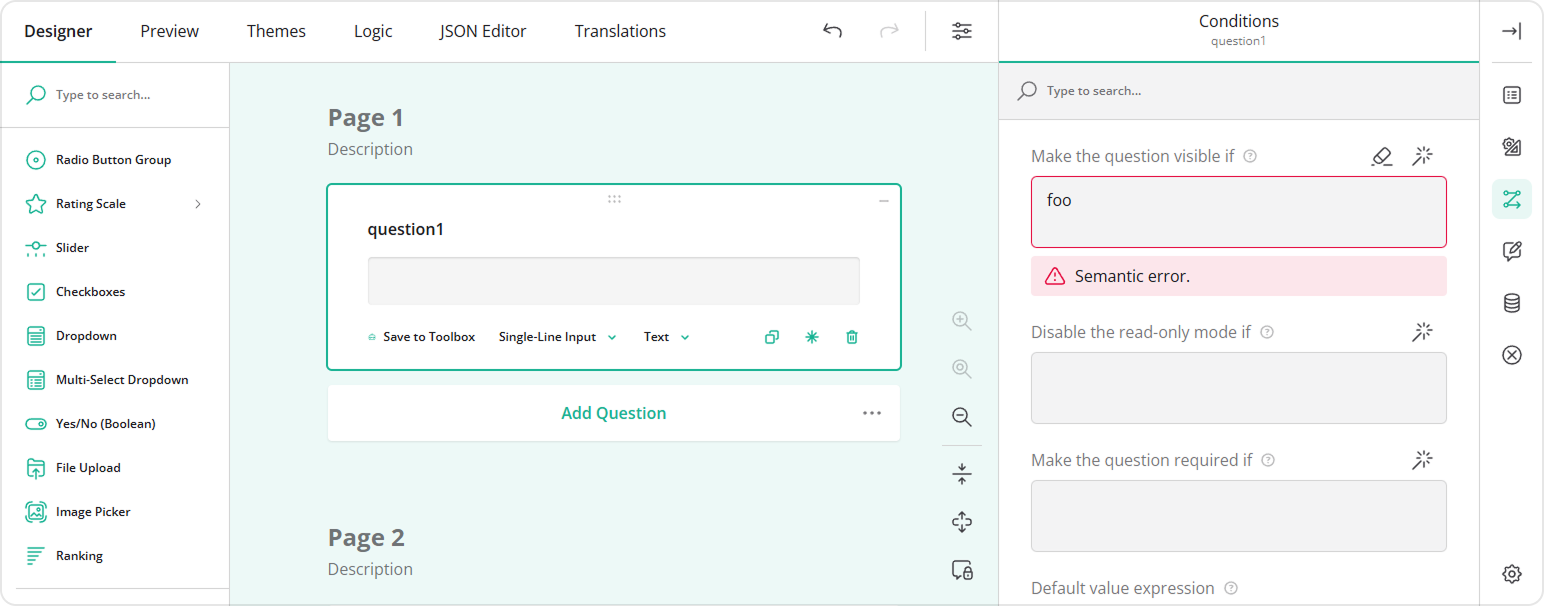
Semantics validation is enabled by default. To disable it, set the expressionsValidateSemantics property to false when instantiating Survey Creator:
import { SurveyCreatorModel } from "survey-creator-core";

const creatorOptions = {
  expressionsValidateSemantics: false
};

const creator = new SurveyCreatorModel(creatorOptions);
Expression Validation API
Starting with SurveyJS v2.5.7, expressions can also be validated programmatically using the validateExpressions(options) method.
This method detects the following types of errors:
Unknown variable
The expression references an undefined variable or an unknown question, panel, or page name.Unknown function
The expression references an unregistered function.Semantic error
The expression is syntactically valid but has no meaningful effect because it always evaluates to the same value.Syntax error
The expression contains invalid syntax, such as unmatched parentheses, missing operands, or invalid operators.
When called without arguments, the method validates all four error types. It returns an array of IExpressionValidationResult objects. Each object contains the survey element and property name that hold the invalid expression, along with detailed error information.
// ...
// Omitted: `SurveyModel` creation
// ...

const results = survey.validateExpressions();
results.forEach(result => {
  const element = result.obj;
  const propertyName = result.propertyName;
  const errors = result.errors;

  // Example: log validation errors
  console.warn(
    `Expression error in "${element.name}", property "${propertyName}":`,
    errors
  );
});
You can disable checks for unknown variables, unknown functions, and semantic errors by passing an options object with the variables, functions, or semantics property set to false. Syntax errors are always validated.
// ...
// Omitted: `SurveyModel` creation
// ...

// Validate syntax errors only
const results = survey.validateExpressions({
  variables: false,
  functions: false,
  semantics: false
});
Add Hours, Minutes, or Seconds to Date-Time Values
The dateAdd expression function now supports adding or subtracting full hours, minutes, or seconds to and from date-time values.
// Adds 4 hours to the value of a `start-date` question
"dateAdd({start-date}, 4, 'hours')"

// Adds 30 minutes to the value of a `end-date` question
"dateAdd({end-date}, 30, 'minutes')",

// Subtracts 45 seconds from the current date and time
"dateAdd(currentDate(), -45, 'seconds')"
For the complete list of supported functions, refer to the Built-in Functions help section.
New Help Topics
Survey Creator: Show Nested Follow-Up Questions Based on a Selected Choice Option
Bug Fixes and Minor Enhancements
Form Library
- JSON schema with properties metadata contains a typo:
allOffinsteadallOf(#10804) - Custom required property is not validated (#10811)
- Required color input does not prevent survey submission when no color is selected (#10808)
- [Accessibility] Radio Button Group: "Clear" button doesn't have the
aria-labelattribute (#10795) Serializer.generateSchema()does not output derived types for polymorphic single-object properties (#10800)- Date and time input mask:
ssplaceholder doesn't insert actual seconds value (#10820) fromJSON()withvalidatePropertyValues: trueproduces an error when thechoicesproperty is defined as a function that references the object instance (#10818)- Survey Creator: JSON Editor incorrectly flags a valid property value as invalid (#10813)
Survey Creator
- Property Grid:
logicAllowTextEditExpressions: falsestill shows caret in expression editors (#7372) - Choices table: "Remove" button is enabled regardless of
minChoices(#7375) - Choices table: Exception occurs when removing all choices and then adding a new one with
minChoicesdefined (#7374) - Expression validator displays only one error at a time (#7377)
- "Logical rules are incomplete" popup uses the default browser font style (#7373)
How to Update SurveyJS Libraries in Your Application
Angular
npm i survey-core@v2.5.7 survey-angular-ui@v2.5.7 --save
npm i survey-creator-core@v2.5.7 survey-creator-angular@v2.5.7 --save
npm i survey-analytics@v2.5.7 --save
npm i survey-pdf@v2.5.7 --save
React
npm i survey-core@v2.5.7 survey-react-ui@v2.5.7 --save
npm i survey-creator-core@v2.5.7 survey-creator-react@v2.5.7 --save
npm i survey-analytics@v2.5.7 --save
npm i survey-pdf@v2.5.7 --save
Vue.js
npm i survey-core@v2.5.7 survey-vue3-ui@v2.5.7 --save
npm i survey-creator-core@v2.5.7 survey-creator-vue@2.5.7 --save
npm i survey-analytics@2.5.7 --save
npm i survey-pdf@2.5.7 --save
HTML/CSS/JavaScript
<link href="https://unpkg.com/survey-core@2.5.7/survey-core.min.css" type="text/css" rel="stylesheet">
<script type="text/javascript" src="https://unpkg.com/survey-core@2.5.7/survey.core.min.js"></script>
<script type="text/javascript" src="https://unpkg.com/survey-js-ui@2.5.7/survey-js-ui.min.js"></script>

<script src="https://unpkg.com/survey-core@2.5.7/themes/index.min.js"></script>
<script src="https://unpkg.com/survey-creator-core@2.5.7/themes/index.min.js"></script>

<link href="https://unpkg.com/survey-creator-core@2.5.7/survey-creator-core.min.css" type="text/css" rel="stylesheet">
<script src="https://unpkg.com/survey-creator-core@2.5.7/survey-creator-core.min.js"></script>
<script src="https://unpkg.com/survey-creator-js@2.5.7/survey-creator-js.min.js"></script>

<link href="https://unpkg.com/survey-analytics@2.5.7/survey.analytics.min.css" rel="stylesheet">
<script src="https://unpkg.com/survey-analytics@2.5.7/survey.analytics.min.js"></script>

<script src="https://unpkg.com/survey-pdf@2.5.7/survey.pdf.min.js"></script>
<script src="https://unpkg.com/survey-pdf@2.5.7/pdf-form-filler.min.js"></script>