SurveyJS v2.5.6
Released: January 15, 2026
SurveyJS v2.5.6 introduces expression validation in Survey Creator and adds a capability to customize regular expressions dynamically.
[Survey Creator] Expression Validation
Writing and editing expressions is error-prone. This Survey Creator release adds built-in expression validation that helps authors identify issues early. Survey Creator detects three types of errors:
Unknown variable
The expression references an undefined variable or an unknown question, panel, or page name. This check is disabled by default. To enable it, set theexpressionsValidateVariablesproperty totrue.Unknown function
The expression references an unregistered function. You can disable this check by setting theexpressionsValidateFunctionsproperty tofalse.Syntax error
The expression contains invalid syntax, such as unmatched parentheses, missing operands, or invalid operators. You can disable this check by setting theexpressionsValidateSyntaxproperty tofalse. Note that this disables expression validation entirely.
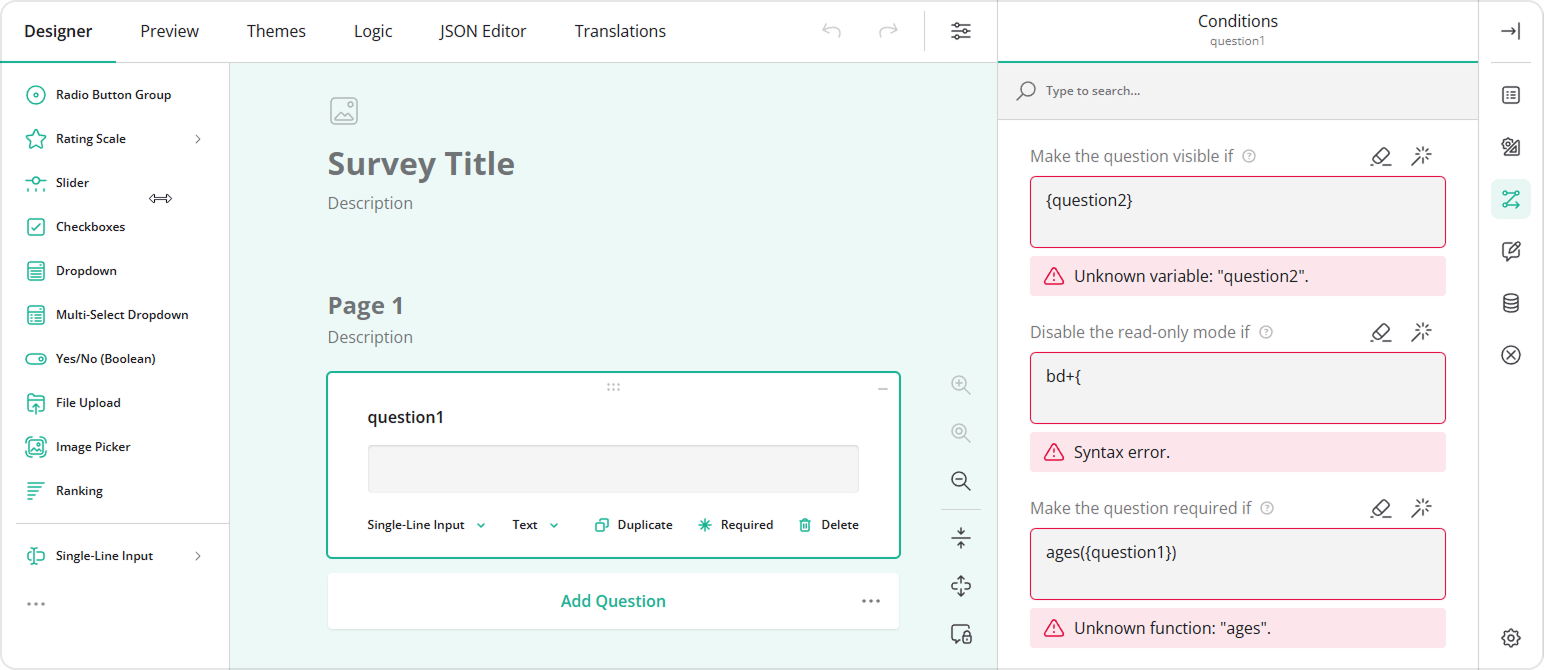
The following example shows how to enable variable validation:
import { SurveyCreatorModel } from "survey-creator-core";

const creatorOptions = {
  expressionsValidateVariables: true
};

const creator = new SurveyCreatorModel(creatorOptions);
Customize RegExp Validation Dynamically
In SurveyJS, regular expressions are used to validate user input against custom rules. Previously, you could only define a pattern and specify whether matching should be case-sensitive. This release introduces the onCreateRegexValidator event, which allows you to customize the regular expression and control additional matching behavior via flags.
For example, the following code enables support for Unicode characters in regular expressions:
// ...
// Omitted: `SurveyModel` creation
// ...
survey.onCreateRegexValidator.add((_, options) => {
  options.flags += "u";
});
New Blog Post
SurveyJS 2026 Roadmap: What We're Building Next
New Help Topics
Survey Creator: How to Translate Forms in the Designer Tab
Survey Creator: How to Translate Forms in the Translations Tab
Bug Fixes and Minor Enhancements
Form Library
- Expressions: The
containsoperator ignores the case sensitivity setting (#10784) - Expressions are not re-evaluated when they depend on a survey object property and that property changes (#10776)
- Question number styling is incorrect after the question's visibility changes (#10775)
toJSON()withvalidatePropertyValues: truetreats choices whosevalueis an object as invalid (#10773)- Localization JSON schemas are generated incorrectly when the survey includes composite or specialized questions (#10771)
- Ranking: Dragging a choice option causes ghosting artifacts (#10743)
Survey Creator
- [Angular] Preview tab: Required mark disappears when the question receives focus (#7368)
How to Update SurveyJS Libraries in Your Application
Angular
npm i survey-core@v2.5.6 survey-angular-ui@v2.5.6 --save
npm i survey-creator-core@v2.5.6 survey-creator-angular@v2.5.6 --save
npm i survey-analytics@v2.5.6 --save
npm i survey-pdf@v2.5.6 --save
React
npm i survey-core@v2.5.6 survey-react-ui@v2.5.6 --save
npm i survey-creator-core@v2.5.6 survey-creator-react@v2.5.6 --save
npm i survey-analytics@v2.5.6 --save
npm i survey-pdf@v2.5.6 --save
Vue.js
npm i survey-core@v2.5.6 survey-vue3-ui@v2.5.6 --save
npm i survey-creator-core@v2.5.6 survey-creator-vue@2.5.6 --save
npm i survey-analytics@2.5.6 --save
npm i survey-pdf@2.5.6 --save
HTML/CSS/JavaScript
<link href="https://unpkg.com/survey-core@2.5.6/survey-core.min.css" type="text/css" rel="stylesheet">
<script type="text/javascript" src="https://unpkg.com/survey-core@2.5.6/survey.core.min.js"></script>
<script type="text/javascript" src="https://unpkg.com/survey-js-ui@2.5.6/survey-js-ui.min.js"></script>

<script src="https://unpkg.com/survey-core@2.5.6/themes/index.min.js"></script>
<script src="https://unpkg.com/survey-creator-core@2.5.6/themes/index.min.js"></script>

<link href="https://unpkg.com/survey-creator-core@2.5.6/survey-creator-core.min.css" type="text/css" rel="stylesheet">
<script src="https://unpkg.com/survey-creator-core@2.5.6/survey-creator-core.min.js"></script>
<script src="https://unpkg.com/survey-creator-js@2.5.6/survey-creator-js.min.js"></script>

<link href="https://unpkg.com/survey-analytics@2.5.6/survey.analytics.min.css" rel="stylesheet">
<script src="https://unpkg.com/survey-analytics@2.5.6/survey.analytics.min.js"></script>

<script src="https://unpkg.com/survey-pdf@2.5.6/survey.pdf.min.js"></script>
<script src="https://unpkg.com/survey-pdf@2.5.6/pdf-form-filler.min.js"></script>