SurveyJS v3.1.2
Released: September 29, 2026
SurveyJS v3.1.2 adds response data verification, linting in Survey Creator's JSON Editor, and trailing zeros in numeric and currency input masks, along with bug fixes and minor enhancements.
For an overview of the major features introduced in SurveyJS v3.0, see:
API for Verifying User Responses
The new setData() method loads a response data object into the SurveyModel, applies survey logic, and checks the resulting values against the survey definition. It returns an array of issues. Pass an options object as the second argument to configure which issues it reports:
const issues = survey.setData(response, {
  reportExpressionResultMismatches: true
});
The example above enables reporting of changes made during loading alongside the default checks. The available options are listed below:
| Option | Default | Reports |
|---|---|---|
reportUnknownProperties |
true |
Data properties that do not correspond to a recognized survey result field. |
reportInvalidValueTypes |
true |
Values whose type or structure does not match the question configuration. |
reportInvalidChoiceValues |
true |
Values that do not match an available choice, matrix column or row, or rating value. |
reportExpressionResultMismatches |
false |
Values added, changed, or removed by expressions, defaults, triggers, or other logic during loading. |
Each returned issue includes its type, path, and affected value. For an expressionResultMismatch issue, value contains the original value and expressionResult contains the value after loading. This difference can occur even when the supplied data is valid.
Documentation: Validate Response Data
[Survey Creator] Built-In Linter in the JSON Editor Tab
Survey Creator's JSON Editor tab now includes the SurveyJS Linter, helping form authors catch logic defects while editing. It detects broken question references, conditions that can never be true, invalid choice comparisons, and cycles in calculated values or triggers.
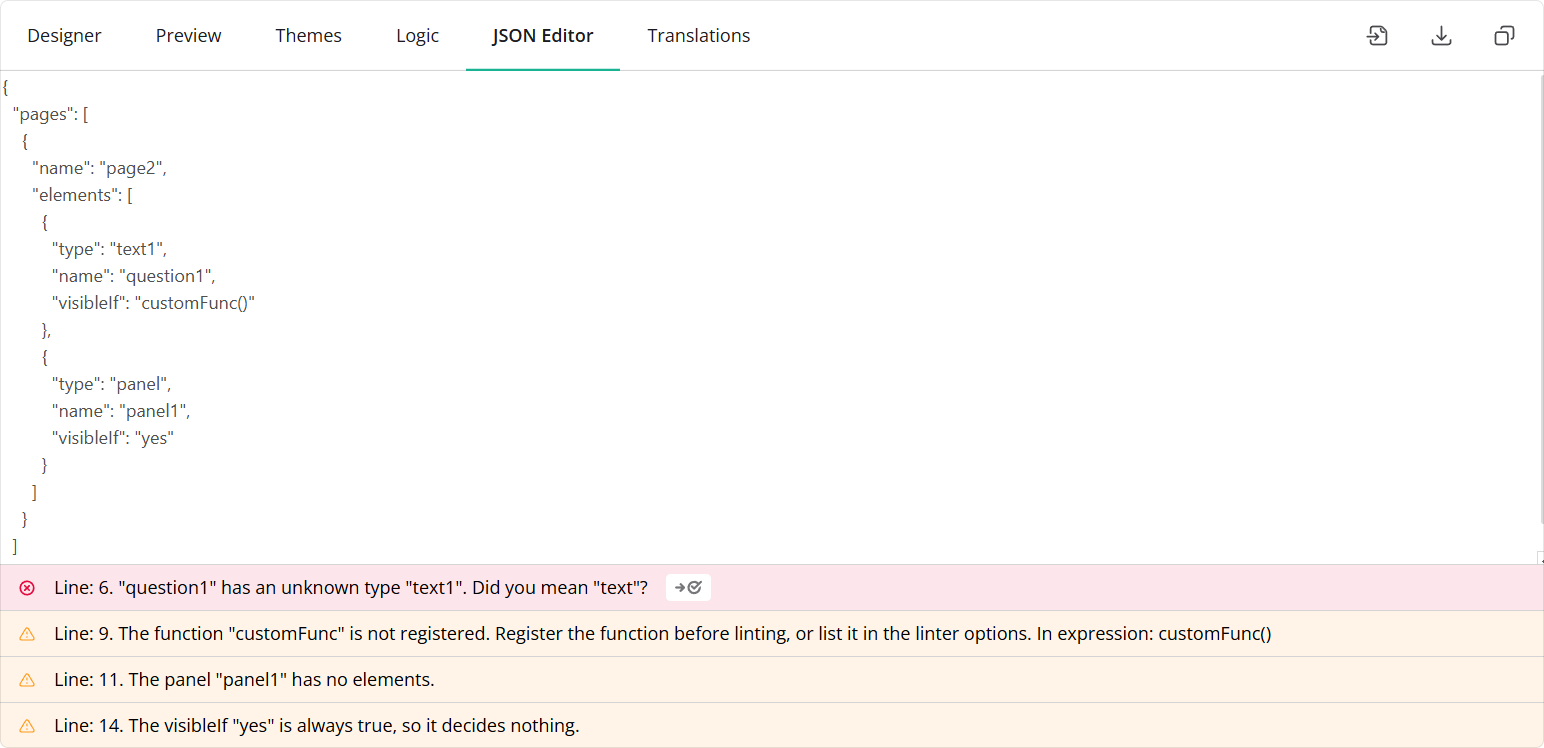
Handle the new onLintSurvey event and use options.lintOptions to adjust rule severity, disable checks, or declare application-supplied variables and functions.
import { SurveyCreatorModel } from "survey-creator-core";

const creator = new SurveyCreatorModel();

creator.onLintSurvey.add((_, options) => {
  options.lintOptions.rules["property/unknown"] = "warning";
  options.lintOptions.knownVariables = ["customerTier"];
});
Documentation: Linter Rules and Configuration
Trailing Zeros in Numeric and Currency Input Masks
Numeric and currency input masks now support trailing zeros, which pad the fractional part of a value to the specified precision.
Set maskSettings.showTrailingZeros to true to display trailing zeros. With the default precision of 2, entering "1" displays "1.00", and entering "1.5" displays "1.50".
const surveyJson = {
  "elements": [{
    "type": "text",
    "name": "amount",
    "title": "Amount",
    "maskType": "numeric",
    "maskSettings": {
      "showTrailingZeros": true
    }
  }]
};
Bug Fixes and Minor Enhancements
Form Library
- Progress bar:
belowHeaderlocation is not recommended when displaying progress by questions (#11900) - Decimal input mask allows values outside the defined
[min, max]range (#11891) - Animations do not respect
prefers-reduced-motion(#11588) - Decorative checkbox icon may be announced by VoiceOver in iOS Safari (#11897)
- VoiceOver announces a single checkbox item three times (#11898)
- Root element incorrectly renders
lang="en"when the survey's default locale is not English (#11912) - Dynamic Matrix:
onMatrixRowAddedanddetailPanelShowOnAddingtarget the wrong row whenrowsVisibleIfhides the newly added row (#11857) - Composite question should render without panel styling in a panelless theme (#11895)
- Required choice comment validation highlights the choice items instead of the comment box (#11902)
- Numeric and currency masks with
saveMaskedValue:displayValueis incorrect when the decimal separator is a comma (#11910) autoFocusFirstError: falseis ignored when navigating to the next page withcheckErrorsMode: "onNextPage"(#11927)- [Survey Creator] Clicking "Add Question" triggers a React state update during render (#11904)
Survey Creator
- [Performance] Theme tab opens slowly from the Designer tab (#8025)
- "Validation rules" table: "Show Details" doesn't open the detail section (#8029)
- Logic tab: Do not swap operands for constant-on-the-left conditions (#8021)
How to Update SurveyJS Libraries in Your Application
To update your application to SurveyJS v3.1.2, install the packages you use or replace your existing script and stylesheet links with the versioned links below:
Angular
npm i survey-core@3.1.2 survey-angular-ui@3.1.2
npm i survey-creator-core@3.1.2 survey-creator-angular@3.1.2
npm i survey-analytics@3.1.2
npm i survey-pdf@3.1.2
React
npm i survey-core@3.1.2 survey-react-ui@3.1.2
npm i survey-creator-core@3.1.2 survey-creator-react@3.1.2
npm i survey-analytics@3.1.2
npm i survey-pdf@3.1.2
Vue.js
npm i survey-core@3.1.2 survey-vue3-ui@3.1.2
npm i survey-creator-core@3.1.2 survey-creator-vue@3.1.2
npm i survey-analytics@3.1.2
npm i survey-pdf@3.1.2
HTML/CSS/JavaScript
<link href="https://unpkg.com/survey-core@3.1.2/survey-core.min.css" type="text/css" rel="stylesheet">
<script type="text/javascript" src="https://unpkg.com/survey-core@3.1.2/survey.core.min.js"></script>
<script type="text/javascript" src="https://unpkg.com/survey-js-ui@3.1.2/survey-js-ui.min.js"></script>

<script src="https://unpkg.com/survey-core@3.1.2/themes/index.min.js"></script>

<link href="https://unpkg.com/survey-creator-core@3.1.2/survey-creator-core.min.css" type="text/css" rel="stylesheet">
<script src="https://unpkg.com/survey-creator-core@3.1.2/survey-creator-core.min.js"></script>
<script src="https://unpkg.com/survey-creator-js@3.1.2/survey-creator-js.min.js"></script>

<link href="https://unpkg.com/survey-analytics@3.1.2/survey.analytics.min.css" rel="stylesheet">
<script src="https://unpkg.com/survey-analytics@3.1.2/survey.analytics.min.js"></script>

<link href="https://unpkg.com/survey-analytics@3.1.2/survey.analytics.tabulator.min.css" rel="stylesheet">
<script src="https://unpkg.com/survey-analytics@3.1.2/survey.analytics.tabulator.min.js"></script>

<script src="https://unpkg.com/survey-pdf@3.1.2/survey.pdf.min.js"></script>
<script src="https://unpkg.com/survey-pdf@3.1.2/pdf-form-filler.min.js"></script>
If you are upgrading from v2.x, review the breaking changes introduced in SurveyJS v3.0 and subsequent updates.