Why Cursor & Claude Code Struggle to Design Forms (And How SurveyJS Fixes That)
TL;DR: AI coding agents struggle to theme forms because design intent often lives in Figma or a token package, while coding agents usually see a fragmented, contradictory implementation in the repo — and forms multiply that ambiguity across many question types, states, and surfaces. SurveyJS addresses this with one shared design-token contract, prebuilt style adapters for CSS frameworks, and curated AI prompt packs for Cursor, Copilot, ChatGPT, and Claude when your app has drifted from those defaults.
"Make this form match our design system" sounds like exactly the kind of job an AI coding agent should be good at. The styles already exist somewhere in the codebase, so the task should be mostly translation. Just let Cursor, Copilot, or Claude Code do its thing. Right?
But do your styles really exist in a form your agent can use?
For most codebases, the actual design system is scattered: a Tailwind config here, a few CSS-in-JS overrides there, some hardcoded hex values nobody's touched since a sprint two years ago, and a handful of conventions that only reveal themselves once you start clicking around the live product.
And don't forget — the forms library has its own styling model sitting on the other side of that gap.
Unless both sides expose a stable contract, your agent isn't "translating" anything. It's reverse-engineering two moving targets and trying to invent the bridge between them.
And forms make this worse than almost anything else you'd embed. A form isn't one component with three variants — it's Single-Line text inputs, Radio Button Groups, Checkboxes, Dropdowns, Tag boxes, Booleans, Sliders, Matrices, validation messages, progress indicators, and nested panels, each carrying its own resting, hover, focus, pressed, disabled, read-only, and invalid states.
No model is one-shotting that from a prompt, no matter how much you load its context with.
So is this a smarter-model problem? Not really. It's a target problem.
SurveyJS is a forms library that changes the target: it uses a unified token vocabulary, plus bespoke AI prompt packs built specifically to map a real, messy codebase into it.
Why Do AI Agents Get Form Theming Wrong?
AI agents get form theming wrong because the task almost never has a fixed target: design intent often sits in Figma or a token package, while the repo presents conflicting configs, stylesheets, and one-off overrides as if they were equivalent — and forms multiply every ambiguous call across many question types, states, and surfaces instead of just one or two components.
Agents are very good at pattern-matching when the input and output shapes are known. Give one a typed schema and a few representative examples, and the result is usually easy to inspect and trust. The trouble starts the moment the task has no fixed output shape — which describes almost every "theme this for me" prompt ever written.
The styles that matter are scattered, and might even contradict each other. Picture an agent walking into a repo and finding all of this in the same codebase:
primary: "#4F46E5"in the config--color-action: #4338CAin a global stylesheet- a wrapped button component overriding these with
#3730A3on hover only - an old form field with a hardcoded
6pxradius, and a newer component reading from atokens.radius.mdfile.
Which one is the actual design decision?
A developer who lived through the history can tell an intended token from an accident. An agent can't — it has to infer that hierarchy from context alone, and it will often get it wrong: treating the most frequent value as authoritative, copying a computed pixel value instead of the token behind it, or faithfully reproducing an override that was never supposed to be permanent.
That problem exists in any UI task. Forms just make you pay it dozens of times over instead of once.
No Target Schema Means Every Agent Run Invents a Different Theme
Without a documented target schema, every agent run produces a differently-shaped theme — one run writes inline properties, another writes global overrides, a third invents its own component variables — and none of those outputs are directly comparable to each other.
Suppose the forms library exposes a handful of CSS classes but nothing you'd call a documented contract. One run might produce:
const formTheme = {
  primaryColor: tokens.brand.primary,
  inputRadius: tokens.radius.md,
};
A second run writes global overrides instead. A third invents component-specific variables like --survey-checkbox-active.
All three might look fine in a screenshot, but they are differently shaped solutions with different maintenance costs. There is nothing stable to diff, review, or reuse.
A second developer cannot easily tell whether the output is complete because completeness itself has not been defined.
Static Code Can't Show You the States That Actually Matter
An agent can read a token file into context. It cannot infer every live state from that file alone.
- Hover and focus live in pseudo-classes.
- Invalid styling only shows up after validation fires.
- Disabled and read-only states get introduced at runtime.
- A dropdown might render into a portal the agent never inspected.
- A matrix can expose states that do not appear in the simple form the agent used as its reference.
None of this is visible from a token file, no matter how carefully the agent reads it.
For a form specifically, missing these states isn't a cosmetic bug — it's functional. Focus tells someone where their keyboard is. Invalid styling is the thing that connects a field to its error message. Disabled and read-only treatments are how a user knows what they're allowed to touch. If the agent only matches the default screenshot, it has themed the least interesting state your form will ever be in.
Theming Prompts Use Too Much Context at Once
Large prompts mean shallow coverage.
Ask an agent to inspect the entire app, understand its design system, discover the forms library's internals, and customize every question type those forms support.
Instead of solving one well-defined problem, it now has to juggle several at once. The resulting plan — and the generated code — becomes much longer, and research suggests that longer LLM outputs become progressively less reliable.
The result might look convincing at the top level (correct brand color, expected font changes, and the input radius looks close enough). Then somebody opens a Tag Box, triggers validation, switches to dark mode, or exports a PDF — and it all falls apart.
The fix isn't a larger prompt. It's a smaller job with a stable interface.
SurveyJS Gives the Agent a Contract Instead of a Guess
SurveyJS is a schema-driven forms product family.
- The open-source Form Library renders and collects responses from a JSON definition.
- Survey Creator is the white-label drag-and-drop builder over that same schema.
- Dashboard visualizes collected responses, turning that data into charts and tables.
- PDF Generator produces branded exports from the same form model.
All four surfaces in SurveyJS share a unified design token foundation — a --sjs2-* vocabulary that turns theming from selector-patching into a constrained mapping exercise.
Think of these as two levels of instruction:
Semantic tokens express the general rule
Primary text uses this color, alert borders use that color, and form controls use this radius. In SurveyJS, those ideas appear as variables such as--sjs2-color-fg-basic-primary,--sjs2-color-border-alert-primary, and--sjs2-radius-form.Component tokens apply those rules to a specific control, state, and property
Variables like--sjs2-color-component-input-default-value,--sjs2-color-component-formbox-invalid-border, and--sjs2-radius-component-formboxtell SurveyJS exactly where each decision belongs.
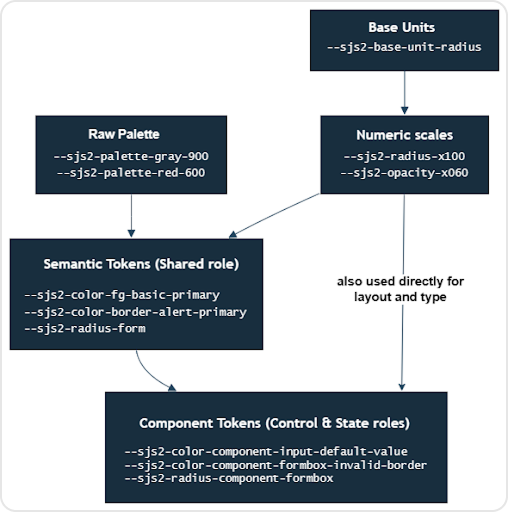
SurveyJS wires those slots together with CSS variable references. The default theme includes chains like:
survey.applyTheme({
  cssVariables: {
    "--sjs2-palette-gray-900": "#1C1B20",
    "--sjs2-color-fg-basic-primary": "var(--sjs2-palette-gray-900)",
    "--sjs2-color-component-input-default-value": "var(--sjs2-color-fg-basic-primary)",

    "--sjs2-palette-red-600": "#E50A3E",
    "--sjs2-color-border-alert-primary": "var(--sjs2-palette-red-600)",
    "--sjs2-color-component-formbox-invalid-border": "var(--sjs2-color-border-alert-primary)",

    "--sjs2-base-unit-radius": "8px",
    "--sjs2-radius-x100": "calc(var(--sjs2-base-unit-radius) * 1)",
    "--sjs2-radius-form": "var(--sjs2-radius-x100)",
    "--sjs2-radius-component-formbox": "var(--sjs2-radius-form)"
  }
});
This gives your agent a contract: a key such as component-formbox-invalid-border identifies what it controls, while its default reference to border-alert-primary identifies the broader design decision it inherits. That changes your agent's task from "find every input-like selector and restyle it" to "map our design system onto these SurveyJS roles".
So a useful prompt becomes:
"Map our primary foreground, brand action, alert border, form radius, and typography decisions to the corresponding --sjs2-* role tokens. Preserve component-token references unless our design system requires a documented exception."
Which produces:
import tokens from "@your-org/design-tokens";

export const surveyTheme = {
  themeName: "app-design-system",
  colorPalette: "light" as const,
  cssVariables: {
    "--sjs2-color-project-brand-600": tokens.color.brand[600],
    "--sjs2-color-fg-basic-primary": tokens.color.text.primary,
    "--sjs2-color-bg-basic-primary": tokens.color.surface.default,
    "--sjs2-color-border-alert-primary": tokens.color.border.danger,
    "--sjs2-radius-form": tokens.radius.md,
    "--sjs2-typography-font-family-text": tokens.typography.fontFamily.base,
  },
};
Notice the difference? This object can now be versioned, diffed, and reused. Two agent runs might still make different judgment calls on the edges, but they're making those calls inside the same structure now, instead of each inventing its own.
Why a Schema Gives AI Agents Superpowers
A schema fundamentally changes what the agent can do because it turns theming from an open-ended invention task into a fill-in-the-slots task — the same shift that makes structured output and tool-calling more reliable than free-form generation. LLMs are much better at filling out a known schema than inventing one, and that's exactly what SurveyJS applies to form theming.
The --sjs2-* vocabulary does for a theming task what a JSON schema does for a tool call. You're no longer asking the agent to "produce a plausible-looking theme." You're asking it to populate specific, documented, enumerable slots. The space of plausible outputs shrinks from anything CSS could theoretically be down to the tokens SurveyJS actually documents.
There's a concrete verification loop on top of that. SurveyJS's theme object has a documented TypeScript interface — ITheme isn't just a convention on a doc page — but the enumerable --sjs2-* keys are documented in the design-token list. Agentic tools like Claude Code don't just generate code and stop; they can build the integration, read errors back, and compare the generated keys against that inventory. TypeScript alone may not catch a misspelled CSS variable, so that explicit inventory check still matters.
The schema and prompt packs help an agent generate a mapping — they do not verify hover, focus, disabled, invalid, or read-only states against a live UI. Static token inspection cannot substitute for clicking through the form yourself. This gap is intentional — generation can be assisted, but visual and interaction QA should still belong to your team.
How SurveyJS Unified Vocabulary Prevents Drifts
Cross-surface consistency is exactly where a generic agent session tends to fall apart — and it gets worse the moment your product needs more than just form filling. If your application also lets users create forms, analyze responses, or export submissions, you're potentially theming four unrelated styling models instead of one.
SurveyJS shares one token vocabulary across the whole product family. Forms Library, Survey Creator, Dashboard, and PDF Generator — all embed them when your app actually needs those workflows. All four work from the same JSON schema and the same --sjs2-* contract.
Form Library, Dashboard, and PDF Generator accept the theme through applyTheme(). Survey Creator uses applyCreatorTheme() for the Creator interface and applyTheme() for the survey being edited underneath it.
survey.applyTheme(surveyTheme);

creator.applyCreatorTheme(surveyTheme);
creator.applyTheme(surveyTheme);

dashboard.applyTheme(surveyTheme);

surveyPdf.applyTheme(surveyTheme);
That doesn't mean every pixel is identical everywhere — Dashboard still needs its own chart-color tokens, and for PDF output, applyTheme() covers color tokens only; typography, spacing, borders, and document structure are configured separately through applyLayout(). But what it does mean is that the decisions that should be shared — brand, foregrounds, surfaces, semantic states — start from one contract instead of drifting apart across four codebases nobody's diffing against each other.
This foundation is also what makes the whole thing incremental. Generate and verify the Form Library mapping first. If your app uses the other surfaces, point your AI coding agent at Creator, Dashboard, and PDF, and handle only what's actually surface-specific from there.
A Practical Agentic Workflow Using SurveyJS
First of all, if your application is close to standard Bootstrap, Material UI, or shadcn/ui, just start with SurveyJS's theme adapters instead of asking an agent to recreate that mapping.
For example, if using shadcn/ui, import the shared adapter followed by the variant that matches your application:
import "survey-core/survey-core.css";
import "survey-core/themes/adapters/shadcn.css";
import "survey-core/themes/adapters/shadcn-default.css";
SurveyJS also ships variants including shadcn-new-york and the shadcn-base-* family.
The agent's workflow actually starts when your application has drifted far enough from those stock styles that the mapping must come from the codebase itself.
Step 1 — Define What Counts as Truth
Don't point the agent at the whole repo and let file-read order decide what wins. Give it an explicit hierarchy: which design-token files are authoritative, which production components demonstrate those tokens correctly, and which legacy styles or one-off overrides it must not copy.
// theming-source-of-truth.ts - hand this to the agent before generation
export const themingSourceOfTruth = {
  authoritative: [
    "packages/design-tokens/src/color.json",
    "packages/design-tokens/src/radius.json",
    "packages/design-tokens/src/typography.json",
  ],

  representativeComponents: [
    "src/components/TextField.tsx",
    "src/components/Button.tsx",
  ],

  doNotCopy: [
    "src/legacy/OldIntakeForm.css",
    "src/components/Button.tsx - hard-coded hover override",
  ],
};
If two sources disagree, require the agent to flag the conflict instead of letting it choose whichever value looks most plausible:
export const themingConflicts = [
  {
    decision: "primary action color",
    candidates: [
      { source: "tokens.color.brand[600]", value: "#4F46E5" },
      { source: "src/styles/globals.css --color-action", value: "#4338CA" },
    ],
    resolution: "unresolved - needs human review",
  },
];
Step 2 — Constrain the Artifact
Use the SurveyJS prompt pack for your AI assistant once they become available, then make the expected output explicit:
- One reusable theme object
- Documented
--sjs2-*keys only - Semantic mappings before component-level exceptions
- No selector patches or invented variables
- The source design token behind every mapped value
This layering is schema-enabled, not schema-enforced — prompt packs steer the agent toward semantic and component tokens, but a hand-written prompt still needs to say that selector patches and invented variables are not acceptable output.
The deliverable should look like a translation layer, not a styling patch:
// survey-theme.ts - this is the artifact you commit
import tokens from "@your-org/design-tokens";

export const surveyTheme = {
  themeName: "app-design-system",
  colorPalette: "light" as const,
  cssVariables: {
    // tokens.color.brand[600]
    "--sjs2-color-project-brand-600": tokens.color.brand[600],

    // tokens.color.text.primary
    "--sjs2-color-fg-basic-primary": tokens.color.text.primary,

    // tokens.color.surface.default
    "--sjs2-color-bg-basic-primary": tokens.color.surface.default,

    // tokens.color.border.danger
    "--sjs2-color-border-alert-primary": tokens.color.border.danger,

    // tokens.radius.md
    "--sjs2-radius-form": tokens.radius.md,

    // tokens.typography.fontFamily.base
    "--sjs2-typography-font-family-text": tokens.typography.fontFamily.base,
  },
};
Now the output is something another developer (or another agent) can audit. A raw hex value with no traceable source, an undocumented key, or a component exception with no stated reason becomes an obvious review failure.
Step 3 — Generate in Bounded Passes
Don't ask the agent to inspect the whole design system and theme every SurveyJS surface in one run. First generate the shared semantic mapping. Review the uncertain decisions, then make a second pass for justified component exceptions.
Pass 1 — Apply only the shared semantic mapping to Form Library
import "survey-core/survey-core.min.css";
import { Model } from "survey-core";
import { surveyTheme } from "./survey-theme";

const survey = new Model(surveyJson);

survey.applyTheme(surveyTheme);
Pass 2 — Add a component exception only after review proves the shared semantics are not enough
export const surveyThemeWithExceptions = {
  ...surveyTheme,
  cssVariables: {
    ...surveyTheme.cssVariables,

    // Exception: Intake inputs use a pill radius not shared by buttons
    "--sjs2-radius-component-formbox": tokens.radius.pill,
  },
};
If your app also embeds Creator or Dashboard, extend the accepted base mapping in a third pass — same theme object, different integration points:
creator.applyCreatorTheme(surveyThemeWithExceptions);
creator.applyTheme(surveyThemeWithExceptions);
dashboard.applyTheme(surveyThemeWithExceptions);
Each pass stays small enough for the agent to reason about without losing the contract in a large context window. If your product also exports PDFs — that gets its own pass in Step 4.
Step 4 — Run a Separate PDF Pass with Named Artifacts
applyTheme() alone is not enough for PDF Generator. An agent that stops at surveyPdf.applyTheme(surveyTheme) will get the colors right and miss document geometry, typography, and element-level exceptions.
Tell the agent to treat PDF as a separate bounded job after the interactive surfaces pass review. Require three committed artifacts instead of one theme object:
survey-theme.ts– Shared color and shadow tokens viaapplyTheme()pdf-layout.ts– Spacing, sizing, typography, border radius, and other dimensional properties viaapplyLayout()pdf-style.ts– Per-element-type exceptions viaapplyStyle(), reading live values throughgetSizeVariable()andgetColorVariable()instead of inventing a second vocabulary; for one-off pages, panels, questions, or choice items, useonGetPageStyle,onGetPanelStyle,onGetQuestionStyle, oronGetItemStyle
Use the callback form of applyStyle() so exceptions read from the active theme via getters. Call applyTheme() before applyStyle() when using getters — they resolve against the active theme. A static object with hard-coded values is supported, but that reintroduces a separate vocabulary the agent should avoid.
Here are some prompt constraints for your Agent, for the PDF pass:
- Reuse the accepted
survey-theme.ts; do not remap colors from scratch. - Start from the Compact or Spacious preset, then override only what the export requires.
- Keep every PDF exception traceable to a documented
--sjs2-*token or getter call. - In
pdf-style.ts, prefer getter calls over raw hex or pixel literals, or selector patches unless a human documents why the shared contract cannot express the rule.
// pdf-layout.ts - layout overrides the agent commits separately
import { Spacious } from "survey-pdf/layouts";

export const pdfLayoutPreset = Spacious;

export const pdfLayoutOverrides = {
  "--sjs2-typography-font-family-text": tokens.typography.fontFamily.base,
  "--sjs2-pdf-border-width-question": "var(--sjs2-border-width-x200)",
};

// pdf-style.ts - element exceptions tied back to the active theme
// This wraps surveyPdf.applyStyle()
export function applyPdfStyles(surveyPdf) {
  surveyPdf.applyStyle(({ getSizeVariable, getColorVariable }) => ({
    radiogroup: {
      spacing: {
        choiceGap:
          getSizeVariable("--sjs2-base-unit-spacing") * 1.1,
      },
    },
    survey: {
      title: {
        fontColor: getColorVariable("--sjs2-palette-gray-800"),
      },
    },
  }));
}
Finally, bring together all three artifacts at the integration point:
import { surveyThemeWithExceptions } from "./survey-theme";
import {
  pdfLayoutOverrides,
  pdfLayoutPreset,
} from "./pdf-layout";
import { applyPdfStyles } from "./pdf-style";

surveyPdf.applyTheme(surveyThemeWithExceptions);
surveyPdf.applyLayout(pdfLayoutOverrides, pdfLayoutPreset);
applyPdfStyles(surveyPdf);
Ask the agent to include a short PDF audit alongside the code: which preset it chose, which layout tokens it overrode, which element types needed applyStyle(), and which --sjs2-* variables each exception reads through the getter functions.
Step 5 — Make the Agent Audit Its Own Output
Before visual review, ask the agent to report:
- Source values it found contradictory or ambiguous
- SurveyJS tokens it could not map confidently
- Component overrides it introduced and why
- Raw values that do not trace back to your design system
- Generated keys that do not appear in the SurveyJS token reference
- For PDF exports: preset choice, layout overrides,
applyStyle()exceptions, and the--sjs2-*variables each getter reads
export const themeAudit = {
  ambiguousSources: [
    "tokens.color.brand[600] vs globals.css --color-action",
  ],
  unmappedTokens: [],
  componentOverrides: [
    {
      token: "--sjs2-radius-component-formbox",
      reason: "Intake inputs use a pill radius; shared --sjs2-radius-form is too small",
    },
  ],
  undocumentedKeys: [],
};
Then validate the generated keys against the documented inventory. Type-checking the integration helps, but it will not catch a misspelled CSS variable name on its own:
const documentedSurveyJsTokens = new Set([
  "--sjs2-color-project-brand-600",
  "--sjs2-color-fg-basic-primary",
  "--sjs2-color-border-alert-primary",
  // ...from the SurveyJS Design Tokens reference
]);

const invalidKeys = Object.keys(surveyTheme.cssVariables).filter(
  (key) => !documentedSurveyJsTokens.has(key)
);
Survey Creator's Theme Editor is useful here as a second ground truth: hand-build or spot-check a theme through its UI controls, export the JSON, and diff that known-good object against whatever the agent generated before you move on to live interaction testing.
Step 6 — Feed Failures Back as Structured Evidence
The agent still cannot prove the visual result from static token inspection. During review, report each miss with the question type, interaction state, color mode, observed result, and intended design token:
export const themeReviewFindings = [
  {
    surface: "Form Library",
    questionType: "tagbox",
    state: "invalid + focused",
    colorMode: "dark",
    observed: "border stays neutral",
    expectedSourceToken: "tokens.color.border.danger",
    preferredSurveyJsToken: "--sjs2-color-border-alert-primary",
  },
  // Use these if you use PDF Generator
  {
    surface: "PDF Generator",
    questionType: "radiogroup",
    state: "exported document",
    observed: "choice spacing too tight",
    expectedSourceToken: "tokens.spacing.md",
    preferredSurveyJsToken: "--sjs2-base-unit-spacing via getSizeVariable()",
    artifact: "pdf-style.ts",
  },
];
That gives the agent a bounded correction. Require it to fix the shared mapping where possible, rather than reaching immediately for local CSS. For the Form Library finding above, update the theme object:
export const surveyThemeRevision = {
  ...surveyTheme,
  cssVariables: {
    ...surveyTheme.cssVariables,
    "--sjs2-color-border-alert-primary": tokens.color.border.danger,
  },
};
For the PDF finding, adjust pdf-style.ts or pdf-layout.ts instead, choice spacing belongs in applyStyle(), not cssVariables:
// pdf-style.ts - increase radiogroup choiceGap using the active theme
surveyPdf.applyStyle(({ getSizeVariable }) => ({
  radiogroup: {
    spacing: {
      choiceGap:
        getSizeVariable("--sjs2-base-unit-spacing") * 1.25,
    },
  },
}));
The artifact you keep is not merely a form that looked right in one pass. It is a versioned translation layer, plus a short audit trail of ambiguous decisions and deliberate exceptions — something the next agent run can inspect instead of rediscovering.
The AI Model Was Never the Actual Bottleneck.
Forms stress-test agentic coding harder than almost any other embedded UI — too many controls, too many interaction states, and often, too many surfaces for an open-ended prompt to cover reliably.
The fix isn't a smarter model. It's changing the shape of the job. Define what counts as truth in your codebase. Constrain the output to a documented --sjs2-* theme object you can diff, audit, and commit. Generate in bounded passes instead of asking for everything at once. Feed visual misses back as structured evidence, not another vague "make it match" request.
If you're using Cursor, Copilot, or Claude Code to align a forms library with a custom design system, the agent's reliability depends less on the model, and more on whether the library ships a documented, shared variable contract, and tooling built to target it. SurveyJS provides both. A unified --sjs2-* contract across its surfaces, framework adapters where you're close to defaults, and AI prompt packs where you're not.
Frequently Asked Questions
Q: Does the SurveyJS AI prompt pack work with Claude Code, or only Cursor and GitHub Copilot?
A: It's built for all four: Cursor, GitHub Copilot, ChatGPT, and Claude (including Claude Code). The prompt pack itself isn't tool-specific logic — it's a curated prompt designed to run inside whichever assistant you're already using.
Q: If my app already looks like stock Bootstrap, Material UI, or shadcn/ui, do I still need an AI agent to theme SurveyJS?
A: No. Import the matching prebuilt style adapter instead and skip the agent step entirely. The agent-driven mapping is only necessary once your app has drifted from those defaults: customized colors, spacing, or component behavior that the stock adapter won't catch.
Q: Does one --sjs2-* theme object work across SurveyJS Form Library, Survey Creator, Dashboard, and PDF Generator, or do I need a separate mapping for each surface?
A: One shared object covers the common decisions — apply it with applyTheme() on Form Library, Dashboard, and PDF Generator. Survey Creator needs both: applyCreatorTheme() for Creator's chrome and applyTheme() for the survey preview underneath it. It doesn't cover everything, though: Dashboard needs its own chart-color tokens, and PDF Generator applies only colors and shadows from the theme: spacing, sizing, typography, and border radius need applyLayout(), and per-element-type exceptions (or individual-element overrides via onGetPageStyle, onGetPanelStyle, onGetQuestionStyle, or onGetItemStyle) need applyStyle().
Q: Will TypeScript catch a misspelled --sjs2-* variable name in my SurveyJS theme object?
A: Not reliably. cssVariables accepts a string-keyed object, so a typo'd token name still type-checks — it just won't do anything at runtime. Validate generated keys against the documented token reference explicitly, rather than trusting the compiler to catch it.
Q: Can an AI agent verify that hover, focus, disabled, or invalid states are themed correctly?
A: No — this is a hard limit, not a missing feature. Those states only exist at runtime (in pseudo-classes, post-validation, or after user interaction), so static token or code inspection can't see them. SurveyJS AI Prompt packs and schemas help an agent generate a mapping; confirming it against live interaction states is still a manual QA step.
Q: Do I need to write a new prompt for every SurveyJS surface, or can I reuse one agent run across all of them?
A: Reuse it. Generate and review the Form Library mapping first, then extend that same accepted theme object into Survey Creator and Dashboard rather than regenerating a mapping from scratch for each surface — that's what keeps the workflow bounded instead of ballooning into one large, harder-to-review prompt. For PDF Generator specifically, reuse the accepted theme for colors and shadows, then run a separate pass for pdf-layout.ts and pdf-style.ts — don't stop at applyTheme() alone.