Hybrid Paper and Digital Form Data Collection
SurveyJS provides a unified way to collect form responses across both digital and paper-based workflows. You design a survey once, collect responses online through web forms, and process paper-based submissions by converting scanned documents into the same structured data format.
This approach allows you to treat printed forms as an extension of your digital system rather than a separate data entry channel. All responses—whether submitted online or extracted from paper—are normalized into a single SurveyJS JSON data object.
SurveyJS implements this workflow using a schema-driven architecture. The survey definition serves as a single source of truth for both form rendering and data extraction, ensuring that paper-based inputs can be mapped to the same structure as online responses.
The solution is based on two open-source MIT-licensed SurveyJS libraries: Form Library for building and running online forms, and AI Form Response Extractor for converting scanned documents into structured survey data.
Demo: Paper Form Data Extraction
How It Works
The hybrid workflow combines online data collection with paper form digitization into a single pipeline:
- A survey JSON schema defines the structure of the form.
- Respondents complete the form online or on paper.
- Paper forms are scanned or photographed.
- An extraction service maps detected answers to schema fields.
- You review and correct extracted data if necessary.
- All responses are stored in a unified format.
The resulting data object is identical to the one produced by an online form upon survey completion.
Prepare a Survey JSON Schema
A survey JSON schema defines the structure required to collect and extract responses. It acts as the reference model for both online and paper-based forms.
Using Form Library API
SurveyJS Form Library is an open-source JavaScript library for building dynamic forms and surveys. You can use its API to create a survey JSON schema programmatically.
Using Survey Creator UI
Survey Creator is a visual editor that allows you to build a survey JSON schema without writing code.
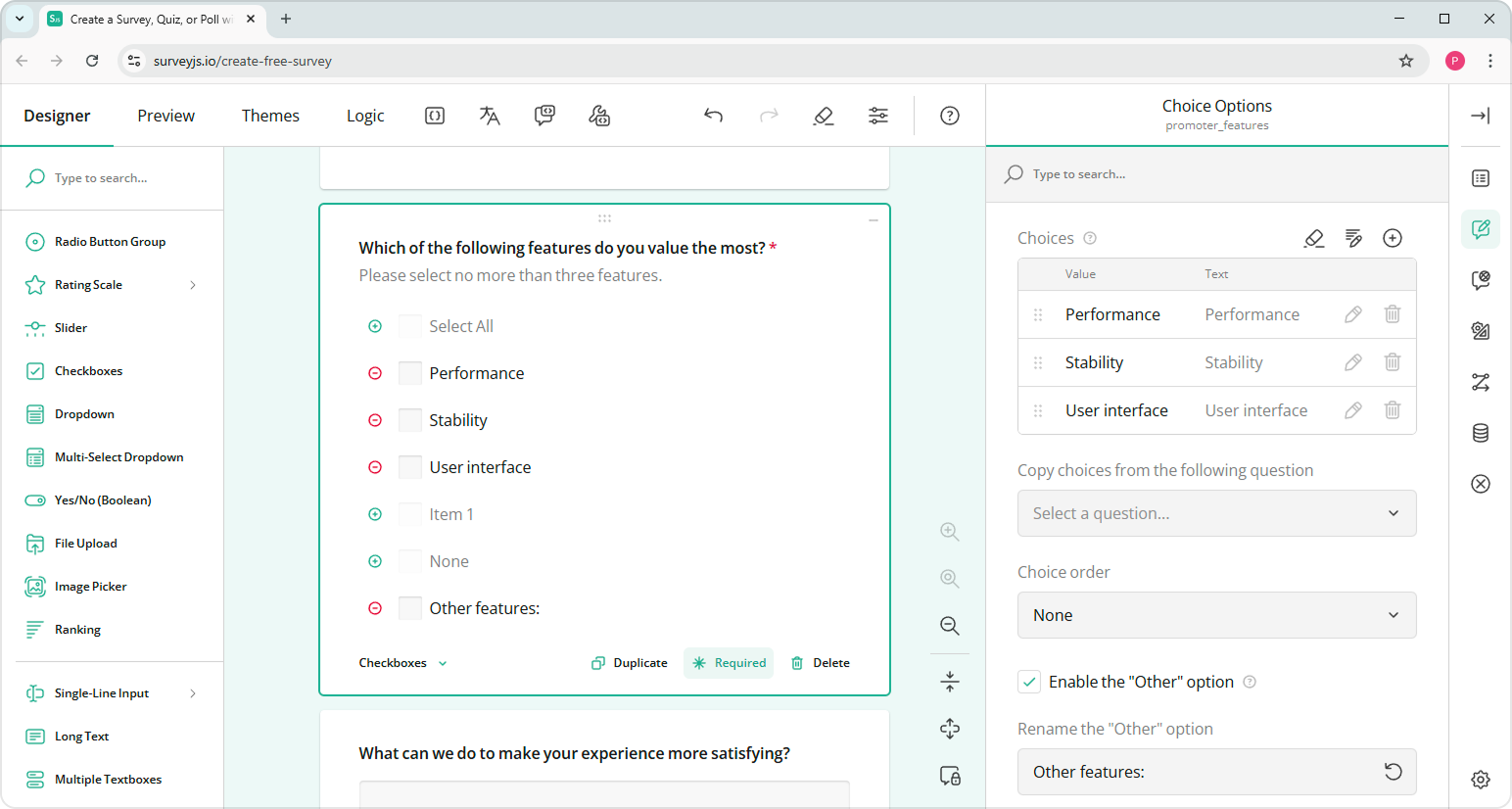
Try it in the All-in-One Demo, then copy the schema from the JSON Editor tab.
The demo is intended for testing and demonstration purposes only and allows you to try Survey Creator functionalities for free. Integrating Survey Creator into your application requires a commercial developer license.
Generate from PDF Using AI
If you already have a printed form, you can generate a survey JSON schema from it using AI. You can try this approach using the following demo:
Generate Survey from PDF Document Using AI
The demo is intended for simple, single-page documents. This limitation applies to the demo only and does not reflect the capabilities of a full implementation.
This approach works best for structured documents. After generation, follow these steps to ensure accuracy:
- Verify question types and choices
- Normalize question names
- Adjust structure where needed
Collect User Responses
In a hybrid setup, responses can be collected both online and on paper.
Create an Online Form
To collect responses online, integrate the SurveyJS Form Library into your application. Render the form, share it with respondents, and store results in your database.
(Optional) Generate a Printable Form
If you do not have an existing paper form, you can generate one in PDF from your survey schema using SurveyJS PDF Generator:
import { SurveyPDF } from "survey-pdf";

const surveyJson = { /* ... */ };
const surveyPdf = new SurveyPDF(surveyJson);
surveyPdf.save("my-form-for-printing.pdf");
Get Started with PDF Generator
SurveyJS PDF Generator requires a commercial license for production use.
Print the form, distribute it to respondents, and collect completed copies for processing.
Extract Answers
Online responses can be stored directly. Paper forms must be processed by an extraction service.
SurveyJS provides the MIT-licensed AI Form Response Extractor, which converts scanned documents, images, and digital PDFs into structured survey data. In a typical workflow, you upload a document (a scan, image, or digital PDF form) together with the corresponding survey JSON schema and receive extracted data mapped to schema fields.
Digital PDFs are parsed using their internal document structure, which improves mapping accuracy. Scanned documents are processed using visual recognition techniques to detect text, checkboxes, and input regions.
The input document does not need to replicate the visual layout of the SurveyJS form. Unlike template-based OCR or IDP systems that rely on fixed positions, AI Form Response Extractor matches content based on question text, labels, and contextual meaning in the schema rather than strict spatial alignment.
Demo: Paper Form Data Extraction
Review Extracted Data
Because extraction is schema-guided and AI-based, results may vary in confidence and may be partial or uncertain. Review is recommended before storing them.
You can use SurveyJS Form Library as a review interface:
- Create a
SurveyModelwith your schema. - Assign extracted data to
survey.data. - Render the survey.
- Let users verify and correct responses.
- Submit or store the validated result.
This ensures that final data matches the expected structure and quality. Refer to the following demo for an implementation example:
AI Form Response Extractor Demo on GitHub
Batch Review and Editing
When processing multiple forms, reviewing responses individually becomes inefficient. You can build a batch processing pipeline that accepts multiple scanned documents, runs extraction in bulk, and stores intermediate results for review. Instead of handling each response separately, group similar issues and resolve them in a single pass.
Typical optimizations include filtering responses by confidence score, applying bulk corrections to common fields, and reprocessing failed or low-quality inputs. This functionality is typically implemented at the application level.
Limitations and Considerations
Accuracy Factors
- Use high-resolution scans or clear, well-lit photos.
- Keep documents flat and avoid skew or perspective distortion.
- Prefer printed text over handwriting for critical fields.
Layout Impact
- Use clear spacing and consistent alignment between questions.
- Avoid dense or cluttered layouts.
- Keep repeated structures (matrices, panels) uniform.
- Prefer forms generated from the same survey JSON schema.
Unsupported or Limited Cases
- File upload questions
- Signature questions
- Highly customized or non-standard UI elements
- Forms with inconsistent or irregular structure
Useful Links
Send feedback to the SurveyJS team
Need help? Visit our support page